Developer & API
REST API for custom integrations, 13-event webhooks with HMAC-SHA256 signing, admin activity log, and white-label branding options.
Webhooks
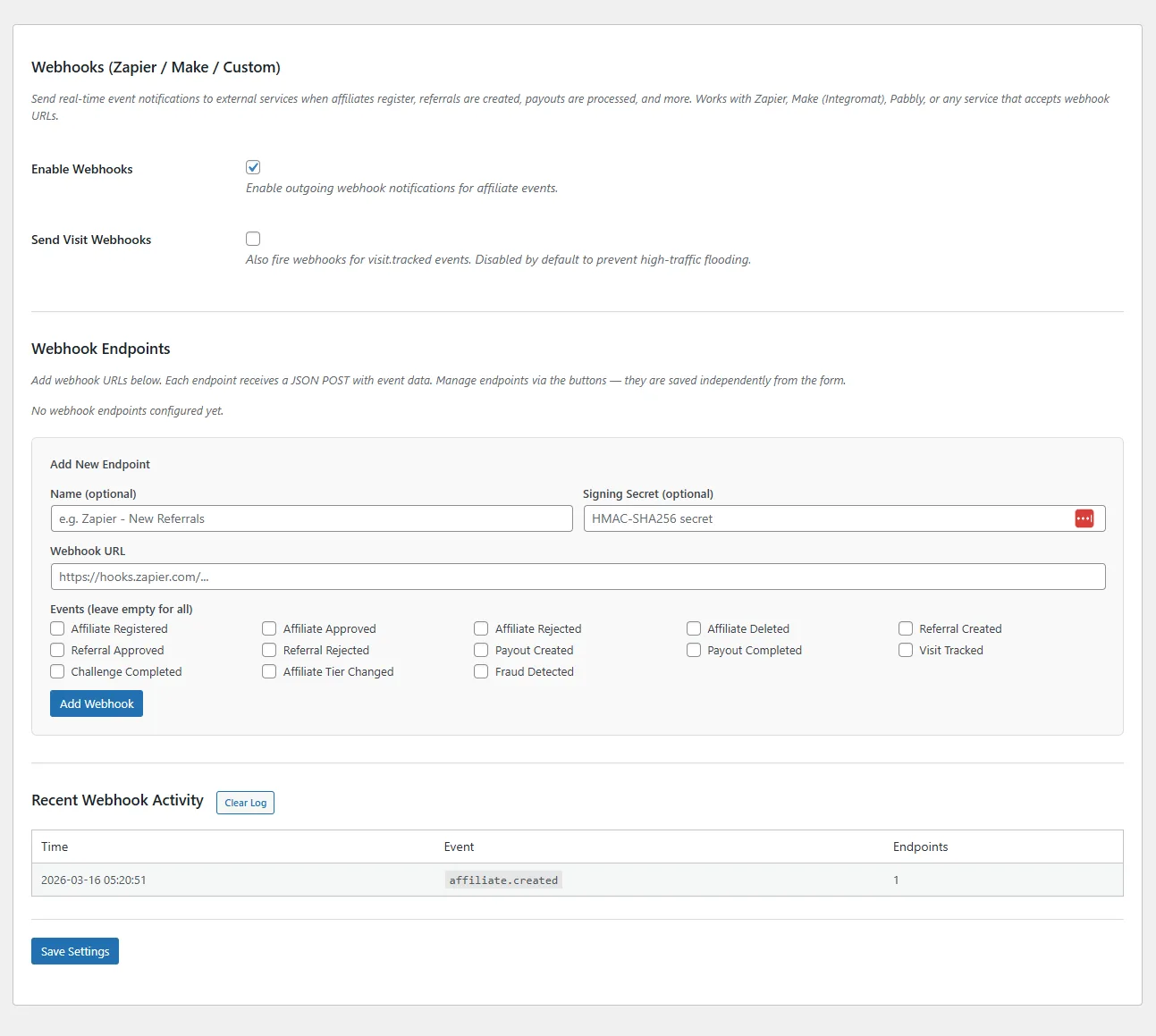
Fire real-time HTTP POST notifications to any URL when key events occur. Connect to Zapier, Make (Integromat), or any custom endpoint.
Supported Events (13)
- affiliate.created — New affiliate registered
- affiliate.approved — Affiliate approved by admin
- affiliate.rejected — Affiliate rejected
- affiliate.deleted — Affiliate removed
- referral.created — Referral recorded (sale or lead)
- referral.approved — Referral approved
- referral.rejected — Referral rejected
- payout.created — Payout initiated
- payout.completed — Payout marked as paid
- visit.tracked — Affiliate link click recorded
- challenge.completed — Affiliate completed a challenge
- tier.changed — Affiliate moved to a new tier
- fraud.detected — Suspicious activity flagged (medium+ severity)
Setup
- Go to Tools → Webhooks
- Click Add Endpoint and enter the URL
- Optionally add a Secret for HMAC-SHA256 payload signing
- Select which events to subscribe to (or leave blank for all events)
- Use the Test button to verify connectivity
Payload Format
Each webhook sends a JSON payload with these fields:
{
  "event": "referral.created",
  "timestamp": "2026-03-16T12:00:00+00:00",
  "site_url": "https://yoursite.com",
  "data": {
    "referral_id": 42,
    "affiliate_id": 7,
    "amount": 99.00,
    "commission_amount": 9.90,
    "reference": "order_1234",
    "reference_type": "sale",
    "status": "pending"
  }
}
Security
If you provide a secret, every payload is signed with HMAC-SHA256. The signature is sent in the X-RAFP-Signature header. Verify it on your server by computing hash_hmac('sha256', $raw_body, $secret) and comparing.
REST API
Full CRUD access to affiliates, referrals, payouts, and visits via the WordPress REST API. Build custom dashboards, integrate with external tools, or automate workflows.
Namespace
royal-affiliate/v1
Endpoints
| Method | Endpoint | Description |
|---|---|---|
GET | /affiliates | List all affiliates (paginated) |
GET | /affiliates/{id} | Get single affiliate |
PUT | /affiliates/{id} | Update affiliate |
DELETE | /affiliates/{id} | Delete affiliate |
GET | /affiliates/{id}/stats | Affiliate statistics |
GET | /referrals | List referrals (date filtering) |
POST | /referrals | Create manual referral |
PUT | /referrals/{id} | Update referral status |
GET | /payouts | List payouts |
GET | /visits | List visits (with filtering) |
Authentication
The REST API uses WordPress authentication. API requests must be made by an authenticated admin user with manage_options capability, or via application passwords.
Activity Log
Every admin action in Royal Affiliate Pro is logged with timestamps and user attribution. Useful for auditing changes, resolving disputes, and tracking who did what.
Logged Events
- Affiliate approved, rejected, deleted, or edited
- Referral status changes (approved, rejected)
- Payout processing and completion
- Setting changes
- Campaign and tier modifications
- Coupon generation
- Tag assignments
Viewing the Log
The activity log is visible on the Dashboard page. Each entry shows the action type, affected entity, admin user, and timestamp. Searchable and filterable.
White Label
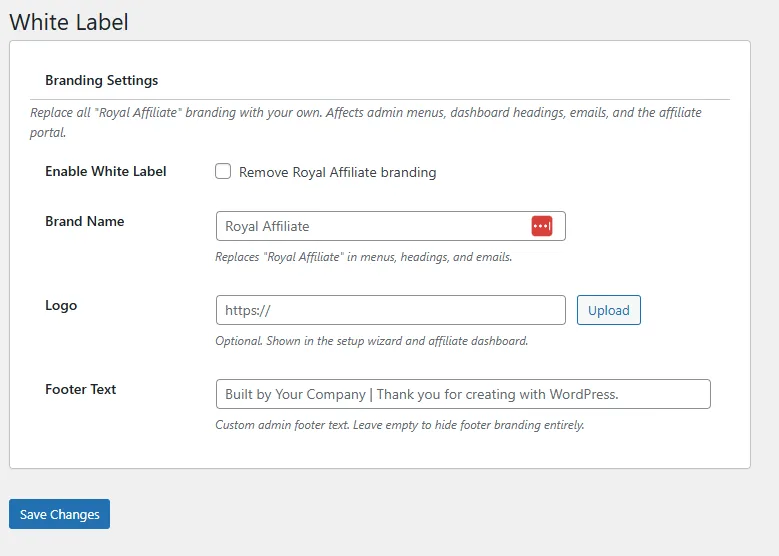
Remove Royal Affiliate Pro branding from the admin interface and replace it with your own brand.
Customizable Elements
- Brand Name — Replace "Royal Affiliate Pro" with your agency or company name throughout the admin
- Logo — Upload a custom logo to replace the Royal Affiliate Pro logo on admin pages
- Footer Text — Customize the admin footer credit text
Setup
Go to Royal Affiliate Pro → White Label, enter your brand name, upload your logo, and save. Changes take effect immediately across all admin pages.