Royal MCP — Connect, manage and edit WordPress from your AI agent
By Jameson · Founder & Lead Developer · Updated October 2026
Royal MCP is a free WordPress plugin that connects AI Agents like Claude, ChatGPT, and Cursor directly to your WordPress site via the Model Context Protocol (MCP), plus the browser-based AI Agents rolling out now through Cloudflare's WebMCP bridge and more to come.
Royal MCP gives AI tools 109 core tools to read, create, edit, and manage your posts, pages, media, users, and settings through natural language, no manual dashboard work required.
Install alongside WooCommerce, Elementor, Divi, ACF, Yoast SEO, UpdraftPlus, WPForms, Solid Security, Wordfence, Contact Form 7, MonsterInsights, W3 Total Cache, LiteSpeed Cache, Duplicator, BuddyPress, Royal AI Firewall, or any of our Royal Plugins and Royal MCP auto-detects them, unlocking 150 additional tools for plugin-specific workflows: 250+ tools in total.
According to Stack Overflow's 2025 Developer Survey, 76% of developers now use AI coding assistants. And according to Anthropic (2025), the Model Context Protocol is supported by over 20 AI applications. Royal MCP bridges the gap between these AI tools and the 43% of the web powered by WordPress.

“Try it live” launches a real WordPress admin in your browser with Royal MCP pre-configured, with a demo API key, enabled platforms, and sample activity log entries. No signup, closes when you leave the tab.
The bridge between WordPress and AI
Royal MCP is a free WordPress plugin that gives AI Agents like Claude, ChatGPT, and Cursor full stack access to your WordPress site through 109 built-in tools, so you can create posts, manage media, work with custom post types, edit settings, and more via natural language. Works with every MCP-capable AI client out of the box via OAuth or API.
Royal MCP works with every MCP-capable client out of the box and with any other AI platform via WordPress’s REST API.
Set up Royal MCP in 3 steps
5 minutes or less.
No developer required. Full walkthrough videos on the Connect Claude and Connect ChatGPT pages.
Install free from WordPress.org
Search “Royal MCP” in your Plugins → Add New screen, or grab it from wordpress.org/plugins/royal-mcp/. One-click activate like any other WordPress plugin.
Grab your MCP URL
Open Royal MCP in the WordPress admin. The Connect screen surfaces your endpoint URL: https://yoursite.com/wp-json/royal-mcp/v1/mcp. Copy it.
Add as a connector, authorize, done
In your AI client of choice, name the connector, paste your URL, click Add, authorize the OAuth prompt in your browser. Full step-by-step: Connect Claude · Connect ChatGPT.
Connecting AI is the easy part. Trusting it is the job.
Any MCP plugin can connect an AI client to WordPress. Royal MCP is built for what comes next: changes you can review and reverse, layouts that stay editable, connections that work on the host you already have, and one place to run every site.
Safe by default
The AI starts with the least it needs. Turn on Drafts only and it can create and edit drafts while publishing, live pages and site settings are refused. Give each connected client Full, Drafts only or Read-only access, preview changes before they go live, and see every AI change from the last 72 hours with the value before and after, ready to undo.
Safety and recovery guide →Stays editable in your builder
What the AI builds is real builder content your team keeps editing, not a block of HTML. Royal MCP Pro creates native Elementor widgets and Divi modules and works with Elementor global classes and variables, theme-builder conditions and Divi global presets. Free already keeps pages as native Gutenberg blocks and covers the Elementor and Divi basics: outlines, clones, text and image swaps.
See Royal MCP Pro →Works on real hosts
Shared hosting, firewalls, CDNs and security plugins are where most AI connections break. Royal MCP checks the usual blockers in Site Health, signs in with Claude and ChatGPT in the browser, connects with an API key when a host blocks sign-in, and comes with nearly 50 support guides for specific hosts, firewalls and CDNs.
Troubleshooting, start here →Every site from one place
Running many client sites? Royally connects to sites running Royal MCP Pro and gives you monitoring, previews, approvals, receipts, undo and a kill switch across all of them.
Three layers. One protocol.
WordPress.org runs MCP for the plugin directory. Royal MCP runs it against your live site, with Drafts only, access levels and 72-hour undo built in. Royal MCP Pro adds 7-day undo, a 90-day audit log and endpoint profiles for agencies.
WordPress.org MCP
Manages the wp.org plugin directory. Validate readme files, check submission status, and submit plugins for review, all from inside Claude Code, Cursor, or VS Code.
Shipped: March 2026
Royal MCP
Manages live WordPress sites. Read and create posts, edit pages, manage media, configure settings: 250+ tools across content, taxonomy, users, and store data, with Drafts only, per-client access levels and 72-hour undo.
Shipped: January 2026
Royal MCP Pro
Builds on the free plugin with 7-day undo, a 90-day audit log, endpoint profiles that choose which tools each connection sees, bulk edits with previews, and structural Elementor and Divi editing.
Shipped: August 2026
Every tool. Four ways in.
Every other WordPress MCP plugin we’ve reviewed ships one endpoint, one transport, one auth pattern (take it or leave it). Royal MCP registers every one of its 250+ tools through four separate access paths: its own MCP endpoint, the WordPress core Abilities API, the Automattic WordPress MCP Adapter, and now the WebMCP browser-agent standard. Same tools, whichever surface your AI stack already speaks.
Native MCP endpoint
Direct JSON-RPC over the /wp-json/royal-mcp/v1/mcp route. Full MCP 2025-11-25 spec, OAuth 2.0 discovery, session management. Claude Desktop, ChatGPT connectors, Cursor, and Windsurf hit this endpoint straight from your WordPress site, the same way any REST client would.
Core Abilities REST API
On WP 6.9+, every Royal MCP tool is discoverable at /wp-json/wp-abilities/v1/*. Standard WordPress authentication (Application Passwords, cookies, JWT). Any script, cron job, or third-party plugin that speaks REST invokes every Royal MCP tool without knowing what MCP is.
WordPress MCP Adapter
Sites running Automattic’s official WordPress MCP Adapter get Royal MCP’s tools through that adapter’s endpoint automatically. Same 250+ tools, whichever MCP server your fleet standardized on. Zero adapter configuration on the Royal MCP side.
WebMCP browser bridge
Browser AI can now use your Royal MCP tools directly. When a visitor is signed into your site, browser-based AI agents from any WebMCP-compatible bridge can call the same tools that Claude Desktop and ChatGPT already use, without any extra login step. Cloudflare’s WebMCP is the first bridge implementation shipping today; more are on the way. Off by default; one toggle in settings turns it on.
Nothing else in the WordPress MCP ecosystem ships this. Some competitors require a local Node.js MCP server to bridge, some only work through a browser extension, some ship a single HTTP endpoint with rigid client requirements. Royal MCP works with the WordPress core direction, the two standard access patterns above, and the emerging browser-agent standard, so whichever way your AI stack evolves, the tools stay reachable. Fully backwards compatible: existing OAuth clients keep working exactly as before.
Your MCP server, discoverable by every AI scanner.
Royal MCP now publishes an MCP Server Card, a Skills Index, and OAuth Protected Resource metadata at the standard well-known paths. Cloudflare’s Agent Readiness scanner, Vercel’s is-agentic, and Chrome Lighthouse’s Agentic Browsing audit all recognize your site as agent-ready with no extra setup.
Server card
A public discovery document at the standard well-known path. Names your MCP endpoint, supported protocol versions, auth methods, and tool categories. Any agent runtime can read it before touching the auth’d endpoint.
Skills index
Publishes your Royal MCP tool set as agent-callable skills, one entry per installed integration category. Auto-populates from what’s active on the site. Filter hook for customization.
RFC 8288 Link headers
Every /mcp response carries a Link header pointing at the metadata documents, so agent runtimes that hit the endpoint find them without extra probing.
Cloudflare Agent Readiness scanner (Level 3: Advanced Integration), Vercel is-agentic, and Chrome Lighthouse 13.3+ Agentic Browsing audit all recognize Royal MCP-installed sites without extra setup on your side. Fully backwards compatible: nothing changes for existing OAuth clients, and the discovery documents work whether or not you enable browser agents.
What Can You Do with Royal MCP?
Built for power users and developers who want seamless AI integration.
Claude Desktop Integration
Native MCP connector designed for Claude Desktop. Copy your Remote MCP Server URL and start chatting with your WordPress content immediately, or install the one-click .mcpb bundle from the plugin admin for zero-config setup.
Enterprise-Ready Security
API key authentication, OAuth with an optional Pending Clients approval gate for new connectors, per-request activity logging, and HTTPS enforcement. Every request is tracked, gated, and secured.
109 WordPress Tools
Full read/write access to posts, pages, custom post types, media, categories, tags, comments, users, menus, plugin settings, and site configuration. Sensitive credentials inside plugin settings are automatically redacted before AI sees them.
Activity Logging
Complete audit trail of every AI interaction, plus a Protocol Insights dashboard that rolls it up weekly: which clients hit your endpoint, which MCP protocol versions they used, which methods they called most.
REST API Endpoints
Standard WordPress REST API integration with JSON-RPC protocol. Supports MCP protocol versions 2024-11-05 through 2026-07-28.
Images and PDFs from the Chat
Hand ChatGPT or Claude an image or PDF and it goes straight into your media library, converted and compressed on the way in (for example, a JPEG under 400 KB).
Dry Run and Undo
High-blast writes like site options and permalink structure accept a dry-run flag, so the AI previews the exact change (current value, proposed value, size delta, affected URLs) before you approve the commit. Content, settings, menu, WooCommerce, Elementor and Divi writes also return a 72-hour undo token, and one call reverses the change.
Your site, your rules
Giving an AI client access to a site should never mean losing sight of it. Royal MCP gives you seven ways to limit, review and reverse what connected clients do, from inside wp-admin or from the terminal.
Drafts only
AI clients can create and edit drafts. Publishing, live pages and site settings are refused, so nothing goes live until you review it.
Settings › What AI clients may doAccess levels
Give each connected client Full, Drafts only or Read-only access. The API key and other MCP servers on the site get their own level.
Connected Clients · SettingsRecent Changes
Every AI change from the last 72 hours, with the value before, what the change wrote, and what it is now. The AI client can undo any of them.
Royal MCP › Recent ChangesRead-only mode
One switch refuses every tool that changes the site. All reads keep working, and clients can see which tools are marked.
Settings › What AI clients may doConnected Clients
One row per AI client and user signed in through OAuth. Revoke access on any row, or revoke all at once.
Royal MCP › Connected ClientsSite Health tests
Four checks that catch the usual blockers before a client does: permalinks, discovery document, Authorization header reaching WordPress, sign-in addresses reachable.
Tools › Site HealthWP-CLI commands
Check connection health, list connected clients, rotate the API key, switch Drafts only on or off and set each client's access level from the terminal, on one site or in a loop over every site you manage.
WP-CLI command referenceWhat Does Royal MCP Look Like?
From inside WordPress, from inside Claude, from inside ChatGPT. See the full picture.
Inside WordPress
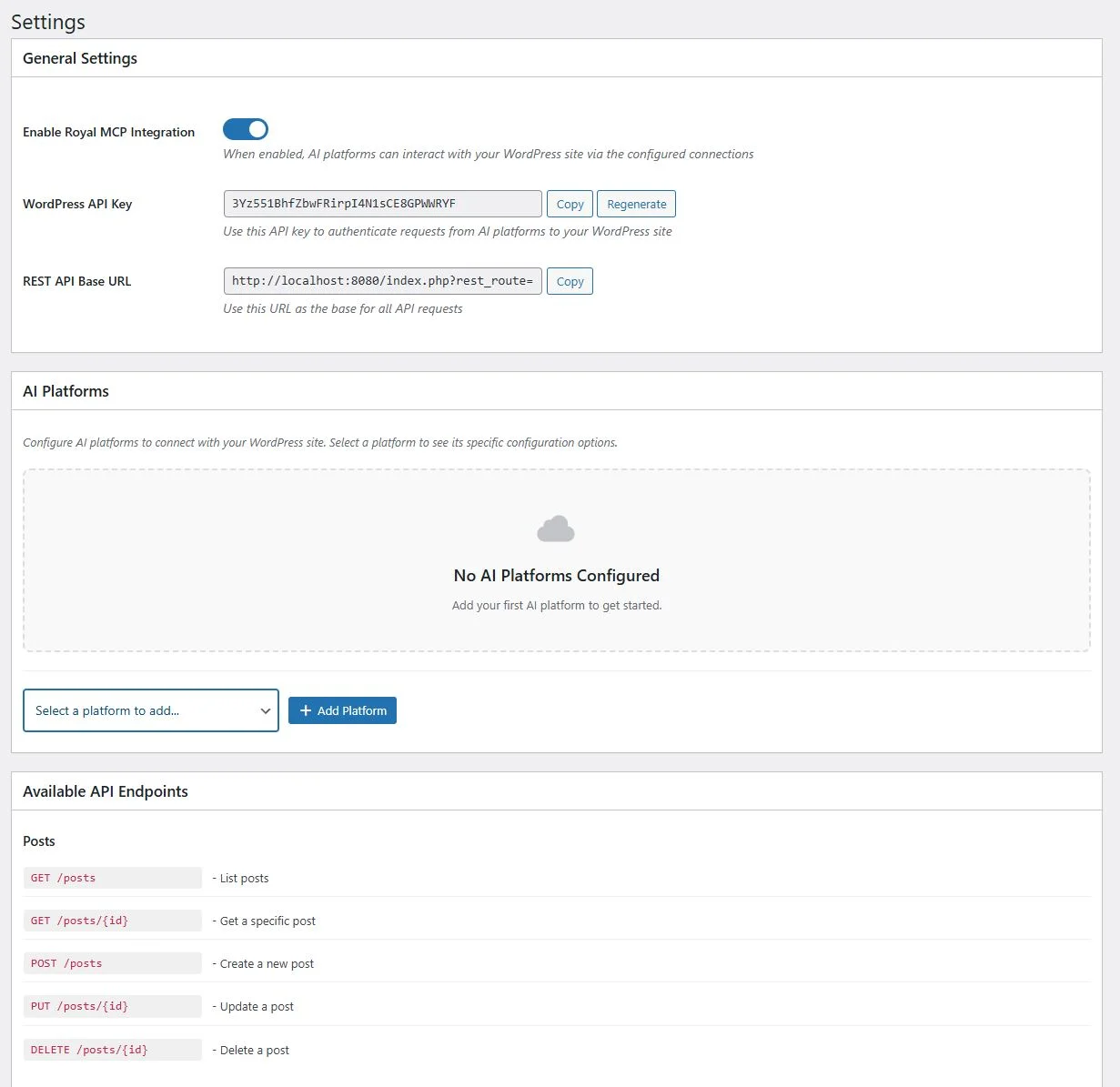
Main Settings Page
Enable the integration, view your API key and REST URL, see available endpoints.
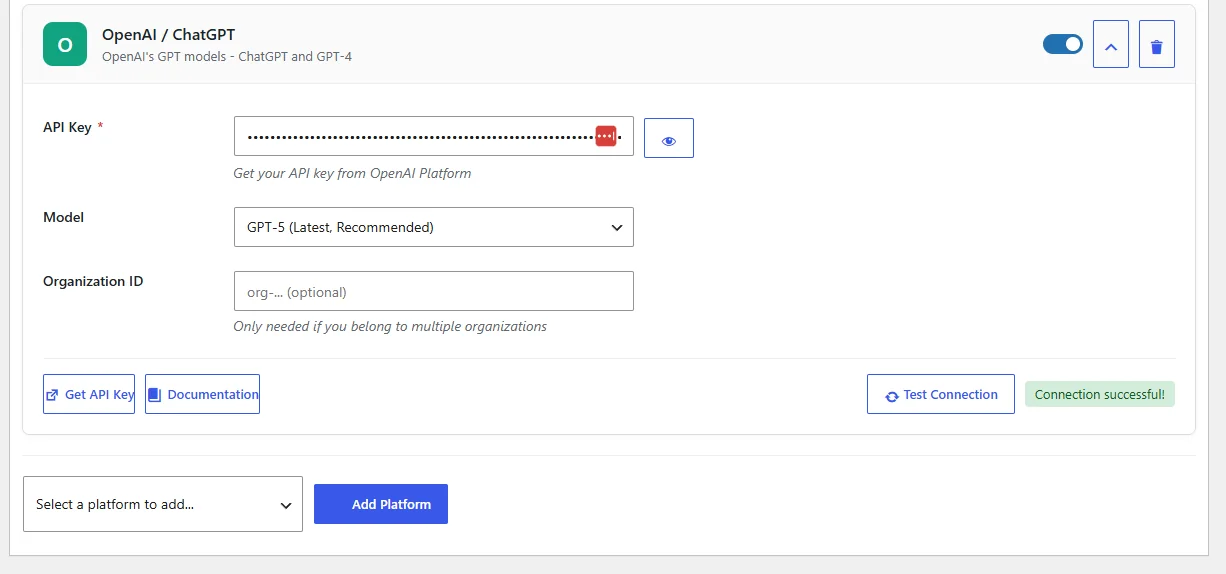
AI Platform Configuration
Add multiple AI platforms, configure API keys, select models, click Test Connection for a green confirmation badge.
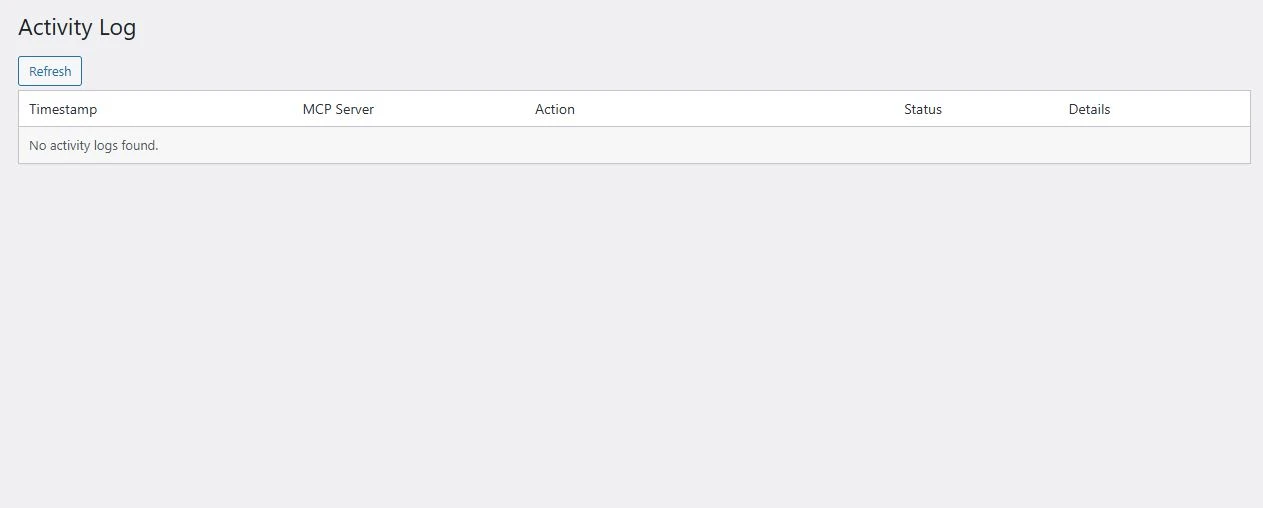
Activity Log
Every AI interaction logged with timestamps, actions, and detailed request data.
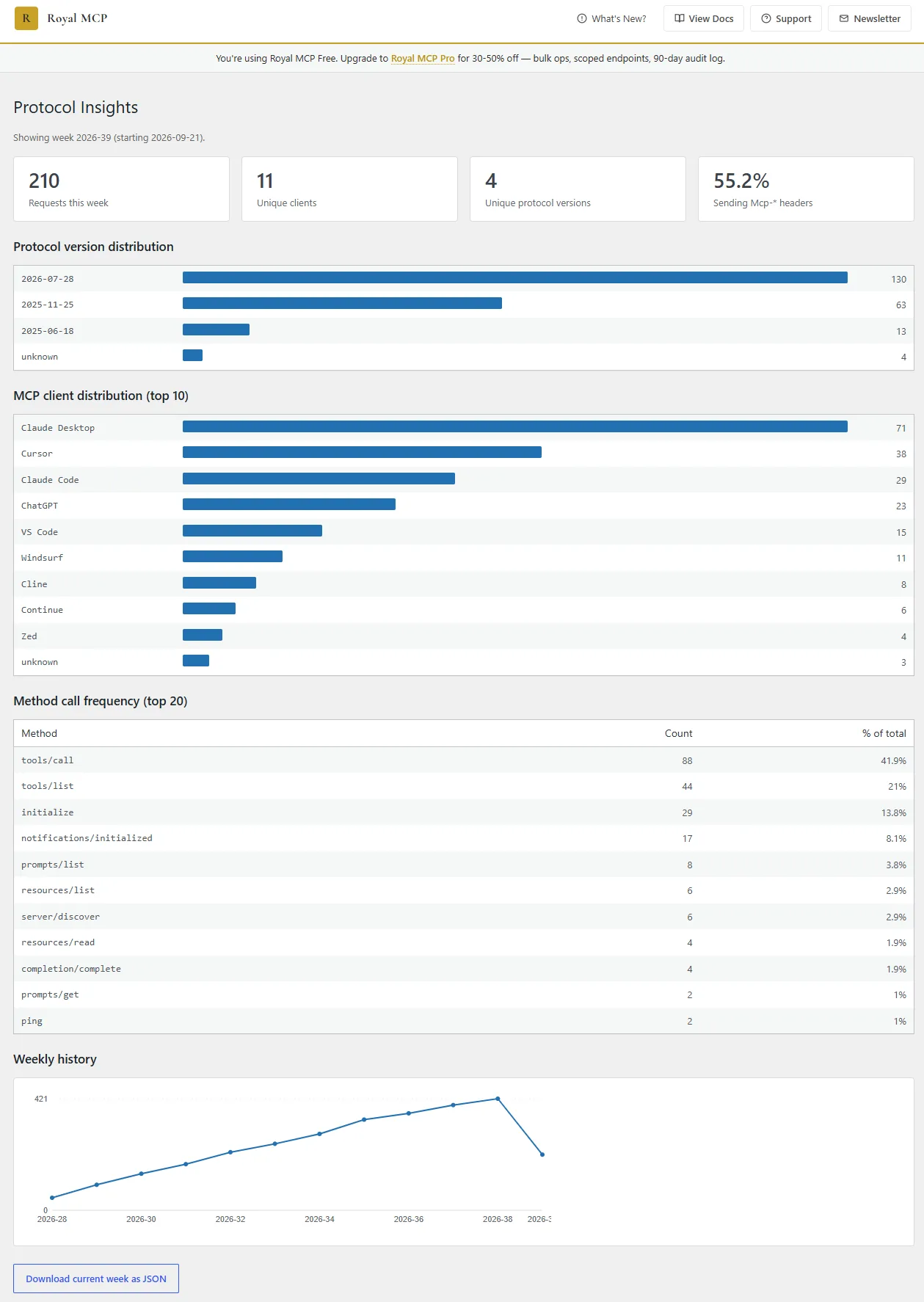
Protocol Insights
Weekly rollups of MCP protocol versions, top AI clients, and method-call frequency across every request.
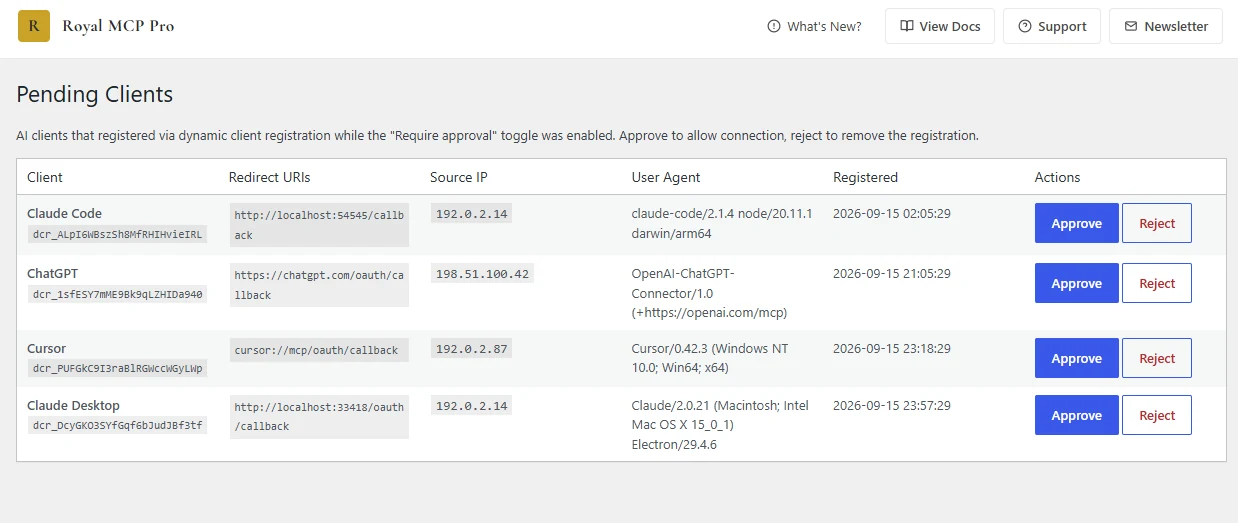
Pending Client Approval
Turn on Require approval before new AI clients can connect and every dynamically-registered client lands here. Review the redirect URI, IP, and user agent, then Approve or Reject.
Connecting Claude
Two paths to connect: paste the Remote MCP Server URL manually, or download the .mcpb bundle from Royal MCP settings for one-click Claude Desktop install. No config, no copy-paste.
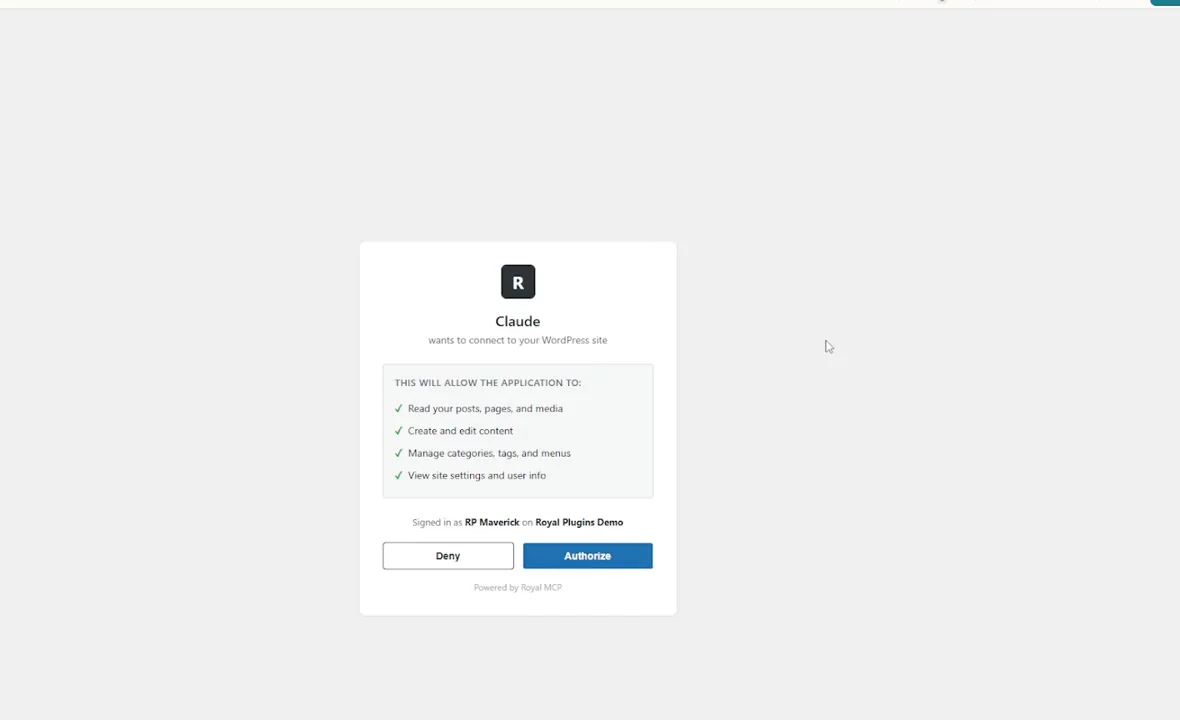
OAuth Consent in Claude
Royal MCP’s native OAuth consent screen: Claude requests scoped permissions, you click Authorize, the handshake completes.
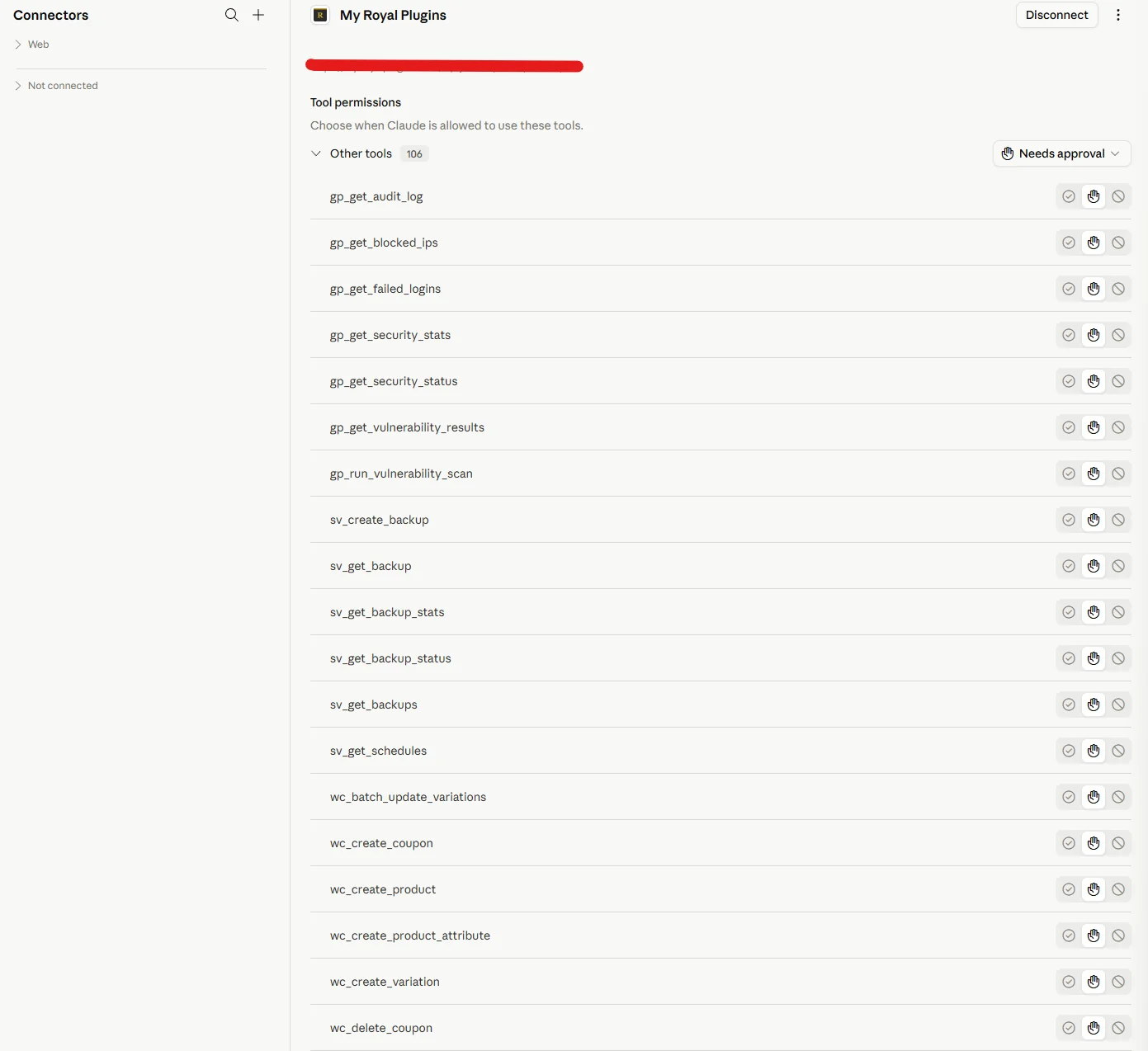
Claude Connector Setup
Claude Desktop showing Royal MCP with 100+ WordPress tools and per-tool permission controls (allow / ask / block).
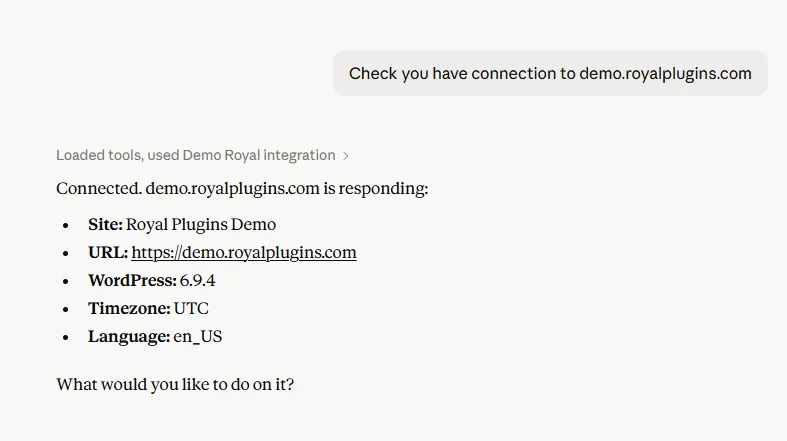
Working in Claude
One natural-language prompt: Claude calls Royal MCP and reports back site name, URL, WordPress version, timezone, and language.
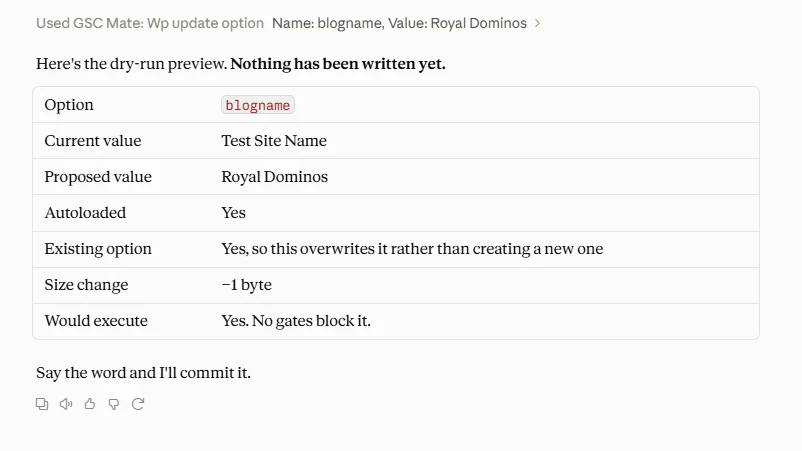
Dry-Run Preview in Claude
Ask Claude to preview a high-blast write like an option or permalink change. Response shows current value, proposed value, size delta, and blast radius before you approve the commit.
Connecting ChatGPT
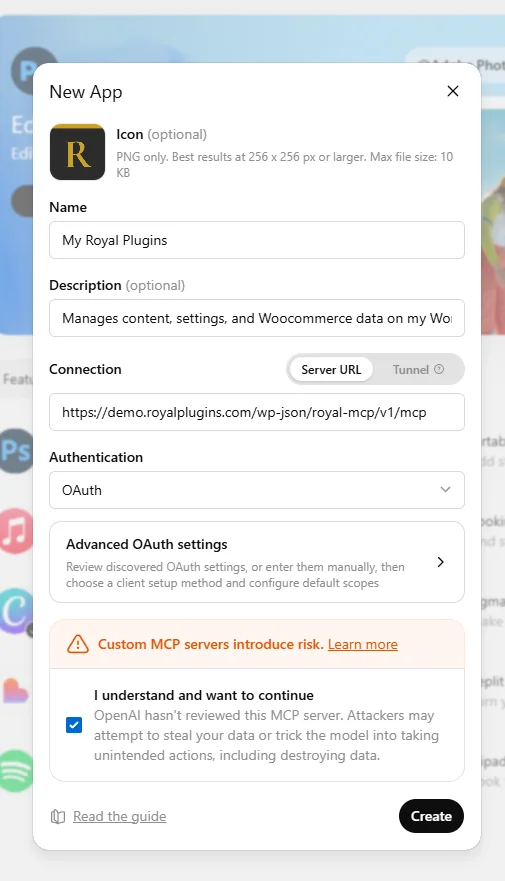
ChatGPT Custom App Setup
Add Royal MCP as a Custom App in ChatGPT (Developer Mode). Fill in the name, description, server URL, and OAuth details, then click Create.
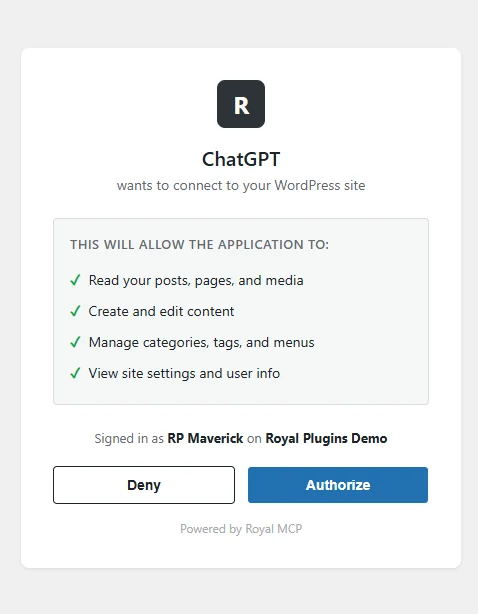
OAuth Consent in ChatGPT
Royal MCP’s native OAuth consent screen: ChatGPT requests scoped permissions, you click Authorize, the handshake completes.
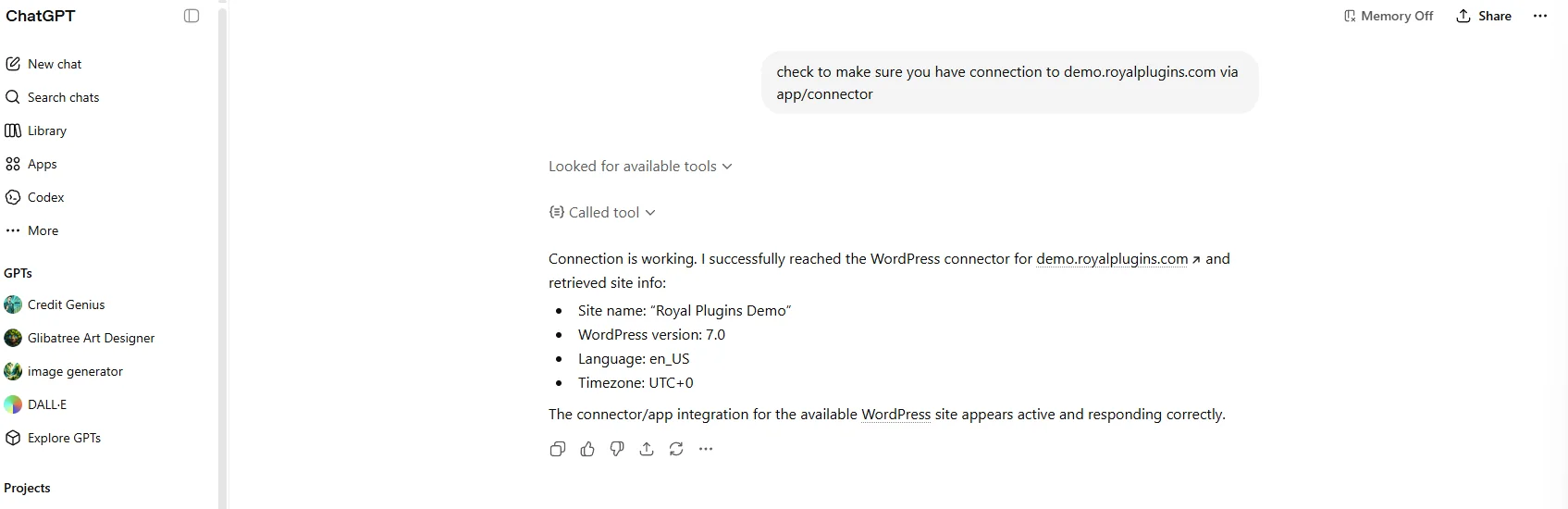
Working in ChatGPT
Same natural-language pattern: ChatGPT calls Royal MCP, retrieves the site info, confirms the connector is active.
See Royal MCP in Action
Setup walkthroughs, feature deep-dives, and real-world use cases, one video at a time.
How Does the Model Context Protocol Work?
Royal MCP exposes 109 core tools via MCP's JSON-RPC protocol. Complete WordPress access for AI platforms, following WordPress security best practices.
Royal Plugin Tools
When other Royal Plugins or supported third-party plugins are active, Royal MCP automatically exposes 150 additional tools. Install any of these alongside Royal MCP and your AI gets dedicated commands for that plugin's functionality, no extra configuration required.
 GuardPress
7 tools
GuardPress
7 tools
 Royal AI Firewall
6 tools
Royal AI Firewall
6 tools
 SiteVault
6 tools
SiteVault
6 tools
 ForgeCache
4 tools
ForgeCache
4 tools
 Royal Links
3 tools
Royal Links
3 tools
 Royal Ledger
4 tools
Royal Ledger
4 tools
 WooCommerce
29 tools
WooCommerce
29 tools
 Elementor
14 tools
Elementor
14 tools
 ACF
4 tools
ACF
4 tools
 Yoast SEO
5 tools
Yoast SEO
5 tools
 UpdraftPlus
4 tools
UpdraftPlus
4 tools
 WPForms
4 tools
WPForms
4 tools
 Solid Security
4 tools
Solid Security
4 tools
Also detects iThemes Security and Kadence Security Basic (same underlying class).
 Wordfence
8 tools
Wordfence
8 tools
 Contact Form 7
3 tools
Contact Form 7
3 tools
Submission access requires the Flamingo companion plugin.
 MonsterInsights
4 tools
MonsterInsights
4 tools
 W3 Total Cache
3 tools
W3 Total Cache
3 tools
 LiteSpeed Cache
4 tools
LiteSpeed Cache
4 tools
 Duplicator
3 tools
Duplicator
3 tools
 BuddyPress
4 tools
BuddyPress
4 tools
Integration tools auto-load only when the host plugin is active, so there's no overhead if you don't use them.*
*If you don’t see your favorite plugin on the list, it doesn’t mean it’s not supported, it just means we haven’t added dedicated MCP tools for it yet. Suggest coverage here →
Why we didn’t build another one-plugin MCP.
The MCP wave is coming to WordPress. WooCommerce is exploring one. Page builders are experimenting. Every major plugin author is asking the same question (“should we ship our own MCP server?”), and for most of them the honest answer is yes.
Which puts the burden on you. Every plugin that ships its own MCP is another endpoint to configure in Claude Desktop, another OAuth flow to walk through, another token to rotate, another health surface to babysit. Multiply that across the plugins on a typical WordPress site, times the AI clients your team uses, and you’re managing a fleet of connectors instead of your actual site.
- × OAuth flow per plugin
- × Tokens per plugin to rotate
- × Health surfaces to monitor
- × Version compatibility to track
- ✓ One OAuth flow
- ✓ One token to rotate
- ✓ One health surface
- ✓ Auto-adapts as plugins ship native MCPs
One connector, one OAuth, one health surface, running your whole plugin fleet. That’s Royal MCP.
91.5% of MCP servers ship without OAuth.
Royal MCP is in the other 8.5%. The four numbers on the right come from published third-party research, not our marketing.
We built Royal MCP with OAuth 2.1 by default, per-tool permission gates mapped to WordPress capabilities, a Pending Clients approval gate for new connectors, and a full activity log plus weekly Protocol Insights rollups for every read and write. No static API keys in .env files. No unauthenticated endpoints. The discipline that should have been standard from day one.
of MCP servers use OAuth.
Astrix Security audit, 5,200+ servers, October 2025.
publicly accessible MCP servers. Roughly half have no authentication in place.
Censys internet scan, May 2026.
zero-day vulnerabilities in an academic scan of 39,884 MCP repositories.
arXiv research, May 2026.
critical vulnerability in a popular MCP proxy shipped across 437,000+ environments.
CVE-2025-6514, NIST database.
Supercharge Your MCP with Claude Skills
Skills package multi-step WordPress workflows into a single prompt. Load one into Claude and every follow-up call to Royal MCP knows the sequence, the gotchas, and the rollback path. Free, community-owned, forever.
Elementor Claude Skill
Clone pages, replace text and images, apply library templates, and repair broken renders. Handles Elementor 3.x containers and 4.x atomic widgets out of the box.
Open SkillDivi Claude Skill
Clone pages, find-and-replace text, swap images, and apply library entries. Divi 4 shortcodes and Divi 5 blocks under one skill, with 72-hour undo on image swaps, clones and library imports.
Open SkillSubmit Your Skill
Refined a workflow through a few conversations with Claude? Package it as a skill so the community never has to have those same conversations. WooCommerce, Yoast, UpdraftPlus, whatever you use.
ContributeWho Is Royal MCP For?
Real examples of AI-powered WordPress workflows.
Content Creators
- Claude, summarize my last 10 blog posts
- Write a social media thread based on my latest article
- Find all posts about marketing and create an outline
- Draft a new post about our product launch
Site Administrators
- List all posts not updated in 6 months
- Show me comment statistics across my site
- What plugins are currently active?
- Find all draft posts and summarize them
Developers
- Build AI-powered content workflows
- Create custom integrations using MCP
- Automate content management with AI
- Generate documentation from site data
Learn, build, contribute
Articles, docs, and a community building on it openly.
From the blog
- Agent Readiness — publisher AI policy playbook (with MCP-era signals)
- Claude Skills for WordPress — turn prompts into reusable workflows
- Translate WordPress with Claude + DeepL MCP
- How to evaluate a WordPress MCP plugin — 5 questions
- Hosting is the hardest part of building an MCP server
- Cloudflare's “Block AI Bots” breaks MCP
Documentation & support
Community & contribute
Common Questions
wp-config.php to edit, no cloudflared tunnel to install, no configuration files to touch. If you've installed and activated a WordPress plugin before, you already have every skill needed to set up Royal MCP.
royal_mcp_rate_limit_max and royal_mcp_rate_limit_window WordPress hooks if a specific workload needs headroom. No daily allowance, no monthly quota, no metered tool call ceiling.
Royal MCP is one endpoint. Get
/wp-json/royal-mcp/v1/mcp past your cache and security plugin once, and it keeps working as we add more integrations. Your AI still sees “your WordPress site,” not a growing list of URLs to babysit. And if a plugin ships its own MCP and you'd rather use their tools directly, Royal MCP doesn't interfere. You can run both side by side.
Ready to connect AI to WordPress?
Download Royal MCP for free from the WordPress Plugin Directory. No account required, no premium upsells.