Every WordPress link feature you need. Completely free.
By Jameson · Founder & Lead Developer · Updated August 2026
Royal Links is a free WordPress plugin that gives you branded short URLs, click analytics, geo-targeting, A/B split testing, QR codes, automatic keyword linking, and product-display shortcodes — every feature Pretty Links Pro, ThirstyAffiliates Pro, and BetterLinks Pro gate behind $79–$249/yr subscriptions.
Version 2.0.12 adds a Dashboard landing page: click totals, unique visitors, top-performing links, recent activity, and unresolved 404s at a glance — plus a Royal Tools page listing every free Royal Plugins family plugin. All in one plugin, from the same admin.

“Try it live” launches a real WordPress admin in your browser with 10 sample links pre-loaded — no signup, closes when you leave the tab.
What Can You Do with Royal Links?
Affiliate link cloaking, branded URL shortening, click tracking, geo-targeting, A/B testing, QR codes, automatic keyword linking, and 404 redirect management. The core WordPress link toolkit.
Dashboard NEW IN 2.0.12
Total clicks, unique visitors, top-performing links, and unresolved 404s at a glance — plus recent link activity and click log all on one landing page. Every stat is a click away from the deeper analytics view.
Geo-Targeting
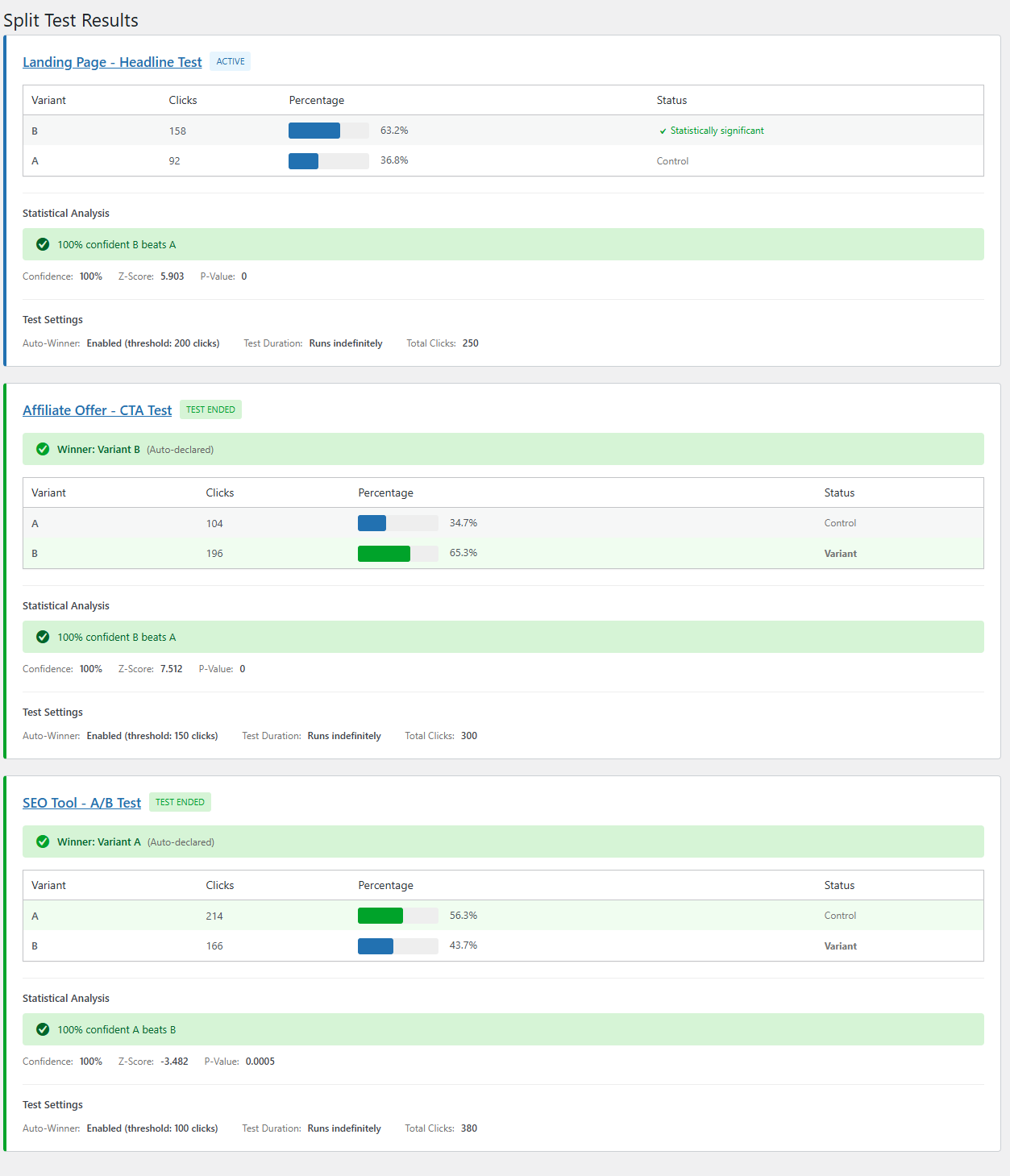
Redirect visitors based on their country. Set rules per link to send US visitors to Amazon.com and UK visitors to Amazon.co.uk automatically.
A/B Split Testing
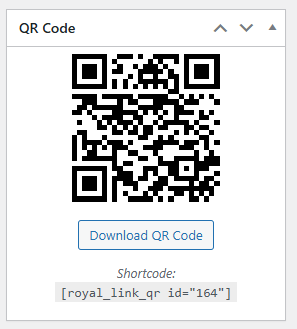
Test multiple destinations for any link and track which converts best. Set traffic splits and see real-time performance data.
QR Code Generation
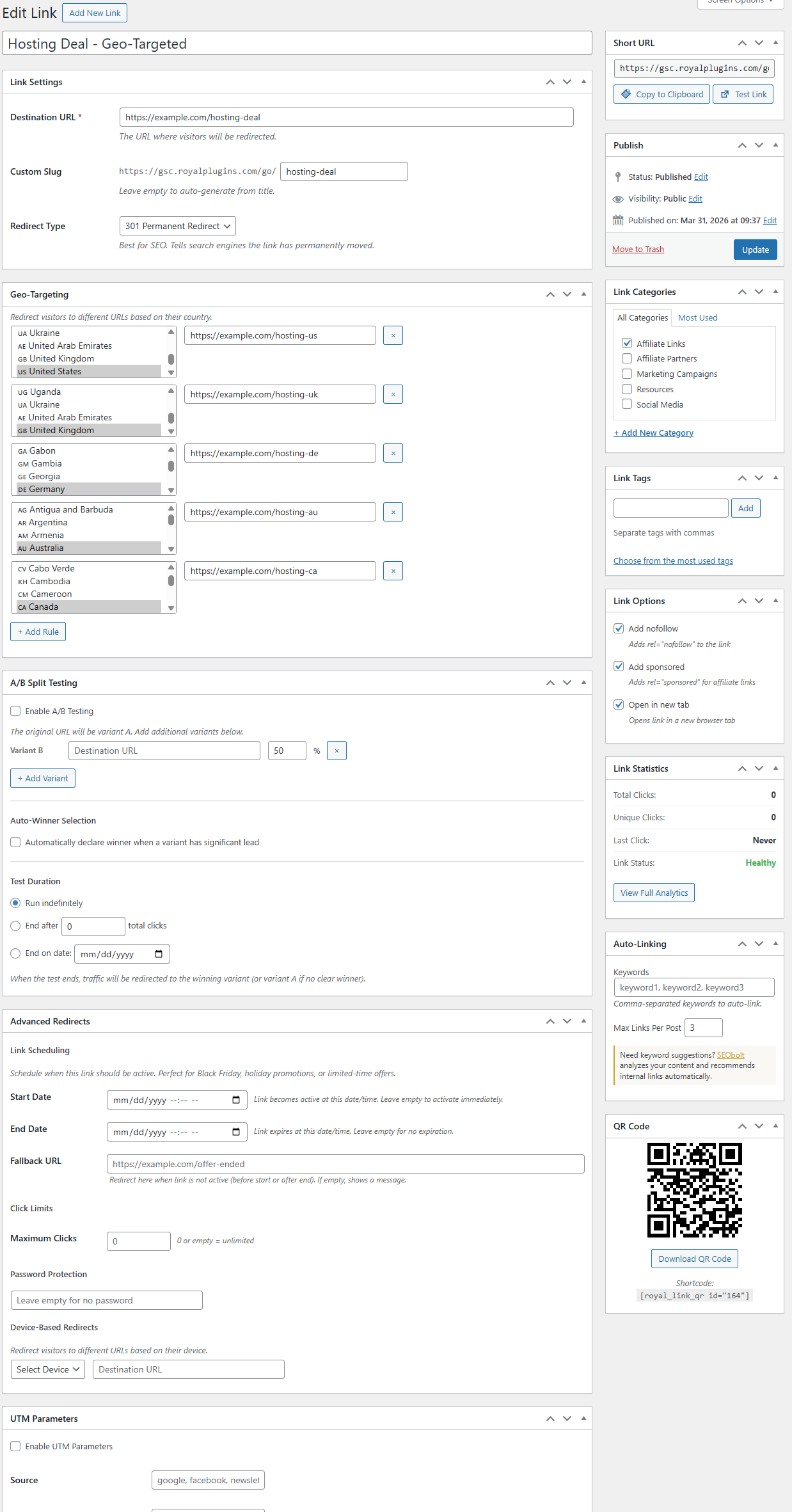
Generate downloadable QR codes for any short link. Perfect for print materials, business cards, and physical marketing.
Automatic Keyword Linking
Define keywords and Royal Links automatically converts them to links across your content. Set frequency limits and exclusion rules.
Product Displays
Beautiful product cards with images, prices, and call-to-action buttons. Embed anywhere with shortcodes or Gutenberg blocks.
404 Redirects
Auto-capture every 404 URL your site is hit with, then convert any of them into a 301, 302, or 307 redirect in one click. Exact, prefix (with tail carryover), and regex match modes. CSV import/export included.
23 features. Zero paywalls.
Link cloaking, URL shortening, click analytics, geo-targeting, split testing, device redirects, time-based redirects, QR generation, auto-linking, product cards, broken-link scanning, and 404 monitoring, grouped by workflow.
Link Management
- Branded short URLs on your own domain
- 301, 302, & 307 redirect types per link
- Categories & tags (taxonomies)
- Nofollow / Sponsored / UGC attributes
- Password-protected links
- Link scheduling (start & end dates)
- Affiliate disclosure shortcode
Click Tracking & Analytics
- Dashboard landing page — every stat on one screen
- Browser, device, OS, referrer, country
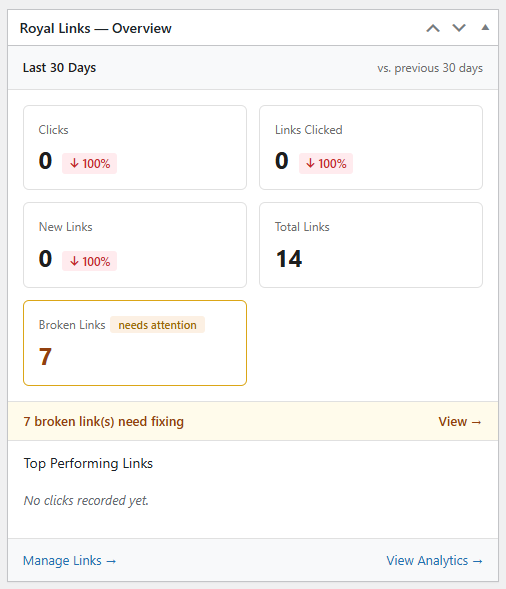
- Dashboard widget with period-over-period comparison
- QR scan tracking (separate from web clicks)
- UTM parameter builder
Advanced Redirects
- Geo-targeting by visitor country
- Device-based redirects (desktop / mobile / tablet)
- Time-based redirects (auto-swap on schedule)
- A/B split testing with traffic weights
Content & Display
- QR code generator (PNG download)
- Product display boxes (image, price, CTA)
- Automatic keyword linking with frequency limits
- Gutenberg block + Classic editor support
Site Health
- Broken link checker (auto-monitors destinations)
- Link health dashboard with status at a glance
- 404 redirect manager with auto-captured monitor log
- One-click "Create Redirect" from any logged 404 hit
- UTM parameter builder for campaign-tagged URLs
Migration Wizard
- Pretty Links — full import (groups + clicks)
- ThirstyAffiliates — full import (categories + click data)
- BetterLinks — full import (analytics)
What Does Royal Links Look Like?
Dashboard landing page, link list, click analytics with 30-day charts, geo-targeting country picker, A/B test setup, QR code generator, and the WordPress dashboard widget with period-over-period stats.
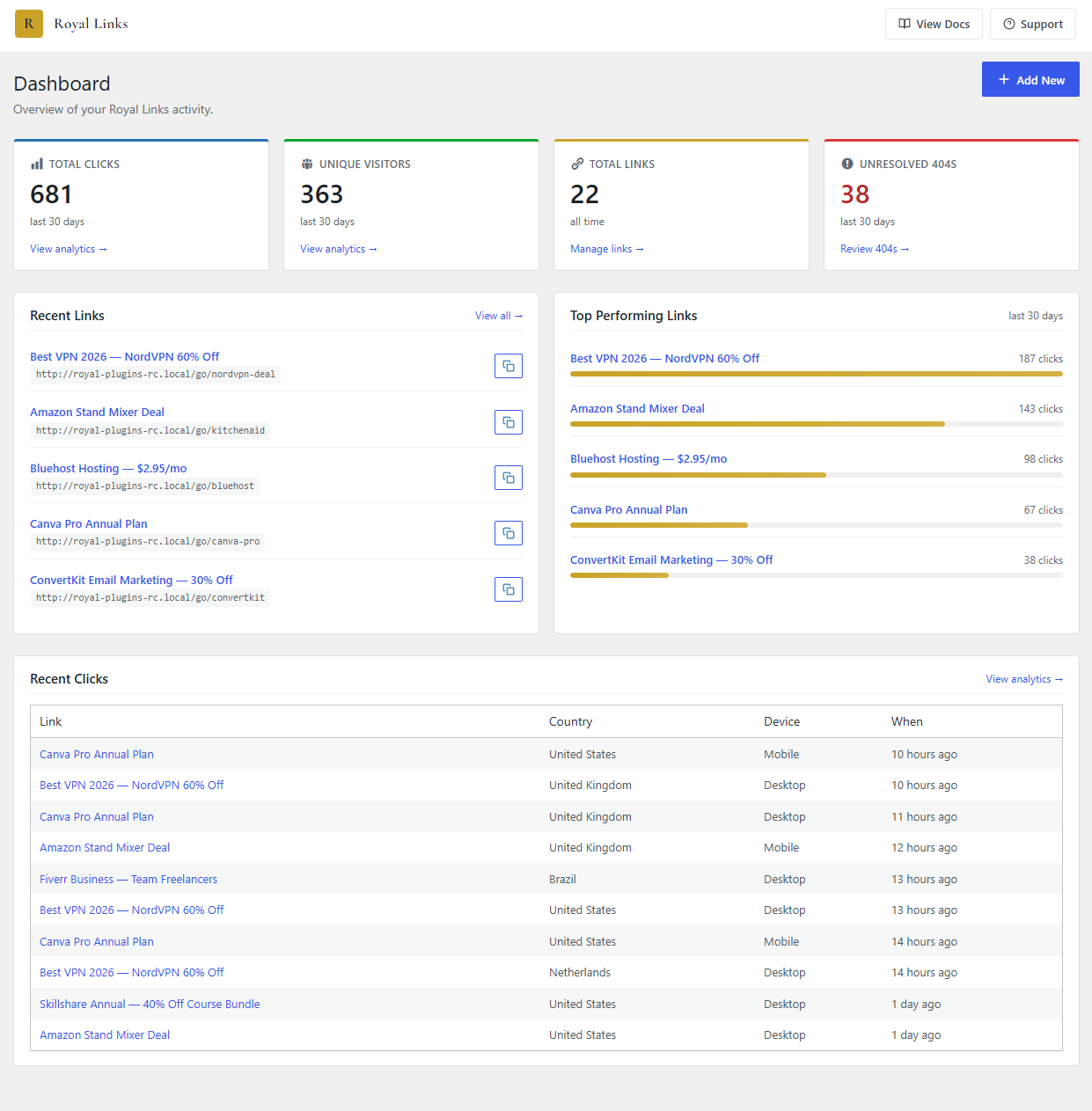
Dashboard NEW IN 2.0.12
Every stat on one screen: total clicks, unique visitors, total links, unresolved 404s, top-performing links with visual bars, recent link activity, and the last ten clicks.
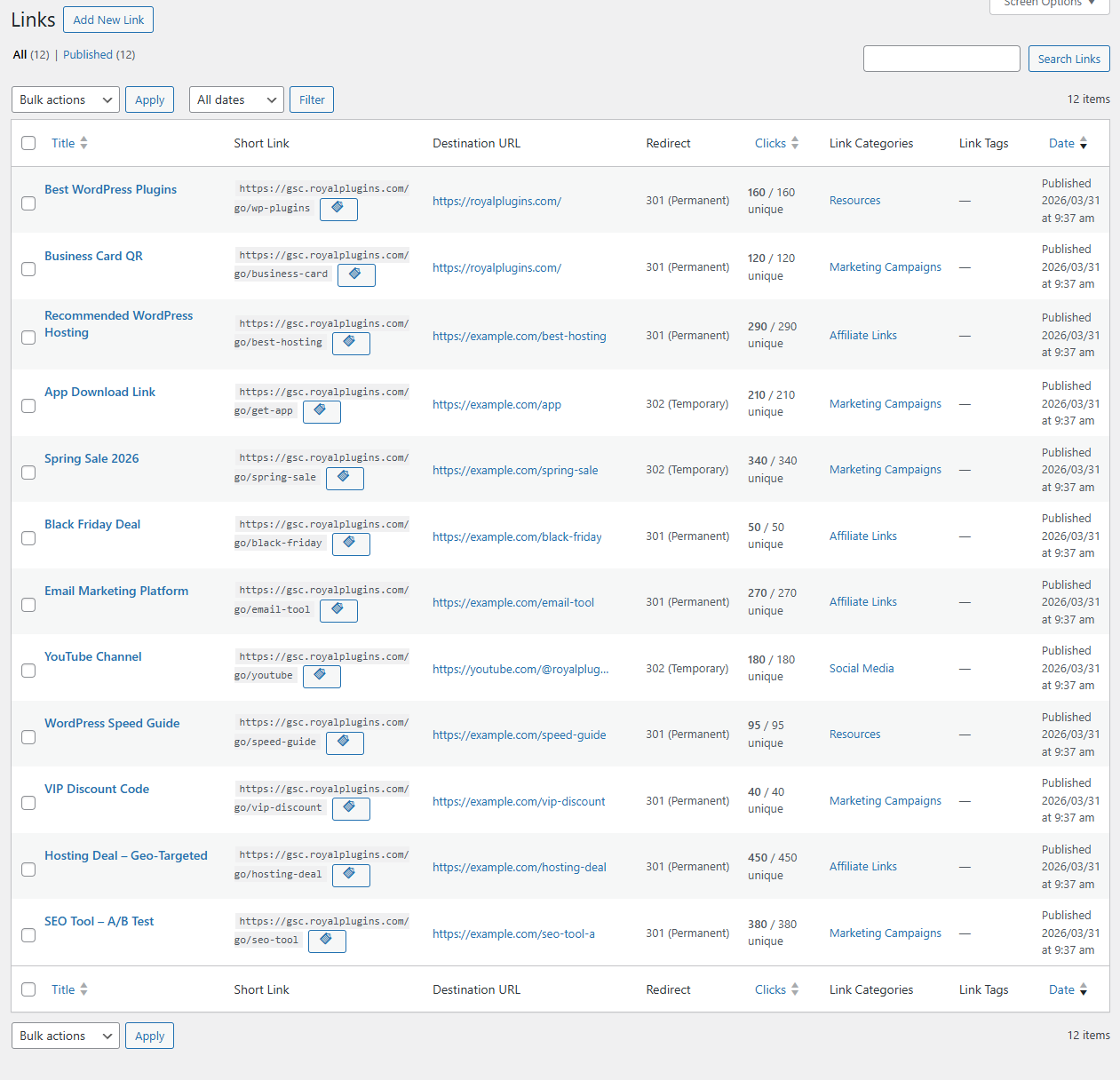
Link List
Manage every short URL from one screen. Sort by clicks, status, or category. Bulk edit and quick-actions built in.
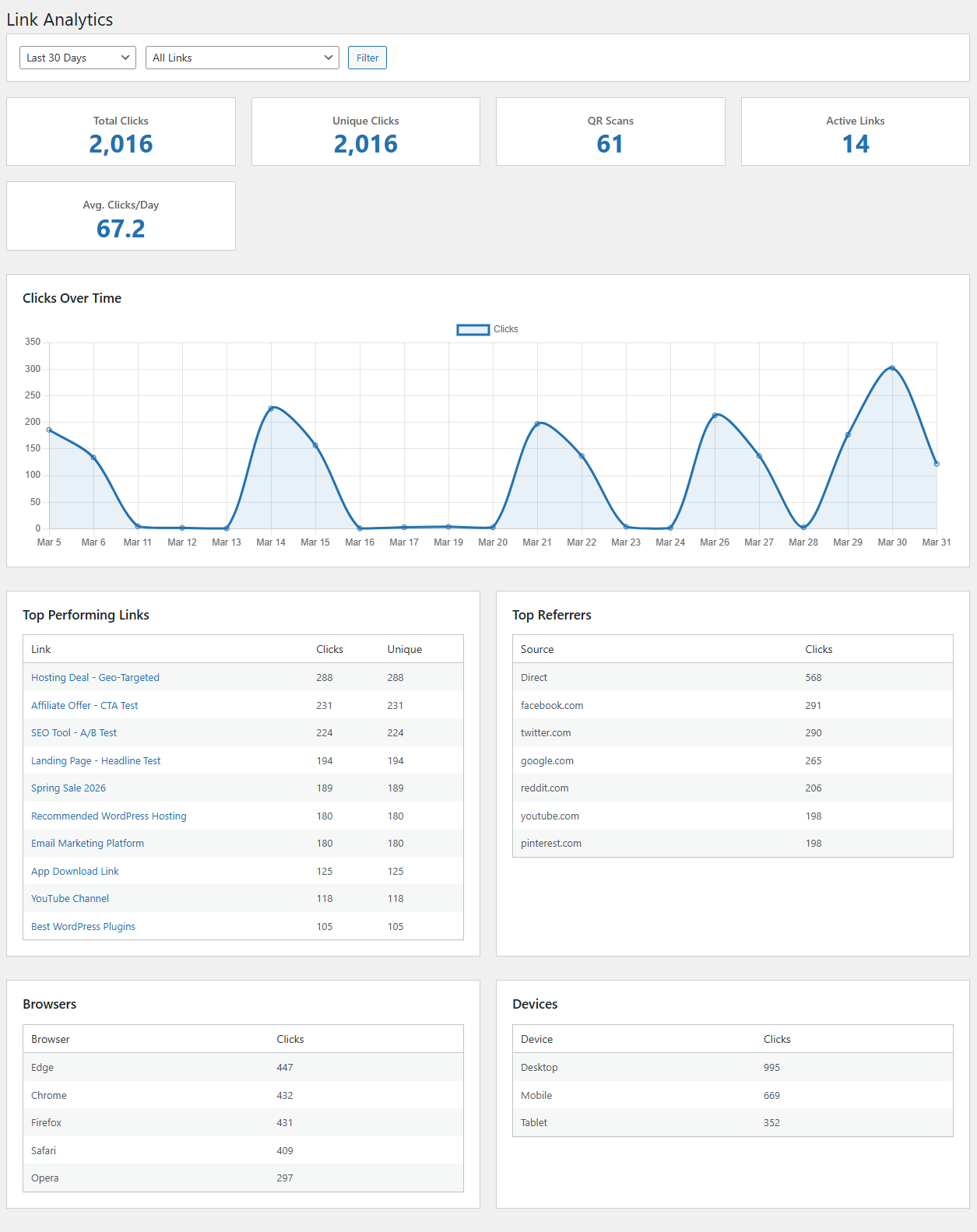
Click Analytics
Five dimensions per click — country, device, OS, browser, referrer — plus period-over-period comparison. No external service required.
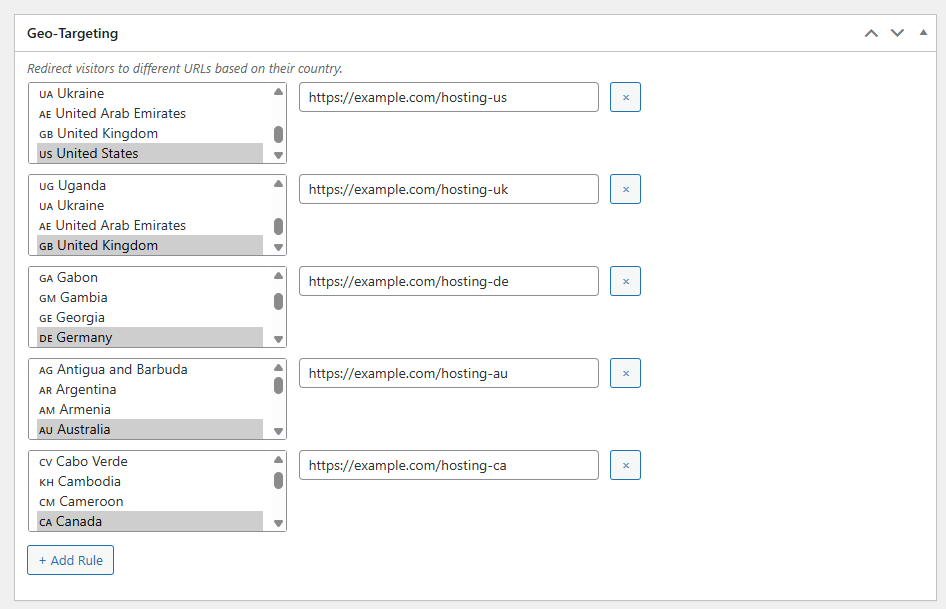
Geo-Targeting
Country-based redirects with searchable multi-select. Send US traffic to Amazon.com, UK to Amazon.co.uk, everyone else to a fallback URL.
A/B Split Testing
Test multiple destination URLs with custom traffic weights. Track conversions per variant so you know which offer actually converts.
QR Codes
Generate a downloadable QR code for any short link. Scans are tracked separately from web clicks so print campaigns get their own numbers.
Settings
Every option in one place: link prefix, default redirect type, click tracking, FTC disclosure, and the new 404 redirects toggle.
WP Dashboard Widget
30-day clicks, top performers, and broken-link alerts on every wp-admin load. Period-over-period comparison against the previous 30 days baked in.
Every click, explained
Five dimensions per click, period-over-period comparisons, and QR scan tracking pulled out separately. No external analytics service required.
Country
Geo-located via ip-api.com (only when geo-targeting is configured). Surface-level country code — no IPs stored unless you opt in.
Device type
Desktop, mobile, or tablet. Useful for spotting which channel a campaign actually lands in.
Operating system
Windows, macOS, iOS, Android, Linux. Essential for app-install campaigns and OS-specific landing pages.
Browser
Chrome, Firefox, Safari, Edge, Opera, Brave, in-app browsers. Catch broken redirects on niche browsers fast.
Referrer
Where the click came from — social platforms, search engines, your own posts, or direct. UTM params are parsed and grouped automatically.
QR scans (separate)
Every QR code scan is logged separately from web clicks, so you can measure print campaigns independently.
Turn every 404 into a redirect
A built-in 404 monitor captures every dead URL visitors and bots hit on your site. Convert any of them into a permanent, temporary, or method-preserving redirect — without opening a config file, editing .htaccess, or installing a second plugin.
Auto-capture 404 hits
Every genuine 404 on your site is logged automatically — deduped by path, so a URL hit 500 times is one row with a hit count. Includes last-hit time, referer, and user agent. Log is capped at 500 rows with resolved entries pruned first, so scanner noise never crowds out real broken-link signal.
One-click redirect
Every unresolved 404 log entry has a “Create Redirect” button that pre-fills the rule form with the captured path. Pick a target URL, choose 301 / 302 / 307, save. The entry flips to “resolved” on the next hit — visible feedback that your fix landed.
Match how you want
Three match modes: exact URL, prefix with automatic tail carryover (/old-blog/* → /blog/* preserves the trailing segment), and full regex. Query strings preserved on the target by default. Bulk-import from CSV or export to CSV for backup.
Replaces a dedicated redirect plugin. If you've been running Redirection, Simple 301 Redirects, or 301 Redirects alongside a link-management plugin, Royal Links 2.0.8 collapses both into one install. Same 404-log workflow, same match modes, plus everything Royal Links already ships (analytics, geo-targeting, A/B tests, QR codes, migration).
Royal Links vs the paid plugins
Feature-by-feature against Pretty Links Pro, ThirstyAffiliates Pro, and BetterLinks Pro on cloaking, click tracking, geo-targeting, A/B testing, QR codes, migration, broken-link checking, and 404 redirects.
| Feature | Royal Links | Pretty Links Pro | ThirstyAffiliates Pro | BetterLinks Pro |
|---|---|---|---|---|
| Branded short URLs | ✓ Free | ✓ | ✓ | ✓ |
| Click analytics & charts | ✓ Free | Pro tier | Pro tier | Pro tier |
| Geo-targeting | ✓ Free | Pro tier | Pro tier | — |
| A/B split testing | ✓ Free | Pro tier | — | Pro tier |
| QR code generator | ✓ Free | — | — | — |
| Auto-linking keywords | ✓ Free | Pro tier | Pro tier | — |
| Product display boxes | ✓ Free | Pro tier | Pro tier | — |
| UTM campaign builder | ✓ Free | Pro tier | Pro tier | Pro tier |
| Device-based redirects | ✓ Free | — | — | Pro tier |
| Time-based redirects | ✓ Free | — | — | — |
| Broken link checker | ✓ Free | Pro tier | Pro tier | — |
| 404 monitor + redirect manager | ✓ Free | — | — | — |
| One-click migration from these plugins | ✓ Built in | — | — | — |
| Yearly cost | $0 forever | ~$99–$249/yr | ~$79–$149/yr | ~$79–$149/yr |
Pricing accurate as of July 2026. Tier names and exact pricing change — check vendor sites for current details. “Pro tier” means the feature exists but is gated behind a paid upgrade.
Already on Pretty Links, ThirstyAffiliates, or BetterLinks?
Royal Links includes a one-click migration wizard that imports your links, categories, and click history with zero downtime. Both plugins can run side-by-side during the transition — Royal Links coexists cleanly with the source, so nothing breaks while you verify each imported link. Most users finish in under two minutes.
Get on WordPress.org → Read the full migration + coexistence guide →
Why we made every feature free.
Royal Links used to have a Pro tier. In 2026 we retired it and merged every premium feature — geo-targeting, A/B testing, QR codes, product displays, auto-linking, split testing — into the free wp.org version. Not because they didn't sell, but because we didn't like the pattern.
Every other affiliate-link plugin on wp.org charges $79–$249/yr for the same features. That works, sort of. What it also does is make the free tier feel like a gate rather than a product — you install Pretty Links, discover the geo-targeting is Pro-only, uninstall, and go looking for something else. That's a lot of churn for a category that should just work.
So we flipped the model. Royal Plugins pays its bills through plugins where the work is genuinely enterprise-grade: GuardPress for WordPress security, ForgeCache for page caching and Cloudflare APO, SEObolt Pro for SEO auditing and keyword rank tracking. Link management and 404 redirects should just work. So they do.
Who Is Royal Links For?
Affiliate marketers cloaking commission URLs, content creators sharing branded short links, and marketing teams running geo-targeted campaigns and 404-recovery workflows.
Affiliate Marketers
- Cloak affiliate links with branded short URLs
- Track commissions with detailed click analytics
- Auto-link keywords across all your content
- A/B test landing pages to maximize conversions
Content Creators
- Branded short URLs for social sharing
- QR codes for print materials and business cards
- Click analytics to see what resonates
- Product displays for monetization
Marketing Teams
- UTM campaign tracking built into every link
- Geo-targeting for regional campaigns
- Device-based redirects for app installs
- Product displays for promotions
Drop-in shortcodes
Three shortcodes cover product cards, QR codes, and FTC disclosure. Or insert any of them as a Gutenberg block — no code needed.
Product card
Eye-catching product box with image, price, and call-to-action button. Pulls everything from the link — or override per-shortcode.
[royal_link_product id="42"
  title="WP Engine Hosting"
  price="$25/mo"
  button_text="Try free for 60 days"
  style="card"]
Styles: card, inline, banner.
QR code
Generate a downloadable QR code for any link. Scans count separately from web clicks so you can measure print campaigns on their own.
[royal_link_qr id="42" size="240"]Pair with a [royal_link_product] in flyers and packaging copy.
FTC disclosure
FTC-compliant disclosure block. Drop it into any post that contains affiliate links — or set the master toggle and let Royal Links inject it sitewide.
[royal_links_disclosure
  text="This post contains affiliate links."
  style="box"]
Styles: box, inline, subtle.
Learn, link, grow
Setup guides, migration walkthroughs from Pretty Links, ThirstyAffiliates, and BetterLinks, comparison articles, and the wp.org support forum.
Frequently Asked Questions
/old-blog/* → /blog/* preserves the trailing path segment), and full regex for complex rewrites. Every rule can be set to a 301 permanent, 302 temporary, or 307 method-preserving redirect, and query strings are preserved on the target by default.yoursite.com/go/product keeps redirecting to the same destination. No 404s, no broken backlinks, no need to update existing posts or social-media bios. Click history is imported alongside the links so your historical analytics stay intact. During the migration, Royal Links only handles slugs you’ve imported — anything else falls through cleanly to whatever plugin owns that slug, so you can migrate one link at a time. Coexistence walkthrough →yoursite.com/go/product). If you want a separate dedicated short domain like yoursi.te/p, you can point it at the same WordPress install and configure the redirect prefix in Royal Links settings — no second WordPress site or paid add-on required.Start Managing Links Like a Pro. For Free.
Download Royal Links from the WordPress Plugin Directory. Ships with the full 22-feature toolkit: link cloaking, click analytics, geo-targeting, A/B testing, QR codes, auto-linking, product displays, migration wizard, and 404 redirect manager.