WordPress Plugins
Free Tools
Pricing Blog Case Studies Switch to Royal Plugin Graveyard Support My Account Cart
Version: 1.7.30

SiteVault Pro — Complete WordPress Backup, Staging & Migration

Automated scheduled backups, incremental file sync, one-click staging, one-click migration, and AES-256 encryption in one plugin. 6 storage destinations (Amazon S3, Google Cloud, Dropbox, OneDrive, SFTP, FTP), no per-site quotas, and no SaaS lock-in — your backups stay on storage you control. Business adds Site Health monitoring; Agency adds real-time Slack & Discord alerts.

60% of businesses that lose data shut down within 6 months. SiteVault is built for the ones that don’t.
By Jameson · Founder & Lead Developer
Cloud Storage
Scheduled Backups
Staging Sites
Incremental
Encrypted
Site Health
$79 $49 / Year (Save $30)

1 Site

  • Cloud storage (6 providers)
  • Scheduled incremental backups
  • Staging sites & one-click migration
  • AES-256 encryption
Buy Now
Buyer Protection
1 Year Updates
Priority Support
security security passed passed Code Scanned

Your Site Deserves Real Protection

Most WordPress sites are one disaster away from total loss. A hacked site, a bad update, a server crash - any of these can wipe out years of content, SEO rankings, and revenue.

SiteVault Pro is your safety net. Automated cloud backups run daily without you lifting a finger. Instant staging lets you test changes safely. And when disaster strikes, one-click restoration gets you back online in minutes, not days.

67%
of businesses have experienced a major data loss event
75%
of WordPress data loss is caused by human error
93%
of companies with 10+ days of data loss file for bankruptcy within a year

Without Proper Backups

  • According to industry research, 60% of businesses that lose data shut down within 6 months in 2025. Hacked sites mean starting from scratch
  • Bad plugin updates break your site
  • Server crashes wipe out everything
  • Host backups are unreliable or absent
  • Testing changes such as plugin updates, theme switches, or WooCommerce upgrades risks breaking production

With SiteVault Pro

  • One-click restoration from any backup
  • Automated daily backups to cloud providers such as Google Drive, Dropbox, and Amazon S3
  • Multiple storage locations for redundancy — for example, local server plus offsite cloud
  • Instant staging to test changes safely
  • Encrypted backups for sensitive data

Lighter Than the Competition

WPVivid Pro
~3MB
Duplicator Pro
~7MB
UpdraftPlus Premium
~8MB
BackWPup Pro
~8MB
Solid Backups Pro
~12MB

A backup plugin shouldn't bloat your site. SiteVault Pro packs cloud storage, scheduling, staging, encryption, and migration into ~250KB — roughly 50× smaller than the largest competitor. Approximate Pro-zip sizes from official downloads and GPL mirror snapshots, May 2026.

50+ features built-in. No add-ons.

Here's the complete list of what SiteVault Pro ships with, grouped by what each one does for your backups, monitoring, and recovery.

Cloud Storage 8

  • Amazon S3 (+ S3-compatible: R2, B2, Wasabi)
  • DigitalOcean Spaces
  • Google Cloud Storage
  • Dropbox
  • Microsoft OneDrive
  • FTP / SFTP / FTPS
  • Multi-destination (mirror to 2+ providers)
  • Per-schedule destination routing

Scheduling 6

  • Hourly / daily / weekly / monthly
  • Multiple independent schedules
  • Per-schedule retention policies
  • WP-Cron + system cron support
  • Timezone-aware scheduling
  • Pre-deploy / post-deploy hooks

Backup Engine 7

  • Incremental backups (changed-only)
  • Full + incremental cycle policy
  • Resumable on timeout / interruption
  • Chunked transfer for large files
  • AES-256 encryption
  • Files + DB + uploads + plugins + themes
  • Selective backup (include / exclude rules)

Restore & Recovery 5

  • One-click full restore
  • Selective restore (files / tables only)
  • Granular post / page restore
  • Restore from any cloud destination
  • Pre-restore safety snapshot

Migration 5

  • Push migration (this site → new host)
  • Pull migration (new host → this site)
  • Auto URL search-and-replace
  • Serialized data handling
  • Multisite-aware migration

Staging 4

  • One-click staging site creation
  • Push staging → production
  • Selective sync (DB only / files only)
  • Password-protected staging URLs

Site Health Monitor 7

  • SSL certificate expiry tracking
  • Disk space & quota monitoring
  • Database health checks
  • PHP error log surfacing
  • Plugin / theme update tracking
  • Core Web Vitals (LCP / CLS / INP)
  • Automated 12hr health pulls

Alerts & Reports 5

  • Email notifications (success / failure)
  • Slack alert channel
  • Discord alert channel
  • Custom webhook events
  • Weekly health-report emails

Compatibility & Control 5

  • WooCommerce-aware (cart / order tables)
  • WP Multisite native
  • WP-CLI commands for CI / deploy
  • REST API endpoints
  • White-label admin (Agency tier)

Powerful Features, Simple Interface

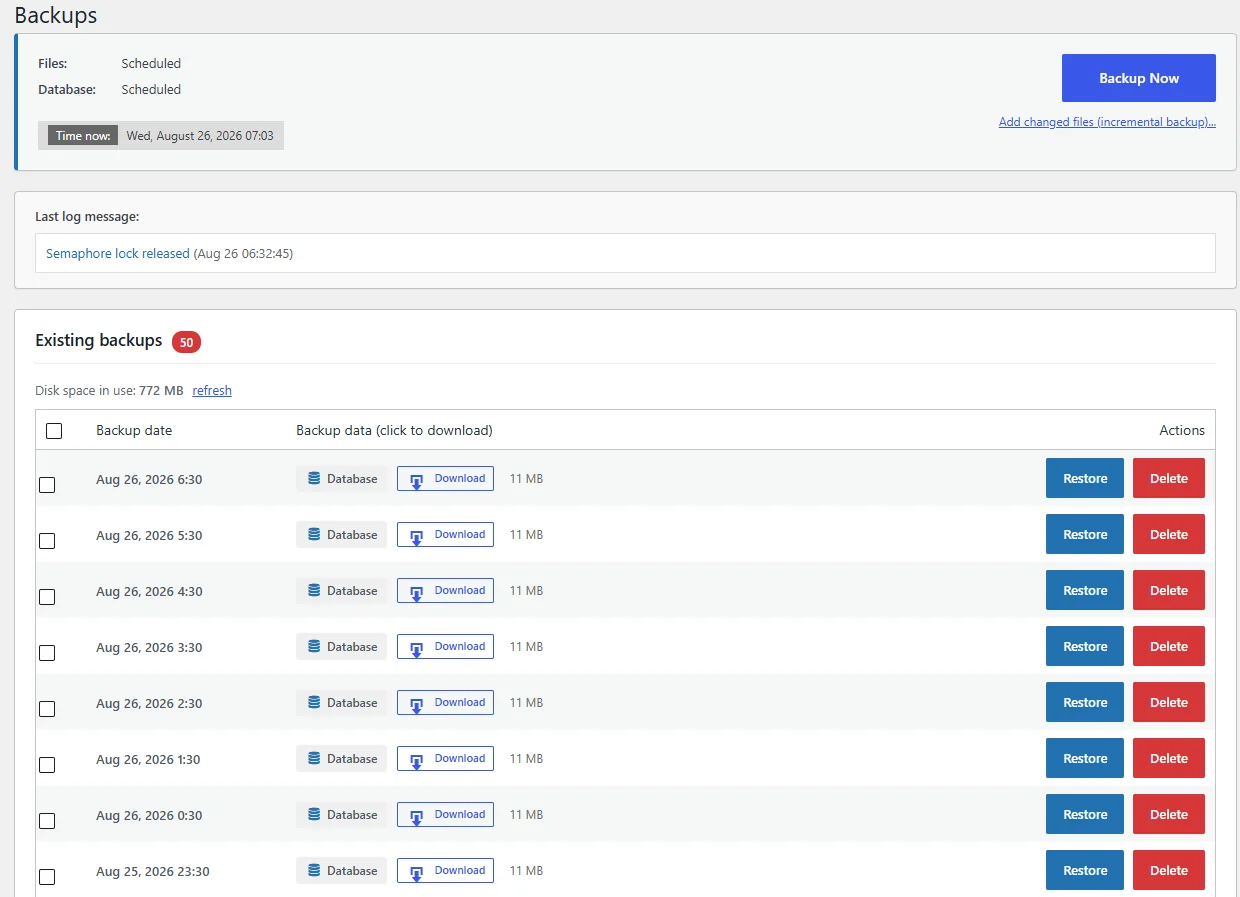
Intuitive Dashboard

See your backup status at a glance. The clean dashboard shows your latest backups, storage usage, and scheduled tasks without overwhelming you with options.

  • Backup history at a glance
  • Storage usage tracking
  • One-click manual backup
  • Next scheduled backup time
SiteVault Pro Dashboard

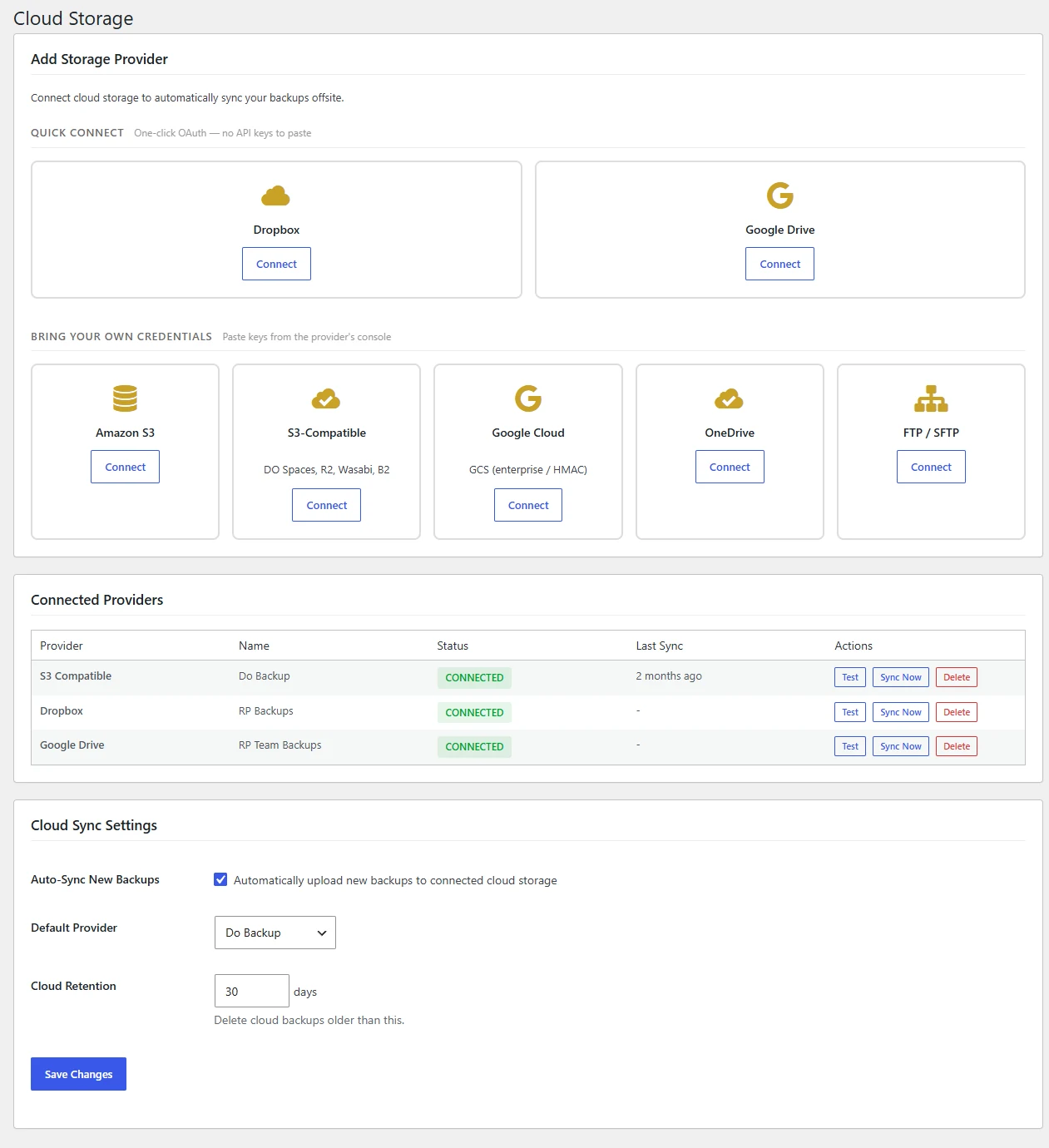
Cloud Storage Integration

Store backups safely off-server with support for all major cloud providers. Your backups survive even if your entire server goes down.

  • Google Cloud support
  • Amazon S3 compatible
  • Dropbox & OneDrive
  • FTP/SFTP servers
SiteVault Pro Cloud Storage Settings

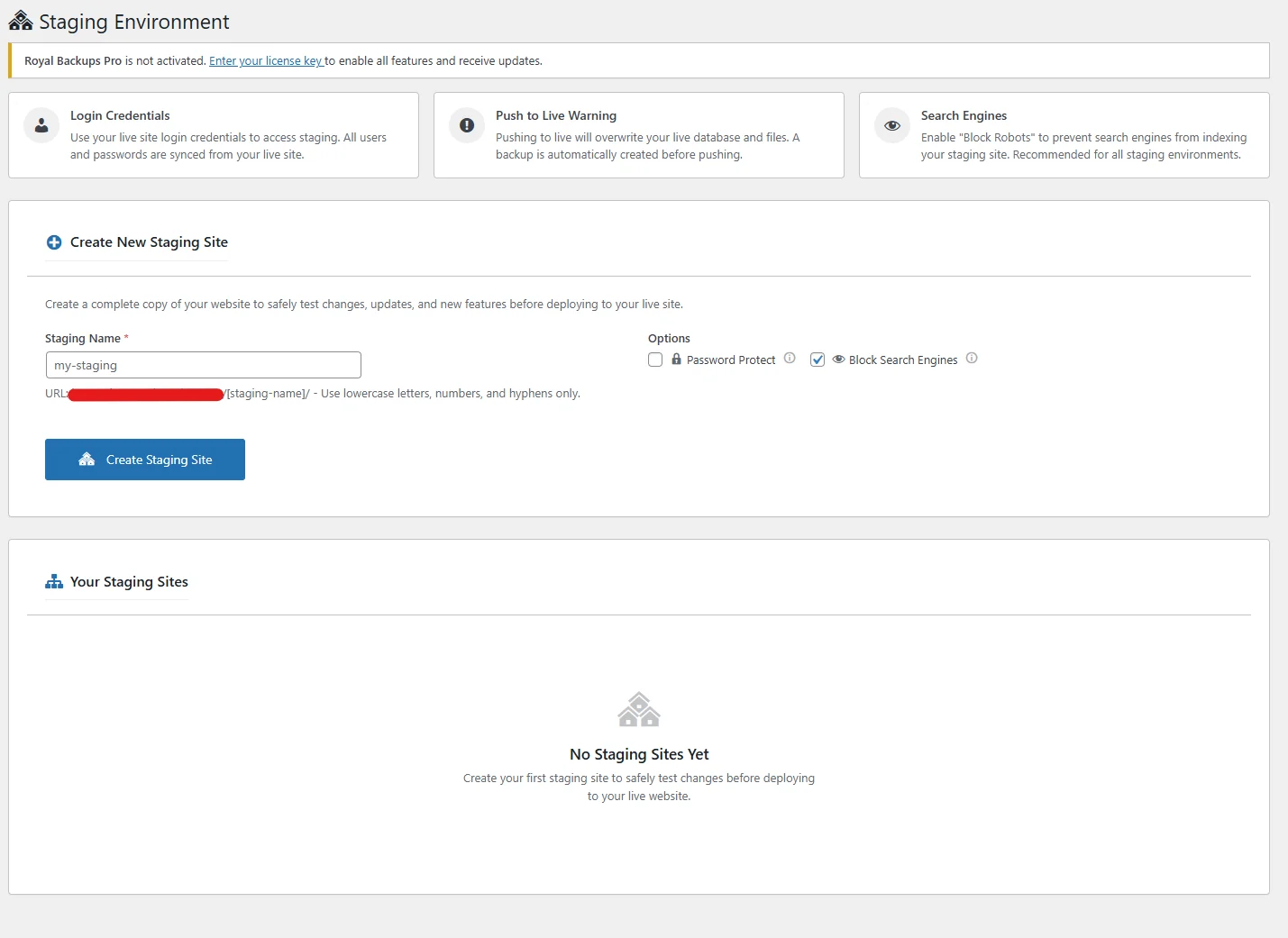
One-Click Staging

Create a complete copy of your site for testing. Try updates, test new plugins, or make design changes without risking your live site.

  • Instant staging creation
  • Password protected
  • Push changes to live
  • Automatic URL rewriting
SiteVault Pro Staging Sites

Incremental Backups

Only backup what's changed. Incremental backups are faster, use less storage, and put minimal load on your server.

  • Changed files only
  • Reduced storage usage
  • Faster backup times
  • Full restore capability
SiteVault Pro Incremental Backups

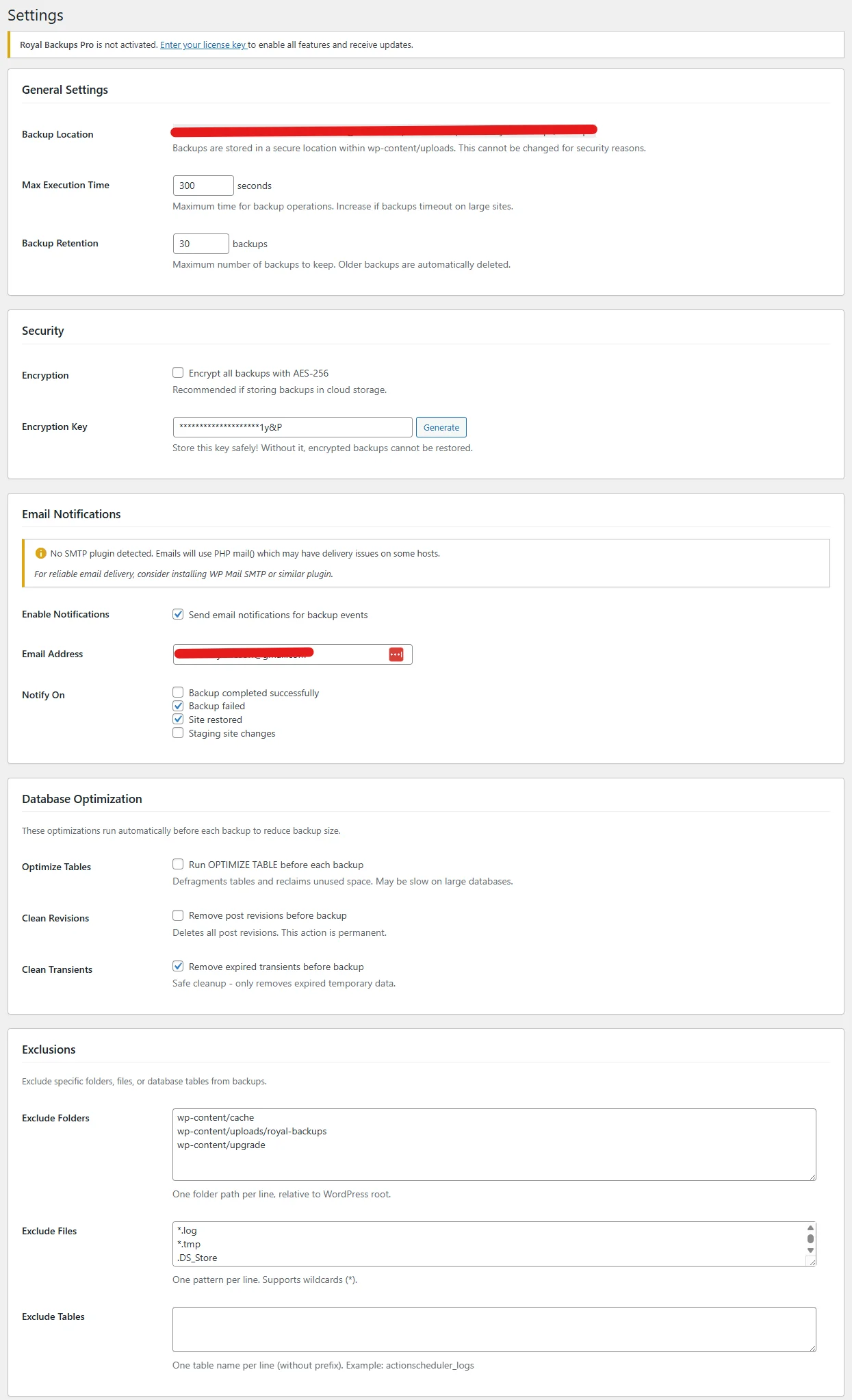
Flexible Settings

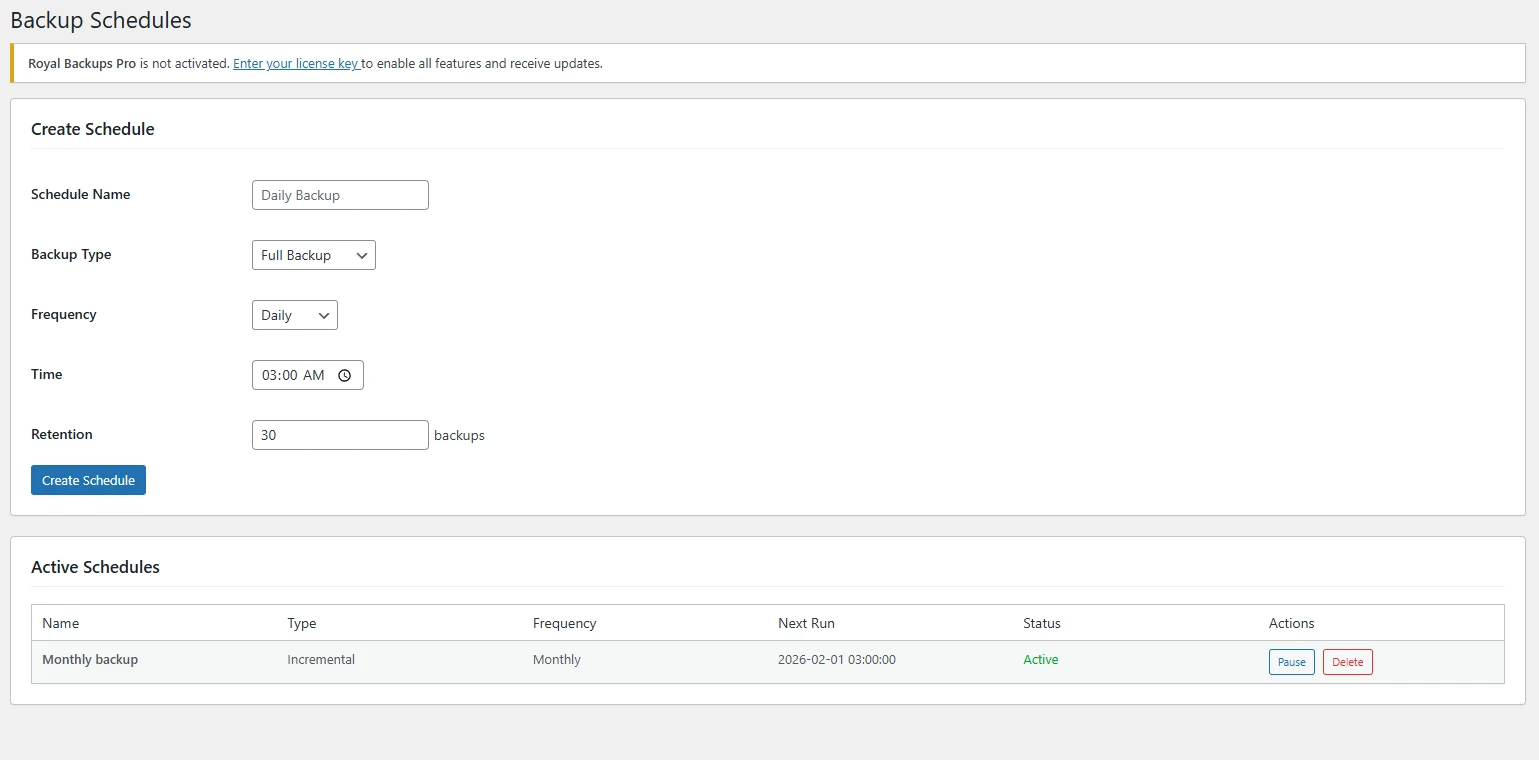
Configure every aspect of your backup strategy. Set schedules, retention policies, and notification preferences to match your needs.

  • Customizable schedules
  • Retention policies
  • Email notifications
  • Exclude files/folders
SiteVault Pro Settings

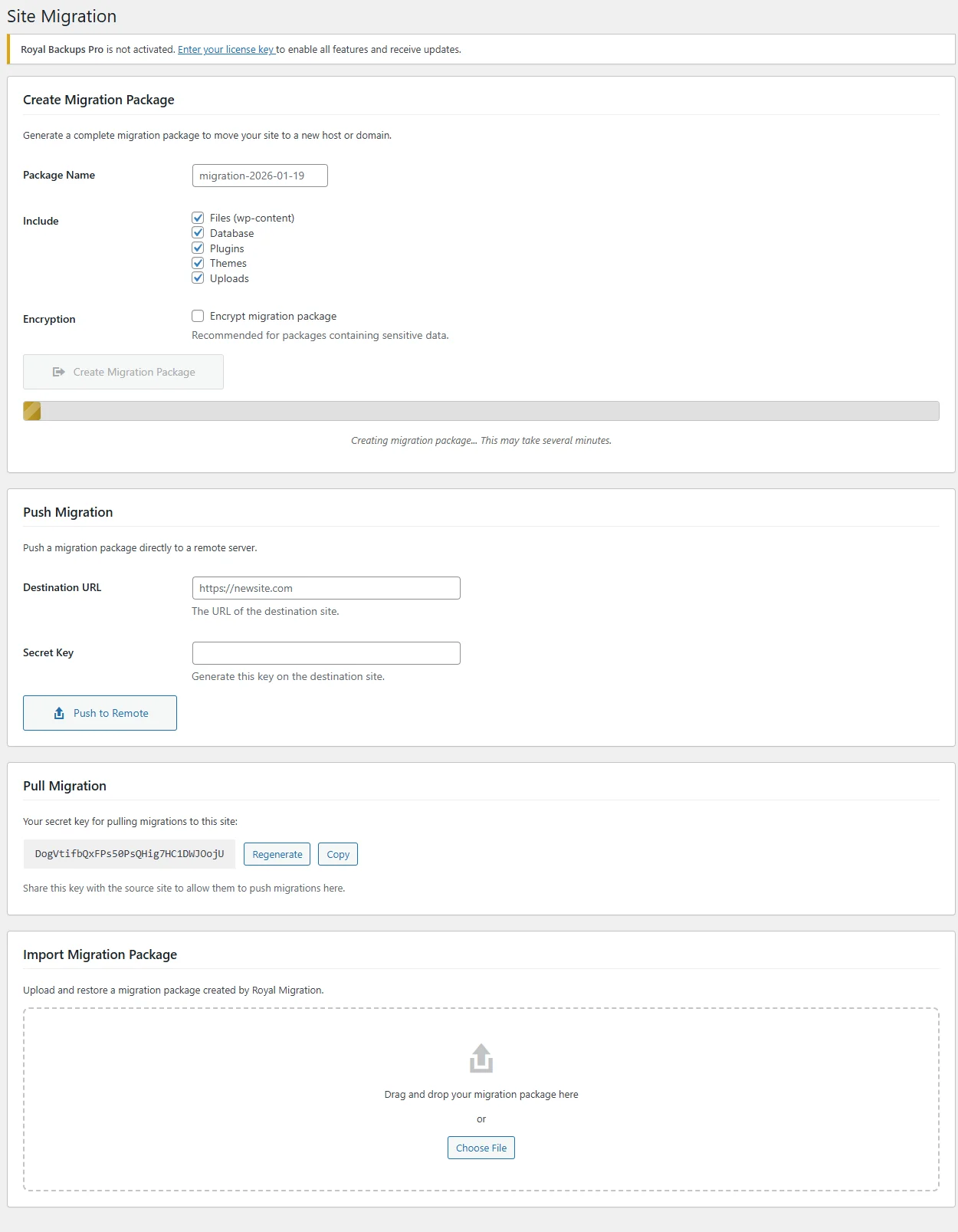
Site Migration

Move your site to a new host or domain with ease. Automatic URL replacement and serialized data handling make migrations painless.

  • Host-to-host migration
  • Domain change support
  • Serialized data handling
  • Database URL replacement
SiteVault Pro Migration

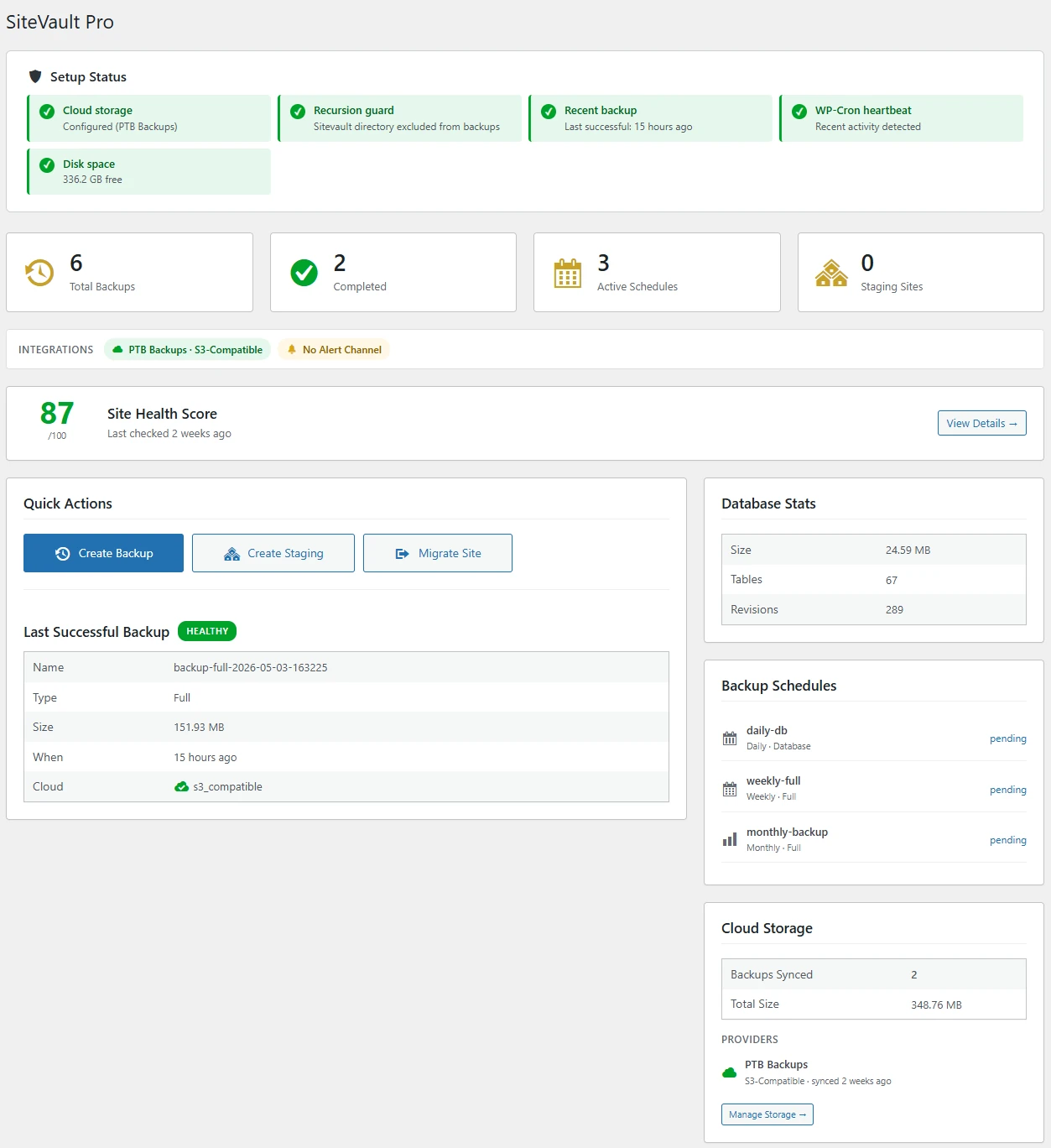
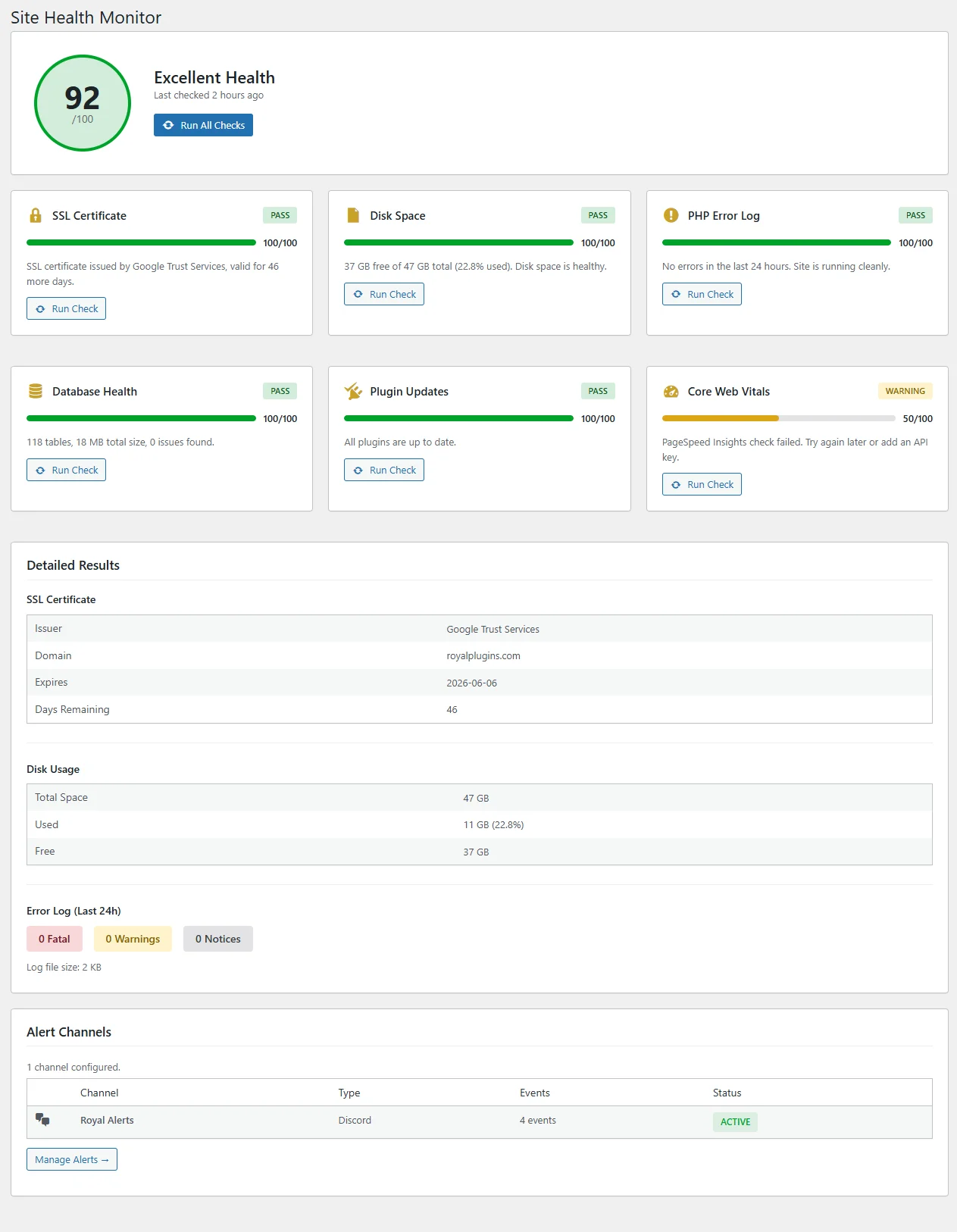
Site Health Monitor Business

Monitor your site's health from one dashboard. Track SSL certificates, disk space, PHP errors, database health, plugin updates, and Core Web Vitals with automated checks every 12 hours.

  • Overall health score (0-100)
  • 6 automated health checks
  • Slack, Discord & webhook alerts
  • Detailed results & recommendations
SiteVault Pro Site Health Monitor Dashboard showing health score, SSL, disk space, PHP errors, database health, plugin updates, and Core Web Vitals checks

Send your backups anywhere

A backup that lives on the same server as your site isn't a backup. SiteVault Pro ships native integrations for the storage providers WordPress operators actually use — including S3-compatible alternatives that run substantially cheaper than AWS at the same durability.

8
Storage providers built-in
AES-256
Encryption at rest
Mirror to multiple destinations
0
Outbound API fees from us

Amazon S3 + S3-Compatible

The industry-standard. Plus all the S3-API-compatible alternatives that run cheaper: Cloudflare R2, Backblaze B2, Wasabi.

  • Native S3 SigV4 signing
  • Cloudflare R2 (zero egress fees)
  • Backblaze B2 ($6/TB/month)
  • Wasabi (no egress / API fees)
  • Custom endpoint URL support
🌍

DigitalOcean Spaces

DO's S3-compatible object store. Flat $5/mo for 250GB, predictable pricing, fast NYC / SFO / SGP / FRA / AMS regions.

  • Native Spaces integration
  • All 5 DO regions supported
  • Path-style + virtual-hosted URLs
  • $5/mo bucket includes 250GB
  • Powers our own backups
📊

Google Cloud Storage

Google's object storage with HMAC-key authentication. Useful if your stack already uses GCP for hosting or analytics.

  • HMAC service-account auth
  • Multi-region bucket support
  • Storage class-aware (Standard / Nearline)
  • Lifecycle-rule friendly
  • Object versioning compatible
📢

Dropbox

For teams already in Dropbox. App-folder install pattern keeps SiteVault from touching anything else in your account.

  • OAuth 2.0 with refresh-token flow
  • App folder isolation (sandboxed)
  • Chunked upload for large backups
  • Path-resolution helpers
  • Quota monitoring
💾

Microsoft OneDrive

Personal + Microsoft 365 / Business accounts. Same OAuth pattern as Dropbox, with SharePoint tenant support for enterprise.

  • Personal + Business tenants
  • OAuth 2.0 + Microsoft Graph API
  • SharePoint document library targets
  • Resumable chunked uploads
  • Quota & bandwidth monitoring
📁

FTP / SFTP / FTPS

For sites that already pay for off-server storage at their host or NAS. Protocol-level support, not a third-party hop.

  • Plain FTP, FTPS (TLS), and SFTP (SSH)
  • Public-key SSH auth
  • Custom port + path
  • Passive / active mode
  • Connection-test before save

Multi-destination mirroring lets you ship the same backup to two providers at once — e.g. DigitalOcean Spaces for primary + Backblaze B2 for cheap long-term archive. Real durability without paying twice for AWS.

Free vs Pro vs Business vs Agency

Not sure which tier is right for you? Compare all features side-by-side to find the perfect fit for your WordPress site.

Free 30 backups, manual only
Pro Unlimited, automated, cloud
Business + Site Health monitoring
Agency + Slack/Discord alerts
View Full Comparison →

SiteVault Pro vs the popular backup plugins

The five most popular WordPress backup plugins, compared on the features that matter when something actually goes wrong.

Feature ProSiteVault PremiumUpdraftPlus ProSolid Backups ProDuplicator ProWPVivid
Scheduled backups
Incremental backups Add-on ×
S3-compatible storage (R2 / B2 / Wasabi) S3 only S3 only S3 only S3 only
Multi-destination mirror × × × ×
AES-256 encryption DB only ×
Resumable on timeout Partial
One-click staging sites × × × Limited
Push / pull migration
Site Health monitoring × × × ×
Slack / Discord alerts × × × ×
WP-CLI commands ×
Yearly cost (entry tier) $49 (1 site) $70 (2 sites) $99 (1 site) $79 (2 sites) $49 (2 sites)
Yearly cost (highest tier) $299 (unlimited) $195 (unlimited) $299+ (26+ sites) $599 (100 sites) $149 (unlimited)

Pricing accurate as of May 2026 from vendor sites. Tier names and exact pricing change — check vendor sites for current details. “Add-on” means the feature requires a separate paid extension; “S3 only” means the plugin supports AWS S3 but not S3-compatible alternatives like R2 / B2 / Wasabi. Site-count column reflects the lowest paid tier for each vendor (entry) and the largest tier (highest); SiteVault is the only vendor in this comparison whose entry tier covers a single site.

50+

Features Built-In

8

Cloud Providers

~250KB

Plugin Size

AES-256

Encryption

Tuned for what your site can't lose

Same plugin, different recovery story. Pick the angle that matches what would hurt most if you lost it.

Bloggers & Content Sites

Set-and-forget protection

Daily incremental backup to Dropbox or Google Drive, weekly full to a second destination, automatic retention. The setup that catches both "I deleted my own post" and "host had a fire."

  • Daily incremental + weekly full
  • Two cloud destinations (mirrored)
  • Email alert on any failure
  • One-click restore from any backup
  • Selective post / page restore
Suggested tier: Pro — $49/yr

WooCommerce Stores

Order data is irreplaceable

Hourly DB backups so you never lose more than 60 minutes of orders. Site Health monitor watches SSL expiry, disk fill, and Core Web Vitals so you don't lose checkout to silent issues.

  • Hourly DB backups (orders / customers)
  • Daily full incremental backups
  • SSL expiry tracking
  • Disk-fill alerts before checkout breaks
  • Pre-deploy safety snapshot
Suggested tier: Business — $129/yr

Membership & SaaS

Recovery point objectives

Granular schedules so user data has a tight RPO. Staging-to-production for safe migrations / upgrades. WP-CLI commands integrate cleanly with your CI / deploy pipeline.

  • Multiple independent schedules
  • Staging ↔ production sync
  • WP-CLI for CI / deploy hooks
  • Database-only restore option
  • Per-schedule retention policies
Suggested tier: Business — $129/yr

Agencies

Unlimited sites, white-label

One $299/yr license, unlimited client sites. Slack / Discord alerts route directly to your client channels. Weekly health reports, white-labeled, sent automatically.

  • Unlimited sites for $299/yr
  • White-labeled health reports
  • Slack / Discord alert routing
  • Per-client REST API access
  • Custom webhook events
Suggested tier: Agency — $299/yr

30-Day Money-Back Guarantee

If you aren't happy with our plugins, our features, or our support, reach out to our support team and request a refund within 30 days of your original purchase for a full refund.

View Refund Policy →

Common Questions

A typical WordPress site (1-5GB) takes 2-10 minutes. Backups run in chunks to avoid timeouts, and incremental backups are even faster since they only process changed files.
SiteVault Pro tracks progress and can resume from where it left off. This makes it reliable even on shared hosting with strict resource limits.
Yes. Your license covers the number of sites in your plan, whether they're your own or client sites. The Unlimited plan is perfect for agencies.
Yes! SiteVault Pro is fully compatible with WooCommerce stores and WordPress multisite networks. All features work seamlessly with both.
Always your own. SiteVault Pro never stores your backups on our servers — they go directly from your site to your cloud account. Native support for Amazon S3 and S3-compatible storage (Cloudflare R2, Backblaze B2, Wasabi), DigitalOcean Spaces, Google Cloud Storage, Dropbox, OneDrive, and FTP/SFTP/FTPS. Multi-destination mirroring lets you ship the same backup to two providers at once for true durability without paying twice.
After the first full backup, SiteVault Pro tracks file modification times and database checksums. Each scheduled run only transfers files that changed, dramatically reducing time and bandwidth. Cycle policy: weekly full + daily incrementals is the most common pattern. Restores stitch full + delta automatically — you don't pick which one to restore from. WPVivid, BackWPup, and Duplicator either don't ship incrementals or charge extra for them.
Staging creates a complete copy of your site at a separate URL (subdomain or subdirectory). Your live site is untouched. Test plugin updates, theme changes, or content workflows on staging, then push the changes to production with one click. Push can be selective (DB only / files only) so you can test and ship a content change without overwriting plugin updates that already shipped to production.
On Business and Agency tiers, Site Health Monitor runs automated 12-hour pulls covering: SSL certificate expiry, disk space & quota, database health (table size / errors), PHP error log, plugin / theme update tracking, and Core Web Vitals (LCP / CLS / INP). Alert channels (Slack, Discord, webhook on Agency tier) fire when thresholds are crossed. Weekly health-report emails summarize everything for non-technical stakeholders.

Backup, monitor, recover

Documentation, blog articles, and the rest of the Royal Plugins stack that pairs with rock-solid backups.

Ready to Backup Your Site?

Join thousands of WordPress users who never worry about losing their site again.

SiteVault Pro

Version 1.7.30
PASSED
Scan Date May 22, 2026
Files Scanned 66
Lines of Code 30,472
Scan Engines Regex, PHPCS