GuardPress Pro — Complete WordPress Security Plugin
WordPress-native firewall, malware scanner, two-factor authentication, brute force protection, file integrity monitoring, and real-time activity logs. Now with a vulnerability scanner that surfaces real CVE IDs, CVSS scores, and CISA KEV cross-references, so you patch actively-exploited issues first. 30+ protection modules, 30-day audit trail, and no API keys to manage, since vulnerability intelligence flows through the Royal Plugins proxy.
Protect What You've Built
WordPress powers over 40% of the web, making it the biggest target for hackers. Every 39 seconds, a website is attacked somewhere on the internet. Without proper protection, your site is vulnerable to malware, data theft, and devastating SEO penalties.
Google blacklists over 10,000 websites daily for malware. Getting hacked doesn't just cost you data—it destroys visitor trust, tanks your rankings, and can take months to recover from. Prevention is infinitely easier than cleanup.
Without GuardPress
- Vulnerable to malware such as backdoors, cryptominers, and SEO spam injections
- Constant brute force login attempts
- According to Patchstack, 97% of WordPress vulnerabilities come from plugins in 2025. No idea if site is compromised
- Complex security configurations
- Sleepless nights worrying
With GuardPress
- Protected by intelligent firewall — for example, blocking SQL injection, XSS, and file inclusion attacks
- Brute force attacks blocked automatically
- Daily malware scans & alerts
- One-click setup, zero config needed
- Peace of mind, finally
Great content and SEO work mean nothing if your site gets hacked. Security is the foundation everything else is built on.
30+ protection modules. No add-ons.
Here's the complete list of what GuardPress Pro ships with, grouped by what each one defends.
Core Protection 6
- Brute force attack protection
- Two-factor authentication (TOTP)
- Spam protection (comments & login form)
- Malware scanner with 20+ signatures
- File integrity monitoring
- Downtime & uptime monitoring
WAF & Detection 9
- Web application firewall
- SQL injection detection (UNION / time / stacked / file)
- XSS attack blocking
- SSRF & dangerous-scheme protection
- Rate limiting / request flood prevention
- IP block / whitelist / country block
- Virtual patches for known WordPress core attacks
- Fake search-crawler blocking (reverse-DNS verified)
- Optional auto-ban on confirmed attacks
Login Hardening 8
- Login page CAPTCHA (Turnstile / math)
- Custom login URL (hide /wp-login.php)
- Per-role 2FA enforcement
- Failed-login lockout
- Login notifications
- Emergency lockdown switch
- Emergency access link & WP-CLI unban
- Admin email change verification (OLD-email confirmation)
Monitoring & Audit 7
- Audit log of logins, user, content and plugin changes
- Blocked-request log with top blocked IPs
- Email security alerts
- One-click Block / Whitelist from the alert email
- Security dashboard with score
- Dashboard widget summary
- Attacker-behavior alerts (new admin, role granted, plugin toggle)
Hardening & Headers 6
- Security headers (CSP, HSTS, X-Frame-Options)
- Force strong passwords
- XML-RPC protection
- Disable file editing
- Hide WordPress version & signatures
- Uploads PHP execution block
Updates & Compliance 4
- Vulnerability scanner with CVE + CISA KEV data (core / plugins / themes)
- Database security scanner & cleanup
- Core file verification
- Signed, verified Pro updates
Powerful Protection, Simple Interface
Intelligent Firewall
Our Web Application Firewall (WAF) analyzes every request before it reaches your site. Malicious traffic is blocked instantly, legitimate visitors pass through seamlessly.
- Real-time threat detection
- SQL injection protection
- XSS attack prevention
- Minimal overhead
- Doesn't block search engine crawlers
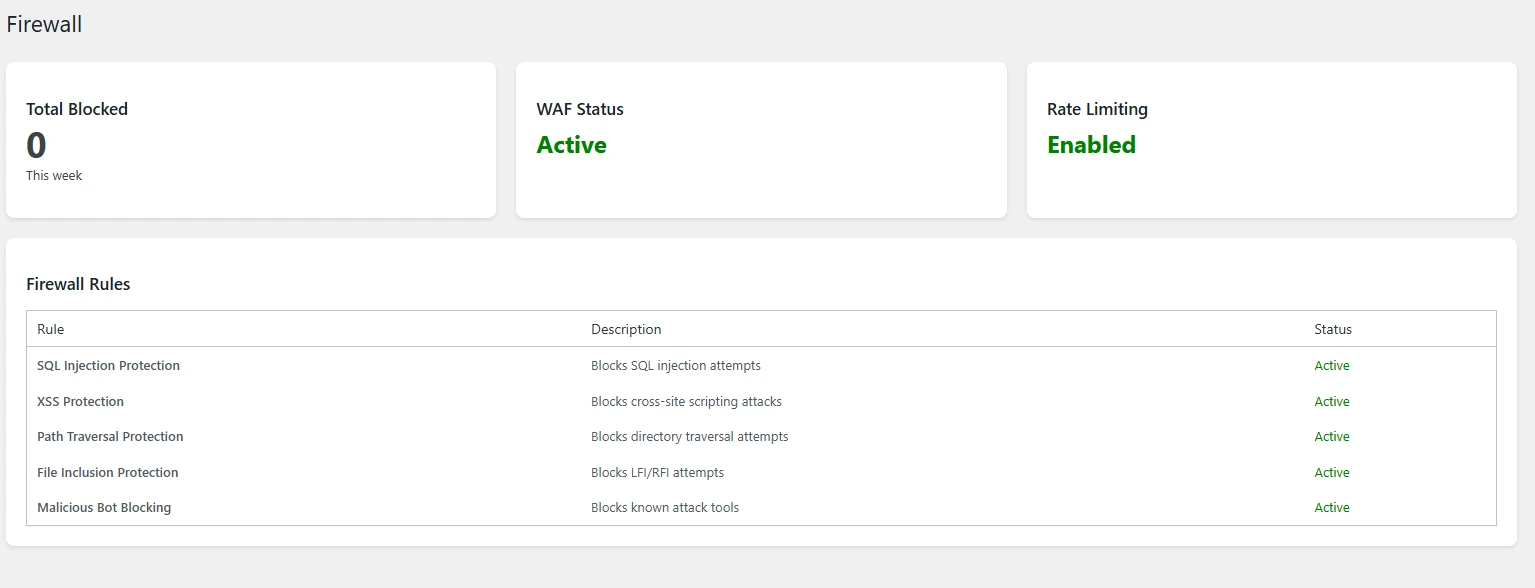
Malware Scanner
Scans every PHP file in your plugins, themes, uploads and core folders for malware signatures and suspicious code. Scans run automatically every day, and Scan Now runs one whenever you want.
- Scheduled automatic scans
- File integrity monitoring
- Core file comparison
- Detailed threat reports
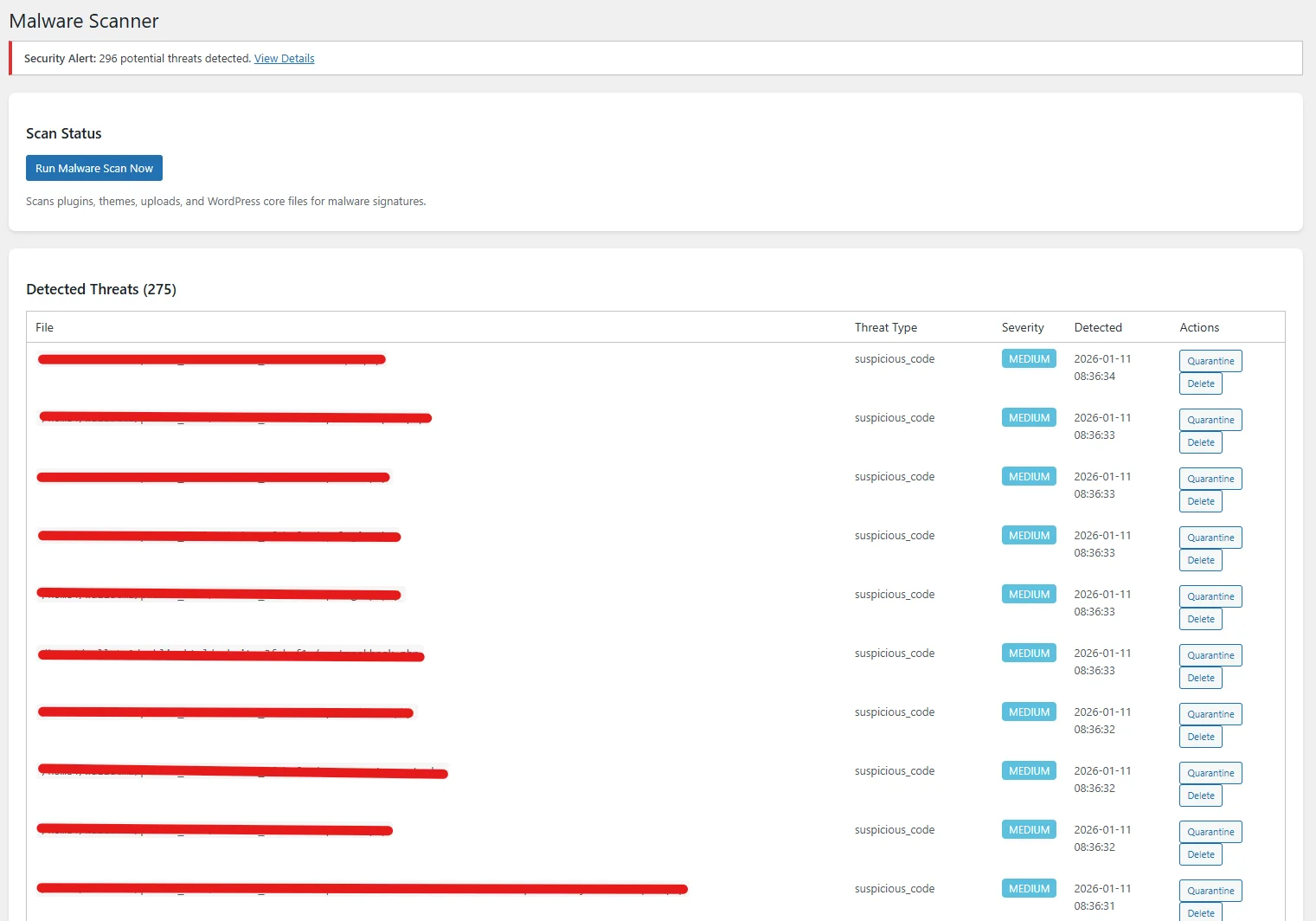
Login Protection & 2FA
Stop brute force attacks cold. Intelligent rate limiting, CAPTCHA integration, and two-factor authentication keep unauthorized users out permanently.
- Brute force blocking
- Two-factor authentication (TOTP)
- Login CAPTCHA protection
- Login attempt logging
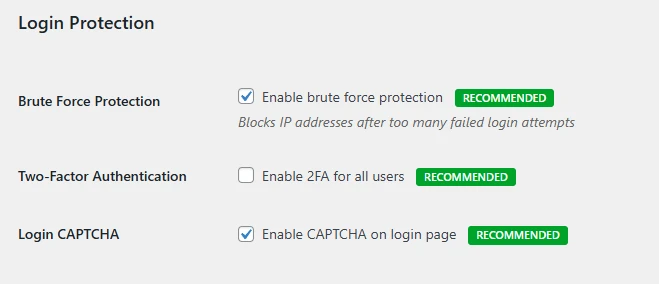
Activity & Uptime Monitoring
Know exactly what's happening on your site at all times. Activity logging records logins, user changes, content and plugin changes, and an optional uptime check emails you when your homepage starts returning errors.
- Complete activity logging
- Uptime monitoring
- Email security alerts
- User action audit trail
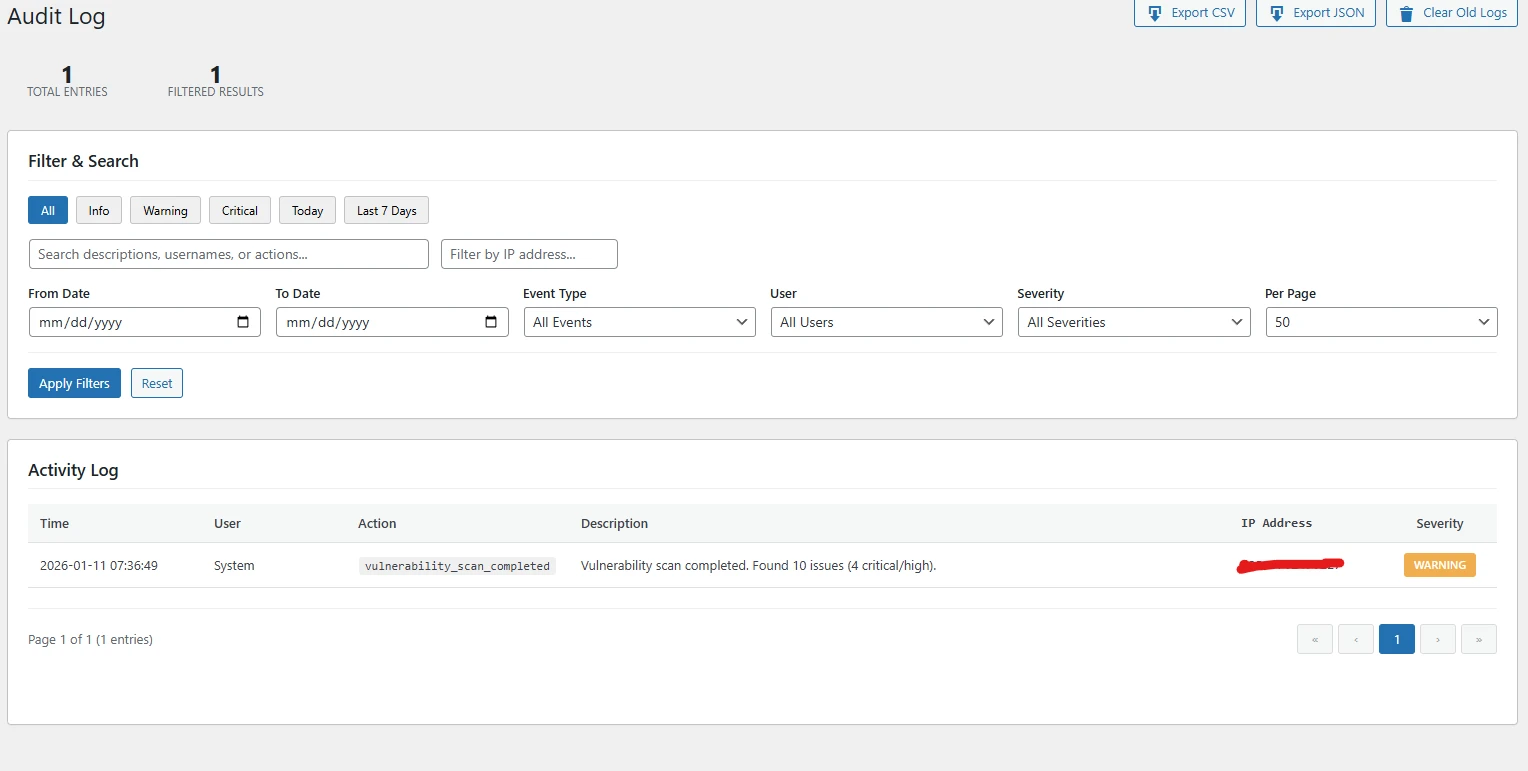
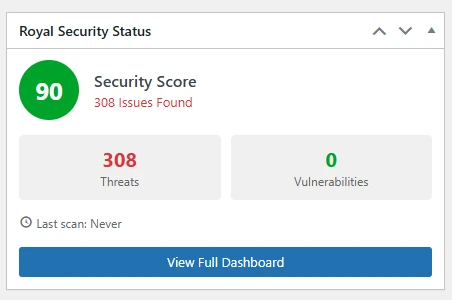
WordPress Dashboard Widget
See your security status at a glance right from the WordPress dashboard. No need to navigate to the security pages—your protection level is always visible.
- Security score at a glance
- Threat and vulnerability count
- Color-coded status indicators
- Quick link to full dashboard
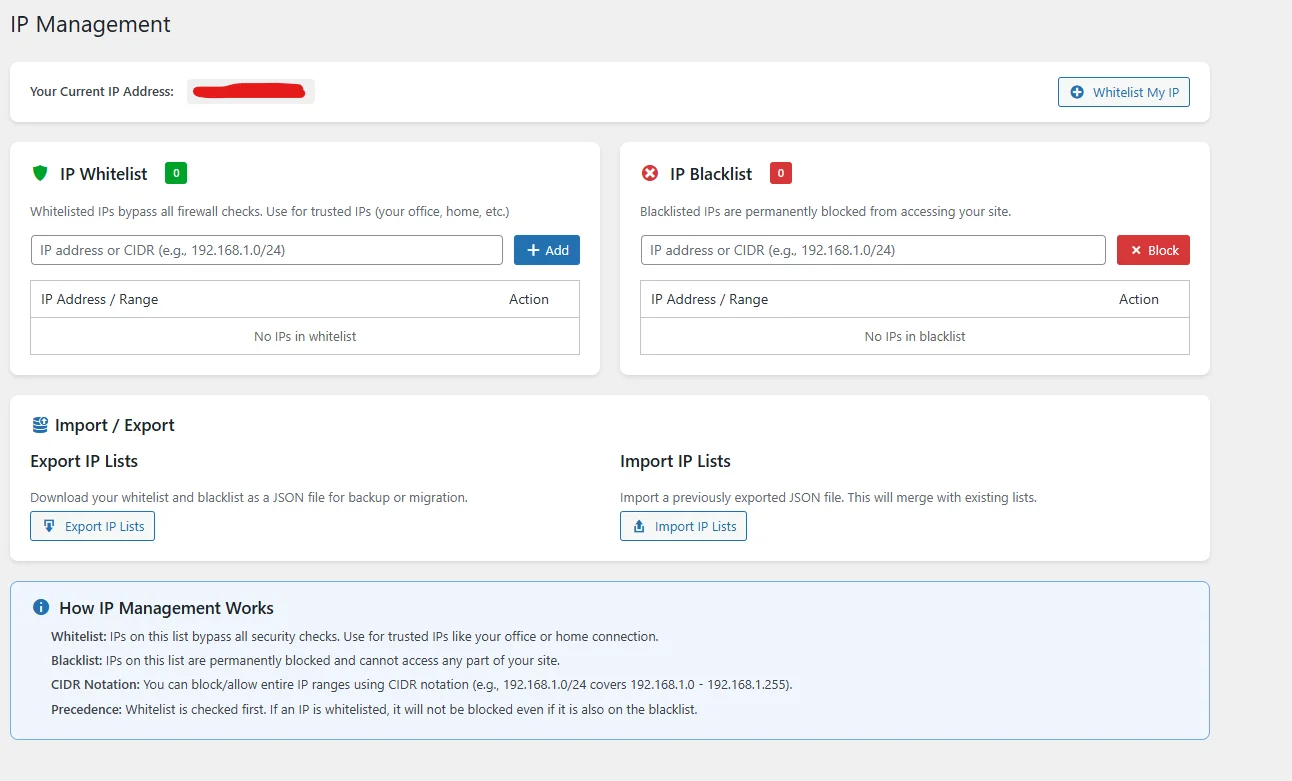
IP Whitelisting & Blocking
Take full control of who can access your site. Whitelist trusted IPs for guaranteed access, or block malicious IPs and entire ranges with one click.
- IP whitelist for trusted users
- Block individual IPs or ranges
- Import and export IP lists
- Country-based blocking
- Auto-block repeat offenders
- Block the Tor network on sites behind Cloudflare
- Warns when a page cache serves pages before the firewall
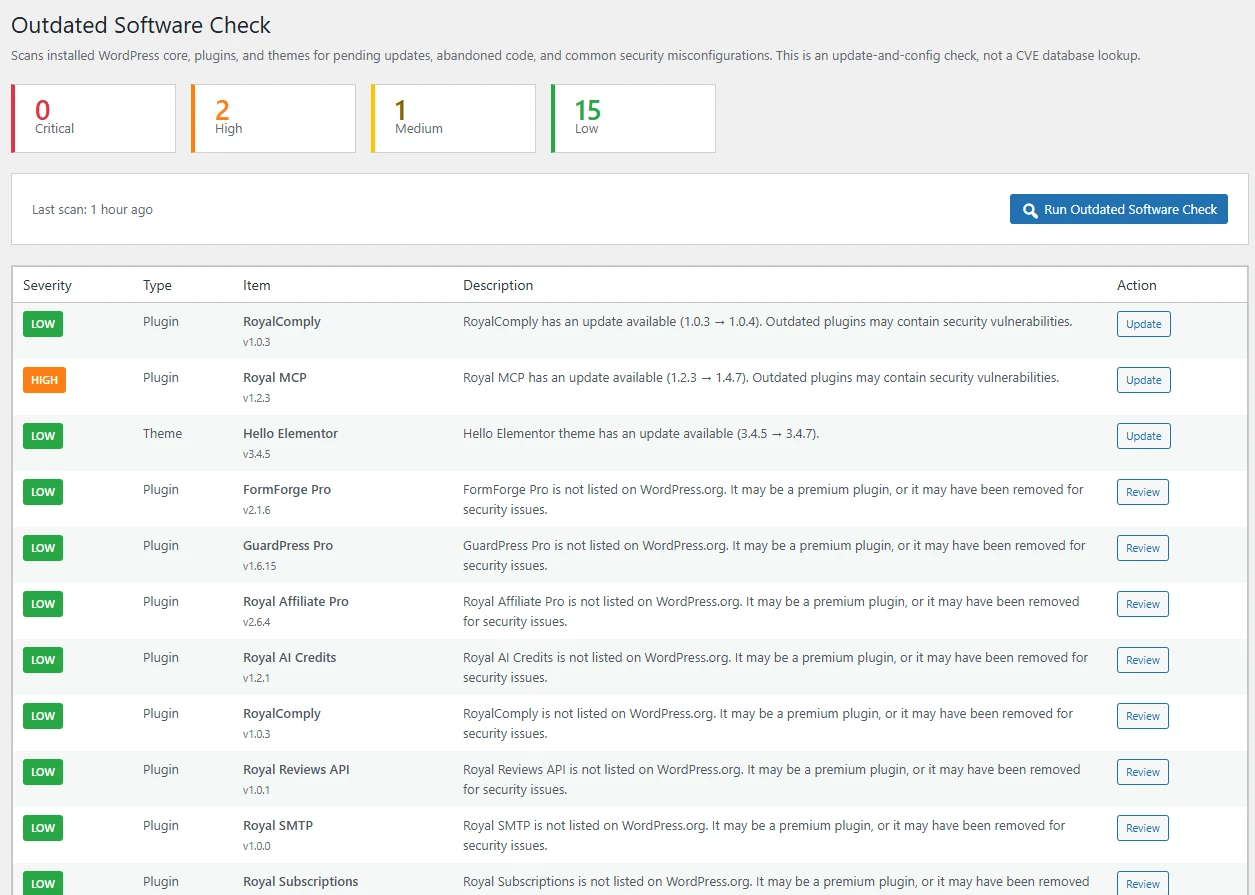
Vulnerability scanner with CVE + CISA KEV intel
Every finding is enriched with the CVE ID, CVSS score, and a red pill if the vulnerability sits on the CISA Known Exploited Vulnerabilities catalog. Data flows through the Royal Plugins vulnerability intelligence proxy, refreshed daily, so there are zero API keys for you to manage. Alerts prioritize actively-exploited vulnerabilities so you patch the highest-risk items first.
- Real CVE IDs and CVSS scores on every match
- CISA KEV pill for actively-exploited vulnerabilities
- Alerts when wp.org closes a plugin you have installed
- Pending update alerts (core, plugins, themes)
- Hardening misconfiguration checks
- Warns when your PHP version stops getting security fixes
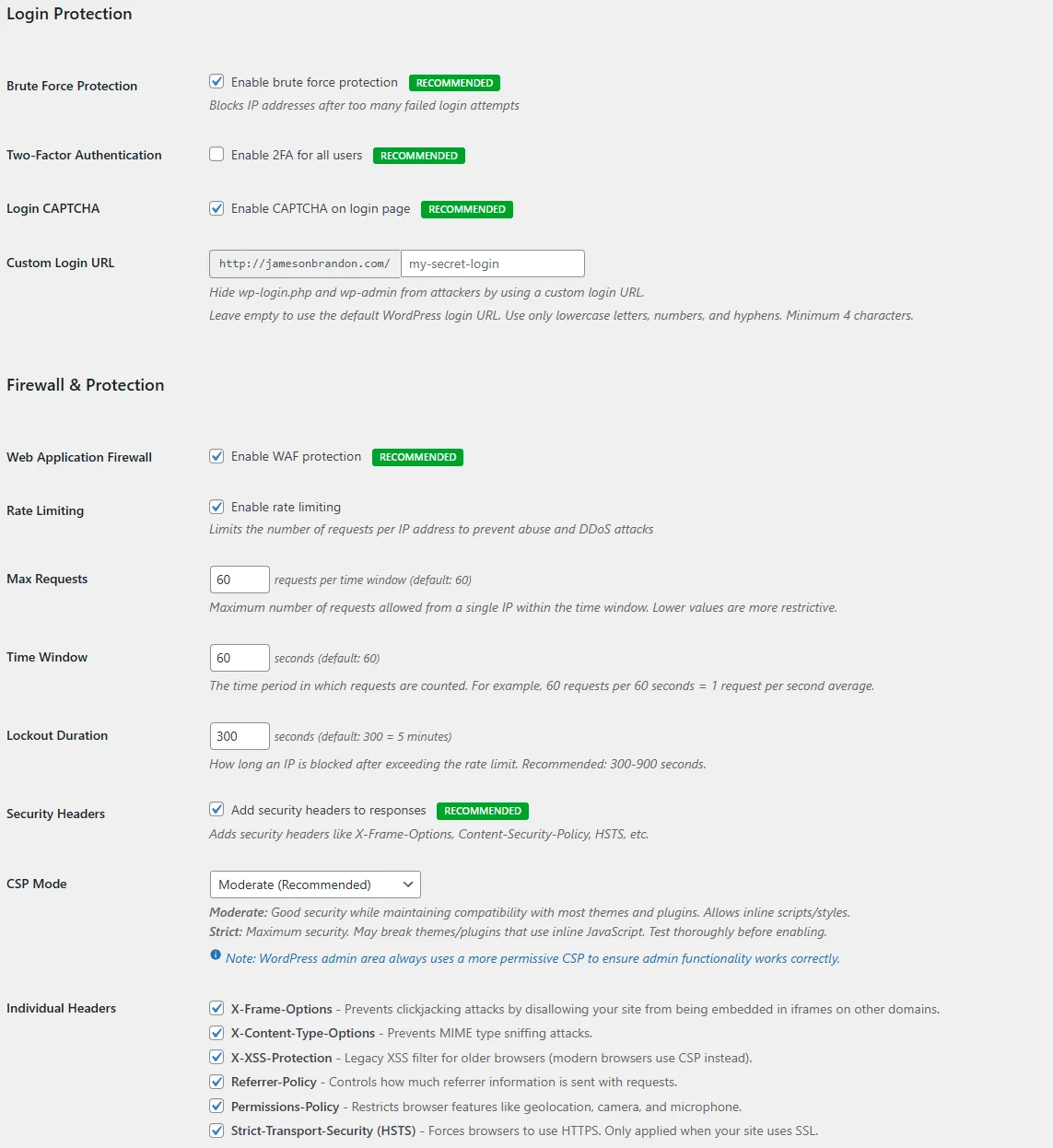
Comprehensive Settings
Fine-tune every aspect of your security. From hardening options to notification preferences, you're in complete control with our intuitive settings panel.
- Security hardening toggles
- Email alert configuration
- Custom security headers
- Rate limiting controls
The attacks GuardPress actually catches
Real attack signatures, not generic claims. The detection engine uses grammar-based matching — so legitimate content with the words “select” and “from” in the same string passes, while a stacked-query injection at /wp-admin/admin-ajax.php gets blocked.
SQL Injection
Grammar-based matching, not greedy keyword pairs. Catches all 7 classical injection vectors without false-positiving SQL tutorials or comments.
- UNION-based with whitespace
- Boolean tautology with end markers (
--,;,/*) - Stacked queries with semicolons
- Time-based:
sleep(),benchmark() - File functions:
LOAD_FILE,INTO OUTFILE information_schemaenumeration
XSS & Script Injection
Common script-injection payloads in URL parameters, form posts, JSON bodies and cookies.
- Reflected XSS in GET / POST
- Stored XSS payloads
- Common event-handler injection
- JavaScript URI schemes
SSRF & Dangerous Schemes
URL parameters aimed at your private network and dangerous URL schemes are blocked, even when a URL shortener plugin is active.
file://,php://,data:schemes- Loopback:
127.0.0.1/localhost - Private nets:
10.x/192.168.x/172.16-31.x - Link-local:
169.254.x(cloud metadata) - Always runs, whatever plugins are active
Brute Force & Credential Stuffing
Always-on protection independent of CAPTCHA — even if a token is missing, the lockout still fires.
- Failed-login rate limiting
- IP-level lockout after N attempts
- Username enumeration block
- Application Password & XML-RPC paths covered
- WooCommerce / BuddyPress / MemberPress login surfaces
Malware & File Tampering
Deep file scanning catches code patterns and signatures, while file integrity monitoring flags any unexpected change to core, plugin, or theme files.
- 20+ malware signatures
- Suspicious code-pattern matching
- Core file verification (vs WP.org checksums)
- Daily file change alerts
- Database scanner for poisoned records
Bot & Bad Traffic
Country blocking, IP allow / deny lists, fake-crawler blocking, and rate limiting keep low-quality and abusive traffic away before it reaches WordPress.
- Country-based blocking
- Fake search-crawler blocking (reverse-DNS verified)
- IP block / whitelist
- Request rate limiting
- XML-RPC abuse protection
- Comment spam filtering
All blocking happens server-side at plugins_loaded:20, early in the WordPress load, before your theme, REST routes and AJAX handlers run. No outbound scanning queue and no cloud round-trip per request.
Built for the day something goes wrong
The details most security plugins leave out: getting back in, acting on an alert in one click, and staying protected while you update or renew.
Locked out? Get back in
The “what if I block myself” question, answered before you need it.
- One-time emergency access link in the block email when an address you sign in from gets blocked
- WP-CLI commands to unban an IP, whitelist an IP and switch lockdown off
- Brute-force protection gives addresses an administrator recently used a temporary lockout, never a permanent ban
Alerts you can act on
Every alert carries the context to decide and the buttons to act.
- Block and Whitelist buttons right in the email, with an undo link after every block
- Reverse DNS, first-seen date and 30-day history for the address
- No emails for verified search crawlers or addresses you sign in from
- Repeat alerts rolled into one summary instead of an inbox flood
Trusts what’s genuine
Fewer false alarms, and updates you can rely on.
- Plugin files that match the official WordPress.org release aren’t reported as malware
- Plugin and theme updates that WordPress installs don’t trigger file-change alerts
- Every GuardPress Pro update is cryptographically signed and checked before it installs
A firewall that stays ahead
Protection for the gap between a disclosure and your next update.
- Virtual patches that block known WordPress core attacks on affected versions until you update
- Fake search-crawler blocking: “Googlebot” has to prove it with a reverse-DNS check
- Optional auto-ban on the first confirmed attack, with safe addresses exempt and a one-click 24-hour pause
No hard stop at renewal time
If a license lapses, protection winds down instead of vanishing.
- Two-factor login and IP blocking keep running for 72 hours, with an email when the window starts and ends
- Before you deactivate, GuardPress shows what will switch off, including how many users have 2FA and how many IPs are blocked
- Settings, 2FA setups and IP lists are kept for when you renew
Works with AI agents
Part of the Royal MCP toolkit, not in its way.
- Optional setting keeps Royal MCP and other MCP connections from being rate-limited or locked out
- Attack checks stay on for that traffic
- Royal MCP Pro clients can block an IP address for a set time
Switching from Wordfence?
One-click migration imports your IP blocklists, login settings, and notification preferences. No data lost, no downtime.
Install GuardPress
Install and activate alongside your current plugin.
Auto-Detect
GuardPress finds your Wordfence, Sucuri, or Solid Security data automatically.
One-Click Import
Preview what transfers, then import with one click.
What Transfers
- IP blocklists (permanent & temporary)
- Login security settings
- Email notification preferences
- Ban lists with reasons
Stays Behind
- Firewall learning data
- Scan results
- Live traffic history
GuardPress Pro vs the paid security plugins
All four major paid WordPress security plugins, compared on the protections that matter most.
| Feature | ProGuardPress | PremiumWordfence | PlatformSucuri | Pro bundleKadence Security | PremiumAll-In-One Security (AIOS) |
|---|---|---|---|---|---|
| Web application firewall | ✓ | ✓ | ✓ | Partial | ✓ |
| Malware scanner | ✓ | ✓ | ✓ | Blocklist check only | Basic |
| Two-factor authentication | ✓ | ✓ | ✓ | ✓ | ✓ |
| Per-role 2FA enforcement | ✓ | ✓ | × | ✓ | ✓ |
| SSRF & dangerous-scheme protection | ✓ | × | Cloud-only | × | × |
| File integrity monitoring | ✓ | ✓ | ✓ | ✓ | ✓ |
| Vulnerability scanner (real CVE + CVSS) | ✓ Wordfence Intel | ✓ | CVE IDs, needs firewall key | ✓ | × |
| CISA KEV cross-reference | ✓ | ? | × | × | × |
| No API key management for CVE data | ✓ via managed proxy | ✓ | × | × | × |
| Plugin-closed watcher (wp.org) | ✓ | ✓ | × | × | × |
| Activity / audit log | ✓ | ✓ | ✓ | ✓ | ✓ |
| Country-based blocking | ✓ | ✓ | ✓ | Not documented | ✓ |
| Security headers (CSP / HSTS / X-Frame) | ✓ | × | Partial | Partial | X-Frame only |
| Uptime monitoring | ✓ | × | ✓ | × | ✓ |
| Runs without cloud dependency | ✓ | Partial | × | ✓ | ✓ |
| Uploads PHP execution block | ✓ with pre-scan + canary | × | ✓ | ✓ | Not documented |
| Attacker-behavior email alerts (new admin, role granted, plugin toggle) | ✓ per-event toggle + test | Per-event email | Per-event email | User Logging (Pro) | ? |
| Admin email change verification (OLD-email confirmation) | ✓ | × | × | × | ? |
| Yearly cost (1 site) | $59 | $149 | $229–$549 | $299 (Kadence Pro) | $89 (2 sites) |
| Yearly cost (5 sites) | $149 | ~$633 (5 × $149, 15% volume) | $999.98 (Junior Dev, 2–5 sites) | $599 (10-site suite) | $149 (10 sites) |
Data pulled: October 2026, from vendor pricing pages and documentation. Tier names and exact pricing change — check vendor sites for current details. Kadence Security is the current name for the plugin formerly sold as Solid Security (renamed from iThemes Security in 2023, then to Kadence Security in May 2026). “Partial” means the feature exists in the plugin but is limited or requires an add-on; “Cloud-only” means the protection runs in the vendor’s paid cloud firewall rather than the plugin itself. Kadence Security is not sold on its own, and Kadence markets two prices: Kadence Pro at $299/year per site, the plan that includes Kadence Security (shown for 1 site), and an all-products suite (Give, The Events Calendar, LearnDash and Kadence) priced by site count, $350 for 1 site and $599 for 10 sites (shown for 5 sites, since Kadence has no 5-site plan).
Tuned for the way your site actually gets attacked
Same plugin, different threat models. Pick the angle that matches what you protect.
Bloggers & Personal Sites
Set-and-forget protection
Brute force lockout, 2FA on the admin account, malware scanner, and a vulnerability scanner that flags real CVEs on your installed plugins. Configured once, alerts you only when something actually matters.
- 2FA on the admin user
- Brute force protection
- Custom login URL
- Email alerts for real threats
- Outdated plugin check
E-commerce & WooCommerce
PCI-conscious hardening
Bot blocking and rate limiting at the WAF, file integrity monitoring on payment-handling plugins, and security headers (CSP / HSTS) that pass payment-processor security scans.
- WAF + rate limiting against checkout abuse
- Country-based blocking for high-fraud regions
- CSP / HSTS / X-Frame for PCI checks
- File integrity on cart & payment files
- 2FA on shop manager / admin roles
Membership & SaaS
Granular role & audit
For sites where users log in. Per-role 2FA enforcement, full activity log, login notifications, and CAPTCHA on the WooCommerce login, registration and lost-password forms and the Elementor login widget (not just wp-login).
- Per-role 2FA enforcement
- Full audit log of every change
- Login notifications to admins
- CAPTCHA on wp-login.php and WooCommerce account forms
- Application Password & XML-RPC controls
Agencies
100 sites, one license
One $299/yr license activates GuardPress on up to 100 client sites. Every install gets the same dashboard widget, so each client site shows its security score, threats and vulnerabilities at a glance.
- 100 sites for $299/yr
- Per-site dashboard widget summary
- WP-CLI commands to unban, whitelist and end a lockdown
- No cloud proxy in front of your site
- Drop-in deploy across new clients
30-Day Money-Back Guarantee
If you aren't happy with our plugins, our features, or our support, reach out to our support team and request a refund within 30 days of your original purchase for a full refund.
Need a VAT invoice? Add your VAT or tax ID at checkout and every purchase and renewal comes with a numbered PDF invoice, emailed with your receipt and in My Account → Billing & Invoices.
View Refund Policy →Common Questions
Yes. GuardPress only starts a PHP session on wp-login.php, so every other page stays cacheable and caching layers (WP Rocket, LiteSpeed, W3 Total Cache, ForgeCache, Cloudflare APO) work the way they should.
No. The CAPTCHA protects wp-login.php, WooCommerce /my-account/ forms, and theme or page-builder login forms that post to wp-login.php. REST API basic auth, Application Passwords, and XML-RPC fail-open if no token is present so your headless / mobile / API clients aren't broken. Brute-force lockout still applies to all surfaces.
Several ways back in: (1) when an address an administrator recently signed in from gets blocked, the alert email carries a one-time emergency access link that lifts the block; (2) the IP Management page removes any block in one click; (3) from a terminal, wp guardpress access unban <ip> does the same; (4) as a last resort, deactivate the plugin via FTP or your host's file manager — settings persist, so reactivation restores everything. A temporary lockout also tells the visitor how many minutes are left, and an address an administrator used in the last 24 hours is never banned permanently. SQL injection detection uses grammar-based matching to keep false positives on legitimate content low.
Format-aware. When a request is blocked, GuardPress detects whether it's a REST call (/wp-json/ or ?rest_route=), an AJAX request, an XML-RPC payload, or a cron run, and emits a JSON / XML / plain-text 403 instead of an HTML page, so headless clients and API callers get a response they can parse.
Three tiers: 1 Site ($59/yr), 5 Sites ($149/yr), 100 Sites ($299/yr). Same license key activates GuardPress on each site. Deactivate from the admin to free up a slot — staging-to-production moves are one click.
Protection winds down instead of switching off without warning. The firewall, malware and file scans, database scan and spam protection stop when the license lapses, while two-factor login and IP blocking keep running for 72 hours, and the alert address is emailed when that window starts and when it ends. Brute-force lockout, hardening and the audit log keep working. Your settings, two-factor setups and IP lists are kept, and everything comes back on as soon as you renew.
30-day money-back guarantee. Email support within 30 days of purchase for a full refund — no questionnaire. Full refund policy →
Yes. Add your company name and VAT or tax ID at checkout, and every purchase and renewal comes with a numbered PDF invoice, attached to your receipt email and downloadable any time from My Account → Billing & Invoices. EU businesses with a valid VAT ID are invoiced under the reverse charge, noted on the invoice.
Everything runs on your own server. The firewall, malware scanner, file integrity monitor, and audit log all execute locally and store data in your WordPress database. No outbound scanning queue and no cloud upload of file contents. Outbound calls go to: the license server, the vulnerability scanner's daily CVE + CISA KEV refresh (which sends installed plugin and theme slugs + WP version, authenticated with your license key, to the Royal Plugins vulnerability intelligence proxy at my.royalplugins.com, receives an HMAC-signed response, and never uploads file content), WordPress.org (official file checksums and plugin status), and, only while country rules are on, a monthly download of the country database they use. A visitor's IP address leaves your site only if you use the Cloudflare Turnstile CAPTCHA (sent to Cloudflare to check the challenge); country rules look visitors up in that database on your own server, or use Cloudflare's country information when your site is behind Cloudflare, and requests that claim to be a search-engine crawler are verified with a DNS lookup on their IP. File contents are never sent.
Three big ones: (1) less than half the price for 1 site ($59 vs $149), (2) CISA KEV cross-reference on every CVE, (3) security headers, SSRF protection, and uptime monitoring are all built in. And you never manage a Wordfence API key since our vulnerability intelligence flows through the Royal Plugins proxy. Full comparison →
Learn, harden, recover
Articles, docs, and a place to get help.
From the blog
Documentation
"The best security is the kind you never think about—because it simply works, silently protecting you in the background."
Get GuardPress Pro