See every AI agent on your site. Decide who gets in.
By Jameson · Founder & Lead Developer · Last updated September 2026
GPTBot, ClaudeBot, PerplexityBot, ByteSpider, and 60+ others are hitting your WordPress site right now. Most owners have no idea what they’re taking, or how to control it. Royal AI Firewall puts the live list, the one-click controls, and CDN integration guidance directly in your WordPress admin. Plus a new Bot Access monitor that catches upstream Googlebot or Bingbot blocks within 24 hours before rankings drop.
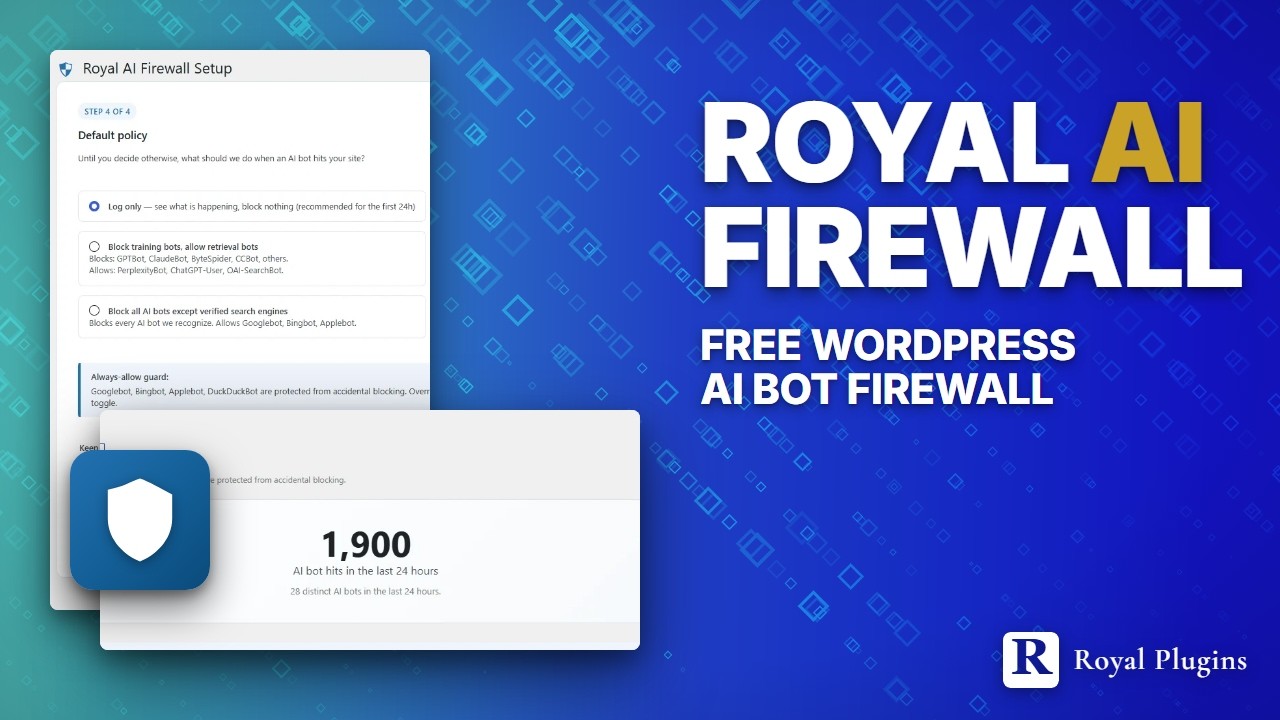
“Try it live” launches a real WordPress admin in your browser with Royal AI Firewall pre-configured, with the dashboard pre-seeded with 24 hours of realistic AI-bot traffic (GPTBot, ClaudeBot, PerplexityBot, ByteSpider, and more), per-bot policy overrides, and MCP activity. No signup, closes when you leave the tab.
Managing AI bots shouldn’t take a Cloudflare cert.
Blocking GPTBot, ClaudeBot, PerplexityBot, or ByteSpider on your WordPress site today means clicking through a moving-target Cloudflare dashboard, deciphering which plan tier still includes the setting you need, and hoping the panel name hasn’t been renamed since last month. Royal AI Firewall puts per-bot allow / block / log-only controls at the WordPress layer, all without needing an edge cert or premium CF account.
Cloudflare moves the goalposts every quarter
Cloudflare does show AI bots by name in its dashboard, but only if you can find the panel this month. AI Audit, AI Labyrinth, Bot Fight Mode, Super Bot Fight Mode, Managed Rules, Custom Rules, WAF managed AI category: the features are constantly renamed, reshuffled between Free / Pro / Business / Enterprise, and hidden three menus deep in a UI designed for network engineers. Every time you sit down to block one specific bot you burn 20 minutes hunting through the console for whichever setting Cloudflare renamed this quarter, and half the time the granular per-agent rule you need has quietly moved to a paid tier. Blocking “GPTBot but not ChatGPT-User” is a project.
One page. Every AI bot. Every switch in one place.
Every AI bot hitting your site, listed by name inside wp-admin. One dropdown per bot: allow, block, log-only. Blocking consequence explained right next to the toggle so you know what you’re giving up before you flip it. GPTBot and ChatGPT-User are separate rows, so you can block training without blocking retrieval, without writing a WAF rule, without hunting through Cloudflare menus. 72 AI bots across 6 categories. Catalog refreshes automatically on every plugin update.
Nine features. One admin page. Zero configuration to start seeing data.
Every panel below sits on the same WordPress AI bot dashboard inside wp-admin. Activate the free plugin, walk the 4-step setup wizard, refresh, and the classifier identifies GPTBot, ClaudeBot, PerplexityBot, ByteSpider, and 70+ other AI crawlers. You get a per-bot policy dropdown, a master “Block all AI bots” panic button, and a 4-card hero showing Total Hits, Blocked, Allowed, and Distinct Bots for the last 24 hours. The Bot Access monitor sits alongside and tells you within 24 hours if verified search-engine bots have stopped reaching your site.
Bot Access monitor — upstream-block detection
Flags when verified Googlebot, Bingbot, Applebot, or DuckDuckBot hits fall below 10% of your 30-day baseline. A dual-request probe fires every 12 hours to catch WAF, CDN, or hosting-layer rules blocking crawlers. Reverse-DNS self-test, raw log evidence, and a diagnostic bundle for support tickets — all on one page.
Live AI bot dashboard
Per-bot hit counts, bandwidth used, and the last time each bot touched your site. A 4-card hero shows Total Hits, Blocked, Allowed, and Distinct Bots for the last 24 hours side by side, plus a sortable per-row drill-down with top URLs, recent activity, and what blocking the bot would cost you.
One-click per-bot policy + panic button
Each row has a dropdown: Use default policy / Always allow / Log only / Block. A master “Block all AI bots” button sits on top of the dashboard for one-click lockdown. Blocked bots receive a 403 at parse_request priority 1, before WordPress runs any heavy work. Export the full policy set as JSON to back up or sync across multi-site installs.
Search engine guard
Googlebot, Bingbot, Applebot, DuckDuckBot are protected from accidental blocking by default. The dropdown is disabled for them. To override, you flip a Settings toggle that warns “blocking Googlebot removes your site from Google Search.”
CDN detection & integration guide
The wizard detects Cloudflare, Bunny CDN, Fastly, KeyCDN, Sucuri, StackPath, and Akamai on your site. For Cloudflare it lists exactly which CF settings to turn off so this plugin can take over the AI-bot layer — AI Audit, AI Labyrinth, custom WAF rules — and which to leave on (DDoS protection, managed WAF, SSL, Bot Fight Mode).
MCP & Abilities API activity
If a WordPress MCP server plugin is installed, the dashboard shows a live widget of recent tool / ability invocations — which tool was called, by which client, whether it succeeded. First-party bridge for Royal MCP 1.4.33+ captures the full tool name and status.
Bundled bot catalog
72 AI bots recognized across training crawlers, retrieval bots, AI search engines, agent browsers (Operator, Atlas, Claude Computer Use, Perplexity-Comet), dataset scrapers, and traditional search engines. Every entry carries its owner, blocking consequence, and AI-purpose classification (ai-train / ai-input / search) for Content Signals matching. Refreshes on every plugin update.
Content Signals watchdog
Flags every AI bot that ignores your declared Content Signals (ai-train, ai-input, search). New dashboard widget shows honored / violated / unknown counts over the last 7 days, and a dedicated Violations tab in the Activity Log lists every offender with the signal they crossed. Optional auto-block engine catches repeat offenders after 3 violations in 24 hours. Manual per-bot policies always win, so auto-block never touches choices you made yourself.
Web Bot Auth verification
Cryptographic signature verification for OpenAI, Anthropic, Perplexity, Google, and Meta bot requests. Ed25519 mandatory, ECDSA-P256 supported. Per-operator toggles let you trust verified traffic OR block requests that spoof an operator’s user-agent without a valid signature. Publishes an /auth.txt discovery document at your site root so operators know which auth methods you accept.
Agent Readiness is a category now. RAIF enforces the stack at the WordPress layer.
Cloudflare rolled out an Agent Readiness scorecard. Vercel launched is-agentic.com. The IETF Web Bot Auth draft is under active revision. Three specs are converging on the same idea: sites should declare what AI operators may do, operators should prove who they are, and there should be a public way to discover both. Royal AI Firewall 1.0.8 ships the WordPress-layer implementation of all three.
Your robots.txt just got teeth
Declaring ai-train=no is table stakes. Compliant bots respect it. Non-compliant bots ignore it and keep training on your content anyway.
RAIF sees every AI bot that violates your declared signals, surfaces them in a dedicated Violations tab, and can auto-block repeat offenders after 3 violations in 24 hours. Manual policies always win.
Verified operators bypass the noise
OpenAI, Anthropic, Perplexity, Google, and Meta are rolling out cryptographic request signing. RAIF verifies every signature (Ed25519 mandatory, ECDSA-P256 supported) against the operator's published keys.
Per-operator toggles let you trust verified requests OR block requests that spoof an operator's user-agent without a valid signature. Two independent decisions, five operators.
Discovery, published at the root
Your site now serves an auth.txt discovery document telling AI operators which authentication methods you accept, who to contact, and when the declaration was last refreshed.
No configuration required. Operators fetch it on first contact, before their bot ever hits WordPress. Aligns with the spec companion to Web Bot Auth.
The full Agent Readiness Stack
Three plugins, one coordinated story. Each layer owns one concern, they share nothing, they compose cleanly.
Cloudflare at the edge. RAIF in WordPress. Both, on purpose.
Cloudflare owns the edge. It absorbs DDoS, terminates SSL, caches assets, and runs a powerful WAF that keeps moving, adding, and renaming features every quarter. RAIF owns one job at the WordPress layer: making AI-bot decisions dead simple, living inside wp-admin where operators already are. Serious sites run both, on purpose.
The whole plugin, in eight screens.
The AI bot dashboard you land on after the wizard. The Bot Access monitor that flags upstream Googlebot and Bingbot blocks within 24 hours. Every screen of the WordPress setup: welcome, environment detection (7 supported CDNs plus 23 popular security and caching plugins), CDN dial-down guide, default-policy picker, and the Settings panel with fingerprint catalog, log retention, and telemetry controls.
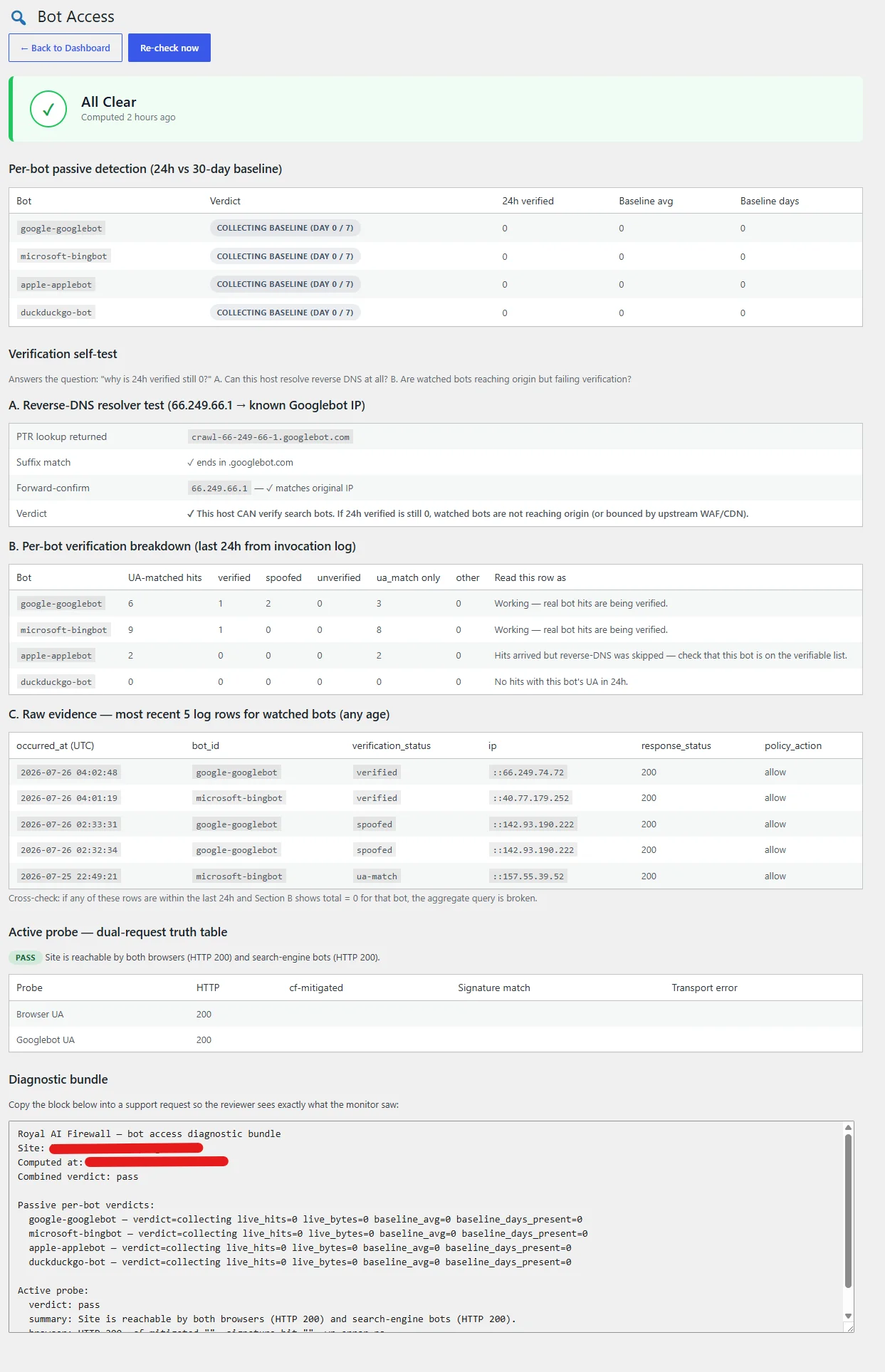
Combined verdict badge at the top. Per-bot passive table shows verified Googlebot, Bingbot, Applebot, and DuckDuckBot hits over the last 24h against a rolling 30-day baseline. Live reverse-DNS self-test tells you at a glance whether your host can verify search bots at all. Raw log evidence rows let you cross-check the aggregate against actual traffic. Active probe fires every 12 hours with browser and Googlebot user-agents to catch upstream WAF or CDN rules that would silently strip search-engine access.
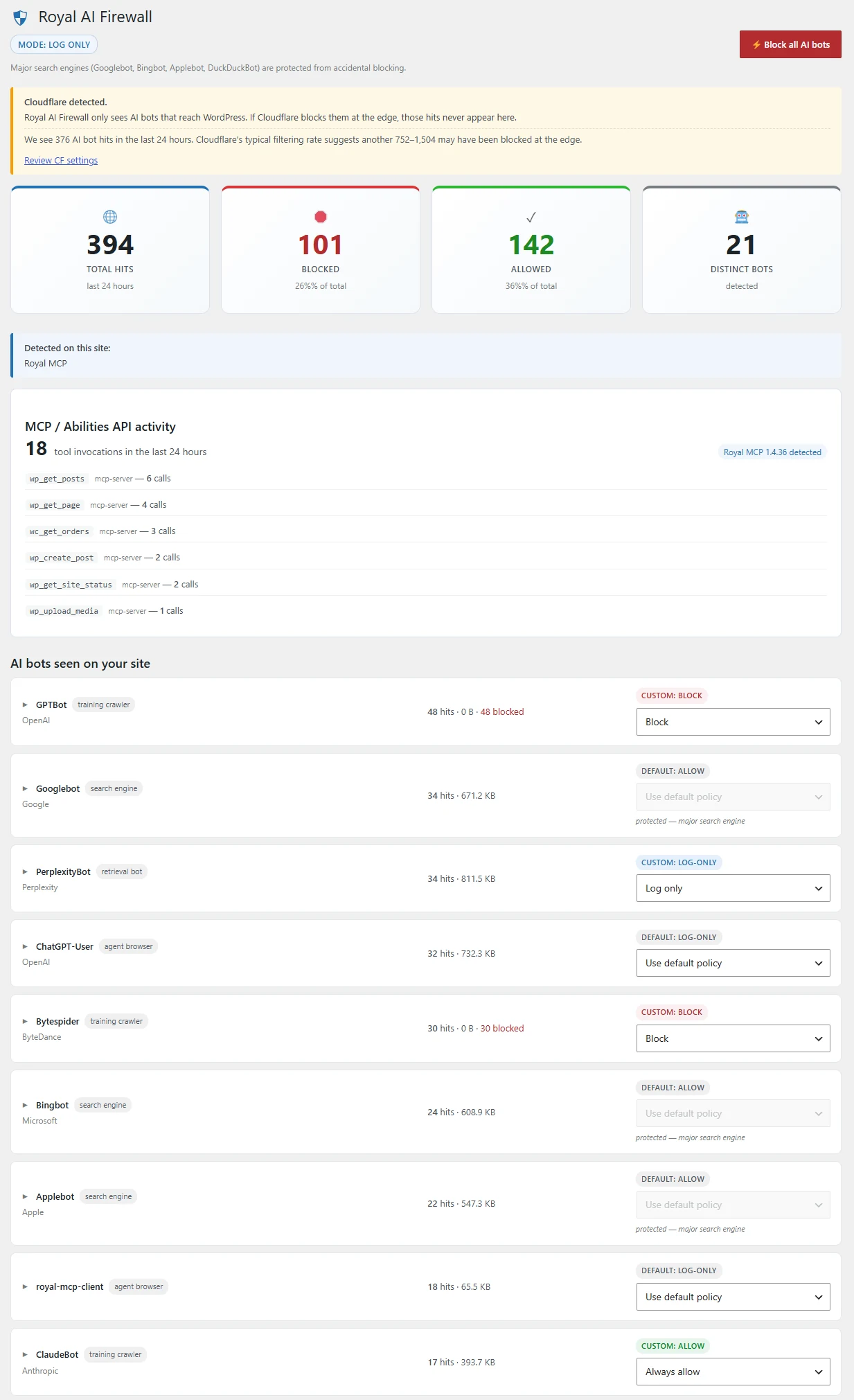
Live 24-hour hero metrics at the top. Content Signals widget shows your declared preferences plus honored / violated / unknown counts over the last 7 days with the top violators called out. Per-bot list with hit counts and a one-click policy dropdown per agent. Master “Block all AI bots” button next to Settings. MCP / Abilities API activity widget appears when an MCP server plugin is detected.
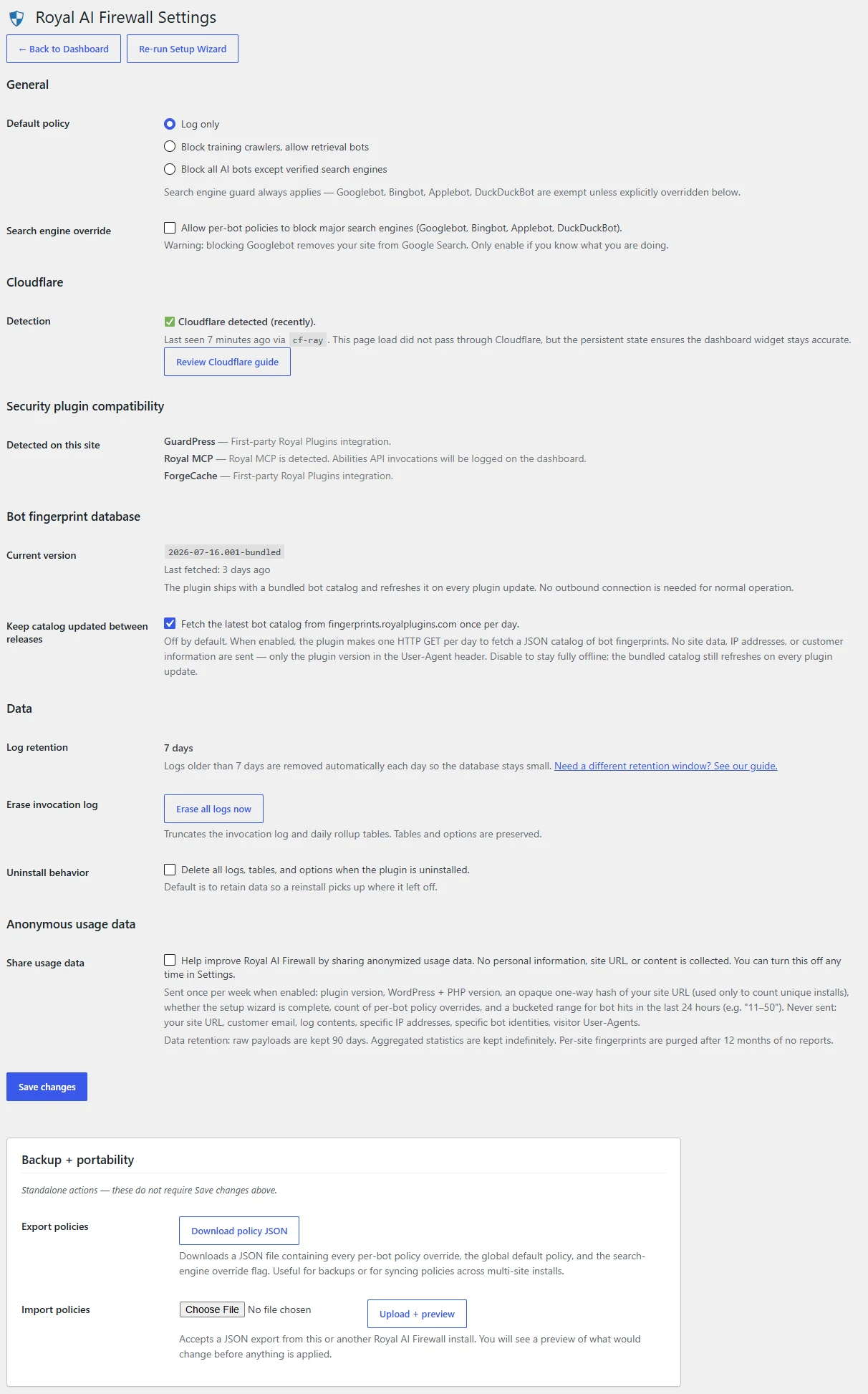
Default policy, search engine override, Content Signals auto-block toggle, Web Bot Auth per-operator toggles for OpenAI, Anthropic, Perplexity, Google, and Meta, Cloudflare detection status, security plugin compatibility notes, bot fingerprint database version with opt-in for live updates, log retention, uninstall behaviour, and anonymous usage data opt-in.
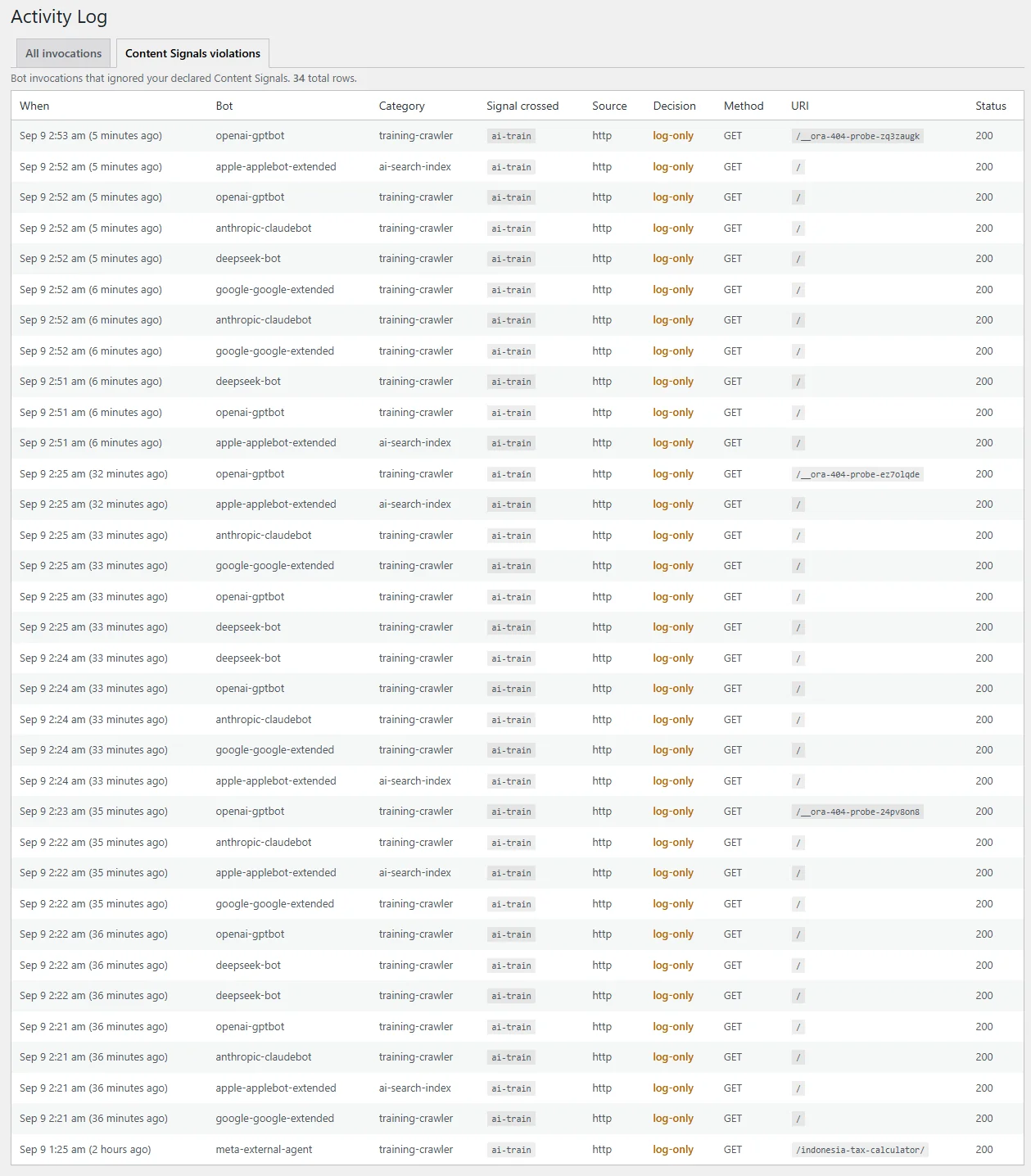
New in 1.0.8. A dedicated tab in the Activity Log filtered to only the invocations that crossed a declared Content Signal. Each row carries the bot ID, the category, the exact signal ignored (ai-train, ai-input, or search), the source layer, your policy decision, request method, and URI. This is the evidence you point at when a bot repeatedly ignores your preferences, and the same list the optional auto-block engine watches to catch repeat offenders.
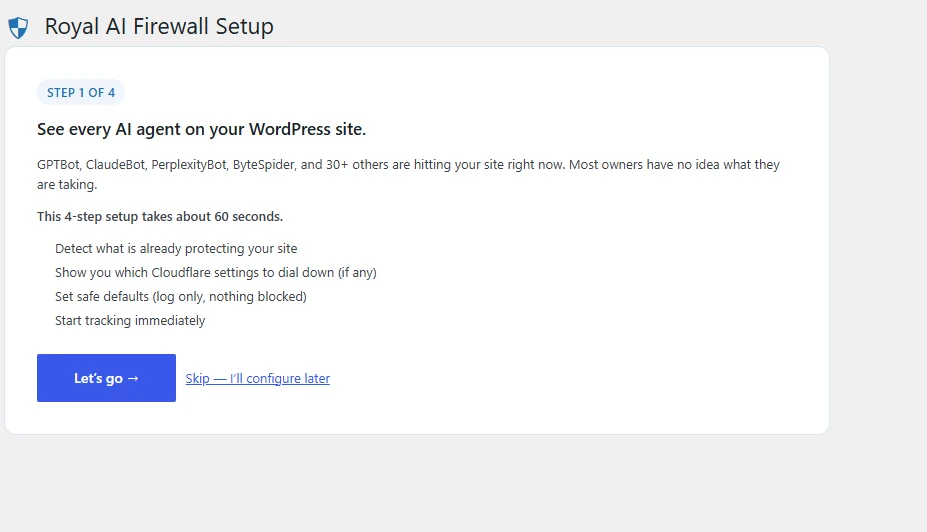
Value prop and 4-item checklist of what the next 60 seconds will do.
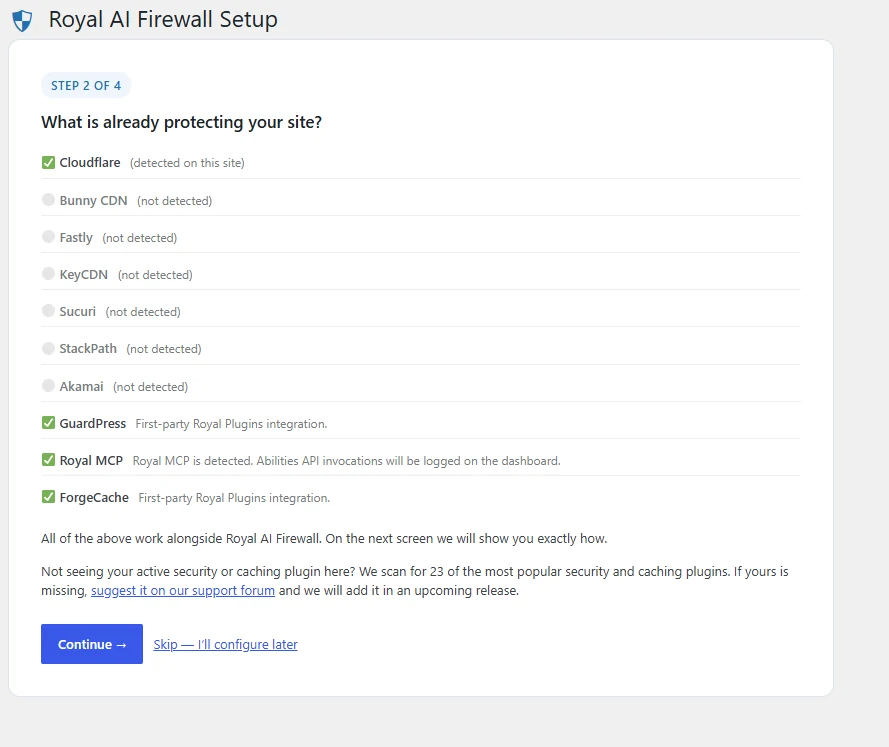
Auto-detects your CDN (Cloudflare, Bunny CDN, Fastly, KeyCDN, Sucuri, StackPath, or Akamai) and popular security plugins so you can see how the layers stack before turning anything on.
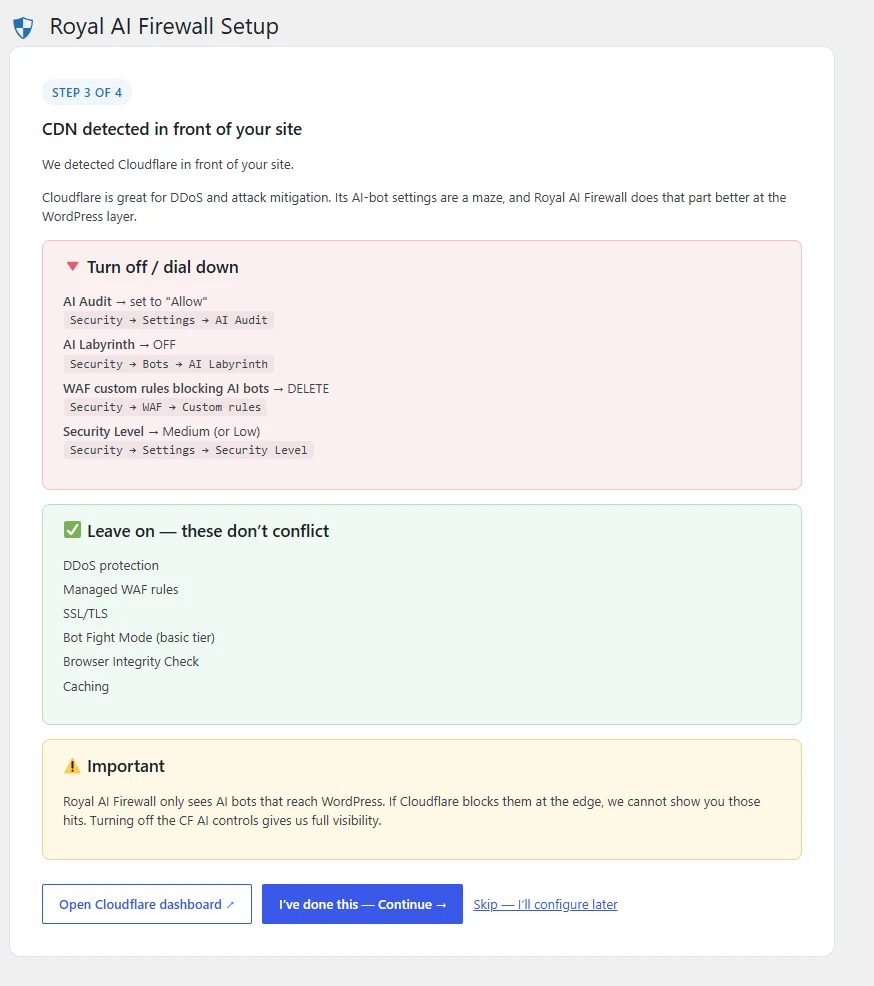
The wizard names whichever CDN is detected (Cloudflare, Bunny, Fastly, KeyCDN, Sucuri, StackPath, or Akamai). For Cloudflare it lists exactly which CF settings to turn off and which to leave on, so this plugin can take over the AI-bot layer.
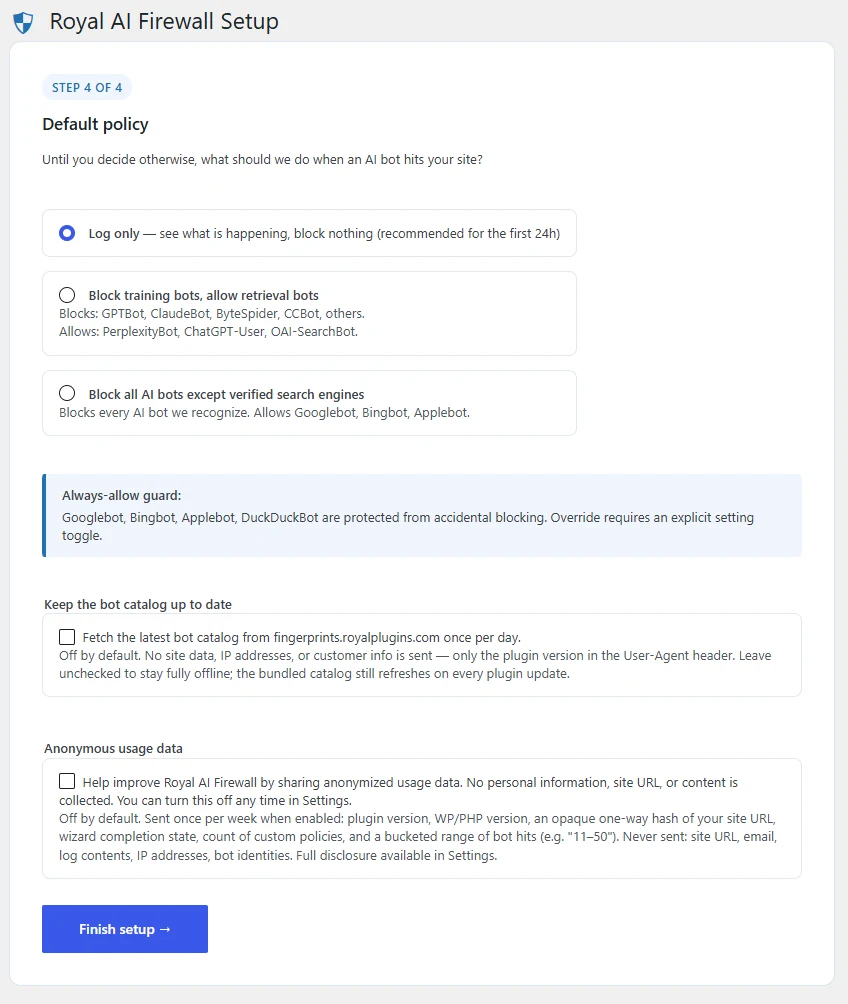
Pick log-only, block-training, or block-all, then opt in (or not) to daily catalog refreshes. Log-only is the recommended first-day setting.
Four things you will never see in this plugin.
If any of these ever show up in a release, treat it as a bug and open a ticket. Royal AI Firewall is a free, GPL-licensed, self-hosted WordPress AI bot firewall. Built to sit on every WordPress site, not to funnel you into an upsell.
Feature gates
No greyed-out settings, no locked panels, no “upgrade to unlock this dropdown”. What you see on install is what you get.
A Pro version to upgrade to
There isn’t one. Every panel is live from install: no locked settings, no email capture, no “unlock this feature” overlays. You may see the occasional cross-plugin promo for Royal Plugins, but nothing in Royal AI Firewall itself sits behind a paywall.
Tracking & analytics
No page-view pixels, no session recording, no marketing analytics call-outs from wp-admin. What you do inside the plugin stays inside the plugin.
Personal data on our servers
We never receive your invocation logs, visitor IPs, blocked-bot stats, or hit URLs. All of that lives in your own database. Uninstall wipes it if you ask.
The actual questions.
What WordPress operators actually ask when they first look at a per-bot AI firewall: Cloudflare compatibility, search-engine safety, blocking Googlebot by accident, catalog refresh cadence, MCP server integration, uninstall behaviour. Here are the answers we give them.
I just installed. Now what?
Activate the plugin and walk the 4-step wizard (welcome, environment detection, CDN guide if any of the 7 supported CDNs is detected, default policy). Then open the dashboard. Bot hits start populating within a few hours on any indexed site. From there, pick which agents to block per row, or hit the master “Block all” button for a quick lockdown. Total hands-on time is 60–90 seconds after install.
How granular is the per-bot control really?
Every recognized bot gets its own row and its own dropdown with four options: Use default policy, Always allow, Log only, Block. That means GPTBot can be blocked while ChatGPT-User stays allowed, or you can log Perplexity-User while blocking PerplexityBot. The traditional-search-engine group of 7 bots (Googlebot, Bingbot, Applebot, DuckDuckBot, and their variants) is locked to Allow by default. Overriding it requires an explicit Settings toggle with a warning.
What’s in the per-bot drill-down?
Click any bot row to expand it. You’ll see the bot’s owner, its intended purpose (training crawler, retrieval, AI search index, agent browser, dataset scraper, or traditional search), the top 10 URLs it hit, and the last 10 requests with timestamp, method, URL, and response code. Each row also carries a plain-English explanation of what blocking this bot would cost you: ChatGPT-search delisting for GPTBot, AI-search referral loss for PerplexityBot, and so on.
Does it call home?
Not by default. On a fresh install the plugin makes no outbound HTTP calls. The bot catalog ships bundled in the zip and refreshes on plugin update. If you tick the optional “Keep catalog updated between releases” toggle, the plugin makes one HTTP GET per day for a fresher catalog. The request body is empty, no site data of any kind is sent.
How does RAIF know if search bots can still reach my site?
The Bot Access page runs three checks. (1) A passive check compares verified Googlebot, Bingbot, Applebot, and DuckDuckBot hits in the last 24 hours against a rolling 30-day baseline. If verified hits collapse below 10% of baseline, the page flips to an ALERT verdict. (2) An active dual-request probe fires from your server every 12 hours, or on demand via Re-check now. It sends one browser user-agent and one Googlebot user-agent, reads the response code plus any Cloudflare / Sucuri / Imunify360 challenge-page signatures, then interprets the pair via a truth table. (3) A live reverse-DNS resolver self-test on 66.249.66.1 confirms your host can actually verify search bots. If it can’t, no amount of real Googlebot traffic will ever be marked verified. All three checks feed a combined verdict badge at the top of the page, and a dismissible admin notice fires on state transitions to ALERT.
Does it work with my existing security plugin, CDN, or Cloudflare?
Yes, and the layers coexist cleanly. Keep Cloudflare’s DDoS protection, general WAF, SSL, and Bot Fight Mode on (or the equivalent settings on your CDN). Keep your other security plugin’s firewall, login hardening, and malware scanning on. Royal AI Firewall operates at the WordPress application layer, one level in from those edge layers. On activation it auto-detects Cloudflare and 6 other CDNs (Bunny CDN, Fastly, KeyCDN, Sucuri, StackPath, and Akamai) plus the popular security plugins. Compatibility notes then appear so you can see how the layers stack.
What’s the MCP / Abilities API widget?
If you have a WordPress MCP server plugin installed (Royal MCP, or anything implementing the WordPress Abilities API), a widget on the Royal AI Firewall dashboard shows recent tool and ability invocations: which tool was called, by which client, and whether it succeeded. It’s the traffic view for what AI agents are actually doing through your MCP server. It sits right next to the traffic view for what AI agents are reading from your site.
Does it slow the site down?
No. The classifier runs in-process against a small pre-compiled UA pattern list and stays in the sub-millisecond range on the hot path. Logging is buffered and flushed on the WordPress shutdown hook after the response is sent to the visitor, so database writes never sit on the request’s critical path.
What happens to my data if I uninstall?
Preserved by default, so a reinstall picks up where you left off. If you want a fully clean slate, flip the “Delete all logs, tables, and options when the plugin is uninstalled” toggle in Settings → Data before removing the plugin.
Get up to speed.
Self-serve docs for setup, per-bot policy configuration, Cloudflare and CDN dial-down, bot fingerprint catalog updates, troubleshooting zero-hit dashboards, and MCP / Abilities API activity.
Integrations
Troubleshooting
Ready to see who’s reading your site?
One install, one 4-step wizard, one dashboard. Bot hits populate within hours on any indexed site — and the controls sit right next to the data.