Email Marketing & Forms
Mailchimp, Kit, and ActiveCampaign email sync. Form lead tracking for Gravity Forms, WPForms, FormForge. Landing pages and email notifications.
Email Marketing Integrations
Automatically sync new affiliates to your email marketing platform with tag mapping for segmentation.
Supported Platforms
- Mailchimp — Sync to audiences with tag mapping
- Kit (ConvertKit) — Sync with tag-based segmentation
- ActiveCampaign — Sync with tag-based segmentation
Configuration
Navigate to Royal Affiliate Pro → Settings → Integrations to configure your API keys and select your audience/list. New affiliates are automatically added when they register.
Bulk Sync
Use the Sync All button to push all existing affiliates to your email platform in one click. Useful when first connecting the integration or after importing affiliates.
Form Lead Tracking
Track affiliate referrals from form submissions. When a visitor who was referred by an affiliate submits a form, a flat-rate lead referral is automatically created — perfect for service businesses where a contact form or quote request is the conversion event.
Supported Form Plugins
- Gravity Forms
- WPForms
- FormForge Pro (part of the Royal Plugins stack)
How It Works
- A visitor clicks an affiliate link (e.g.,
yoursite.com/?ref=JOHN) - Royal Affiliate sets a tracking cookie (
rafp_ref) that persists for 30 days - The visitor browses your site and fills out a form
- On form submission, Royal Affiliate detects the cookie and creates a lead referral for the affiliate
- The affiliate receives a flat commission (configurable amount per lead)
Setup
- Go to Royal Affiliate → Settings → Integrations
- Under Form Integrations, check the box next to your form plugin
- Optionally enter specific Form IDs to track (comma-separated). Leave blank to track all forms.
- Set the Lead Commission amount — this is the flat dollar amount the affiliate earns per form submission (default: $1.00)
- Save settings
Using with FormForge Pro
If you use both Royal Affiliate Pro and FormForge Pro, the integration is automatic — no API keys or complex setup required. Both plugins are part of the Royal Plugins stack and communicate via WordPress hooks.
The Integration Flow
FormForge fires the formforge_after_submission action when a form is submitted. Royal Affiliate listens for this hook and:
- Checks if FormForge tracking is enabled in settings
- Checks if the form ID is in the allowed list (or blank = all forms)
- Reads the affiliate tracking cookie to identify the referring affiliate
- Checks for duplicate submissions (each entry can only generate one referral)
- Creates a lead referral with the configured flat commission amount
- Clears the tracking cookie (one referral per visit)
Example Use Cases
- Service businesses: Pay affiliates $5 for each contact form submission that comes from their referral link
- Lead generation: Track quote request forms and pay affiliates per lead
- Event signups: Create a registration form in FormForge and reward affiliates for each signup
- Free consultations: Track booking forms and attribute leads to affiliates
Restricting to Specific Forms
If you only want to track certain forms (e.g., your "Request a Quote" form but not your "Contact Us" form), enter the FormForge form IDs separated by commas in the Form IDs field. You can find a form's ID in the FormForge form list or in the shortcode: [formforge id="42"] → the ID is 42.
Referral Details
Each form lead creates a referral with these properties:
- Type: Lead (not a sale)
- Reference:
ff_123(where 123 is the FormForge entry ID) - Context:
lead_formforge - Commission: Flat amount (configured in settings)
- Description: "FormForge lead — Form Name (#ID)"
Webhooks
When a form lead referral is created, the referral.created webhook fires with reference_type: "lead" and context: "lead_formforge". This lets you trigger automations in Zapier, Make, or custom endpoints when form leads come in.
Affiliate Landing Pages
Create dedicated landing pages for affiliates with automatic referral code injection.
How It Works
Navigate to Royal Affiliate Pro → Tools → Landing Pages to enable and configure. When enabled, each affiliate gets a custom URL that automatically sets their tracking cookie when visitors arrive.
Features
- Custom URLs — Each affiliate gets a personalized landing page URL
- Auto cookie injection — Referral tracking is set automatically on page load
- Template customization — Configure which page template to use
Email Notifications
Royal Affiliate Pro sends 9 notification types to keep admins and affiliates informed throughout the affiliate lifecycle.
Notification Types
| # | Notification | Recipient |
|---|---|---|
| 1 | New Affiliate Registration | Admin |
| 2 | Affiliate Approved | Affiliate |
| 3 | Affiliate Rejected | Affiliate |
| 4 | New Referral | Affiliate |
| 5 | Referral Approved | Affiliate |
| 6 | Referral Rejected | Affiliate |
| 7 | Payout Sent | Affiliate |
| 8 | Payout Completed | Affiliate |
| 9 | Monthly Performance Report | Affiliate |
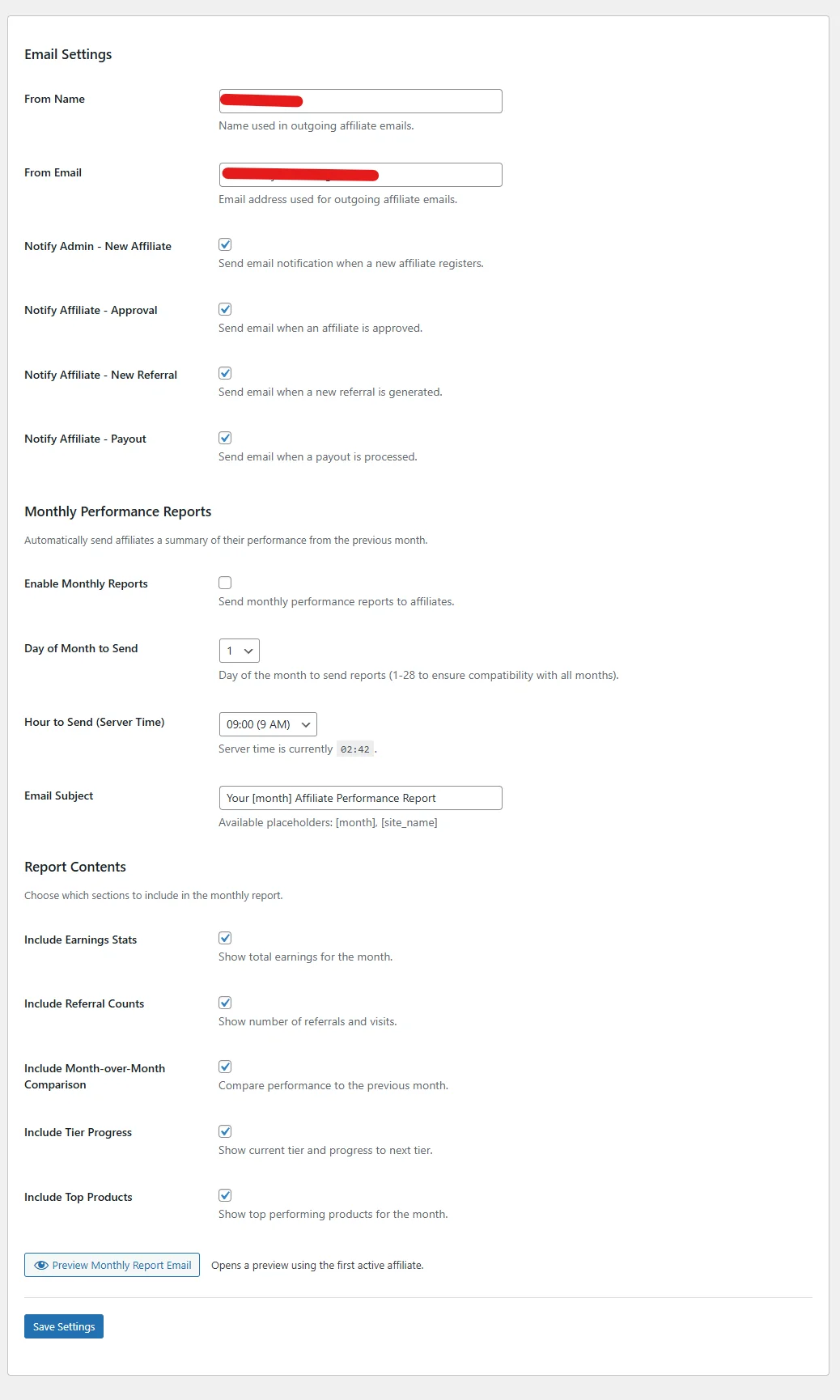
Monthly Performance Reports
Automated monthly reports sent to each affiliate include:
- Earnings summary for the month
- Referral counts and conversion rate
- Top-performing referral links
- Comparison to the previous month
For reliable email delivery, we recommend using an SMTP plugin like WP Mail SMTP. Royal Affiliate Pro includes automatic SMTP plugin detection and will warn you if no SMTP plugin is found.