Getting Started
Install Royal Affiliate Pro, activate your license, and set up your affiliate program in minutes. Complete step-by-step walkthrough.
Getting Started
Royal Affiliate Pro is a complete affiliate management solution for WordPress, built for store owners and marketers who need powerful commission tracking, automated payouts, and robust fraud protection without relying on external SaaS platforms.
Pro Features
Automated PayoutsBUSINESS
Stripe Connect and auto payouts (Business+), PayPal and manual (all plans). Zero additional platform fees.
Multi-Tier MLMBUSINESS
UniLevel commission system with configurable 2-5 level depth for recruitment rewards.
Tiered CommissionsBUSINESS
Automatic tier progression based on referral count and earnings performance.
Campaign ManagementBUSINESS
Time-bound campaigns with custom commission rates and URL-based tracking.
Fraud DetectionBUSINESS
VPN/proxy blocking, IP rate limiting, bot detection (Business+). Self-referral and duplicate blocking included in all plans.
Standalone ConversionsAGENCY
Track affiliate referrals without WooCommerce using shortcode-based conversion pages.
Affiliate DashboardPRO
7-tab dashboard (Pro). Business adds Challenges and Team tabs for 9 total.
Lifetime CommissionsBUSINESS
Recurring commissions from first-referred customers on all future purchases.
Affiliate TagsPRO
Color-coded tags for grouping affiliates. Filter, bulk-assign, and target campaigns by tag.
Coupon TrackingPRO
Assign WooCommerce coupons to affiliates with usage analytics and tag-based bulk generation.
Challenges & GamificationBUSINESS
Goal-based challenges with 5 reward types: commission overrides, bonuses, payouts, tier upgrades, and custom prizes.
Email MarketingBUSINESS
Mailchimp, Kit (ConvertKit), and ActiveCampaign integrations with tag mapping and bulk sync.
Core Features
- Real-time cookie-based referral tracking
- Percentage or fixed-rate commission structures
- WooCommerce integration with automatic referral tracking
- Affiliate tags with color-coded management (Pro)
- Coupon tracking with usage analytics (Pro)
- Form lead tracking — Gravity Forms, WPForms, FormForge (Pro)
- Challenges & gamification with 5 reward types (Business)
- Email marketing — Mailchimp, Kit, ActiveCampaign (Business)
- Affiliate landing pages (Business)
- Email notifications for registration, approval, referrals, and payouts
- REST API for custom integrations (Agency)
- Link cloaking with branded redirect URLs (Pro)
- QR code generation and download (Pro)
- Vanity coupon codes — affiliates choose their own codes (Pro)
- Webhooks — 13 events with HMAC-SHA256 signing (Pro)
- Custom registration fields (Pro)
- Direct link tracking via referer domain matching (Pro)
- CSV export with contact fields for all data
- Monthly performance report emails (Business)
- Bulk email communications (Agency)
- Activity log for admin actions (Agency)
- White-label branding (Agency)
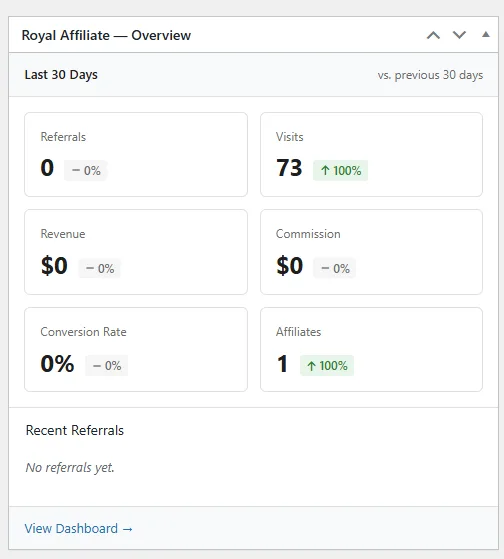
- WordPress dashboard widget for quick stats overview
WordPress Dashboard Widget
A quick stats widget appears on your WordPress admin dashboard showing total affiliates, pending approvals, recent referrals, and earnings at a glance.
Installation
Download from your account
Log in to my.royalplugins.com and download the Royal Affiliate Pro zip file.
Upload to WordPress
Go to Plugins > Add New > Upload Plugin, select the zip file, and click "Install Now".
Activate the plugin
Click "Activate" after installation completes.
Enter your license key
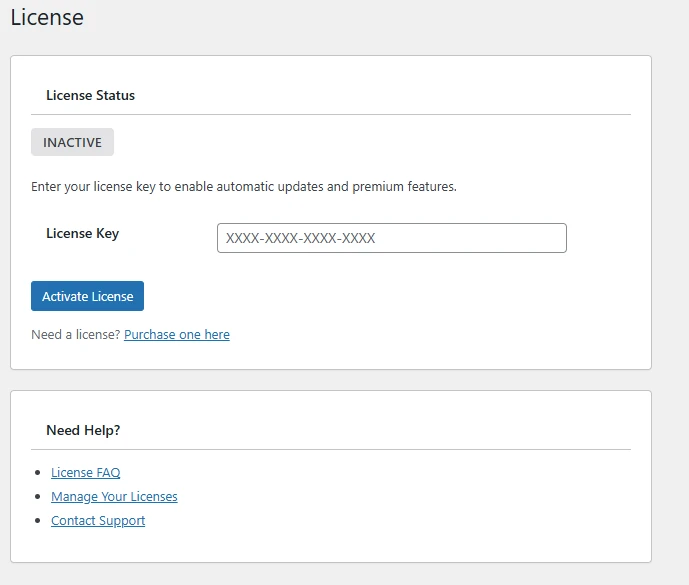
Go to Royal Affiliate Pro > License and enter your license key to enable updates and Pro features.
After activation, use the built-in Setup Wizard to configure your affiliate program in minutes. It walks you through page creation, commission rates, and payment gateway setup.
License Activation
A valid license is required to receive updates and access Pro features.
Find your license key
Your license key is in your purchase confirmation email or at my.royalplugins.com/my-account/licenses/
Enter the key
Go to Royal Affiliate Pro > License and paste your license key.
Activate
Click "Activate License". You should see a success message and green "Active" status.
Each license has an activation limit based on your plan. Deactivate unused sites from your account to free up activations.