9 Page Builder Integrations
Edit SEO settings without ever leaving your page builder. SEObolt embeds real-time SEO controls directly inside Elementor, Gutenberg, Divi, and 6 more builders.
SEO Controls Where You Actually Build
Every time you switch between your page builder and a separate SEO settings panel, you lose focus and waste time. SEObolt eliminates that context switch by placing SEO controls directly inside the builders you already use.
Zero Context Switching
Edit meta titles, descriptions, and focus keywords without leaving the builder interface.
Real-Time Score Updates
SEO score recalculates as you edit content, so you see the impact of every change immediately.
AI Inside Your Builder
Generate optimized titles and descriptions with AI suggestions available directly within the builder panel (Pro).
Every Builder. One SEO Plugin.
SEObolt detects your active page builder automatically and injects its SEO panel in the right place. No configuration needed.
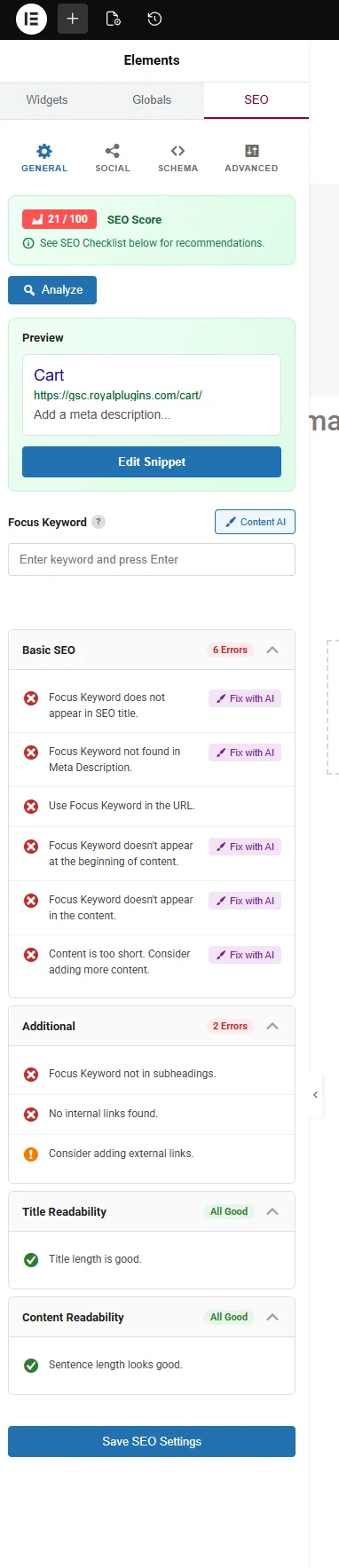
3-tier navigation panel with accordion-style SEO controls, Content AI integration, Schema Generator access, and real-time score updates inside Elementor.
Pro4-tab sidebar panel (SEO, Social, Schema, Advanced) with accordion controls, Content AI, SEO Checklist, and Full Site Editing support.
ProFloating SEO panel in Visual Builder with meta title/description editing, focus keyword analysis, and SEO score display.
ProSEO panel in the builder sidebar with core SEO controls and score indicator for quick optimization.
ProSEO panel accessible in both backend and frontend editor modes for meta editing and score review.
ProIntegrated SEO panel within the Bricks builder interface for on-page optimization while you design.
ProSEO controls available within the Oxygen builder interface for managing meta data alongside your layout.
ProSEO panel integrated into the Thrive Architect builder for editing meta and reviewing SEO scores.
ProSEO tab integrated into the Avada / Fusion Builder interface for meta editing and score review while you design.
ProElementor Integration
Full SEO Panel Inside Elementor
SEObolt adds a dedicated 3-tier navigation panel directly inside the Elementor editor. Expand accordion sections for meta tags, focus keywords, schema, social previews, and more — all without leaving the builder.
- 3-tier navigation panel
- Accordion-style SEO controls
- Content AI integration within Elementor
- Schema Generator access
- Real-time SEO score updates
Gutenberg / Block Editor
The Gutenberg integration adds a 4-tab sidebar panel covering SEO, Social, Schema, and Advanced settings. Accordion controls keep everything organized, and the SEO Checklist panel gives you a clear optimization roadmap. Compatible with Full Site Editing (FSE) for template-level SEO.
- 4-tab sidebar: SEO, Social, Schema, Advanced
- Accordion-style controls
- Content AI integration
- SEO Checklist panel
- Full Site Editing (FSE) support

Requirements & Compatibility
SEObolt is tested and verified with the latest stable versions of every supported builder. Here is what you need.
Minimum Versions
- WordPress 6.0 or higher
- PHP 7.4 or higher (PHP 8.x recommended)
- Elementor 3.10+ / Elementor Pro 3.10+
- Divi 4.20+ / Divi Builder 4.20+
- Beaver Builder 2.7+
- WPBakery 7.0+
Verified With
- Bricks 1.9+
- Oxygen 4.0+
- Thrive Architect 3.0+
- Classic Editor plugin (any version)
- Full Site Editing (FSE) block themes
- WooCommerce product editor
SEO Inside Every Builder
Stop switching between tabs. Get SEObolt Pro and optimize content directly inside the page builder you already use.