SEO Analytics & Dashboard
Google Search Console integration, keyword position tracking, automated email reports, and a cloud-based SaaS dashboard that goes beyond what GSC shows natively.
Data-Driven SEO Decisions
SEO without analytics is like driving blindfolded. SEObolt provides a complete analytics stack directly inside WordPress—from Google Search Console data to keyword rank tracking, automated reports, and a cloud-based SaaS dashboard for deeper insights.
Whether you are managing a single blog or an agency portfolio of 100 sites, SEObolt gives you the data you need to understand what is working, what is declining, and exactly where to focus your effort for maximum ranking impact.
Google Search Console Integration
Connect your Google Search Console account to SEObolt and view all your search performance data directly in WordPress. No need to switch between tabs or remember to check GSC—your data is always right where you work.
Free & Starter
Manual credentials setup—you create a Google API project and enter your Client ID and Client Secret.
- Create your own Google Cloud project
- Enter Client ID and Client Secret manually
- Full GSC dashboard once connected
- Same data, just more setup steps
Pro & Above Pro
One-click OAuth connection via the Royal Plugins proxy. No API keys, no Google Cloud setup—just click and connect.
- One-click OAuth authentication
- No Google Cloud project needed
- Automatic token refresh
- Connected in under 30 seconds
Once connected, the GSC Dashboard inside WordPress shows you:
- Top Queries: See which search terms are driving traffic to your site, with clicks, impressions, CTR, and average position
- Top Pages: Identify your best-performing pages and discover which ones are losing traction
- Click-Through Rate: Track how often searchers click your results vs just seeing them
- Impressions & Clicks: Monitor your search visibility trends over any date range
- Position Tracking: Watch how your average position changes over time for key queries
SaaS Analytics Dashboard
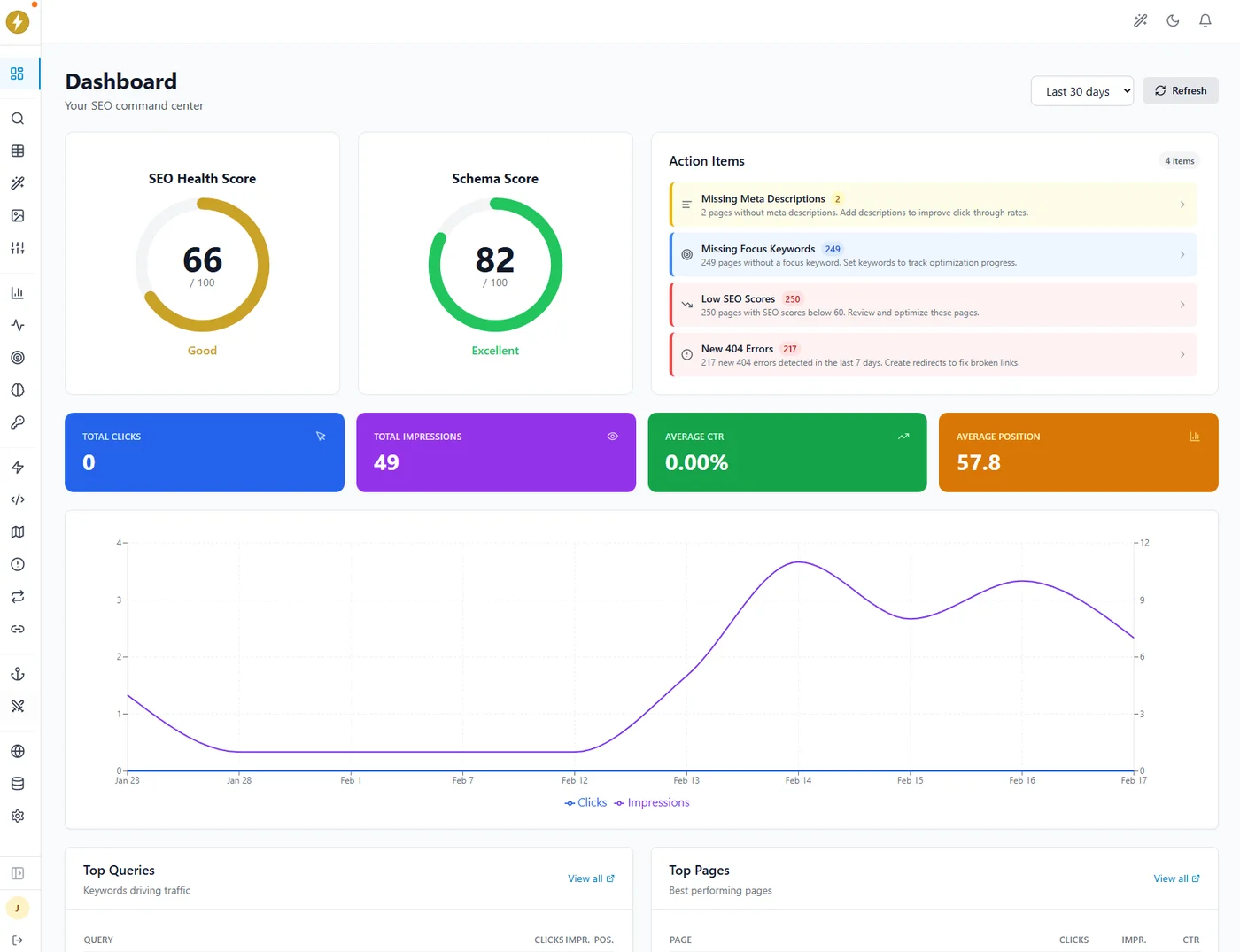
The SEObolt SaaS Dashboard at app.seobolt.io is a cloud-based analytics platform that goes far beyond what Google Search Console shows natively. Available on Pro, Business, and Agency tiers.
Keyword Tracking
Track keyword positions over time with historical data and trend charts.
Email Reports
Automated weekly or monthly SEO performance reports delivered to your inbox.
Multi-Property
Manage multiple GSC properties from a single cloud dashboard.
Data Export
Export analytics data as CSV or PDF for offline analysis or client sharing.
White-Label Reports
Custom branding on SEO reports & emails for the Agency tier. Your logo, your colors, your brand.
Deep Insights
Surface opportunities that GSC hides: rising queries, declining pages, and quick wins.
The SaaS Dashboard is entirely optional—the WordPress plugin works perfectly on its own. But for users who want deeper analytics, historical tracking, and automated reporting, the dashboard delivers insights you simply cannot get from GSC alone.
Keyword Rank Tracking
SEObolt gives you two rank-tracking surfaces so you can choose the fidelity you need — an in-plugin tracker that pulls positions from your Google Search Console data, and a cloud tracker in the SEObolt.io dashboard that pulls daily SERP-based positions.
In-Plugin Rank Tracker BUSINESS+
Inside WordPress at SEObolt → Analytics → Rank Tracker. Uses your connected GSC data to show tracked-keyword positions with a 7-day change indicator and one-click sync.
- GSC-sourced positions: Positions come from the same data Google reports in Search Console — no separate SERP scrape
- 7-day position change: Per-keyword up/down/neutral indicators between syncs
- Manual sync from GSC: One-click refresh, plus daily automated sync
- Keyword cap: Up to 100 tracked keywords on Business, 500 on Agency
Cloud Rank Tracker PRO+
In the SEObolt.io SaaS dashboard. Daily SERP-based position tracking (not GSC-derived), historical trend charts, and competitor comparison.
- Historical Position Data: Track how each keyword moves over days, weeks, and months with visual trend charts
- Position Change Alerts: Get notified when a keyword drops or jumps significantly, so you never miss critical ranking shifts
- Competitor Keyword Comparison: See how your positions stack up against competing domains for the same search terms
- Search Volume Data: Understand the traffic potential of each keyword to prioritize your optimization efforts
- SERP Feature Tracking: Know when your pages appear in featured snippets, People Also Ask, or other rich results
- Keyword Grouping: Organize keywords into custom groups by topic, campaign, or page for focused analysis
Automated Email Reports
SEObolt sends scheduled SEO performance reports straight to your inbox—or directly to your clients. No manual exports, no forgetting to check. Configure the frequency, choose which metrics to include, and let SEObolt handle the rest.
- Scheduled Delivery: Choose weekly or monthly report cadence, with custom send day and time
- Customizable Sections: Pick which data to include—keyword rankings, traffic trends, top pages, CTR changes, and more
- Multiple Recipients: Send reports to yourself, your team, or directly to clients
- White-Label Branding: Agency tier can add custom logos, colors, and company name to reports
- PDF & HTML Formats: Reports are delivered in clean, professional formats ready for client presentation
- Comparison Periods: Reports automatically include period-over-period comparisons so trends are immediately visible
Google Analytics 4 Integration
SEObolt Pro brings your GA4 data into WordPress so you can correlate your SEO efforts with actual traffic and user behavior—all in one place.
- Traffic Overview: See sessions, users, pageviews, and bounce rate at a glance from your WordPress dashboard
- User Behavior: Understand how visitors engage with your content—time on page, scroll depth, and navigation paths
- Enhanced Ecommerce: When paired with WooCommerce, track revenue, conversion rate, and product performance tied to organic search
- Source Attribution: Identify how much of your traffic comes from organic search vs other channels, broken down by landing page
The GA4 integration is available on all Pro tiers and connects using the same OAuth flow as Google Search Console—one click and you are connected.
GA4 Tracking Code Injection
Don’t have the GA4 tracking snippet on your site yet? SEObolt can output the standard gtag.js code in your page head automatically—no separate analytics plugin required. Available on all tiers including Free.
- One-Field Setup: Paste your Measurement ID (G-XXXXXXXXXX) and enable—done
- Exclude Admins: Prevent your own visits from inflating analytics data
- Duplicate Detection: SEObolt warns you if another plugin is already injecting gtag.js, preventing double-tracking
GEO Score & AI Visibility
Traditional analytics track where you rank in Google. The SEObolt.io dashboard goes further—it tracks how well your content is optimized for AI search engines like ChatGPT, Perplexity, and Google AI Overviews.
GEO Score
Enter any URL and get a score from 0–100 measuring how likely AI engines are to cite your content. Based on peer-reviewed research from Princeton, Georgia Tech, and UC Berkeley.
- 40+ factors across 7 categories: Content Structure, Evidence & Citations, Technical Accessibility, Authority & E-E-A-T, Freshness, Writing Quality, Off-Site Brand Signals
- Radar chart visualization showing strengths and weaknesses at a glance
- Prioritized recommendations with research-backed improvement tips (e.g., “Add statistics—+40% AI visibility”)
- Eligibility gates flag critical blockers like missing HTTPS or blocked AI crawlers
LLM Rankings
Track whether ChatGPT, Claude, and Perplexity actually mention your brand when users ask questions in your industry.
- Multi-provider tracking: Monitor mentions across ChatGPT, Claude, and Perplexity
- Citation types: Primary, secondary, or indirect—know how strongly you’re recommended
- Trend charts: See your mention rate and citation count over time
- BYOK mode: Use your own API keys for unlimited checks
Together, GEO Score tells you what to fix and LLM Rankings tells you if it worked. Learn more at seobolt.io.
Analytics Features by Tier
SEObolt analytics features scale with your plan. Here is what you get at each tier:
| Feature | Starter | Pro | Business | Agency |
|---|---|---|---|---|
| GSC Integration (Manual) | ✓ | ✓ | ✓ | ✓ |
| GSC One-Click OAuth | — | ✓ | ✓ | ✓ |
| GSC Dashboard in WP | ✓ | ✓ | ✓ | ✓ |
| SaaS Cloud Dashboard | — | ✓ | ✓ | ✓ |
| In-Plugin Rank Tracker (GSC-sourced) | — | — | ✓ | ✓ |
| Cloud Rank Tracker (SaaS, daily SERP) | — | ✓ | ✓ | ✓ |
| Position Change Alerts | — | ✓ | ✓ | ✓ |
| GA4 Tracking Code (gtag.js) | ✓ | ✓ | ✓ | ✓ |
| GA4 Data Dashboard | — | ✓ | ✓ | ✓ |
| Automated Email Reports | — | ✓ | ✓ | ✓ |
| Data Export (CSV/PDF) | — | ✓ | ✓ | ✓ |
| Multi-Property Support | — | ✓ | ✓ | ✓ |
| White-Label Reports | — | — | — | ✓ |
| Competitor Keyword Comparison | — | — | ✓ | ✓ |
| GEO Score (AI Citation Optimization) | — | ✓ | ✓ | ✓ |
| LLM Rankings (AI Visibility Tracking) | — | ✓ | ✓ | ✓ |
Start Tracking Your Rankings Today
Get Google Search Console integration, keyword tracking, and the SaaS analytics dashboard with SEObolt Pro.