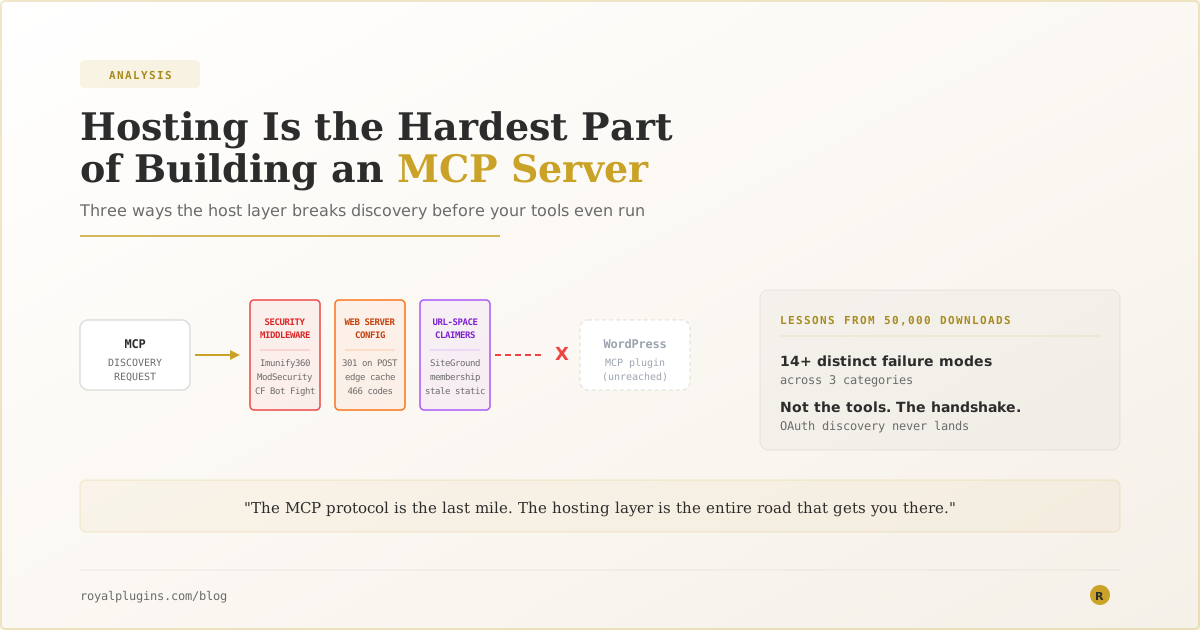
The MCP spec gets all the attention: tool schemas, sampling, resources, prompts. But after 50,000 downloads of a WordPress MCP server and a support inbox full of “Claude can’t connect” tickets, the most consistent failure mode has nothing to do with tools. It’s the OAuth handshake never reaching the server — blocked at the host layer by security middleware, edge WAFs, or CDN rules the plugin can never see. If you’re building or evaluating an MCP server, the fragile part is the handshake, not the protocol.
Every conversation about MCP servers is about the tools — what the model can do once it’s connected. Tool schemas, capability matrices, sampling patterns, resources, prompts. The protocol itself is thoughtful and well-specified, and after roughly ten months of writing MCP tool handlers for WordPress, I can tell you the tool layer is not where MCP struggles.
The handshake is where it struggles.
Many of the support tickets we’ve handled on Royal MCP that start with “Claude can’t connect to my WordPress site” follow the same shape. The plugin is installed and configured. The endpoint responds correctly to a manual curl. But when Claude tries to connect, the OAuth discovery request never reaches the plugin. Something in front of the site — a WAF rule, a bot-protection layer, a CDN policy, an nginx canonicalization redirect — intercepts the request and returns something that isn’t valid discovery metadata. Claude gives up. The user sees a generic “couldn’t connect” error with no diagnostic breadcrumbs.
The tools didn’t matter. The MCP server never got to run.
The Taxonomy of Host-Layer Failures
Over the course of building this plugin and helping customers debug connection problems, we’ve catalogued over a dozen distinct host-layer failure modes. They fall into three categories.
Category 1: Security middleware blocking non-browser traffic
This is the most common bucket by incident frequency — the pattern behind the largest share of the support tickets. Shared hosts run Imunify360, ModSecurity, Cloudflare Bot Fight Mode, or the “Block AI Bots” toggle — all of which use heuristic detection to distinguish human traffic from automated traffic. MCP clients look automated because they are automated. The middleware doesn’t know the difference between a legitimate agent trying to help the site owner and a scraper harvesting content.
The failure modes vary by vendor:
- Imunify360 returns
HTTP 200with a JSON body:{"message":"Access denied by Imunify360 bot-protection..."}. Because the status is 200, some MCP clients parse it as success and fail on the missing OAuth fields. - Cloudflare’s Agent-category block (formerly the “Block AI Bots” toggle, split into Search / Training / Agent categories on September 15, 2026) returns a
403with an HTML challenge page. MCP clients expect JSON; they get HTML and throw “unexpected response.” See Cloudflare Blocks AI Bots & Breaks MCP for the specific fix. - ModSecurity with default OWASP CRS rules returns
406 Not Acceptableon any request that looks bot-shaped, sometimes based purely on the User-Agent string. - Apache shared-hosting WAF layers (Imunify360, mod_security) return
429on thepython-httpxUser-Agent that Anthropic’s OAuth backend uses, regardless of request rate. UA-targeted, not rate-based.
None of this is visible to the site owner. WordPress debug logs show nothing — the request never reaches PHP. The plugin can’t self-diagnose from inside the site either, because the loopback request from the site to itself often does work (localhost is usually whitelisted), even when external traffic from Claude’s IP is being blocked.
Category 2: Web server config that assumes browsers
The OAuth 2.1 spec is unambiguous about the URLs. Discovery is at /.well-known/oauth-authorization-server. Registration is at whatever URL the discovery document advertises. But the transport still has to survive the web server config, and there are quirks that only bite non-browser clients.
The most common one: nginx, Apache mod_dir, and default .htaccess canonicalization all issue a 301 redirect when a URL points at a directory without a trailing slash. For a browser, this is invisible — the browser follows the redirect and retries. For an OAuth client, it’s fatal on POST — the RFCs don’t permit following a 301 with the original POST body, so the request dies before it reaches the server.
Claude’s OAuth client hardcodes the bare path /register and doesn’t follow 301s on POST. If the host’s default canonicalization redirects /register to /register/, Dynamic Client Registration fails silently. The plugin metadata is correct. The endpoint responds correctly to a direct POST. But because there’s a redirect between “what Claude sends” and “what the server receives,” registration never completes.
The site owner sees the same generic “couldn’t connect” error.
Category 3: URL-space claimers
The third category is other WordPress plugins and hosting providers claiming URL paths for their own use.
SiteGround and a handful of other managed hosts reserve /.well-known/ at the nginx layer for Let’s Encrypt ACME challenges. Any request to /.well-known/oauth-authorization-server returns a nginx 404 before WordPress ever sees it. The plugin’s rewrite rules are correct; they just never fire, because nginx handled the request first.
Membership plugins (ARMember, MemberPress, Restrict Content Pro) sometimes intercept OAuth paths as “protected content” and serve their own HTML login page in response. The response is HTTP 200, but the body is HTML, not JSON. Discovery clients that strictly require JSON metadata fail silently.
Stale static files from earlier plugin versions occasionally survive on disk in /webroot/.well-known/ and advertise OAuth endpoint URLs that no longer exist. The plugin serves fresh metadata from PHP; nginx serves the stale file first because static content wins over WordPress routing. Discovery documents advertise dead URLs, registration hits a 404, and the connection fails.
What We Built in Response
The realization that the plugin needed to diagnose the network layer it can’t control changed how we think about MCP server design. Our OAuth notice module in the WordPress admin now runs four different classifiers on the site’s own discovery endpoint, using WordPress’s loopback HTTP API to probe it from the inside:
blocked— HTTP 404 from an nginx-style static handler (SiteGround pattern)stale_static— HTTP 200 JSON with legacy REST-namespace URLs (leftover from pre-1.4.0 versions)body_is_html— HTTP 200 but the body starts with<!doctype html>(membership plugin intercept)register_301— POST to/registerreturns a 301 to/register/(nginx canonicalization)
A fifth classifier for the Imunify360 pattern (HTTP 200 + JSON denial body with a message field mentioning Imunify360) is queued for the next release. When any of these fires, the plugin surfaces an admin notice explaining what’s blocked, why it matters, and linking to a specific support article with the fix.
Every classifier corresponds to a support ticket we handled. Every notice exists because someone paid the “silent connect failure with no error message” tax and told us about it.
The Takeaway for Anyone Building an MCP Server
If you’re building an MCP server — for WordPress, or anything else — the tool schema is the easy part.
The hard parts are:
- Discovery must survive the network. Assume every path in
.well-known/will be claimed, redirected, blocked, or intercepted somewhere in the wild. Build detection for the common failure modes into the server itself. Users can’t diagnose what they can’t see, and the CLI clients don’t surface useful errors. - OAuth must survive edge middleware. Non-browser clients trigger heuristic bot detection everywhere. Assume this will happen. Provide diagnostic tools, allowlist documentation, and clear escalation paths (“email your host with this exact request”) for common providers.
- The site owner is not the operator of the middleware. In WordPress specifically, “hosting” often means shared hosting where the customer has no access to WAF rules, no visibility into bot-detection settings, and no relationship with the CDN vendor. The support workflow for MCP has to include “here’s what to send your host.”
If you’re on the site-owner side of a silent MCP connect failure, our troubleshooting hub walks through the diagnostic curls that identify which category you’re in and what to do about it.
The MCP protocol is the last mile. The hosting layer is the entire road that gets you there. It’s the hardest part of the problem, and it’s the one that receives the least engineering attention.