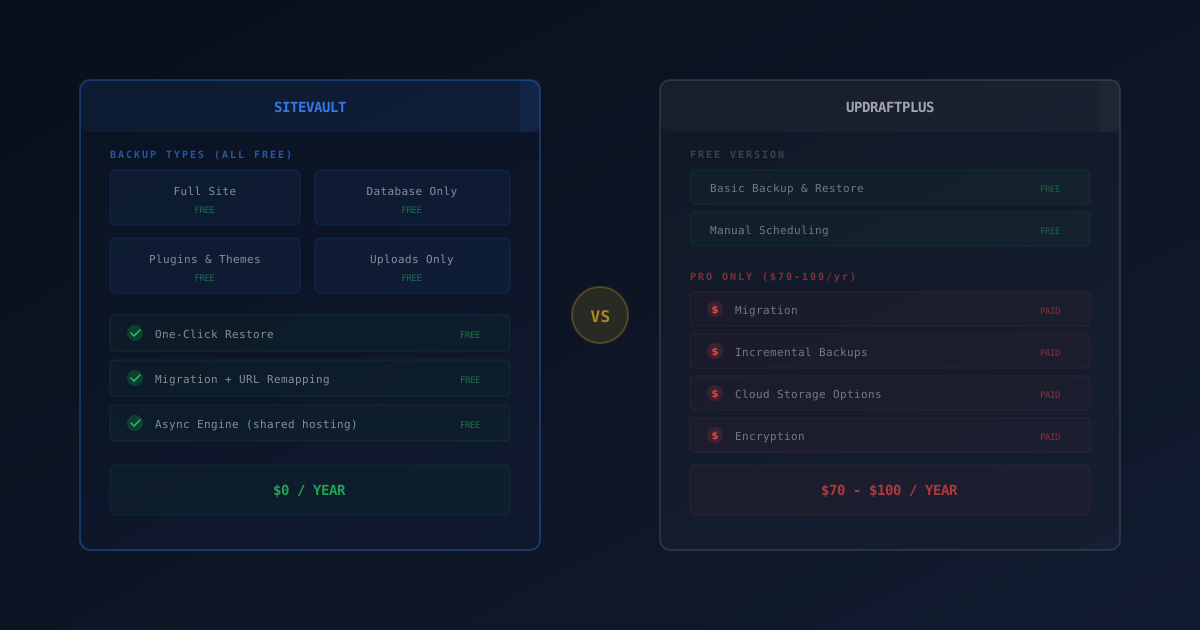
SiteVault is a free WordPress backup plugin built for shared-hosting reliability, with a standalone migration installer that does not require WordPress on the destination server. UpdraftPlus has 3M+ active installs and broader cloud-storage coverage but gates multisite, encryption, and some cloud providers behind its Premium tier. For simple backup + migration on shared hosting, SiteVault’s free feature set covers more ground.
WordPress backups are one of those things everyone knows they should have but many site owners skip until something breaks. A corrupted plugin update, a hosting outage, a malware infection — any of these can take a site down permanently if there's no backup to restore from.
The backup plugin market has been dominated by one name for years: UpdraftPlus. With over 3 million active installs, it's the default choice for most WordPress users. But newer plugins have emerged that take a different approach to the same problems.
SiteVault is a free WordPress backup plugin built specifically for shared hosting reliability, with a standalone migration installer that doesn't require WordPress on the destination server. This guide compares both honestly so you can decide which fits your needs.
SiteVault is built by Royal Plugins (that's us). We've done our best to represent both plugins accurately, but you should verify features on each plugin's WordPress.org listing before making a decision.
What Is SiteVault?
SiteVault is a free WordPress backup, restore, and migration plugin designed specifically to work reliably on shared hosting — the environment where most WordPress sites actually live.
Four Backup Types
- Full backup: database, plugins, themes, uploads, and core files in one package
- Database only: quick backup of your database tables, ideal for before risky changes
- Plugins & themes: back up your installed plugins and themes without the uploads folder
- Uploads only: back up your media library independently
One-Click Restore
Restoring a backup is a single click. SiteVault validates the backup integrity before restoration begins, checks file permissions, and handles the database replacement atomically to prevent half-restored states. If something goes wrong during restoration, it rolls back automatically.
Standalone Migration Installer
SiteVault takes a unique approach to migration. Instead of requiring WordPress on the destination server, SiteVault generates a standalone installer file that you upload alongside the backup package. Open it in your browser and it handles everything:
- URL remapping: automatically finds and replaces all instances of the old domain with the new one, including serialized data in the database
- Standalone operation: the installer works independently without WordPress installed on the destination
- Path correction: updates file paths if the directory structure differs between servers
Shared Hosting Engine
SiteVault's async processing engine was built for the constraints of shared hosting:
- ZIP batching: creates archives in small batches to stay within memory limits
- Keyset pagination: processes database tables without loading entire result sets into memory
- Adaptive chunking: adjusts chunk sizes based on server response times to avoid timeouts
- Resumable operations: if a backup is interrupted, it picks up where it left off
Most WordPress sites run on shared hosting with 256MB memory limits and 30-second PHP timeouts. SiteVault was built for these constraints. No "out of memory" errors, no "maximum execution time exceeded" failures.
“Backups protect your site if something goes wrong — hacks, host outages, botched updates, or human error. A backup plan should include regular automated backups, off-site storage, and a tested restore process. A backup you can’t restore is no backup at all.”
— WordPress.org Support, Official WordPress Backup Documentation
What Is UpdraftPlus?
UpdraftPlus is the most popular WordPress backup plugin, with over 3 million active installations and a decade of development history. It's maintained by Updraft (now part of Jetstrike), and offers a full suite of backup, restore, and related tools.
Free Version Features
- Manual and scheduled backups: back up your entire site on demand or on a schedule (2hr, 4hr, 8hr, 12hr, daily, weekly, fortnightly, monthly)
- Cloud storage: send backups to Dropbox, Google Drive, Amazon S3, Rackspace, FTP, DreamObjects, and more
- Restore: restore from any backup within the WordPress admin
- Selective restore: restore just the database, plugins, themes, or uploads independently
- Migration: built-in search-and-replace engine for moving sites to new domains
Premium Features
- Premium migration: more streamlined migration directly from the source site
- Incremental backups: only back up files that changed since the last backup
- Auto-backups before updates: automatic backup before WordPress/plugin updates
- Database encryption: encrypt sensitive database backups
- More storage destinations: OneDrive, Azure, Google Cloud, Backblaze, SFTP, SCP, pCloud, WebDAV, UpdraftVault
- Multisite support: network-level backup management
- WP-CLI management: manage backups from the command line
- Priority support: faster response times from the development team
UpdraftPlus has earned its 3 million installs. The plugin is reliable, well-maintained, and has a massive knowledge base. Its cloud storage integrations are particularly strong. The question isn't quality — it's value: what do you actually get for free?
Feature Comparison
| Feature | SiteVault (Free) | UpdraftPlus (Free) |
|---|---|---|
| Full Site Backup | ✓ | ✓ |
| Database Backup | ✓ | ✓ |
| Selective Backup Types | ✓ 4 types | ✓ |
| One-Click Restore | ✓ With validation | ✓ |
| Migration | ✓ Standalone installer | ✓ Search-and-replace |
| URL Remapping | ✓ | ✓ |
| Standalone Installer | ✓ No WP needed on destination | ✗ Requires WP on both ends |
| Cloud Storage (Free) | ✗ Pro only | ✓ Dropbox, S3, Drive |
| Scheduled Backups | Pro only | ✓ |
| Incremental Backups | ✗ | Premium only |
| Database Encryption | ✗ | Premium only |
| Shared Hosting Optimized | ✓ Async engine | Partial |
| Pro Price | From $49/year | From $70/year |
Migration: Different Approaches
Both SiteVault and UpdraftPlus include free migration, but they take fundamentally different approaches. The right choice depends on your technical comfort level and situation.
Common migration scenarios: moving from shared hosting to a VPS, switching providers, setting up staging environments, or cloning sites for clients. All require URL remapping in the database, which is harder than it sounds.
Why Migration Is Hard
WordPress stores the site URL in dozens of places throughout the database. Some of these are in serialized PHP arrays, where a simple find-and-replace would corrupt the data because serialized strings include byte-length markers. Change the URL length and the serialization breaks.
A proper migration tool needs to:
- Export the entire site (files + database)
- Import everything to the new server
- Find and replace URLs in regular database fields
- Properly handle serialized data with length-aware replacement
- Update file paths if the directory structure changed
- Fix any hardcoded references in theme files or plugin settings
SiteVault's Approach
SiteVault generates a portable backup package with a standalone installer. You upload the package and installer to the new server, open the installer in your browser, and it handles everything: database creation, file extraction, URL remapping, and path correction. No WordPress installation needed on the destination.
UpdraftPlus's Approach
UpdraftPlus free includes migration with a built-in search-and-replace engine that handles domain and path changes. You download your backup components from the source site, upload them into the destination site's UpdraftPlus install, and the search-and-replace handles URL remapping. This works well but requires WordPress and UpdraftPlus already installed on the destination server.
UpdraftPlus Premium adds a more streamlined migration workflow that can be initiated directly from the source site, making the process easier for less technical users.
SiteVault's standalone installer is particularly useful when migrating to a blank server. No need to install WordPress first. Upload the package, run the installer in your browser, and it sets up everything including the database. This is ideal for freelancers deploying client sites from scratch.
Shared Hosting: Where Backup Plugins Fail
The dirty secret of WordPress backup plugins is that many of them fail on the hosting environments where most WordPress sites actually run. Shared hosting typically comes with 256MB PHP memory limits, 30-second execution timeouts, and restrictive process limits. A backup plugin that works perfectly on a VPS with 4GB RAM and no timeout limits may crash repeatedly on a $5/month shared plan.
How SiteVault Handles Constraints
SiteVault's async engine was designed specifically for these limitations:
- ZIP batching: instead of creating one massive ZIP file in a single PHP execution, SiteVault adds files in small batches across multiple requests. Each batch stays well within memory limits.
- Keyset pagination: database exports use cursor-based pagination instead of
OFFSET, which means performance stays consistent even on tables with millions of rows. - Adaptive chunking: the engine monitors how long each chunk takes and automatically adjusts the next chunk size to use about 80% of the available execution time. If your host has a 30-second limit, SiteVault targets 24 seconds per chunk.
- Resumable operations: every backup stage records its progress. If a request gets killed (by an overzealous process manager, for example), the next attempt picks up exactly where it stopped.
UpdraftPlus on Shared Hosting
UpdraftPlus has improved its shared hosting compatibility over the years, and most standard sites back up without issues. However, larger sites (several GB of uploads, or complex databases) can still hit timeout issues on restrictive hosts. The premium version's incremental backup feature helps here by reducing the amount of work per backup run.
Pricing: What You Actually Pay
Let's be direct about what each plugin costs for the features most people need:
SiteVault
- Free: Full backup (4 types), one-click restore with validation, migration with standalone installer and URL remapping, async engine for shared hosting
- Pro (from $49/year): Scheduled backups, cloud storage (Google Cloud, Dropbox, S3, OneDrive, FTP/SFTP), staging environments, push to live, AES-256 encryption, email notifications, WooCommerce integration, multisite support. Business ($129/yr) adds Site Health monitoring. Agency ($299/yr) adds Slack/Discord alerts.
UpdraftPlus
- Free: Backup, restore, migration with search-and-replace, scheduled backups, cloud storage (Dropbox, S3, Google Drive, FTP, and more)
- Premium (from ~$70/year): Premium migration, incremental backups, auto-backups before updates, database encryption, more storage destinations (OneDrive, Azure, SFTP, etc.), multisite, WP-CLI, priority support
Both plugins have generous free tiers. UpdraftPlus free includes scheduled backups and cloud storage, features SiteVault reserves for Pro. SiteVault free includes a standalone migration installer that doesn't require WordPress on the destination, a different approach than UpdraftPlus's WordPress-to-WordPress migration.
UpdraftPlus free gives you more automation (scheduled backups, cloud storage, and migration with search-and-replace). SiteVault free gives you a standalone migration installer that works without WordPress on the destination, plus an async engine built for shared hosting. Both offer free migration. The difference is approach, not price.
When to Choose SiteVault
- You need a standalone migration installer. Deploying to a blank server without WordPress pre-installed. SiteVault's installer handles everything independently.
- You're on shared hosting. SiteVault's async engine with ZIP batching and adaptive chunking was built specifically for shared hosting constraints.
- You want simplicity. Four backup types, one-click restore, and a self-contained migration installer. Less to configure, less to go wrong.
- You're a freelancer or agency deploying client sites. The standalone installer makes deploying from a master backup to new servers fast without installing WordPress first.
- You want a lighter plugin. SiteVault is newer and smaller. Fewer features to configure means less complexity.
When to Choose UpdraftPlus
- You need free scheduled backups. UpdraftPlus includes automated backup scheduling in the free version. SiteVault requires Pro for scheduling.
- You need free cloud storage. Direct backup to Dropbox, Google Drive, or Amazon S3 is included free. SiteVault free stores locally only.
- You never need to migrate. If your site has been on the same host for years and you don't plan to move, UpdraftPlus free covers backup and restore perfectly.
- You want a massive ecosystem. 3 million installs means extensive documentation, community support, and compatibility with virtually every host and configuration.
- You need incremental backups. For very large sites where full backups take too long, UpdraftPlus Premium's incremental feature is valuable (though this requires the paid tier).
UpdraftPlus earned its 3 million installs by being reliable and feature-complete. If it's working well for you and you don't need migration, there's no urgent reason to switch. The comparison here is about which plugin gives you more value for the features you actually need.
The Bottom Line
Both SiteVault and UpdraftPlus are solid free backup plugins with different strengths. UpdraftPlus free gives you more out of the box. Scheduled backups and cloud storage are huge conveniences. SiteVault free gives you a standalone migration installer that works without WordPress on the destination, plus an async engine purpose-built for shared hosting.
For site owners who frequently deploy to new servers or need the simplest possible migration workflow, SiteVault's approach is hard to beat. For site owners who want automated cloud backups running on a schedule with zero intervention, UpdraftPlus free covers that perfectly.
Either way, the worst WordPress backup strategy is no backup at all. Pick one, set it up today, and test the restore process before you actually need it.
Disclaimer: SiteVault is developed by Royal Plugins. We have attempted to honestly and accurately reflect all current features and pricing for both plugins in this comparison. Feature and pricing data was gathered in April 2026 from each plugin's official WordPress.org listing. Features and pricing may change. Please verify on each plugin's official page before making a decision.