Activity Logging
Complete audit trail of all user actions, login attempts, plugin changes, and security events. Know exactly what's happening on your WordPress site.
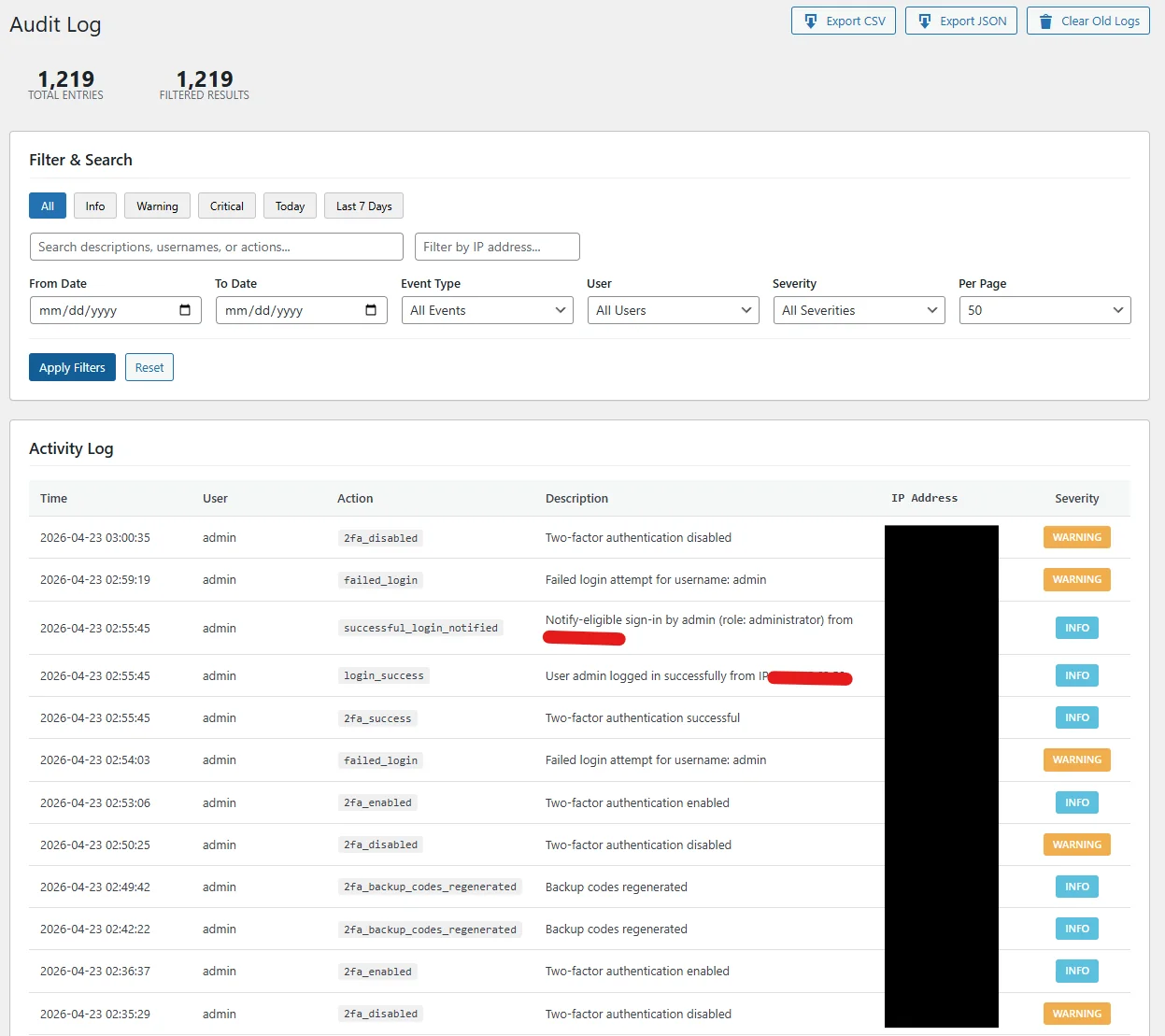
Everything Gets Logged
Activity logging captures every significant action on your WordPress site. Whether it's a user login, content change, or security event, you'll have a complete record.
User Logins
Successful logins, failed attempts, logouts, and session starts with IP and device info.
Content Changes
Posts, pages, and media created, edited, published, trashed, or deleted.
Plugin & Theme Changes
Installations, updates, activations, deactivations, and deletions.
Settings Changes
WordPress options, permalinks, reading/writing settings modifications.
Security Events
Blocked attacks, firewall triggers, malware detections, and vulnerability alerts.
User Management
User creation, role changes, profile updates, and deletions.
Real-Time Log View
Watch activity as it happens or search through historical logs. Every entry includes the user, action, timestamp, IP address, and additional context.
Why Activity Logs Matter
Activity logging isn't just about security—it's essential for understanding your site's operations and maintaining accountability.
Security Forensics
When a breach occurs, logs help you understand what happened, when it started, and what was affected. Trace the attack path and identify compromised accounts.
Compliance Requirements
Many regulations (GDPR, HIPAA, PCI-DSS) require audit trails. Activity logs provide the documentation you need for compliance audits.
Team Accountability
Know who changed what and when. Useful for multi-author sites, agencies, or any situation where multiple people have admin access.
Troubleshooting
When something breaks, logs show recent changes. Quickly identify if a plugin update, settings change, or user action caused the problem.
Logging Features
- Searchable Logs: Filter by user, action type, date range, IP address, or keyword to find specific events.
- Log Retention: Configure how long to keep logs. Set 30 days, 90 days, 1 year, or custom periods.
- Email Alerts: Get notified when specific events occur—failed logins, user creation, plugin installations, etc.
- Export Options: Download logs as CSV for external analysis, reporting, or long-term archival.
- Geolocation: See where login attempts and actions originate on a map view.
- User Sessions: View all active sessions and remotely terminate suspicious ones.
- Database Optimization: Automatic log cleanup and database optimization to prevent bloat.
- Privacy Controls: Anonymize IP addresses after a set period to comply with privacy regulations.
Know What's Happening on Your Site
Get Activity Logging and all other GuardPress Pro features with a single license.