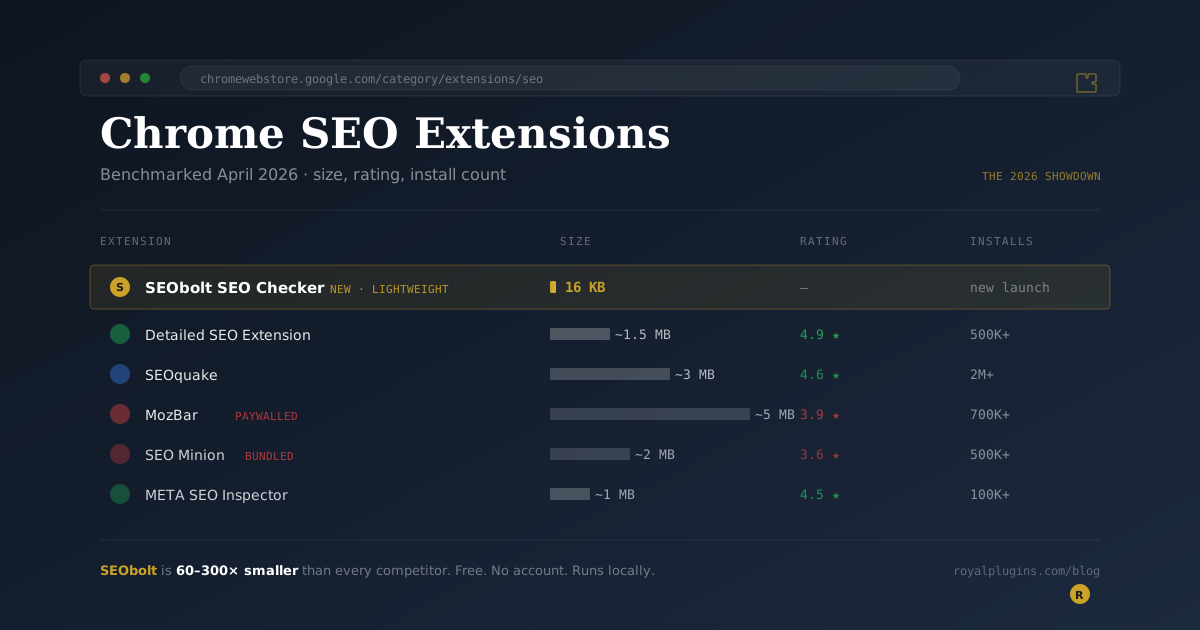
The best free Chrome SEO extension for overall feature completeness in 2026 is Detailed SEO Extension (4.9 stars, 500K+ users). For a lightweight page-audit tool, SEObolt SEO Checker is 16 KB, 60 to 300x smaller than every competitor. MozBar’s rating has fallen to 3.9 since it paywalled DA/PA, and none of the top 10 yet tracks LLM/AI search visibility.
Every SEO blog has a "best Chrome extensions" post. Most of them read like press releases. We built our own Chrome SEO extension in April 2026 (SEObolt SEO Checker), and in the process, we spent a weekend actually benchmarking the top 10 options. Install counts, ratings, size on disk, what each one checks, and where users complain in the reviews.
This is what we found. Every number below comes from the Chrome Web Store listing as of April 2026. You can verify everything yourself.
TL;DR: Detailed SEO Extension is the best feature-complete free option (4.9 stars, 500K users). MozBar's rating has collapsed to 3.9 since it paywalled DA/PA. SEOquake has the biggest user base but funnels you into Semrush. SEObolt is the new 16 KB lightweight challenger, 60 to 300x smaller than every competitor. And nobody in the top 10 tracks LLM/AI search visibility yet. That last one is the biggest gap in the market.
The 2026 Chrome SEO Extension Matrix
Here's the full comparison at a glance. All data is pulled from each extension's public Chrome Web Store listing.
| Extension | Installs | Rating | Price | Size |
|---|---|---|---|---|
| SEObolt SEO Checker | New (Apr 2026) | — | ✓ Free, no account | 16 KB |
| Detailed SEO Extension | 500,000+ | 4.9 ★ | ✓ Free | ~1–2 MB |
| SEOquake | 2,000,000+ | 4.6 ★ | Free (Semrush tie-in) | ~3 MB |
| MozBar | 700,000+ | 3.9 ★ | Freemium (paywall) | ~5 MB |
| SEO Minion | 500,000+ | 3.6 ★ | Paid (bundled) | ~2 MB |
| META SEO Inspector | 100,000+ | 4.5 ★ | ✓ Free | ~1 MB |
| Keywords Everywhere | 1,600,000+ | 4.4 ★ | Freemium (credits) | ~3 MB |
| Ubersuggest | 700,000+ | 4.5 ★ | Freemium | ~4 MB |
| SEO Pro Extension | 100,000+ | 4.3 ★ | ✓ Free | ~1 MB |
| SERP Simulator (Nightwatch) | 90,000+ | 4.8 ★ | ✓ Free | ~1 MB |
| SerpWorx | ~20,000 | 4.3 ★ | Paid subscription | ~3 MB |
An on-page SEO auditor only needs DOM-parsing logic. It can fit in under 20 KB. When an extension is 3–5 MB, it's almost always bundling telemetry SDKs, UI frameworks, or a persistent connection to a SaaS back end. Those extras show up in your browser's memory and battery — and in the 1-star reviews.
“Your extension must provide a clear value proposition and do what is necessary to deliver that value. Avoid extensions that provide only a small amount of functionality or are slow or laggy.”
— Google Chrome Web Store, Developer Program Policies — Quality Guidelines
The Ones Worth Installing
1. Detailed SEO Extension — Best Feature-Complete Free
4.9 stars. 500K+ users. Genuinely free. Built by Glen Allsopp (indie, not a SaaS company). Shows title, meta description, canonical, robots, Open Graph, Twitter Card, schema.org, H1–H6, internal/external link counts, and image alt coverage, all visible in one popup. No account required. Zero upsell pressure. If you want one extension that just works, this is the answer.
The catch: No rank tracking, no backlink data, no keyword research. It's a pure on-page tool.
2. SEOquake — Biggest User Base, Semrush-Adjacent
2M+ users. 4.6 stars. Owned by Semrush. Shows SEMrush-sourced domain/backlink metrics alongside on-page data. Useful if you're already a Semrush customer. The download speed numbers come from Semrush's crawl data.
The catch: Forced login, aggressive Semrush marketing, and reviews are full of "extension broke after update" complaints. Fine if you're in the Semrush ecosystem; annoying if you're not.
3. META SEO Inspector — Developer's Favorite
100K+ users. 4.5 stars. Deep on-page focus, favored by developers and technical SEOs. Validates meta tags, microformats, and structured data thoroughly. Minimal UI, maximum signal.
4. SEObolt SEO Checker — The Lightweight Challenger
New (April 2026). 16 KB. Disclosure: we built this one. We designed it specifically to be the fastest, smallest free on-page SEO checker on the Chrome Web Store. It runs entirely locally, requires no account, and checks meta tags, social tags, schema, headings, images, and links in about two seconds. No forced login ever. Future versions will tie into our SEObolt SaaS for optional rank tracking and LLM (ChatGPT/Perplexity) visibility scoring. But the extension itself will stay free forever.
The catch: It's new. Zero reviews at launch. If you want the battle-tested 500K-install option, use Detailed. If you want the leanest, fastest, most privacy-respecting tool, try SEObolt.
5. SERP Simulator by Nightwatch — Title-Tag Preview Specialist
90K+ users. 4.8 stars. It's a focused tool that shows how your title and meta description will render in Google search results, not a full on-page auditor. Pair it with one of the above, not instead of it.
The Ones to Be Cautious About
MozBar — The Cautionary Tale
MozBar was the industry standard for years. Today it sits at 3.9 stars from nearly 2,000 reviews. Read the recent reviews and the story is consistent: Moz paywalled Domain Authority and Page Authority behind a login, then behind a paid subscription. Users who installed it for a free DA check find themselves at an auth wall. The 3.9 rating is not a bug. It's the market's honest reaction to feature gating.
If you need DA/PA specifically, you'll either need to pay Moz or use a free alternative like SEObolt's on-page audit (which doesn't attempt to report DA because DA is a Moz-proprietary metric anyway).
SEO Minion — Bundled, Not Free
SEO Minion has 500K+ installs and a 3.6 rating. The rating story is similar to MozBar: features that were free are now gated behind a bundled subscription with Keywords Everywhere. Users install expecting a free tool and run into paywalls on what used to be core functionality.
Ubersuggest — Neil Patel's Funnel
4.5 stars is respectable, but be aware: the extension is designed to funnel you into the Ubersuggest SaaS. Free tier limits are hit quickly, and the upsell is persistent. Fine as long as you're aware of what it is.
Five Things We Learned From the Benchmark
1. Paywalls destroy ratings
Every extension in the 3.0–4.0 range got there by paywalling something users expected free. MozBar, SEO Minion, and SerpWorx all tell the same story. Meanwhile, the three highest-rated extensions are either genuinely free or don't hide core features: Detailed (4.9), SERP Simulator (4.8), and SEOquake (4.6).
2. Size matters more than you'd think
MozBar's reviews routinely mention "slows my browser" and "destroys my RAM." Lightweight extensions don't generate that complaint. At 3–5 MB, every major competitor is bundling code that has nothing to do with SEO. SEObolt's 16 KB isn't a gimmick. It's what happens when you ship only the SEO logic and nothing else.
3. No account = happy users
The top-rated extensions all share one thing: they don't require a login. Every extension that forces auth gets a steady drip of 1-star reviews for session drops, forced sign-ups, and "I just want to check a meta tag" complaints. If an SEO extension asks you to create an account before it does anything, that's a red flag.
4. Nobody is tracking AI search visibility yet
In 2026, the SEO conversation has shifted: Google Search Console tells you about Google, but what about ChatGPT, Claude, Perplexity, and Gemini? Zero mainstream Chrome extensions track whether those platforms cite your content. This is the biggest open gap. We're building it into the SEObolt SaaS; expect competitors to ship similar features in the next 6–12 months.
5. Feature overlap is massive — differentiation is rare
Eight of the top ten check the same things: title, meta description, headings, canonical, schema. The interesting differentiators are: footprint (SEObolt), visual SERP preview (SERP Simulator), developer-grade validation (META SEO Inspector), and SaaS integration depth (SEOquake, Ubersuggest). Pick the one whose differentiator matches your workflow.
Which Should You Install?
A simple decision tree based on what you actually do:
- "I just want to spot-check SEO on pages I visit." Install SEObolt SEO Checker for the leanest, fastest option. Add Detailed SEO Extension if you want the broadest check coverage.
- "I want to preview how my title and meta render in Google." SERP Simulator by Nightwatch is the specialist for that one job.
- "I need to validate structured data thoroughly." META SEO Inspector. Or Google's Rich Results Test (not an extension).
- "I'm already a Semrush customer." SEOquake, obviously.
- "I want Domain Authority scores." MozBar, though it requires a Moz login now, so factor that in.
- "I want ongoing SEO monitoring, not just spot checks." A Chrome extension isn't enough. You need a SaaS that tracks rankings over time. The SEObolt platform is our answer, but Ahrefs, Semrush, and Ubersuggest are all reasonable picks depending on budget.
Chrome extensions are cumulative in memory cost. A cheap, reliable pairing is one lightweight on-page checker (SEObolt or Detailed) plus one specialist for whatever you do often (SERP Simulator if you write titles, META SEO Inspector if you debug schema). Skip the rest.
The Gap Nobody Is Filling: LLM Search Visibility
Every extension in this benchmark is designed for a world where Google is the only search engine that matters. That world is ending. In 2026, a non-trivial share of informational queries are now answered by ChatGPT, Claude, Perplexity, and Gemini. None of those engines share their data the way Google Search Console does.
If you're serious about where the SEO industry is heading, the question isn't "which on-page checker should I use?" but "how do I know if ChatGPT is citing my content?" That's why the SEObolt SaaS tracks LLM citations across all five major AI platforms alongside classic Google rank tracking. The Chrome extension is the free on-ramp; the paid SaaS is where you track AI visibility over time.
Expect every major Chrome SEO extension to add some form of LLM tracking within the next 12 months. First movers get the review volume.
The Bottom Line
If you want the single best free Chrome SEO extension in 2026, install Detailed SEO Extension. It's earned its 4.9 stars across 500K users.
If you want the smallest and fastest option with an optional upgrade path to LLM search tracking, install SEObolt SEO Checker. Full transparency: we built it. It's 16 KB, runs locally, requires no account, and we think it's the most honest free SEO extension in the store.
If you want Domain Authority scores, you're stuck with MozBar and its login. If you want Semrush data baked in, SEOquake is still the pick. For everyone else, the combination of a lightweight on-page checker and the free tier of a rank-tracking SaaS will beat installing six bloated extensions every single time.
The most important thing an SEO Chrome extension can do in 2026 isn't tell you your title tag is 62 characters. It's tell you that the AI engines that are slowly eating Google's lunch are or aren't citing your content. None of the ten extensions we benchmarked do that yet. Whichever one ships it first will win the next cycle.
Disclaimer: SEObolt SEO Checker is developed by Royal Plugins. Benchmarks were gathered in April 2026 directly from each extension's public Chrome Web Store listing. Ratings, install counts, and feature sets change. Verify each listing before making your decision. We've tried to be honest about both our own extension and the competition; if we got something wrong, tell us at support@royalplugins.com and we'll correct it.