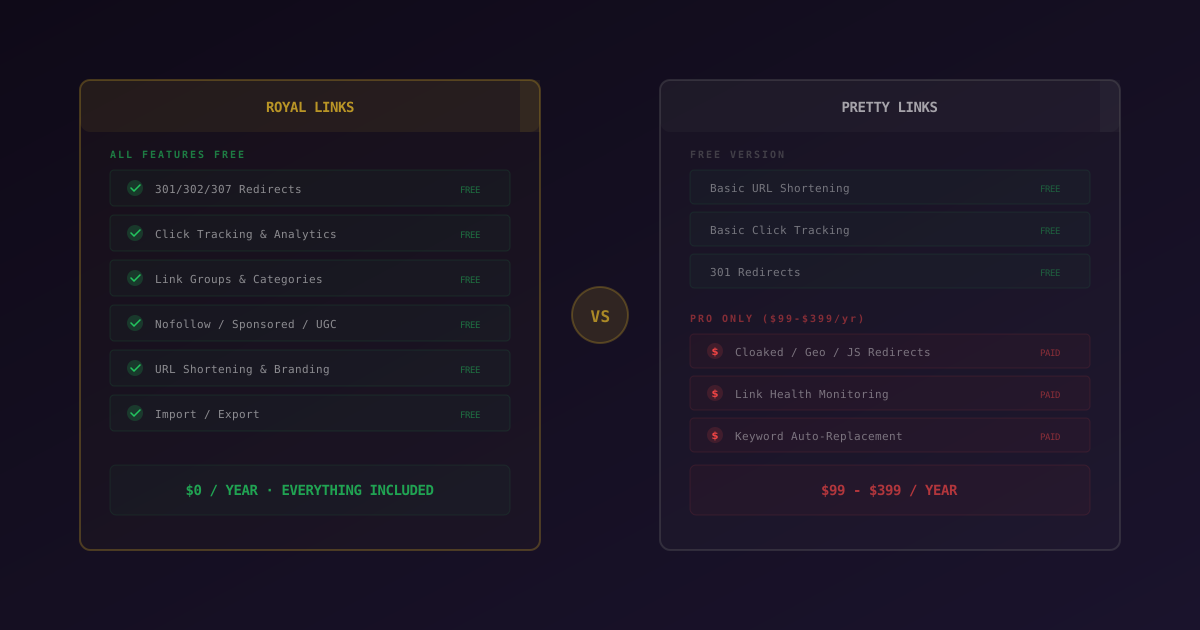
Royal Links is a free WordPress link management plugin that includes geo-targeting, A/B testing, automatic keyword linking, QR codes, and broken-link monitoring. Pretty Links keeps these features behind a $99–399/year Pro paywall. Pretty Links still has 300,000+ installs and a longer track record, but Royal Links ships every advanced feature in the free version on WordPress.org.
Link management is one of those WordPress tasks that seems trivial until you're managing fifty affiliate links across a hundred posts and one of them changes. Then you're searching your entire database, replacing URLs one by one, hoping you didn't miss any.
A link management plugin centralizes your links. Create a branded short URL like yoursite.com/go/product-name, point it at the destination, and use that short link everywhere. When the destination changes, update it in one place. Every post using that link updates instantly.
For years, Pretty Links was the go-to choice, and it still has 300,000+ active installs on WordPress.org. But its free version covers only the basics, while advanced features like geo-targeting, automatic keyword linking, A/B testing, and broken link checking are locked behind a $99-399/year Pro paywall. For example, running a single A/B test between two affiliate offers requires Pretty Links Pro ($99+), while the same test is free in Royal Links. According to the Affiliate Marketing Association, affiliate marketing spend in the US alone exceeded $14 billion in 2024. Per-click optimization features directly affect revenue in this category. Royal Links changes the equation entirely: it includes every one of those advanced features and more, completely free.
What Is Royal Links?
Royal Links is a free WordPress link management plugin available on WordPress.org. There is no Pro tier, no premium upsell, and no feature gating. Every feature listed below is available to every user at zero cost.
Link Management
- Branded short URLs: create clean links on your own domain like
yoursite.com/go/product-nameinstead of long, ugly affiliate strings. - 301, 302, and 307 redirects: permanent, temporary, and method-preserving redirects. Choose the right type for SEO and your specific use case.
- Categories and tags: organize links into groups. Keep affiliate links, social links, and internal redirects separate and manageable.
- Nofollow, sponsored, UGC attributes: set
relattributes on links. Mark affiliate links assponsored(Google's recommended approach), user-generated links asugc, ornofollowto prevent link equity passing. - Password-protected links: restrict access to specific redirect URLs with a password gate.
- Link scheduling: set start and end dates for links. Perfect for limited-time promotions, seasonal affiliate campaigns, or coupon expiration dates.
- Affiliate disclosure notices: automatically display FTC-compliant disclosure notices on pages with affiliate links.
Click Tracking and Analytics
- Detailed click analytics: every click records browser, device, operating system, referrer URL, and country.
- Dashboard widget: period-over-period comparison right on your WordPress dashboard. See trends at a glance without navigating to a separate analytics page.
- QR scan tracking: track scans from generated QR codes alongside regular click data.
- UTM parameter builder: build UTM-tagged destination URLs directly from the link editor for Google Analytics tracking.
Advanced Redirects
- Geo-targeting: redirect visitors to different URLs based on their country using ip-api.com. Send US visitors to Amazon.com, UK visitors to Amazon.co.uk, and German visitors to Amazon.de, all from one link.
- Device-based redirects: serve different destinations for desktop, mobile, and tablet users. Useful for app download links or mobile-optimized landing pages.
- Time-based redirects: change where a link points based on the time of day or day of the week.
- A/B split testing: split traffic between multiple destinations with conversion tracking. Test which landing page or affiliate offer converts better, with real data.
Content and Display
- QR code generator: generate QR codes for any managed link, with scan tracking built in.
- Product display boxes: create styled product showcase boxes with images and call-to-action buttons for affiliate products.
- Automatic keyword linking: define keywords and Royal Links automatically creates links from those keywords across your content. A massive time-saver for content-heavy sites.
- Gutenberg block and Classic Editor support: insert managed links from both editors without leaving the post editor.
Site Health
- Broken link checker: automatic monitoring of destination URLs. Get alerted when an affiliate link dies so you can fix it before it costs you commissions or hurts your SEO.
- Link health dashboard: see the status of all your links at a glance, sorted by healthy, broken, and redirected destinations.
Migration
- Import from Pretty Links, ThirstyAffiliates, and BetterLinks: migrate your links, categories, and click data. No starting over from scratch.
- Run both plugins side-by-side during the transition: Royal Links coexists cleanly with the source plugin, so reader-facing URLs never break while you verify each imported link. Slug conflicts during import are logged with a one-click retry-with-suffix action. See the full walkthrough: Coexistence with Pretty Links, ThirstyAffiliates, and BetterLinks.
“Qualify your outbound links to search engines. Use
— Google Search Central, Quality Links Policyrel="sponsored"for links that are paid advertisements, sponsorships, or other compensation agreements. Userel="ugc"for user-generated content.”
Royal Links has no paid version. Every feature listed above is free for all users: geo-targeting, A/B testing, auto-linking, broken link checking, product displays, and advanced analytics. There are no "upgrade to unlock" prompts, no feature teasing, and no subscription fees. The plugin you download from WordPress.org is the complete product.
What Is Pretty Links?
Pretty Links is the category-defining WordPress link management plugin, created by Blair Williams (who also built MemberPress). With over 300,000 active installs, it established many of the conventions that link management plugins now follow. It deserves credit for that. However, its feature split between free and Pro tiers is worth understanding before you commit.
Free Version
- URL shortening: create clean redirect URLs on your domain
- Basic redirect types: 301 and 307 redirects
- Basic click tracking: click counts per link (no geographic, device, or browser breakdown)
- Nofollow: set nofollow attribute on links
Pro Tier ($99-399/year)
Everything beyond the basics requires a paid subscription:
- Geographic redirects: country-based redirects
- Keyword auto-replacement: automatic keyword linking across content
- Link health monitoring: broken link detection
- A/B split testing: test different destinations
- Advanced analytics: geographic, device, and browser click data
- Product displays: affiliate product showcase widgets
- Cloaked and JavaScript redirects: additional redirect methods
- Stripe integration: create payment links directly
Pretty Links Pro comes in three tiers: Beginner ($99/year, 1 site), Marketer ($199/year, 5 sites), and Super Affiliate ($399/year, 25 sites).
Pretty Links earned its reputation and Blair Williams has maintained it reliably for years. The Pro features are well-built. Those features are clearly useful. The question is whether paying $99-399/year for them makes sense when Royal Links includes all of them free.
Feature Comparison
This is where the gap becomes clear. Royal Links offers every feature for free that Pretty Links charges $99-399/year for:
| Feature | Royal Links | Pretty Links |
|---|---|---|
| 301 Redirects | ✓ Free | ✓ Free |
| 302 Redirects | ✓ Free | ✗ |
| 307 Redirects | ✓ Free | ✓ Free |
| Click Tracking | ✓ Free (detailed) | ✓ Basic free |
| Country/Device/Browser Analytics | ✓ Free | Pro only ($99+/yr) |
| Link Categories & Tags | ✓ Free | ✓ Free |
| Nofollow | ✓ Free | ✓ Free |
| Sponsored / UGC Attributes | ✓ Free | Pro only |
| Geo-Targeting (Country Redirects) | ✓ Free | Pro only ($99+/yr) |
| Device-Based Redirects | ✓ Free | Pro only ($99+/yr) |
| A/B Split Testing | ✓ Free | Pro only ($99+/yr) |
| Auto-Link Keywords | ✓ Free | Pro only ($99+/yr) |
| Broken Link Checker | ✓ Free | Pro only ($99+/yr) |
| QR Code Generator | ✓ Free | ✗ |
| Product Display Boxes | ✓ Free | Pro only ($99+/yr) |
| Link Scheduling | ✓ Free | ✗ |
| Password-Protected Links | ✓ Free | ✗ |
| UTM Parameter Builder | ✓ Free | ✗ |
| Import from Pretty Links | ✓ Free | — |
| Stripe Integration | ✗ | Pro only ($199+/yr) |
| Price | $0 (everything) | Free / $99-399/yr Pro |
The only feature Pretty Links Pro offers that Royal Links does not is Stripe payment link integration. Royal Links includes every other Pro feature for free: geo-targeting, A/B testing, auto-linking, broken link monitoring, product displays, and advanced analytics.
Click Tracking and Analytics
Analytics is one of the starkest differences between these two plugins, and it favors Royal Links heavily.
Royal Links: Pro-Level Analytics, Free
Every click in Royal Links is logged with detailed metadata: browser type, device category, operating system, referring URL, and visitor country. This data is surfaced in a clean, sortable interface inside WordPress. The dashboard widget shows period-over-period comparison so you can spot trends without leaving your admin dashboard.
Royal Links also tracks QR code scans as a distinct event type, and includes a built-in UTM parameter builder so you can tag destination URLs for Google Analytics tracking directly from the link editor. All of this is free.
Pretty Links: Basic Free, Detailed Costs $99+/year
Pretty Links free shows a click count per link. That's it. No geographic breakdown, no device info, no browser data. To see where your visitors are coming from, what device they use, or which countries generate the most clicks, you need Pretty Links Pro at $99-399/year.
Royal Links gives you two layers of analytics: its own built-in country/device/browser data, and its UTM parameter builder for Google Analytics integration. Together, these give you more analytical depth than any link management Pro tier, at zero cost.
Pricing: $0 for Everything vs. $99-399/Year
The pricing comparison is no longer about whether you need advanced features. Royal Links gives you all of them. The question is simply whether you want to pay for what you can get free.
Royal Links: $0
Every feature is free. Geo-targeting, A/B testing, auto-linking, broken link checking, device redirects, QR codes, product displays, detailed analytics, link scheduling, and password protection. All included. No Pro tier exists. No upsell prompts in the admin. Install from WordPress.org and you have the complete product.
Pretty Links: Free + $99-399/year
Pretty Links free covers the basics: URL shortening, 301/307 redirects, basic click counts, and nofollow. For everything else, you need Pro:
- Beginner: $99/year for 1 site
- Marketer: $199/year for up to 5 sites
- Super Affiliate: $399/year for up to 25 sites
For a single site, that's $99/year for features Royal Links includes free. Over three years, you'd spend $297 on Pretty Links Pro. For five sites, that's $597 over three years with the Marketer plan. Royal Links costs nothing on unlimited sites.
Google recommends using rel="sponsored" on affiliate and paid links instead of just nofollow. Pretty Links locks the sponsored attribute behind Pro. Royal Links includes it free. If you're running affiliate links without the sponsored attribute, you're not following Google's current best practices. Pretty Links won't let you fix that without paying.
When to Choose Royal Links
- You want Pro-level features without paying. Geo-targeting, A/B testing, auto-linking, broken link checking, detailed analytics, product displays, QR codes, device redirects, and link scheduling. All free, no strings attached.
- You're an international affiliate marketer. Country-based redirects for Amazon and other geo-specific affiliate programs are free in Royal Links. Pretty Links charges $99+/year for this.
- You need conversion data. A/B split testing with conversion tracking lets you optimize which landing pages and offers perform best. This feature alone justifies the switch for serious affiliate marketers.
- You manage multiple sites. Royal Links is free on unlimited sites. Pretty Links Pro charges $199-399/year for multi-site licenses.
- You want to migrate easily. Royal Links imports directly from Pretty Links, ThirstyAffiliates, and BetterLinks, including links, categories, and click data.
- You care about link health. Automatic broken link monitoring with a health dashboard means you catch dead affiliate links before they cost you commissions.
When to Choose Pretty Links
- You need Stripe payment links. Pretty Links Pro integrates with Stripe to create payment links directly. Royal Links doesn't offer this. If you sell digital products alongside affiliate content, this could matter.
- You're already invested in Pretty Links Pro. If your workflows are built around Pretty Links and everything is working, the switching cost may not be worth the savings, though Royal Links does include a Pretty Links importer to make migration straightforward.
- You want cloaked redirects. Pretty Links Pro offers cloaked redirects that display your domain in the browser bar while loading the destination. This is a niche feature, but some affiliate marketers prefer it.
- Brand familiarity matters to you. Pretty Links has been around longer, has a larger user base, and more community resources. Some users value that track record, and that's a fair consideration.
Pretty Links is a well-built plugin and Blair Williams deserves credit for establishing the category. But the value proposition has shifted. When Royal Links offers geo-targeting, A/B testing, auto-linking, broken link checking, advanced analytics, and product displays for free, paying $99-399/year for those same features in Pretty Links Pro is a hard sell. The only exclusive Pretty Links Pro feature is Stripe integration.
The Bottom Line
The comparison is straightforward. Royal Links includes every feature that Pretty Links charges $99-399/year for: geo-targeting, A/B split testing, automatic keyword linking, broken link checking, device-based redirects, advanced analytics with country and device data, product display boxes, and QR code generation. All free. No Pro tier, no subscription, no feature gating.
Pretty Links free covers the basics: URL shortening, basic redirects, and simple click counts. Everything beyond that requires an annual subscription. The only Pro feature Royal Links lacks is Stripe payment link integration.
If you're starting fresh, Royal Links is the clear choice. If you're currently paying for Pretty Links Pro, Royal Links has an importer that handles your links, categories, and click data. Either way, both plugins are on WordPress.org and install in seconds. But only one gives you everything for free.
Disclaimer: Royal Links is developed by Royal Plugins. We have attempted to honestly and accurately reflect all current features and pricing for both plugins in this comparison. Feature and pricing data was gathered in April 2026 from each plugin's official WordPress.org listing. Features and pricing may change. Please verify on each plugin's official page before making a decision.