Pretty Links is a well-established WordPress link manager with over 300,000 active installs. On a fresh test-site install in July 2026 we walked through the current admin experience end to end. What we found is a freemium model that has drifted well past the line where a paid upgrade path stops being an option and becomes the entire product surface. The plugin still works. But the way it presents itself to a first-time user has become a case study in how not to design a WordPress freemium plugin.
This is not a takedown of the developers. Building a good freemium plugin is hard, and Pretty Links helped define the category. But the choices baked into the current build — sidebar composition, pro-badge saturation on the primary editor, a 3% platform fee on the “free” payments feature, and same-tab upgrade redirects — add up to a plugin where the free tier is optimized for conversion rather than for utility.
Here is what we saw, in the order a new user encounters it.
1. The sidebar is 60% not-the-plugin
Installing Pretty Links free adds a Pretty Links menu to the WordPress sidebar. That menu has 12 items. Five of them are the actual plugin: Dashboard, Pretty Links, Add New, Click History, Options. The other seven are either paywalled features, a page of cross-promotional ads, or a paid-upgrade entry point.
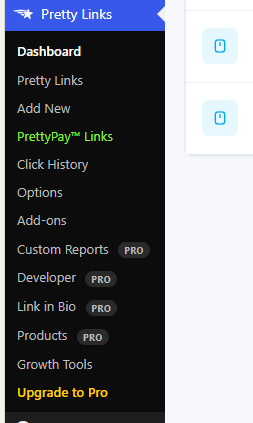
Breaking it down:
- Dashboard, Pretty Links, Add New, Click History, Options, Add-ons — six free surfaces the plugin actually delivers.
- PrettyPay™ Links — a payments feature marked free, but with a 3% platform fee on top of Stripe's processing costs (more on this below).
- Custom Reports — PRO.
- Developer — PRO.
- Link in Bio — PRO.
- Products — PRO.
- Growth Tools — a full-page cross-promotion for other plugins in the Caseproof and MemberPress family (MonsterInsights, WPForms, and so on). Zero Pretty Links functionality.
- Upgrade to Pro — a sidebar entry whose only purpose is to send you to the sales page.
On a first install, it took roughly five minutes of scrolling to find the actual settings page. The word most WordPress plugins use is “Settings.” Pretty Links calls it “Options,” sandwiched between free-lookalike items and PRO items with no visual differentiation. The path is discoverable, but every second the user spends scanning past pro-badged rows is a second the plugin is asking for money instead of solving the problem.
2. Five of six tabs on the Edit Link screen are locked
The Edit Link screen is where the plugin actually earns its keep. It is the one screen a link-management-plugin user visits repeatedly. Its tab strip communicates the shape of the product.
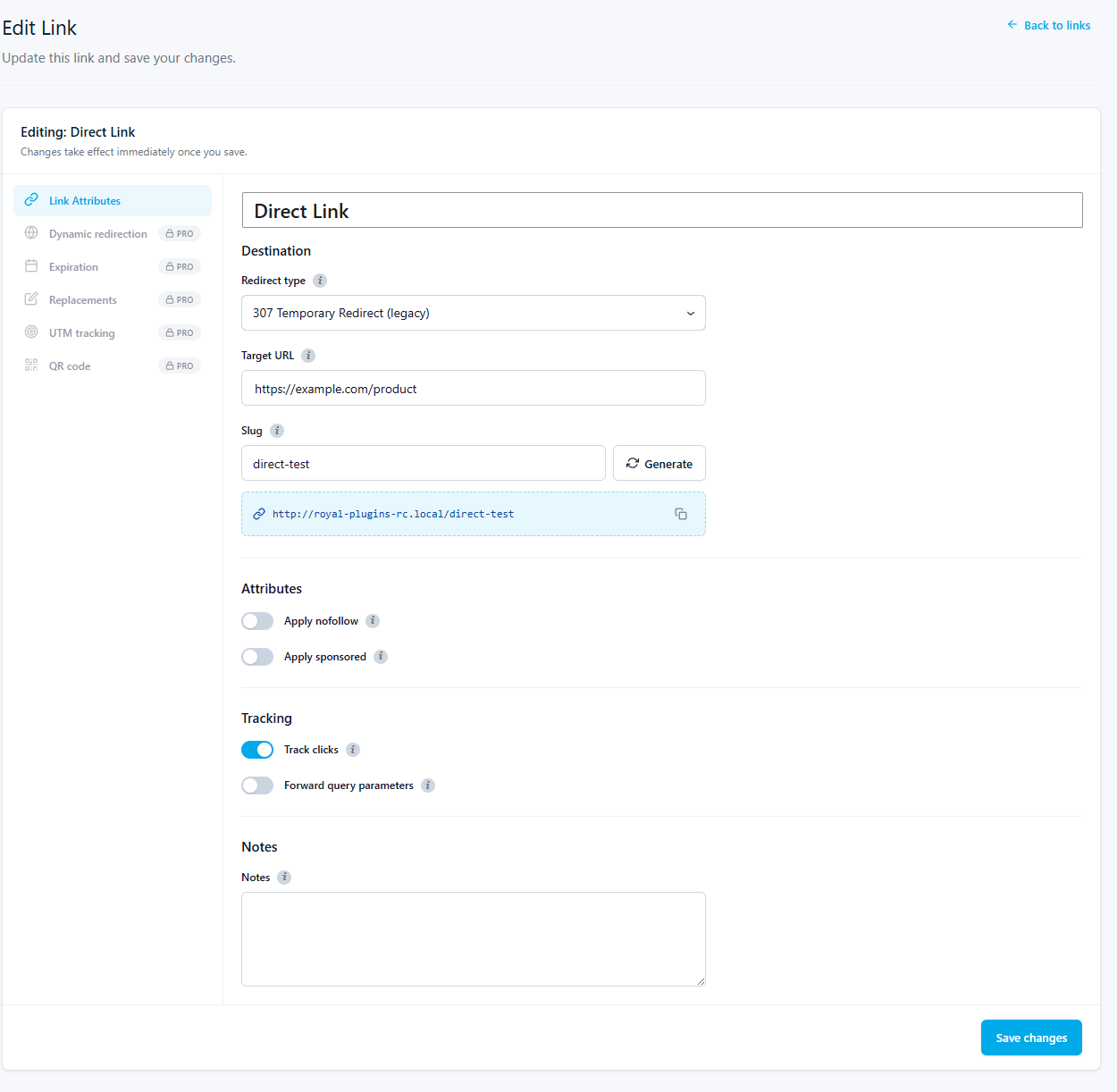
The tabs on the left rail:
- Link Attributes — free. Target URL, slug, redirect type, nofollow / sponsored toggles.
- Dynamic redirection — PRO. Country, device, and time-based routing.
- Expiration — PRO. Link end dates for promotions.
- Replacements — PRO. Automatic keyword-to-link rewriting.
- UTM tracking — PRO. Google Analytics UTM parameter builder.
- QR code — PRO. QR code generation.
Five out of six actionable tabs on the primary screen require an upgrade. If you install Pretty Links free expecting to manage affiliate links, you can create a redirect. That is the ceiling. Any refinement — a UTM tag, a QR code, a time-based expiration — requires paying.
For reference: a working link-management plugin should let free users at least tag UTM parameters and generate a QR code. Those are trivial to implement and universal to the workflow. Pricing them behind a pro paywall is a strategic decision, not a technical one.
3. PrettyPay charges a 3% platform fee on top of Stripe
PrettyPay is a payment-links feature listed in the sidebar as free. When you configure it, you connect a Stripe account. Stripe charges its standard processing fee — roughly 2.9% + $0.30 per transaction in the US. On top of that, Pretty Links adds a 3% platform fee that goes to Pretty Links, not to you.
The practical math on a $100 payment link:
- Stripe processing: roughly $3.20 (2.9% + $0.30).
- Pretty Links platform fee: $3.00.
- Total lost to fees on the “free” tier: about $6.20, or 6.2% of gross revenue.
That is roughly double what a merchant would expect to pay processing a payment through Stripe directly. To remove the platform fee, you upgrade to Pretty Links Pro.
The fee itself is disclosed in Pretty Links' documentation. What is not obvious from the sidebar — where PrettyPay sits alongside genuinely-free features like Click History and Options — is that using it on the free tier costs a percentage of every transaction. A feature marked “free” that meters you at 3% of revenue is a different thing than a feature that is actually free.
4. “Growth Tools” is a page of ads for other plugins
Clicking the Growth Tools sidebar item does not open a Pretty Links feature. It opens a page of cross-promotional advertisements for other plugins in the same ecosystem. Depending on your install, that means suggestions to install MonsterInsights (analytics), WPForms (form builder), OptinMonster (email capture), and other Caseproof / MemberPress-family products.
None of these are Pretty Links features. None help you manage links better. The page is a real-estate lease inside your WordPress admin, using the trust the plugin earned to route attention to sister products.
WordPress admins have finite attention budget. A menu item labeled with a plugin name implies the item does something for that plugin. When it exists to route attention elsewhere, that is a small breach of the implicit contract of the admin sidebar.
5. “Upgrade to Pro” opens in the same tab
The Upgrade to Pro sidebar link sends the browser to the Pretty Links sales page in the current tab. Not a new tab. Not a new window. The current admin tab.
If the admin was in the middle of editing a link, drafting a post, or configuring a Settings screen, they lose that context. The browser back-button will get them back to the admin, sometimes. If the page they were on had form state that had not been saved, that state is gone.
The overwhelming convention across the WordPress ecosystem is that upgrade CTAs open in a new tab, so the admin can decide whether they want to leave. Pretty Links's choice to navigate the current tab is small in isolation. Multiplied across every pro-badge tap and every “go pro” nudge, it adds up to a plugin whose upgrade paths are more aggressive than the plugin itself.
Where this crosses the line
Freemium works when the free tier is genuinely useful, the upgrade paths are honest, and the plugin's admin UI is dedicated to helping the user do their job. Pretty Links's free tier still does the core job. But the surrounding architecture has taken on properties that turn a utility plugin into a conversion funnel:
- The sidebar composition puts paid surfaces at parity with free ones, so first-time users cannot tell what they are actually getting.
- The primary editor screen presents its own capabilities as mostly unavailable, teaching the user to expect a paywall on every setting they might reach for.
- A feature marked “free” meters the user at 3% of every transaction. That is a paid feature with a different label.
- The Growth Tools page uses admin sidebar real estate to promote unrelated products.
- The upgrade CTA behaves in a way that costs the admin their current session context, small pattern by small pattern.
Any one of these on its own would be a UX quibble. Stacked, they describe a plugin whose primary design goal is no longer helping the user manage links. It is a plugin designed to convert the user into a Pro subscriber, ideally within their first session.
What we chose to do instead
We built Royal Links as a free WordPress link management plugin with no pro tier. Every feature ships in the WordPress.org release: geo-targeting, A/B split testing, automatic keyword linking, QR codes, UTM parameter builder, product display boxes, 404 catch-all, JSON policy import/export. No paywalled tabs on the edit screen. No Growth Tools page. No same-tab upgrade redirects. No platform fee on payment features (we do not ship a payment feature at all — if you need Stripe payments, use Stripe's own WordPress plugin).
The plugin's landing page includes a section called “Four things you will never see in this plugin.” That section exists in direct response to the pattern this post has walked through. We wanted to make our commitments explicit so a reader could hold us to them.
If you are already running Pretty Links and want to move, Royal Links imports Pretty Links data directly — slugs, targets, redirect types, categories, and click counts. You can run both plugins side-by-side during the transition; the two coexist cleanly. Full comparison and migration walkthrough: Royal Links vs Pretty Links.
Utility plugins should get out of your way. That is the standard we hold ourselves to. This post is a walk-through of what happens when a plugin drifts from that standard over the course of a decade of freemium optimization. The drift is gradual and each individual choice is defensible in isolation. The cumulative result is a plugin that is mostly billboard.
Methodology
Screenshots captured on July 23, 2026, from a fresh Pretty Links free install (version current as of that date) on a clean WordPress test site. PrettyPay fee terms sourced from the Pretty Links documentation and confirmed in the plugin's PrettyPay setup flow. No affiliate relationship exists between Royal Plugins and Pretty Links / Caseproof.