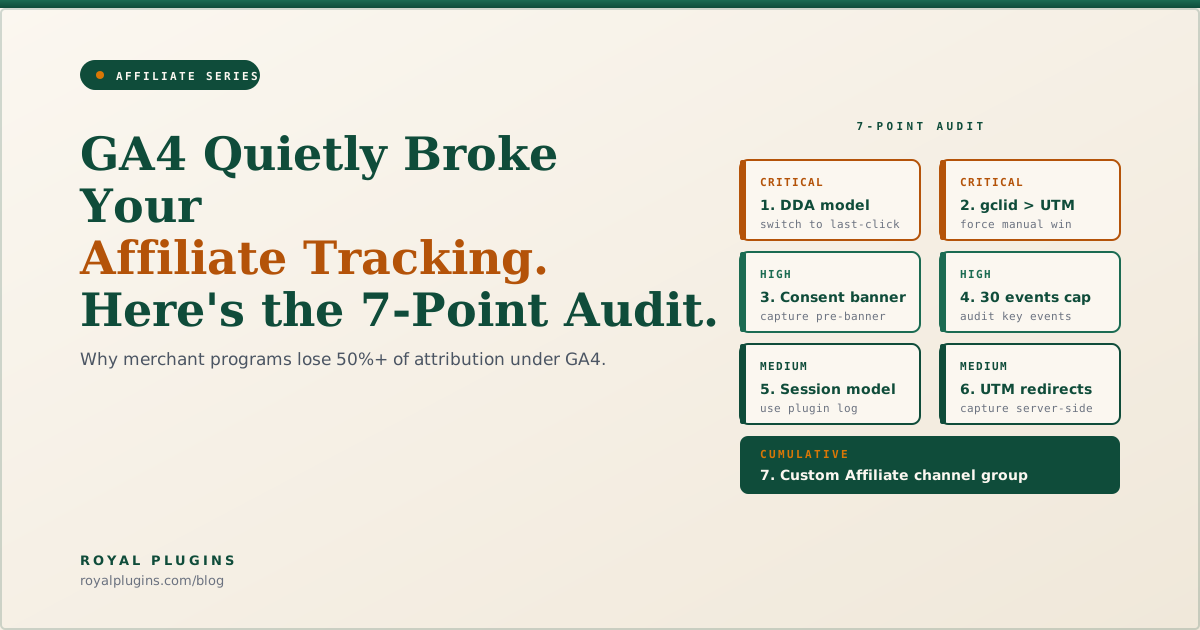
Under Universal Analytics, affiliate-to-merchant attribution gaps ran 5 to 20 percent. Under GA4 they regularly exceed 50 percent, and CJ, Awin, and Rakuten Advertising have all published explainers attributing the discrepancy to GA4 itself, not to merchant programs. Seven specific GA4 settings and design choices cause the gap: data-driven attribution as the default, gclid priority over UTM, the 400-conversions-per-path DDA threshold (which excludes roughly 98 percent of affiliate paths according to CJ's own analysis), cookie-consent banner timing, the 30 key events cap, session redefinition, and UTM loss on redirects. Most are fixable in the Admin panel in under 15 minutes. The rest require treating your affiliate plugin's reporting as the source of truth, exactly as the major networks now recommend.
If your GA4 dashboard shows a sharp drop in affiliate revenue after migrating from Universal Analytics, you are not alone. The drop is rarely a real revenue loss. It is a measurement loss caused by how GA4 was designed.
Why GA4 Reports Less Affiliate Revenue Than UA Did
GA4 replaced Universal Analytics as Google's default analytics product on July 1, 2023. The two systems share a name but not an architecture. Universal Analytics tracked sessions and pageviews; GA4 tracks events and uses a probabilistic model called Data-Driven Attribution. That shift changed three things that matter for affiliate tracking:
- The default attribution model. UA used last-click. GA4 uses DDA, an algorithmic model that is biased toward channels with high conversion volume.
- The session definition. UA started a new session whenever a user re-entered from a different marketing channel. GA4 does not.
- Identifier priority. When both Google's
gclidparameter and standard UTM parameters arrive on the same click, GA4 keeps thegclidand discards the UTM.
Each of these favors Google channels over affiliate channels, by design. The cumulative effect is the 50-percent attribution gap the major networks document.
The 7-Point GA4 Affiliate Audit (At a Glance)
| # | Issue | Severity | Fixable in Admin |
|---|---|---|---|
| 1 | Default DDA attribution model | Critical | Yes |
| 2 | gclid overrides UTM | Critical | Yes |
| 3 | Cookie consent banner timing | High | Partial |
| 4 | 30 key events cap | High | Yes |
| 5 | Session redefinition | Medium | No |
| 6 | UTM loss on redirects | Medium | No |
| 7 | Default channel grouping | Low (cumulative) | Yes |
Run through them in order. The first two account for most of the underreporting most affiliate programs see.
1. Attribution Model: Switch DDA to Last Click (Critical)
GA4 defaults all conversion reporting to Data-Driven Attribution. DDA requires at least 400 conversions per unique path within a 30-day window before it will model that path. CJ's published analysis estimates that roughly 98 percent of affiliate conversion paths fail to hit this threshold, which means GA4's model effectively excludes them and routes their value into "direct" or other catch-all buckets.
Last-click attribution, the affiliate industry standard, gives a deterministic answer for every conversion: the most recent campaign source gets credit.
The fix: In GA4, navigate to Admin > Attribution Settings. Under "Reporting attribution model," switch from "Data-driven" to "Paid and organic last click." Optionally tighten the conversion window. Apply.
This single change recovers a meaningful portion of the underreported affiliate revenue.
2. UTM vs gclid Priority: Force Manual Tagging to Win (Critical)
When a click arrives at your site with both a Google Ads gclid parameter and standard UTM parameters, GA4 ignores the UTMs. The session is credited to Google, even if the affiliate's UTM was the actual referrer. This is documented platform behavior.
The scenario sounds rare but it is not. Any affiliate running paid amplification of their own affiliate links, any merchant doing co-marketed campaigns, and any creator who runs Google Ads on their own link-in-bio page produces this collision.
The fix: In GA4, navigate to Admin > Data Streams > select your stream > Configure tag settings > Show all > Override cookie settings. Enable "Allow manual tagging (UTM values) to override auto-tagging (GCLID values)."
This forces GA4 to honor the affiliate's UTM when both signals are present.
3. Cookie Consent and the "Direct" Inflation Problem (High)
GDPR and CCPA-driven consent banners block GA4's tag from firing until the user clicks accept. By the time the tag fires, the user is on the second pageview. The original referrer information is gone, and the visit shows up in GA4 as "Direct."
Shopify's default cookie banner is one of the worst offenders here, but the issue affects any site running consent management without server-side tagging.
The fix: Two options.
- Configure your consent management platform to capture the source URL and UTM parameters before the banner blocks GA4. Push the captured values into GA4 as custom dimensions on the first allowed event.
- Move to server-side tagging through Google Tag Manager Server-Side. The server holds source data even when client-side tags are blocked.
Option 1 is faster. Option 2 is more complete and is what most enterprise affiliate programs run in 2026.
4. The 30 Key Events Cap: Silent Failure (High)
GA4 caps every property at 30 key events (formerly called conversions). Mark a 31st event as a key event and GA4 silently fails. The event still fires; it just no longer counts as a conversion in reports or in the attribution model.
Most affiliate programs hit this cap as soon as they start tagging affiliate-specific events: link clicks, coupon redemptions, account signups by tier, micro-conversions, signup-to-purchase steps, and the 5 to 10 standard ecommerce events.
The fix: In GA4, navigate to Admin > Events > Key events. Audit the list. Demote events you do not actually use for attribution. Promote affiliate-relevant events. Stay under 30.
If you legitimately need more than 30 key events, you have outgrown GA4's free tier and the conversation is about GA4 360 or a different analytics stack entirely.
5. Session Redefinition: A Limitation You Cannot Fix in GA4 (Medium)
Universal Analytics started a new session whenever a user re-entered the site from a different marketing channel. A reader who clicked an affiliate link, left, and returned 10 minutes later via a Google search created two sessions, one credited to the affiliate and one to organic search.
GA4 does not. The same user pattern produces a single session. Whichever channel arrived first gets the session credit; the affiliate touch in the middle disappears unless it triggered a key event of its own.
The fix: None within GA4. The session model is hard-wired into the product.
The workaround is to stop relying on GA4 sessions for affiliate analysis. Use your affiliate plugin's referral log instead. It records every distinct referral hit, not session-collapsed activity. This is the first of three audit points where the answer is "trust the affiliate platform, not GA4."
6. UTM Loss on Redirects (Medium)
When a user clicks an affiliate link that lands on a page which immediately redirects (a login page, a regional redirect, a checkout flow that strips parameters), the UTM parameters can be lost before GA4's tag fires on the final URL. The conversion is then attributed to "Direct" or to whatever the final URL's referrer happens to be.
This is especially common for membership sites, gated content, and ecommerce flows that route through staging or geo-routing layers.
The fix: Capture the UTM parameters server-side at the first hit, before any redirect. Persist them in a session cookie or, better, in the user's account record. On the conversion event, write them back into GA4 as custom dimensions.
Royal Affiliate Pro's URL parameter tracking captures the affiliate ID server-side at the first hit and persists it through redirects, which is why it survives this specific failure mode regardless of GA4's behavior.
7. Default Channel Grouping: Custom Affiliate Bucket (Low, Cumulative)
GA4's default channel grouping does not include "Affiliate" as a recognized channel. UTM medium values like affiliate, partner, or referral that the channel grouping does not recognize fall into "Unassigned." Custom medium values get the same treatment.
Individually this is a small problem. Across thousands of conversions it adds up to the channel that drives meaningful revenue having no dedicated row in your reports.
The fix: In GA4, navigate to Admin > Channel groups > Create new channel group. Define an "Affiliate" channel with rules matching your standard UTM mediums (affiliate, partner, creator, etc.). Apply across reports.
Confirm with your affiliate program's UTM convention. If creators tag with mixed mediums, decide on one or two standard values and document them in the program rules.
The Source-of-Truth Problem
After all seven fixes are applied, GA4 will still underreport affiliate revenue compared to your affiliate plugin's own dashboard. The underlying design choices, especially DDA and session collapse, do not fully reverse with admin-panel changes.
This is why Awin, CJ, and Rakuten now publicly recommend the same thing: use your affiliate platform's reporting as the source of truth, and use GA4 as a secondary signal for cross-channel context.
For WordPress programs running Royal Affiliate Pro, the source of truth is the plugin's own dashboard. Conversion tracking, referral logs, and the live program dashboard all record affiliate activity at the server level, before any browser-side analytics tag fires. The 13 webhook events with HMAC-SHA256 signatures and the REST API let you stream that data into a warehouse, BI tool, or accounting system without touching GA4 at all.
GA4 stays useful for cross-channel context: how affiliate-driven sessions compare to organic, where in the journey affiliate touches appear, how affiliate-attributed users behave on site. It just stops being the system of record for who gets paid.
The Complete GA4 Affiliate Audit Checklist
| Step | Action |
|---|---|
| 1 | Switched attribution model to "Paid and organic last click" |
| 2 | Enabled "Allow manual tagging to override auto-tagging" |
| 3 | Configured CMP to capture source pre-banner OR migrated to server-side tagging |
| 4 | Audited key events list, confirmed under 30, demoted unused events |
| 5 | Documented session redefinition; switched primary affiliate reporting to plugin dashboard |
| 6 | Captured UTMs server-side at first hit, persisting through redirects |
| 7 | Created custom "Affiliate" channel group with standardized UTM medium rules |
| 8 | Reconciled monthly: GA4 vs affiliate plugin dashboard vs network reports |
Pick the affiliate plugin's dashboard as your system of record, then track GA4's variance from it monthly. Healthy variance is under 15 percent. Anything above 30 percent means one of the seven items above is unfixed.