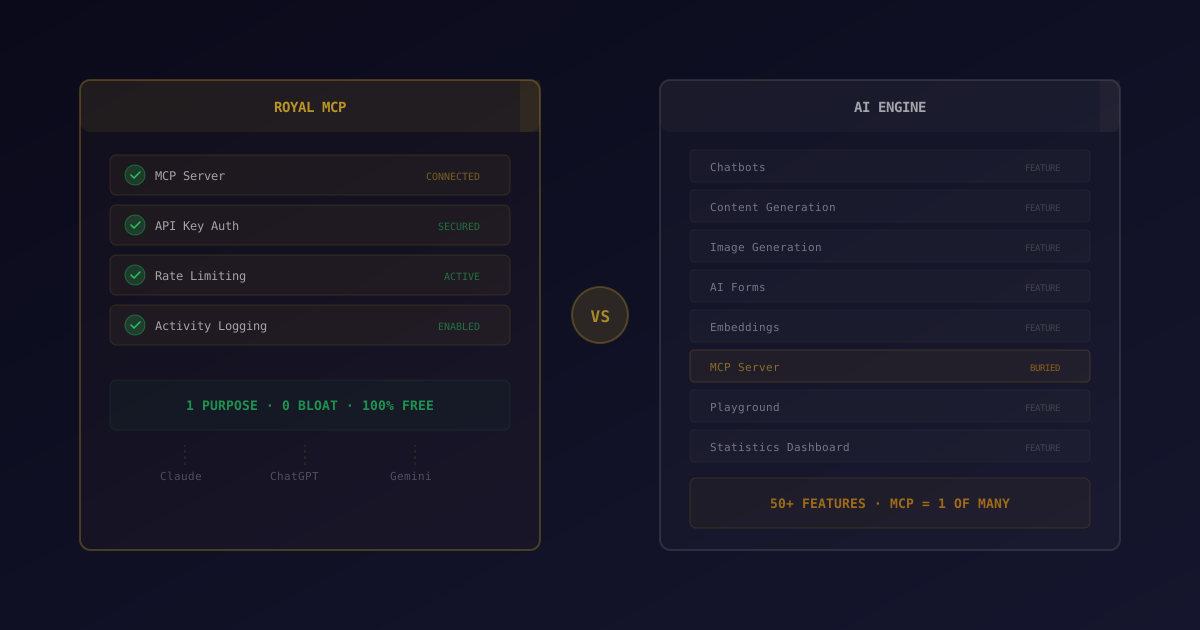
Royal MCP is a focused, security-first MCP (Model Context Protocol) server for WordPress with API-key auth, rate limiting, and activity logging across 8 AI platforms. AI Engine bundles MCP with chatbots, content generation, and 50+ AI features as part of a larger AI suite. Pick Royal MCP if you want a lightweight, hardened MCP endpoint; pick AI Engine if you also need the chatbot and generator bundle.
MCP (the Model Context Protocol) is changing how AI assistants interact with WordPress. Instead of copying and pasting between ChatGPT and your dashboard, MCP lets Claude, ChatGPT, Gemini, and other AI assistants connect directly to your WordPress site. They can read your content, create posts, manage settings, and query your database through a standardized interface.
Right now, two WordPress plugins offer MCP server functionality: Royal MCP and AI Engine. They take fundamentally different approaches. Royal MCP is a focused MCP server that does one thing well. AI Engine is an everything-in-one AI platform that added MCP as one feature among dozens.
This guide breaks down both plugins honestly so you can decide which approach fits your site.
What Is MCP and Why Does It Matter?
Before comparing plugins, it helps to understand what MCP actually does. The Model Context Protocol is an open standard created by Anthropic in November 2024 that defines how AI models communicate with external tools. Since launch, the official MCP directory has grown to 20+ official integrations including GitHub, Slack, Google Drive, Cloudflare, and Puppeteer. For example, a Claude Desktop user can connect to three MCP servers simultaneously (WordPress, GitHub, and Slack), and Claude will call tools across all three in a single conversation. Think of MCP as a universal adapter: any AI assistant that supports MCP can connect to any MCP server, regardless of who built either side.
For WordPress, this means your AI assistant can:
- Read and search your posts, pages, and custom post types
- Create and edit content directly from a conversation
- Manage categories, tags, users, and settings
- Query your database for analytics or troubleshooting
- Interact with WooCommerce products and orders
The key advantage over traditional REST API integrations is standardization. You configure the MCP connection once, and every MCP-compatible AI assistant can use it. No per-tool custom integration needed.
“The Model Context Protocol is an open standard that enables developers to build secure, two-way connections between their data sources and AI-powered tools. The architecture is straightforward: developers can either expose their data through MCP servers or build AI applications (MCP clients) that connect to these servers.”
— Anthropic, “Introducing the Model Context Protocol” (Nov 2024)
What Is Royal MCP?
Royal MCP (v1.4.6) is a free, security-first MCP server for WordPress. It does one thing: connects AI assistants to your WordPress site through the Model Context Protocol. That's it. No chatbots, no content generators, no image creators. Just a clean, focused MCP implementation.
The plugin launched on WordPress.org and has crossed 400+ active installs. It supports 8 AI platforms out of the box: Claude, OpenAI, Gemini, Groq, Azure, Bedrock, Ollama/LM Studio, and custom endpoints. It was built with a specific philosophy: MCP connectivity is a security-sensitive feature that deserves dedicated attention, not a checkbox feature tacked onto an AI suite.
Key Features
- 41+ core WordPress tools: manage posts, pages, users, media, taxonomies, and site settings
- 9 WooCommerce tools: products, orders, customers, and store stats (auto-detected if WooCommerce is installed)
- 7 GuardPress tools: security management (auto-detected if GuardPress is installed)
- 6 SiteVault tools: trigger and manage backups (auto-detected if SiteVault is installed)
- OAuth 2.0 + API key authentication: every connection requires secure auth, with individual keys you can create, name, and revoke independently
- 60 req/min rate limiting: prevent any single connection from overwhelming your server
- Full activity logging: every MCP action is recorded with timestamps, IP addresses, and the specific tool called
- Database queries: safe, read-only database access for analytics and troubleshooting
Royal MCP has no Pro tier. All 41+ core tools, 9 WooCommerce tools, 7 GuardPress tools, 6 SiteVault tools, OAuth 2.0 + API key auth, 60 req/min rate limiting, activity logging. All free across 8 AI platforms. There's no premium upsell.
What Is AI Engine?
AI Engine (v3.4.5), developed by Jordy Meow, bills itself as "The Chatbot, AI Framework & MCP for WordPress." With over 100,000 active installs and a 4.9-star rating (822 reviews), it's one of the most popular AI plugins in the WordPress ecosystem. MCP server functionality is one feature in a much larger package.
AI Engine's free version includes basic MCP server functionality covering posts, pages, media, comments, and users. It also includes role-based MCP access with admin, read-write, and read-only permission levels. The Pro tier ($49+/year) adds the "Extra MCP Tools" module with database queries, plugin/theme management, WooCommerce (25 tools), and Polylang integration.
Beyond MCP, AI Engine Pro includes a substantial AI toolkit:
- Chatbots: customizable AI chatbots, including cross-site chatbots (Pro)
- Content generation: AI-powered post writing, title generation, excerpts
- Image generation: DALL-E and Stable Diffusion integration
- AI Forms: custom AI-powered forms for your visitors (Pro)
- Embeddings & Content-Aware: vector search for your WordPress content (Pro)
- Function Calling: let AI trigger WordPress actions (Pro)
- Editor Assistant: writing assistant in the WordPress editor (Pro)
- Realtime Audio & Statistics: advanced AI interaction features (Pro)
AI Engine is a well-maintained plugin with an active developer. Jordy Meow has been building WordPress plugins for years, and the 100k+ install base speaks to the quality of the overall package. The question isn't whether AI Engine is good — it's whether you need everything it includes.
Feature-by-Feature Comparison
Here's how the two plugins stack up on the features that matter for MCP connectivity:
| Feature | Royal MCP | AI Engine |
|---|---|---|
| MCP Server | ✓ | ✓ |
| Authentication | ✓ OAuth 2.0 + API key | Role-based (admin/read-write/read-only) |
| Rate Limiting | ✓ 60 req/min | ✗ |
| Activity Logging | ✓ Full audit trail | ✗ |
| Basic MCP (posts, pages, media, comments, users) | ✓ Free | ✓ Free |
| Database Queries | ✓ Free | Pro — Extra MCP Tools ($49+/yr) |
| WooCommerce MCP Tools | ✓ Free (9 tools) | Pro — Extra MCP Tools (25 tools) |
| Plugin/Theme Management via MCP | ✗ | Pro — Extra MCP Tools |
| Chatbots | ✗ | ✓ |
| Content Generation | ✗ | ✓ |
| Image Generation | ✗ | ✓ |
| Editor Assistant | ✗ | ✓ Pro |
| Price | Free (everything) | Free (basic) / $49+/yr (Pro) |
Security: The Critical Difference
MCP gives AI assistants direct access to your WordPress database, content, and settings. That's useful, but it's also a significant attack surface. How each plugin handles security matters enormously.
Royal MCP's Approach
Royal MCP was designed security-first from day one. It supports both OAuth 2.0 and API key authentication. Individual keys you can create, name, and revoke independently. Rate limiting is set at 60 requests per minute, so a compromised or misbehaving connection can't overwhelm your server.
The activity log records every single MCP action: which tool was called, what parameters were passed, the IP address, timestamp, and which API key was used. If something goes wrong, you have a complete audit trail. You can also disable specific MCP tools you don't want exposed. If you don't need database queries, turn them off.
AI Engine's Approach
AI Engine's MCP implementation provides role-based access with admin, read-write, and read-only permission levels, which is a useful access control model. However, there's no rate limiting, no dedicated activity logging for MCP actions, and fewer options for restricting which specific tools are exposed. This isn't a criticism of AI Engine as a whole. It's a reflection of MCP being one feature among many rather than the sole focus.
An MCP server with weak authentication is essentially an open door to your WordPress database. Any plugin providing MCP access should have API key auth, rate limiting, and logging at minimum. If your current setup lacks these, reconsider your configuration.
The Bloat Factor
If all you want is MCP connectivity, installing AI Engine means loading a significant amount of code you'll never use. AI Engine's feature set includes chatbot widgets, content generation pipelines, image generation handlers, embedding engines, AI forms, and the editor copilot. All of these load infrastructure even if you never activate those features.
This isn't theoretical. Every additional feature means:
- More database tables: AI Engine creates several tables for conversations, embeddings, and logs
- More admin pages: settings screens, chatbot builders, content tools that add to your dashboard
- More code executing: hooks, filters, and initialization routines for features you don't use
- Larger attack surface: more code means more potential vulnerability points
Royal MCP, by contrast, ships only the MCP server code. No chatbot widgets, no content generators, no image handlers. The plugin's entire codebase is dedicated to doing MCP well.
Royal MCP follows the "do one thing well" principle. If you need chatbots, use a chatbot plugin. If you need content generation, use a content tool. If you need MCP, use an MCP plugin. Specialized tools tend to be more secure, more performant, and easier to debug than all-in-one solutions.
When to Choose Royal MCP
Royal MCP is the better choice when:
- MCP is your primary need. You want AI assistants connected to WordPress and that's the main goal. You don't need chatbots, content generators, or image tools built into WordPress itself.
- Security is a priority. You need per-key authentication, rate limiting, and a full audit trail of every AI action on your site. This matters especially for agency sites, client sites, or any site handling sensitive data.
- You prefer lightweight plugins. You don't want unused chatbot widgets and content generators loading on every page. Less code means fewer conflicts, faster load times, and a smaller attack surface.
- You need WooCommerce or database MCP tools without paying. Royal MCP includes these free. AI Engine requires the Pro tier.
- You manage multiple sites. A focused plugin is easier to audit, update, and maintain across a portfolio of sites.
When to Choose AI Engine
AI Engine makes more sense when:
- You want chatbots on your site. AI Engine's chatbot builder is genuinely useful. If you need a customer-facing AI chatbot and MCP connectivity, getting both from one plugin reduces complexity.
- You use AI for content creation inside WordPress. The editor copilot, content generation, and title/excerpt tools are practical features if your workflow involves writing with AI assistance directly in the WordPress editor.
- You need embeddings and vector search. AI Engine's embedding functionality lets you build semantic search for your WordPress content, which is a distinct capability no MCP plugin provides.
- You're already using AI Engine. If AI Engine is already installed and working well for your chatbot or content needs, enabling MCP is a simple toggle rather than installing another plugin.
- You want image generation. DALL-E and Stable Diffusion integration for generating images within WordPress.
AI Engine is a good plugin for what it does. If you genuinely need chatbots, content generation, AND MCP, it's a reasonable all-in-one choice. The concern is only when you install a 50-feature plugin for the one feature you actually need.
The Bottom Line
The choice between Royal MCP and AI Engine comes down to scope. If MCP connectivity is your goal (connecting Claude, ChatGPT, or Gemini to your WordPress site), Royal MCP delivers that with better security, zero bloat, and everything free. If you want MCP as part of a larger AI toolkit that includes chatbots, content generation, and image creation, AI Engine bundles all of that together.
For most site owners who just want their AI assistant to talk to WordPress, a focused tool beats a Swiss Army knife. You get better security controls, a smaller footprint, and no subscription fees for the features that matter.
Disclaimer: Royal MCP is developed by Royal Plugins. We have attempted to honestly and accurately reflect all current features and pricing for both plugins in this comparison. Feature and pricing data was gathered in April 2026 from each plugin's official WordPress.org listing. Features and pricing may change. Please verify on each plugin's official page before making a decision.