Analytics Dashboard: scores, results and what to fix
The Dashboard is the first tab at SEObolt → Analytics. It shows three scores (SEO, AI Visibility and Local SEO), your results from search and AI, the pages that bring them, and a short Worth your attention list with links to the pages that need work. The scores and search figures show on every plan; visits, leads and revenue are included from the Pro plan.
By Jameson · Updated November 2026 for SEObolt Pro 2.4.182
The three scores
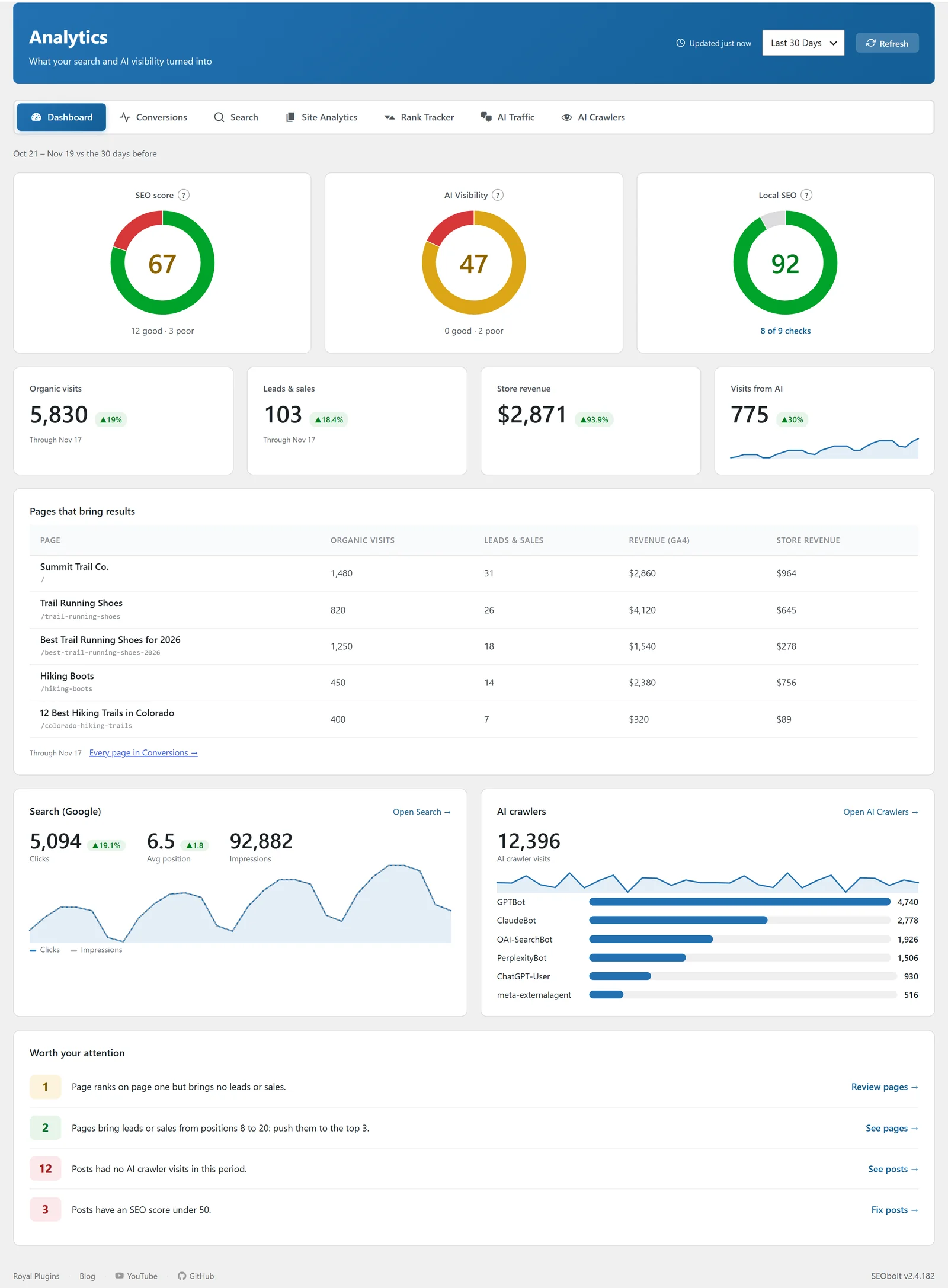
Analytics Dashboard with sample store data.
| Score | What it measures |
|---|---|
| SEO score | The average on-page SEO score of your scored content, with how many pages score good and poor. No posts scored yet means you haven’t analyzed any content; open Site Analytics and analyze all content. |
| AI Visibility | How likely your content is to be quoted by AI search, from the GEO analysis of each page. Score your content runs it if nothing is scored yet. |
| Local SEO | How many of the Local SEO checks pass, shown as checks passed out of the total. Set up Local SEO appears when Local SEO isn’t set up yet. |
Results figures
| Figure | Source | Plan |
|---|---|---|
| Organic visits | Visits from search engines, from Google Analytics | Pro+ |
| Leads & sales | Google Analytics key events from organic search visits | Pro+ |
| Revenue | WooCommerce store revenue on a store (with the Google Analytics figure beside it), otherwise Google Analytics revenue | Pro+ |
| Visits from AI | Visits from ChatGPT, Perplexity, Gemini and other assistants | Pro+ |
| Clicks from Google, Impressions, Average CTR, Average position | Google Search Console (for position, lower is better) | Every plan |
Each figure is compared with the previous period. The Dashboard shows what you have connected: with only Search Console you see the search figures, and a card offers Connect Google Analytics for visits, leads and revenue. With only Google Analytics, a card offers Connect Search Console for clicks, impressions and rankings.
Pages that bring results
This table lists the pages that bring the most organic visits, leads and revenue. Every page in Conversions opens the full table on the Conversions tab. Short summaries of the Search (Google) and AI crawlers data link to the Search and AI Crawlers tabs.
Worth your attention
Each line counts pages with one problem and links to a list of them. A line only appears when SEObolt has the data to check it:
| Line | Needs | Opens |
|---|---|---|
| Pages that rank on page one but bring no key events | Search Console and Google Analytics | Conversions, filtered to “Ranks, no key events” |
| Pages at positions 8 to 20 that already convert | Search Console and Google Analytics | Conversions, filtered to “Converts — push to top 3” |
| Recent posts no AI crawler has visited | The AI crawler log | AI Crawlers, Never crawled by AI |
| Posts with an SEO score under 50 | Scored content | Site Analytics, filtered to poor scores |
Work through Worth your attention from the top. The first two lines point at revenue: pages that get traffic but don’t convert, and pages that convert but don’t rank high enough yet.
Empty or partial Dashboard
- No search figures: connect Search Console in SEObolt → Settings → Connections (see the GSC setup guide).
- No visits, leads or revenue: connect Google Analytics 4 (see the GA4 setup guide); these figures are included from the Pro plan.
- A message about a newer SEObolt Google connection server means nothing needs to change on your site.
- Everything connected but still empty: work through Analytics not populating.