AI Crawlers: which AI bots read your pages
The AI Crawlers tab counts every request AI bots such as GPTBot, ClaudeBot, OAI-SearchBot, PerplexityBot and ChatGPT-User make to your site, by page and by day. Open it at SEObolt → Analytics → AI Crawlers. It works on every plan, needs no Google connection, and stores daily totals in your own WordPress database without IP addresses or browser details.
By Jameson · Updated November 2026 for SEObolt Pro 2.4.182
Turn on the AI crawler log
Open the Analytics settings
Go to SEObolt → Settings → Connections and find the AI Crawler Log card.
Tick “Count requests from AI crawlers”
The Log AI crawlers option starts counting from the next request. Nothing is counted for the time before it was on.
Choose how long to keep the data
Keep data for takes 7 to 365 days; the default is 90. Older days are removed once a day.
Crawlers visit on their own schedule. On a new or small site the first requests can take a few days to show up; until then the tab says no requests have been counted yet.
What the AI Crawlers tab shows
Four figures sit at the top for the selected period: AI crawls (all requests), Crawlers (how many different bots visited), Pages crawled (how many different URLs they requested) and the share of requests confirmed to come from the crawler’s operator.
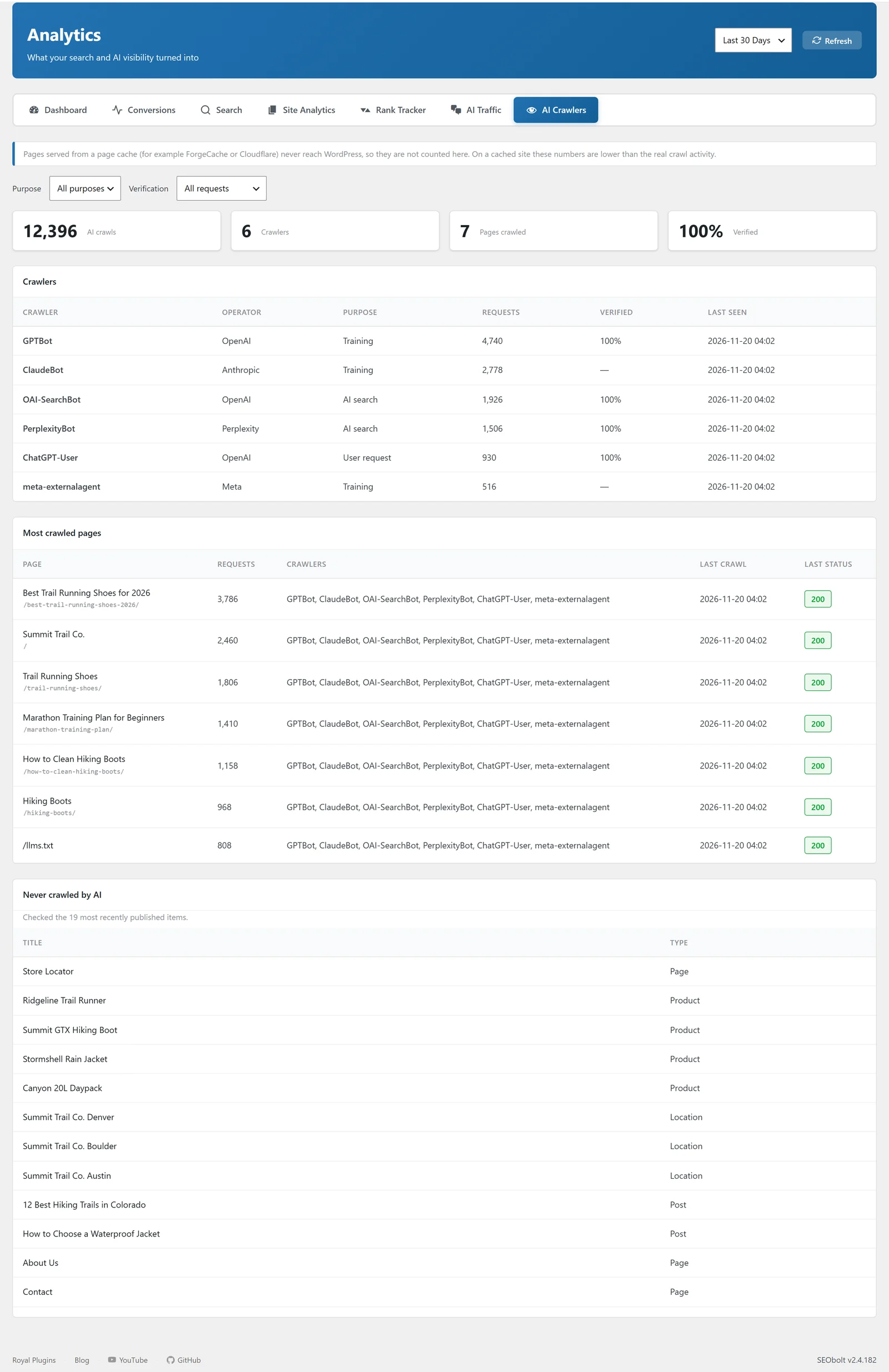
AI Crawlers tab with sample data.
| Section | What it tells you |
|---|---|
| Crawler table | Each bot with its Operator, Requests and when it was Last seen. |
| Most crawled pages | The pages AI bots read most, with the Last crawl and the Last status code your site returned. A 404 or 500 here means a bot is hitting a broken URL. |
| Never crawled by AI | Recently published posts and pages no AI bot has requested yet. Check the next batch looks at older content. |
Filter by purpose
The Purpose filter splits bots by what they read for: AI search (pages fetched to answer and cite in AI search), User request (a person asked an assistant to open your page), Training (content collected to train models) and Verification. AI search and user-request visits are the ones that can lead to citations and visits; training crawls are not.
How visits are verified
Any script can call itself “GPTBot”. SEObolt checks each request against the IP ranges the crawler’s operator publishes and labels it Verified, Not verified yet, Failed verification or No way to verify (for bots whose operator publishes no ranges). Filter by status to leave fakes out of your numbers.
Site behind Cloudflare or another proxy
If the tab says some requests came from a Cloudflare or private network address, WordPress is seeing the proxy instead of the real visitor, so those requests can’t be verified. Turn on Behind Cloudflare in SEObolt → Settings → Advanced. For another proxy or load balancer, add its addresses with the seobolt_trusted_proxies filter.
Why the numbers look lower than your server logs
Pages served from a page cache or CDN (ForgeCache, Cloudflare and similar) never reach WordPress, so SEObolt can’t count those requests. On a cached site the AI Crawlers tab shows fewer requests than really happened. The trend, the ranking of pages and the never-crawled list stay useful, because every page is undercounted in the same way.
Allow or block AI crawlers
The log only counts visits. To decide which AI bots may read your site, open SEObolt → Tools → Robots.txt. You can allow AI search and assistant crawlers while blocking AI training crawlers, block all named AI crawlers, or allow all of them. Blocking AI search crawlers stops AI answers from citing your pages; normal search engines are not affected.
AI Crawlers shows which pages AI bots read. The AI Traffic tab shows the visits, leads and sales those assistants send back.
What is stored
SEObolt keeps daily totals per bot and page in your WordPress database: no IP addresses and no full browser details. Totals older than your Keep data for setting are deleted once a day, and all of it is removed when you uninstall SEObolt with data removal turned on.