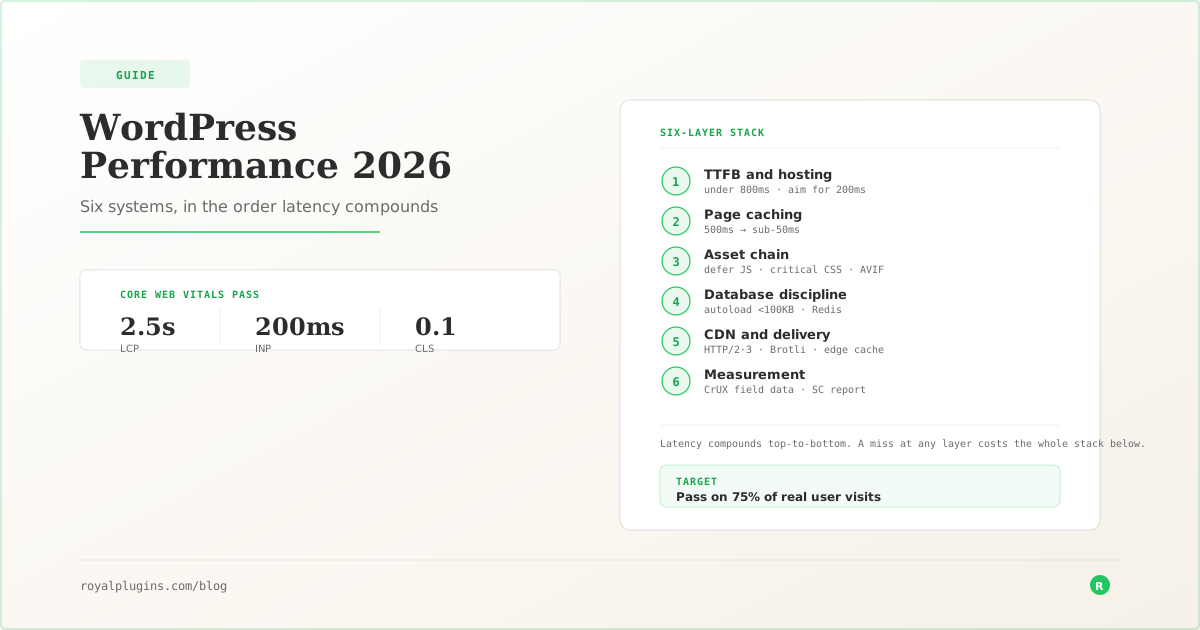
WordPress performance in 2026 comes down to six systems layered on top of each other: TTFB and hosting, page caching, the asset chain, database discipline, CDN and delivery, and measurement. Fix them in that order. The target: LCP under 2.5 seconds, INP under 200 milliseconds, CLS under 0.1, and TTFB under 800 milliseconds, hit on 75 percent of real user visits (Google's Core Web Vitals pass threshold).
Every WordPress site slower than 2.5 seconds pays a compounding cost. Google Search demotes it, Chrome deprioritizes it, and users abandon it. Here is the layered fix, in the order latency actually compounds through your stack.
The Three Numbers That Matter
Core Web Vitals are not a suggestion. They are a ranking input and a Chrome engagement signal, and the thresholds have not moved since the framework stabilized in 2024.
Largest Contentful Paint (LCP) measures how long it takes for the largest visible element in the viewport to render. Under 2.5 seconds is good. Between 2.5 and 4 seconds is “needs improvement.” Over 4 seconds is poor. LCP is dominated by two things: how fast the server responds (TTFB), and how quickly the browser can discover and download the hero image or hero text block.
Interaction to Next Paint (INP) replaced First Input Delay in March 2024. It measures the latency of the slowest user interaction on a page. Under 200 milliseconds is good. INP problems are almost always JavaScript problems: long tasks blocking the main thread, third-party scripts running unthrottled, oversized event handlers.
Cumulative Layout Shift (CLS) measures unexpected layout movement. Under 0.1 is good. CLS is almost always a size-declaration problem. Images without dimensions. Ads inserted after paint. Fonts swapping from a fallback to a webfont at different metrics.
WordPress sites fail these three metrics in reliably predictable ways, which is what makes the problem tractable. Every layer below maps to a specific vital. Core Web Vitals also feed directly into the broader on-page ranking picture covered in the WordPress Perfect SEO Score framework. Speed is not just user experience. It is a ranking signal.
Layer 1: TTFB and Hosting
Everything else depends on this one. Time to First Byte is how long the browser waits for the server to send the first byte of the HTML response. Google's assessment considers under 800 milliseconds “good” and over 1800 milliseconds “poor,” but the practical target for a competitive WordPress site is under 200 milliseconds. Every millisecond above that is subtracted from the front-end budget for hitting LCP under 2.5 seconds.
Three levers control TTFB on WordPress.
PHP version. WordPress still runs on PHP 7.4 through 8.5 in the wild. PHP 8.x is materially faster than 7.4 on the same workload, and the memory footprint is smaller. Every site still on 7.x is choosing a slower stack.
OPcache. OPcache stores compiled PHP bytecode in memory so the interpreter does not recompile every request. On a WordPress site OPcache is one of the biggest TTFB wins outside of hosting choice. Most managed WordPress hosts enable it. Some cheap shared hosts do not enable it, or set the memory limit too low for a real plugin stack.
Database round-trip cost. WordPress runs somewhere between 30 and 200 database queries per request depending on the plugin surface. If the database is on a separate host from PHP, every one of those queries pays a network round trip. The fix is either colocating them or putting an object cache like Redis in front so repeat queries never hit the database at all.
The order of investigation when TTFB is bad: check PHP version, check OPcache, check whether an object cache exists. If all three are correct and TTFB is still over 500 milliseconds, the host is the bottleneck.
Layer 2: Page Caching
A page cache turns dynamic WordPress into a static site for the requests that do not need a live database call. That is most of them. A properly configured page cache takes a 500 ms WordPress response down to under 50 ms, because it is just serving a pre-rendered HTML file.
The mechanics are simple in principle and full of edge cases in practice.
The cache stores the rendered HTML for each URL. On repeat requests, the cache layer intercepts before WordPress boots, serves the stored HTML, and skips PHP and the database entirely. On writes (new post, comment, plugin update) the cache purges affected URLs.
Where this goes wrong: logged-in users, dynamic personalization, form submissions, cart pages, and any content that varies by cookie or query string. A good page cache detects those cases and bypasses cleanly. A bad one either serves stale content to the wrong user or defeats itself by refusing to cache anything.
Most existing WordPress cache plugins have grown into multi-megabyte multi-purpose suites that also try to minify JavaScript, combine CSS, optimize images, and clean the database. That is a lot of surface area for something whose job is to hand back a file. ForgeCache exists because a page cache should be a page cache. It ships at under 200 kilobytes, does one job, and gets out of the way. Whatever cache you use, verify it is actually caching by inspecting the response headers for X-Cache: HIT or the equivalent for your stack.
Layer 3: The Asset Chain
Once the HTML arrives, the browser reads it top to bottom to figure out what else it needs to render the page. Every link tag and script tag it finds is a potential blocker.
The critical rendering path is the ordered list of resources the browser must download and execute before it can paint. On a typical WordPress page it looks like: HTML, then blocking CSS from the theme and each active plugin, then any synchronous JavaScript in the head, then finally the browser can render. Only after that first paint does the browser start pulling images, videos, and deferred scripts.
Three moves shorten this chain.
Defer or async non-critical JavaScript. Analytics, chat widgets, share buttons, A/B testing scripts. None of them need to run before first paint. Setting them to defer moves execution until after HTML parsing. Setting them to async runs them whenever they finish downloading.
Inline critical CSS, defer the rest. The CSS needed to render above-the-fold content should be in the HTML itself. Everything else should load asynchronously. Most WordPress themes ship one large stylesheet with everything in it, blocking rendering while the browser waits for CSS the visitor may never scroll to.
Ship images in modern formats with explicit dimensions. AVIF is meaningfully smaller than WebP at the same quality, and WebP is meaningfully smaller than JPEG. Explicit width and height attributes fix CLS. Lazy-loading below-the-fold images is now native in every current browser via loading="lazy". For the deeper cut on image handling, see the WordPress Image SEO Optimization guide.
Layer 4: Database Discipline
The WordPress database is a general-purpose SQL store being asked to do specific things at high volume. Most performance problems here are self-inflicted.
Autoloaded options. WordPress loads every option marked autoload=yes on every request. Plugins that store large blobs (JSON logs, serialized settings, tracking data) in autoloaded options make every page slow. A healthy autoload payload is under 100 kilobytes. It is not unusual to find sites carrying 5 or 10 megabytes.
Object caching. Redis or Memcached in front of the database turns repeat queries into memory hits. On a busy site this is the difference between the database being the bottleneck and being invisible. Most decent managed WordPress hosts include Redis.
Query cost from plugins. Each plugin adds queries. Some plugins add a lot. Query Monitor is the tool that shows you what is running. When a page ships 200 queries, it is because 4 or 5 plugins are each running 20 to 40 of them. The way to prevent this problem is to vet plugins before they land in production. The WordPress Plugin Audit Checklist is the 8-point framework for doing that.
Layer 5: CDN and Delivery
A CDN moves your static assets closer to the visitor and offloads bandwidth from the origin server. On a WordPress site, “static assets” means images, CSS, JavaScript, fonts, and increasingly the cached HTML itself.
The delivery layer also controls three optimizations a lot of WordPress site owners miss.
HTTP/2 or HTTP/3. Both allow multiplexed requests over a single connection, cutting the head-of-line blocking that HTTP/1.1 used to force. If your host is still on HTTP/1.1, every additional resource on the page pays a serial cost.
Brotli compression. Brotli is meaningfully smaller than gzip for text-based assets. Most modern CDNs and web servers support it. Most WordPress sites are still shipping gzip because nobody flipped the switch.
Correct cache headers. Static assets should have Cache-Control: max-age=31536000, immutable. Cached HTML should have short TTLs and appropriate Vary headers so it does not get served to the wrong user. Use the Royal Plugins HTTP Headers Checker to inspect what your site is actually sending. Header misconfiguration is one of the most common invisible performance problems. Cloudflare's “Block AI Bots” toggle silently breaking MCP connectors is one recent example of a CDN setting quietly changing what your site delivers.
Layer 6: Measurement
Everything above is worthless if you cannot measure the delta. Two data sources matter.
Field data is what your real users experience, aggregated by Google's Chrome User Experience Report (CrUX). Google Search Console surfaces it under the Core Web Vitals report. This is what actually affects your ranking.
Lab data is what a synthetic test like PageSpeed Insights or WebPageTest measures against a controlled network profile. Useful for diagnosing specific issues. Not useful for gauging whether your site “passes” Core Web Vitals in the wild.
Set the CrUX data as the source of truth. Use lab tools to diagnose the field failures.
What Good Looks Like
At the end of a full pass, a WordPress site should hit these numbers on 75 percent of real user visits:
- LCP: under 2.5 s
- INP: under 200 ms
- CLS: under 0.1
- TTFB: under 800 ms (Google's threshold), aim for under 200 ms
- Total page weight: under 1.5 MB
- Total blocking time: under 200 ms
The first three are Google's Core Web Vitals pass thresholds. Miss them and your site ranks below sites that hit them. The rest are supporting metrics that make hitting the first three sustainable at scale.
The sites that get here treat performance as an ongoing measurement problem, not a one-time optimization project. They review CrUX data monthly. They audit their plugin stack quarterly. They refuse to install anything that adds more than 50 kilobytes of blocking JavaScript.
Everything in this guide is a means to that discipline.