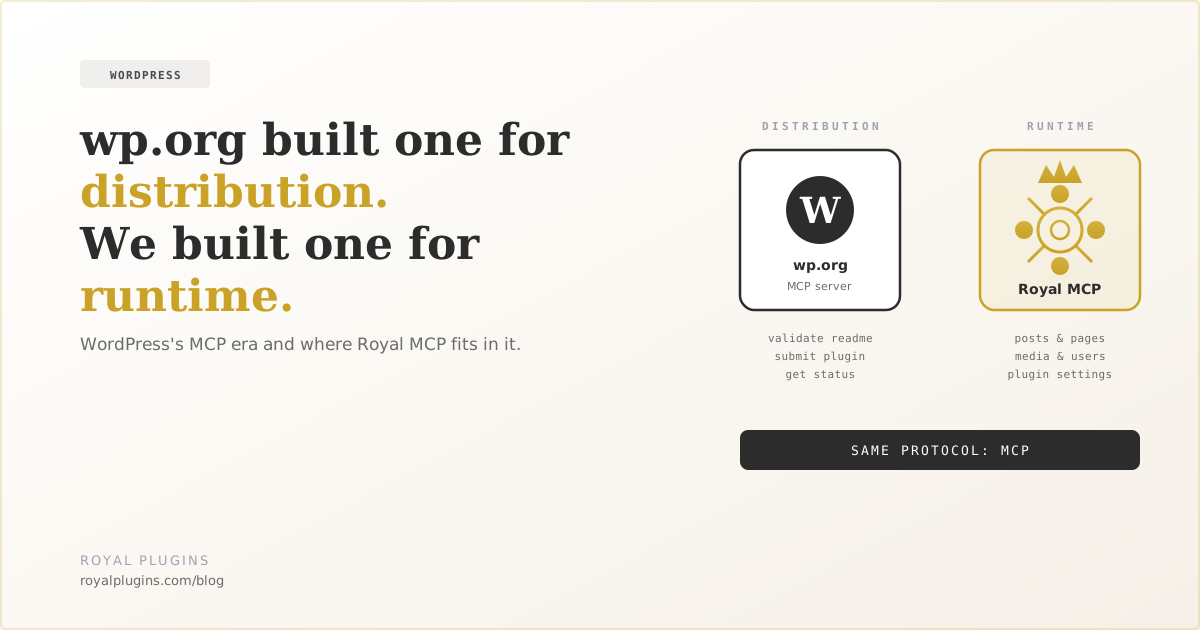
WordPress.org launched its own MCP server on March 20, 2026, an AI bridge to the plugin directory itself. Royal MCP shipped to wp.org in January 2026, an AI bridge to a running WordPress site. Same protocol, different scopes: wp.org's MCP handles distribution (submitting plugins, validating readmes, checking review status); Royal MCP handles runtime (managing posts, settings, content on a live install). They're complementary infrastructure for the AI-WordPress workflows of 2026.
For most of 2025, "WordPress + AI" meant copy-pasting between ChatGPT and your dashboard. The first wave of MCP plugins appeared in late 2025, with servers that let Claude, Cursor, and other AI tools talk directly to a WordPress install through the Model Context Protocol. Then in March 2026, WordPress.org itself shipped an MCP server. That announcement reframed the whole space.
The second server doesn't compete with the first. It targets a different problem entirely. Once you see the split, the AI-WordPress stack of 2026 stops looking fragmented and starts looking like a coherent two-layer system.
Distribution Layer vs. Runtime Layer
The two MCP servers operate at different points in the WordPress lifecycle.
| WordPress.org MCP | Royal MCP | |
|---|---|---|
| Layer | Distribution | Runtime |
| Controls | The plugin directory pipeline | A live WordPress site |
| Used by | Plugin authors submitting to wp.org | Anyone running AI against their site |
| Tools | Validate readme, get plugin status, submit plugin | 41+ across posts, pages, media, users, options, plus integrations |
| Shipped | March 20, 2026 (Konstantin Obenland, Automattic) | January 2026 (Royal Plugins) |
| Install | npx -y @wporg/mcp |
wp plugin install royal-mcp --activate |
“The Model Context Protocol is an open standard that enables developers to build secure, two-way connections between their data sources and AI-powered tools.”
— Anthropic, “Introducing the Model Context Protocol” (Nov 2024)
What WordPress.org's MCP Server Does
WordPress.org's MCP server, announced on the Make WordPress Meta blog, ships three official tools and is built on top of WordPress core's Abilities API plus the MCP Adapter:
- Validate Readme: checks
readme.txtfor errors, warnings, and suggestions before submission - Get Plugin Status: pulls current review status and reviewer feedback for plugins under review
- Submit Plugin: uploads new submissions or updates to plugins still in review
For plugin authors, that turns a 30-minute submission ritual (zip, upload, refresh wp.org/plugins/developers/ until the review status changes) into a conversation with Claude. The submission policy still applies ("all submissions through MCP undergo identical review as web submissions") but the friction drops significantly.
WordPress.org's MCP server doesn't touch your live site. It only talks to wp.org's plugin submission backend. If you want AI to manage your live install (create posts, configure plugins, query content) you need a site-side MCP server like Royal MCP.
What Royal MCP Does
Royal MCP shipped to the WordPress.org plugin directory in January 2026, among the first MCP plugins on the directory and two months before wp.org's own MCP server. It's a security-first MCP server for live WordPress sites. Once installed, AI assistants can read your posts, create content, manage media, query your database (with safety controls), and interact with WooCommerce, GuardPress, and SiteVault when those plugins are present. Every connection requires API key or OAuth authentication, requests are rate-limited at 60 per minute per IP, and every interaction is logged.
The latest release (1.4.7, April 2026) added two tools that close the loop on AI-driven site management. wp_get_plugin_settings reads any plugin's stored options. Sensitive keys like API tokens, secrets, and passwords are automatically redacted before they leave the server. wp_update_option writes back to allowlisted options behind a three-gate security model: admin toggle off by default, a runtime allowlist plugin authors opt into via a single filter call, and a hard denylist for sensitive option names that overrides everything else. The point is that AI can help you configure your site without ever seeing the credentials you've already stored.
What the Two-Layer Stack Enables in 2026
Until March 2026, AI tools could touch one layer of the WordPress lifecycle but not the other. Now both ends are open through the same protocol:
- Conversational plugin development. Claude generates plugin code, validates the readme via wp.org's MCP, submits to the directory, then polls for review status. All from inside the editor.
- Conversational site management. The same Claude session can hop to your live site through Royal MCP and configure the plugin you just shipped, without ever opening wp-admin.
- End-to-end release flow. Every plugin update becomes one conversation: write code, validate, submit, install on a test site, verify it loads cleanly, push to production. Each step calls a different MCP server. The AI doesn't care which.
The reason this works is that MCP is open and consistent. Whether you're calling wp.org's directory tools or Royal MCP's site tools, the AI talks JSON-RPC over the same transport. Building servers for both sides of the lifecycle becomes a one-time investment instead of a per-tool integration sprawl.
What To Do This Week
If you ship plugins to wp.org, install @wporg/mcp and start every release with "validate the readme and tell me what to fix." Even one rejection avoided is more value than the install took to set up. The same primitive that powers wp.org's MCP (the Abilities API in WordPress 6.9+) is also the path forward for plugins that want their own functionality to be AI-native.
If you run WordPress sites and an AI assistant is already part of how you work, install Royal MCP from the directory and start handing the manual parts of admin to Claude. The runtime side of the AI-WordPress stack has been open since January 2026 (one of the early site-side MCP servers in the directory) and you don't need to wait for core to ship its own site-level MCP server to start using it.
Sources
- Plugin Directory MCP Server — Konstantin Obenland, Make WordPress Meta (March 2026)
- Using the WordPress.org MCP Server — Plugin Handbook
- From Abilities to AI Agents — WordPress Developer Blog (February 2026)
- Abilities API in WordPress 6.9 — Make WordPress Core (November 2025)
- Royal MCP on the WordPress Plugin Directory