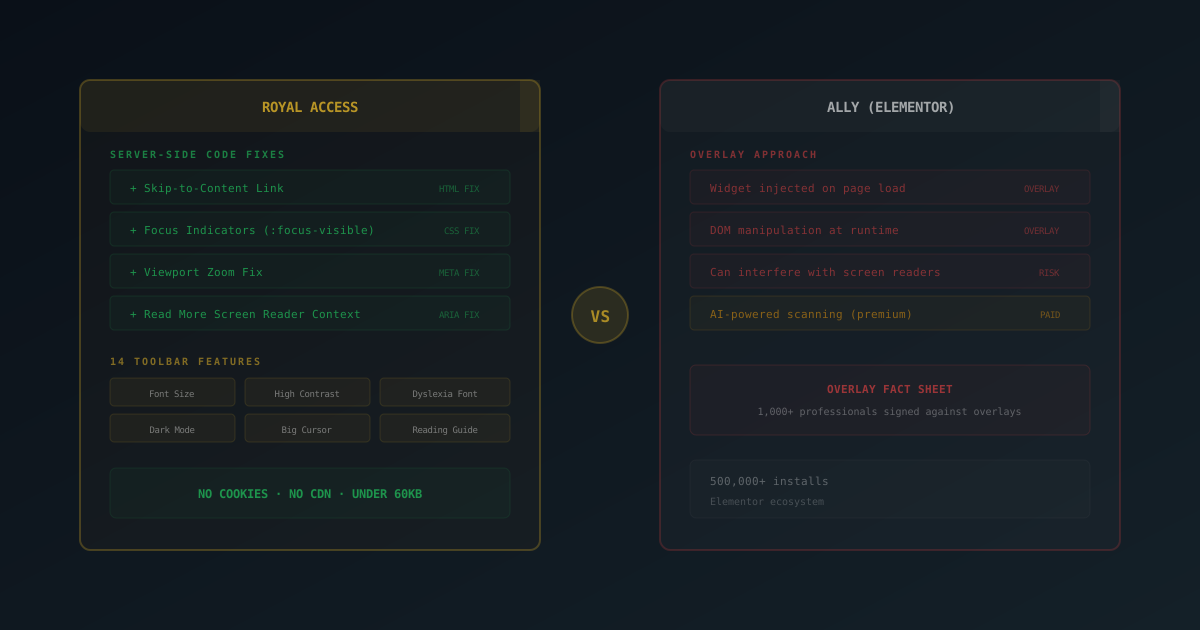
Royal Access is a self-contained WordPress accessibility plugin with a 14-control user toolbar and four server-side WCAG code fixes. No external account, no CDN. Ally (by Elementor, formerly Pojo Accessibility) adds a WCAG violation scanner but requires an Elementor account and loads external CDN resources. For code-level compliance, server-side fixes beat widget overlays.
The European Accessibility Act deadline is approaching, WCAG requirements are tightening, and more businesses than ever are taking web accessibility seriously. The problem is that most WordPress accessibility plugins fall into two camps: overlays that paint over the problem, and manual audit tools that require accessibility expertise most site owners don't have.
Two popular options for WordPress are Royal Access and Ally (by Elementor, formerly One Click Accessibility). They take very different approaches to the same problem. Royal Access is fully self-contained — a user toolbar plus server-side code fixes, no external services required. Ally combines a WCAG violation scanner with a floating widget, but requires an Elementor account and external CDN resources.
The distinction matters more than most people realize: self-contained code-level fixes vs. external-service-dependent tools. Here's why.
Why Are Accessibility Overlays a Problem?
Before comparing these two plugins, we need to address the elephant in the room: accessibility overlays have a credibility problem.
Over 1,000 accessibility professionals have signed the Overlay Fact Sheet, a public statement condemning overlay widgets as an inadequate solution for web accessibility. According to a WebAIM Million 2024 study, 95.9% of home pages had detectable WCAG 2 failures (with an average of 56.8 errors per page), and overlay-equipped sites showed no statistically significant improvement over sites without them. The FTC has taken enforcement action against overlay companies for deceptive practices; for example, accessiBe's 2023 settlement with the FTC reportedly exceeded $1 million. The National Federation of the Blind issued a public statement against AccessiBe, one of the largest overlay providers.
The core issue is straightforward: overlays manipulate the DOM with JavaScript after the page loads. They don't fix the underlying HTML. This creates several problems:
- Screen readers get confused. Assistive technology reads the original HTML. When an overlay rewrites ARIA attributes and DOM structure on the fly, the page becomes less predictable, not more.
- Changes are fragile. Any page update, theme change, or JavaScript conflict can break the overlay's fixes. The underlying accessibility issues remain.
- AI-injected ARIA is unreliable. Some overlays use AI to guess ARIA labels and roles. These guesses are frequently wrong, creating new barriers instead of removing them.
- Legal risk isn't reduced. Courts have consistently ruled that overlays don't satisfy ADA or EAA requirements. Several companies using overlays have lost accessibility lawsuits.
The Web Accessibility Initiative (W3C WAI) does not endorse overlays as a compliance solution. Multiple studies show that overlay widgets can actively interfere with screen reader navigation, especially when they modify ARIA roles and live regions.
“Web accessibility overlays are automated solutions that claim to make websites accessible. These products do not live up to their claims and can actually make websites less usable for people with disabilities.”
— Overlay Fact Sheet, signed by 1,000+ accessibility professionals, overlayfactsheet.com
What Is Royal Access?
Royal Access (v1.0.3) is a free, fully self-contained WordPress accessibility plugin that takes a two-layer approach: a user-controlled toolbar for personal preferences, and automatic server-side fixes that modify the actual HTML output through WordPress hooks. No external services, no account required, no CDN — everything runs on your own server.
Toolbar Features (14 Controls)
The toolbar gives visitors control over how they experience your site:
- Font size adjustment: increase or decrease text size across the page
- High contrast mode: enhanced contrast for low vision users
- Dark mode: inverted color scheme to reduce eye strain
- Dyslexia-friendly font: switches to OpenDyslexic for easier reading
- Line spacing: adjust space between lines of text
- Letter spacing: increase space between characters
- Word spacing: increase space between words
- Highlight links: make all links visually obvious
- Big cursor: enlarged mouse pointer for easier tracking
- Stop animations: pause all CSS and JavaScript animations
- Hide images: remove images for distraction-free reading
- Monochrome: grayscale mode for color sensitivity
- Reading guide: horizontal bar that follows the cursor for line tracking
- Highlight focus: enhanced visible focus indicators on interactive elements
Automatic Server-Side Fixes (4 Code Fixes)
This is where Royal Access fundamentally differs from overlay approaches. These fixes modify the actual HTML output through WordPress hooks, not JavaScript DOM manipulation:
- Skip to content link: adds a hidden skip link for keyboard users (WCAG 2.4.1)
- Focus indicators: ensures all interactive elements have visible focus outlines (WCAG 2.4.7)
- Viewport zoom: prevents themes from disabling pinch-to-zoom on mobile (WCAG 1.4.4)
- Read more context: adds screen-reader-only text to generic "Read more" links so assistive technology users know where the link leads (WCAG 2.4.4)
Compliance Tools
- Contrast checker: test foreground/background color combinations against WCAG AA and AAA standards
- Accessibility statement generator: create a compliant accessibility statement for your site
Royal Access stores user preferences in localStorage only: no cookies, no external API calls, no CDN dependencies, no tracking. The entire plugin runs locally on your server. Total footprint: under 60KB.
What Is Ally?
Ally, by Elementor (formerly "One Click Accessibility" with the slug pojo-accessibility), is one of the most installed accessibility plugins in the WordPress ecosystem with over 500,000 active installations (2.9 stars, 153 reviews). It's more than just an overlay widget — it actually includes three main tools:
- Ally Assistant: a URL scanner that detects 180+ WCAG 2.1 AA violations with guided remediation suggestions. The scanner itself is free, but AI-powered remediation suggestions use credits (paid).
- Usability Widget: a floating toolbar visitors can click to adjust font size, contrast, negative contrast, link highlighting, grayscale, readable font, and more
- Statement Generator: create an accessibility statement for your site
Ally's paid features include AI-powered remediation suggestions (uses credits), screen reader improvements, white labeling, usage analytics, and a language selector in the widget.
One important consideration: Ally requires an Elementor account connection and loads CDN resources from Elementor's servers. Recent user reviews (reflected in the 2.9-star rating) have flagged GDPR concerns from hidden Google Analytics tracking within the CDN JavaScript, site-crashing caching bugs, and poor support response times.
Ally requires an Elementor account to function and loads external CDN resources. For sites concerned about data sovereignty, GDPR compliance, or third-party dependencies, this is a significant consideration. Recent reviews have reported hidden analytics tracking in Ally's CDN scripts.
Feature Comparison
| Feature | Royal Access | Ally (Elementor) |
|---|---|---|
| Toolbar Controls | 14 options | 7 options |
| Server-Side Code Fixes | ✓ 4 automatic fixes | ✗ Widget-based |
| Skip Link | ✓ Server-side | ✗ |
| Focus Indicators | ✓ Server-side | ✗ |
| Viewport Zoom Fix | ✓ Server-side | ✗ |
| Dyslexia Font | ✓ | ✗ |
| Reading Guide | ✓ | ✗ |
| Stop Animations | ✓ | ✗ |
| Contrast Checker | ✓ | ✗ Free |
| Statement Generator | ✓ | ✓ |
| WCAG Scanner (180+ violations) | ✗ | ✓ Free (AI fixes are paid) |
| AI Remediation Suggestions | ✗ | Paid (uses credits) |
| White Labeling | ✗ | Paid |
| Cookies | None (localStorage) | CDN loads external scripts |
| External Dependencies | None (fully self-contained) | Requires Elementor account + CDN |
| File Size | Under 60KB | Larger |
| Price | Free (everything) | Free / Premium for AI |
Code Fixes vs. Widget Layer: Why It Matters
The fundamental difference between Royal Access and Ally is how they deliver accessibility improvements to the browser.
Royal Access: Fix the Source
Royal Access hooks into WordPress's output pipeline using wp_head, wp_footer, and content filters. When a page is generated, the HTML that reaches the browser already contains the skip link, the focus indicators, the viewport meta fix, and the contextual read-more text. Screen readers see these fixes as native page elements because that's exactly what they are.
The toolbar features use CSS classes and minimal JavaScript, but the critical WCAG fixes are baked into the HTML before the page even finishes loading. This means:
- Fixes work even if JavaScript fails or is blocked
- Screen readers encounter real HTML elements, not injected DOM nodes
- Search engines see the accessible markup in the source
- No layout shift or flash of unstyled content from delayed JavaScript
Ally: Scanner + Widget Layer
Ally has a more sophisticated approach than a pure overlay: its Ally Assistant scanner can detect 180+ WCAG 2.1 AA violations with guided remediation, which is genuinely useful for identifying problems. However, the usability widget's adjustments happen through JavaScript after the page loads. The original HTML remains unchanged.
The scanner finds the issues, but the AI-powered fix suggestions cost money (credits). And the widget-based toolbar features like font size and contrast adjustments still operate as a client-side overlay rather than server-side fixes. For structural fixes like skip links and focus indicators, the overlay approach is inherently limited because the fix disappears if JavaScript doesn't execute.
Approximately 1-2% of web users have JavaScript disabled or blocked. For these users, widget-based accessibility features don't exist. Server-side fixes work regardless of the browser's JavaScript state because they're part of the HTML itself.
Privacy and Performance
Accessibility plugins run on every page of your site, which makes their privacy and performance characteristics particularly important.
Royal Access
- No cookies. User preferences are stored in localStorage, which stays in the browser and is never transmitted to any server.
- No external calls. Zero CDN requests, no analytics tracking, no third-party API calls. Everything runs on your own server.
- Under 60KB total. CSS, JavaScript, and the OpenDyslexic font included. Smaller than a typical hero image.
- No GDPR banner needed. Since there are no cookies and no personal data collection, the plugin doesn't trigger additional GDPR consent requirements.
Ally
Ally requires an Elementor account connection and loads CDN resources from Elementor's servers on every page. Recent user reviews have flagged that the CDN JavaScript includes hidden Google Analytics tracking, which raises GDPR concerns since visitors aren't informed of this data collection. The AI-powered remediation features involve additional external API calls.
For sites subject to GDPR, CCPA, or similar privacy regulations, the key question is whether the accessibility plugin introduces external data processing. Royal Access avoids this entirely by design: zero external calls, zero CDN dependencies. Ally introduces external dependencies that may require additional consent disclosures.
When to Choose Royal Access
- You want real code fixes, not just a widget. Server-side HTML modifications create genuine accessibility improvements that screen readers, search engines, and auditors can verify in the page source.
- Privacy matters and you want no external dependencies. No cookies, no external calls, no CDN, no account required, no tracking. Royal Access is fully self-contained on your server. Important for GDPR-conscious sites, healthcare, education, and government.
- You're preparing for EAA compliance. Code-level fixes align with how compliance assessors evaluate accessibility. They look at the actual HTML output, not whether a widget is present.
- You need more toolbar options. 14 controls vs. 7. Dyslexia font, reading guide, stop animations, letter/word spacing, and big cursor are features many users depend on.
- You want a contrast checker and statement generator. Built-in tools to check color combinations and generate compliance documentation.
- Performance is a priority. Under 60KB, no external requests, no layout shift from delayed widget loading.
When to Choose Ally
- You need a WCAG violation scanner. Ally Assistant's scanner detects 180+ WCAG 2.1 AA violations with guided remediation, which is a more sophisticated diagnostic tool than what Royal Access offers. If identifying every specific violation on your site is the priority, this is Ally's strongest feature.
- You're deep in the Elementor ecosystem. If you use Elementor for everything and already have an Elementor account, Ally integrates naturally into your workflow.
- You want AI-powered fix suggestions. Ally's AI remediation suggestions (paid credits) can help you understand how to fix specific accessibility issues, even though the fixes still need to happen in your theme and content.
- You already have Ally installed and working. If it's serving your users well and you're not facing compliance audits or GDPR concerns from the external dependencies, switching may not be worth the disruption.
The Bottom Line
The accessibility industry has been clear: overlays are not a substitute for fixing the actual code. Widget-based tools have their place. Giving users control over font size and contrast is genuinely helpful. But the structural fixes that matter for WCAG compliance need to happen in the HTML itself.
Royal Access is fully self-contained: it gives users a 14-control toolbar for personal preferences and applies real, verifiable server-side code fixes through WordPress hooks. No cookies, no external calls, no account required, under 60KB. Ally has a more sophisticated scanner (180+ WCAG violation detection) and AI-powered fix suggestions, but the AI fixes cost money, the widget doesn't modify the underlying HTML, and it requires an Elementor account with external CDN dependencies that raise GDPR questions.
For sites that take accessibility seriously, whether for legal compliance, ethical responsibility, or reaching a wider audience, the approach that fixes the actual code is the approach that holds up to scrutiny.
Disclaimer: Royal Access is developed by Royal Plugins. We have attempted to honestly and accurately reflect all current features and pricing for both plugins in this comparison. Feature and pricing data was gathered in April 2026 from each plugin's official WordPress.org listing. Features and pricing may change. Please verify on each plugin's official page before making a decision.