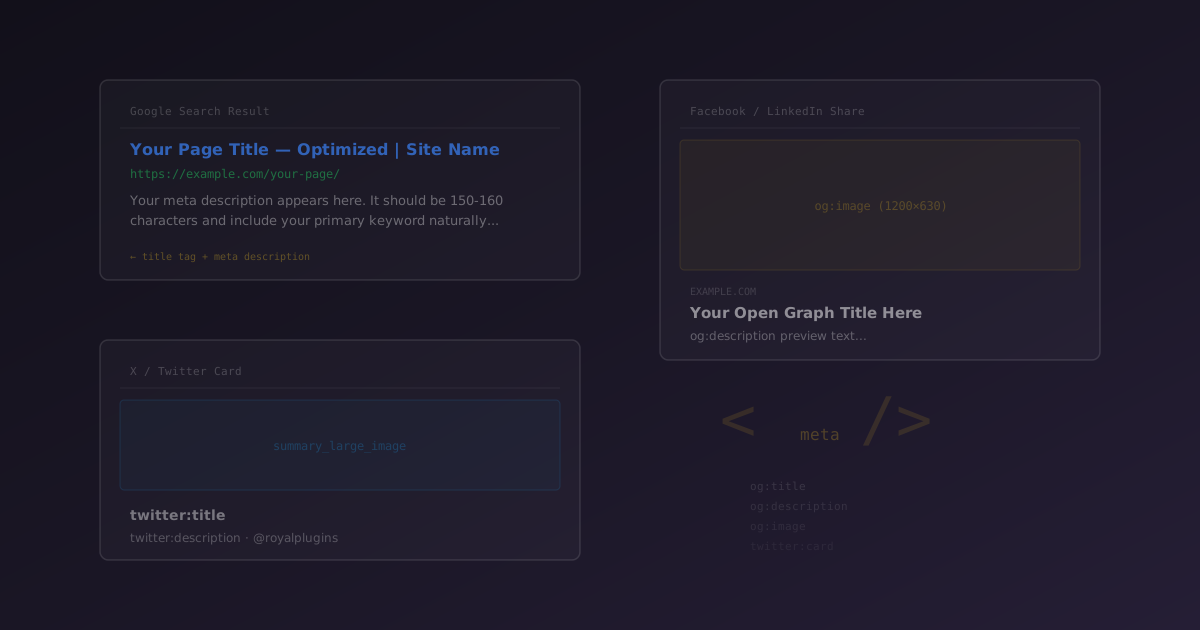
You publish a blog post. It ranks on page one. Someone clicks through from Google — but the title they saw was auto-generated nonsense. Meanwhile, a teammate shares the same post on LinkedIn and the preview shows your site logo instead of the article image, with a description pulled from your footer navigation.
These are meta tag problems. And they cost you clicks every single day.
Meta tags are invisible HTML elements that tell Google what to display in search results and tell social platforms what to show in link previews. Getting them right is one of the highest-leverage SEO tasks you can do — it takes minutes per page and directly impacts your click-through rate from every channel.
The Three Types of Meta Tags That Matter
WordPress outputs basic <title> tags by default, but it does nothing for social media. An SEO plugin fills this gap. Here is what each tag type controls:
| Tag Type | Where It Shows | What It Controls |
|---|---|---|
| SEO Meta | Google, Bing, DuckDuckGo | Title (blue link), description (snippet), canonical URL, robots directives |
| Open Graph | Facebook, LinkedIn, Discord, Slack, iMessage | Preview title, description, and image in link cards |
| Twitter Cards | Twitter/X | Card type (small or large image), title, description, image |
Without explicit tags, each platform guesses. Google might pull text from your H1 or even your navigation. Facebook might grab the first image it finds — which could be a 50px icon. Twitter might show a tiny square thumbnail instead of a large banner. You lose control of your first impression.
Why Meta Tags Directly Impact Traffic
Search Click-Through Rate
Your Google ranking determines how often your page appears. Your meta title and description determine how often people click. Two pages at position 5 can have wildly different click-through rates based entirely on how compelling their snippet looks.
A well-crafted meta description with a clear value proposition and call-to-action ("Learn the exact setup in 5 minutes") outperforms a generic auto-generated excerpt every time.
Social Sharing Engagement
Links shared on LinkedIn with a large preview image and clear title get up to 3x more engagement than bare URLs. On Facebook, posts with rich link previews are prioritized by the algorithm over plain text posts with URLs.
Open Graph tags are the difference between a professional-looking share card and a broken preview that makes your content look untrustworthy.
Brand Consistency
Without meta tags, every platform creates its own version of your content preview. Your page might have three different titles across Google, Facebook, and Twitter. With proper tags, you control the message everywhere.
Keep meta titles under 60 characters and meta descriptions between 150-155 characters. Anything longer gets truncated with an ellipsis. SEObolt includes a real-time character counter that turns green, yellow, or red as you type.
SEO Meta Tags: Controlling Your Google Snippet
Meta Title
The meta title is the blue clickable link in search results. It is the single most important on-page SEO element for click-through rate. Best practices:
- Front-load your keyword — Put the primary keyword near the beginning
- Include your brand — Append your site name with a separator (e.g., "Best Running Shoes | My Store")
- Make it unique per page — Duplicate titles confuse search engines and users
- Stay under 60 characters — Google truncates longer titles
With SEObolt, you set a global title format using template variables like %post_title% - %site_name%, then override it on any individual post. The plugin handles the output automatically — no theme editing required.
Meta Description
The description appears as the gray snippet below the title in search results. Google does not use it as a ranking factor, but it heavily influences whether someone clicks your result or the one below it.
- Include your focus keyword — Google bolds matching terms in the snippet
- Add a call-to-action — "Learn more," "See the full guide," "Get started free"
- Describe the value — Tell the reader what they will get from clicking
- 150-155 characters — The sweet spot before truncation
Google sometimes generates its own snippet if it thinks your meta description does not match the user's search query. This is normal behavior. Writing a strong, relevant description reduces the chances of being overridden.
Title Separator
The character between your post title and site name is a small detail that affects readability. Common options:
| Separator | Example |
|---|---|
| (pipe) |
Best Running Shoes | My Store |
- (dash) |
Best Running Shoes - My Store |
» (double angle) |
Best Running Shoes » My Store |
Pick one and use it consistently across your entire site. SEObolt lets you set this globally in Settings > General > Title Separator.
Open Graph: Making Social Shares Look Professional
Open Graph is a protocol created by Facebook in 2010. It has since been adopted by virtually every platform that displays link previews: LinkedIn, Discord, Slack, iMessage, Pinterest, WhatsApp, and Telegram.
The core OG tags SEObolt outputs for every page:
<meta property="og:title" content="Your Page Title">

<meta property="og:description" content="A compelling description">

<meta property="og:image" content="https://example.com/image.jpg">

<meta property="og:url" content="https://example.com/page/">

<meta property="og:type" content="article">

<meta property="og:site_name" content="Your Site Name">
The OG Image Is Everything
On social media, the image is what catches attention — not the title or description. A post with a compelling 1200x630px image gets dramatically more engagement than one with a tiny fallback thumbnail or no image at all.
| Platform | Minimum Size | Recommended Size |
|---|---|---|
| 200x200px | 1200x630px | |
| 200x200px | 1200x627px | |
| Discord / Slack | 200x200px | 1200x630px |
In SEObolt > Settings > Social, upload a default Open Graph image. This acts as a fallback for any post or page that does not have a featured image, ensuring your links never appear without a preview image on social media.
Per-Post Customization
SEObolt defaults to using your post title, meta description, and featured image for OG tags. But you can override each one individually in the SEObolt panel > Social tab on any post or page. This is useful when you want a shorter, punchier title for social sharing than what you use for Google.
Twitter Cards: Standing Out on X
Twitter/X has its own meta tag format called Twitter Cards. While Twitter can fall back to Open Graph tags, using dedicated twitter: tags gives you more control — particularly over the card type.
Card Types
| Type | Image Display | Best For |
|---|---|---|
summary |
Small square thumbnail (120x120) | Homepages, profiles, short updates |
summary_large_image |
Large banner image (1200x628) | Blog posts, articles, product pages |
Large images consistently outperform small thumbnails for engagement on Twitter/X. Set summary_large_image as your default card type in SEObolt > Settings > Social and forget about it.
SEObolt also lets you set your Twitter @handle globally, which gets added as a twitter:site tag to associate your content with your Twitter account.
Robots Meta & Canonical URLs
Beyond titles and descriptions, two advanced meta directives help you control how search engines crawl and index your site:
Robots Meta Tags
These tell Google whether to index a page and whether to follow its links:
- noindex — Hides the page from search results. Use for thank-you pages, login pages, tag archives, and thin content pages.
- nofollow — Tells search engines not to follow links on the page. Rarely needed on your own content.
- noarchive — Prevents Google from showing a cached version of the page.
In SEObolt, you can set robots directives globally by post type (e.g., noindex all tag archives) and override per-post in the Advanced tab.
Canonical URLs
The canonical tag tells search engines which URL is the "official" version of a page when duplicate or near-duplicate content exists. SEObolt automatically sets the canonical to each page's permalink. You only need to override it for syndicated content or when you intentionally have similar pages that should point to one primary version.
Running multiple SEO plugins (Yoast + SEObolt, Rank Math + SEObolt, etc.) causes duplicate meta tags in your source code. This confuses search engines and social platforms. Deactivate any other SEO plugin before activating SEObolt.
Troubleshooting Common Meta Tag Issues
Social Share Shows Wrong Image or Title
- Clear the platform cache: Facebook — use the Sharing Debugger and click "Scrape Again." LinkedIn — append
?v=2to your URL when sharing. Twitter — post the URL in a draft tweet to preview the card. - Check image dimensions — Must be at least 200x200px (1200x630px recommended).
- Look for duplicate OG tags — View page source and search for
og:title. If you see it twice, another plugin or your theme is outputting competing tags.
Title/Description Not Appearing in Google
- Be patient — Google does not always pick up new meta tags immediately after publishing.
- Google may override — Google sometimes generates its own snippet if it thinks yours does not match the search query.
- Check for noindex — A page set to noindex will not appear in search results at all.
- Verify in source — Right-click your page, View Source, and search for
<title>to confirm your tags are present. Or use our Meta Tag Checker to instantly audit all your tags at once.
You can also preview exactly how your page will appear in Google results with our SERP Preview Tool — it shows you the title, URL, and description as Google renders them.
Social Image Not Loading
- Image must be publicly accessible — Not behind a login, staging password, or CDN restriction.
- Test the URL directly — Open the image URL in an incognito browser window.
- Set a fallback — Configure a Default OG Image in SEObolt settings so no page is ever shared without an image.
Meta Tag Best Practices Checklist
- Write unique titles and descriptions for every page — Duplicate tags dilute your SEO and confuse users.
- Front-load keywords in titles — The first words carry the most weight, both for rankings and for catching the reader's eye in search results.
- Set a site-wide default OG image — Ensure no link is ever shared without a preview image.
- Use
summary_large_imagefor Twitter Cards — Larger images drive more clicks. - Include a call-to-action in descriptions — Tell readers what they will get: "Learn how," "See the full list," "Get started."
- Pick one title separator and stick with it — Consistency builds brand recognition in SERPs.
- Test before major launches — Use the Royal Plugins Meta Tag Checker or Facebook's Sharing Debugger to verify your tags before promoting a page.
- Noindex thin and utility pages — Tag archives, thank-you pages, and login pages should not appear in search results.