You write a detailed FAQ section on your product page, or a step-by-step tutorial in a blog post. The content is good. But in Google search results, your listing looks exactly like everyone else's — a blue link with two lines of text.
Meanwhile, your competitor's result has expandable FAQ dropdowns that take up half the search results page. Or a visual how-to card showing numbered steps with images. They're getting more clicks with the same ranking position.
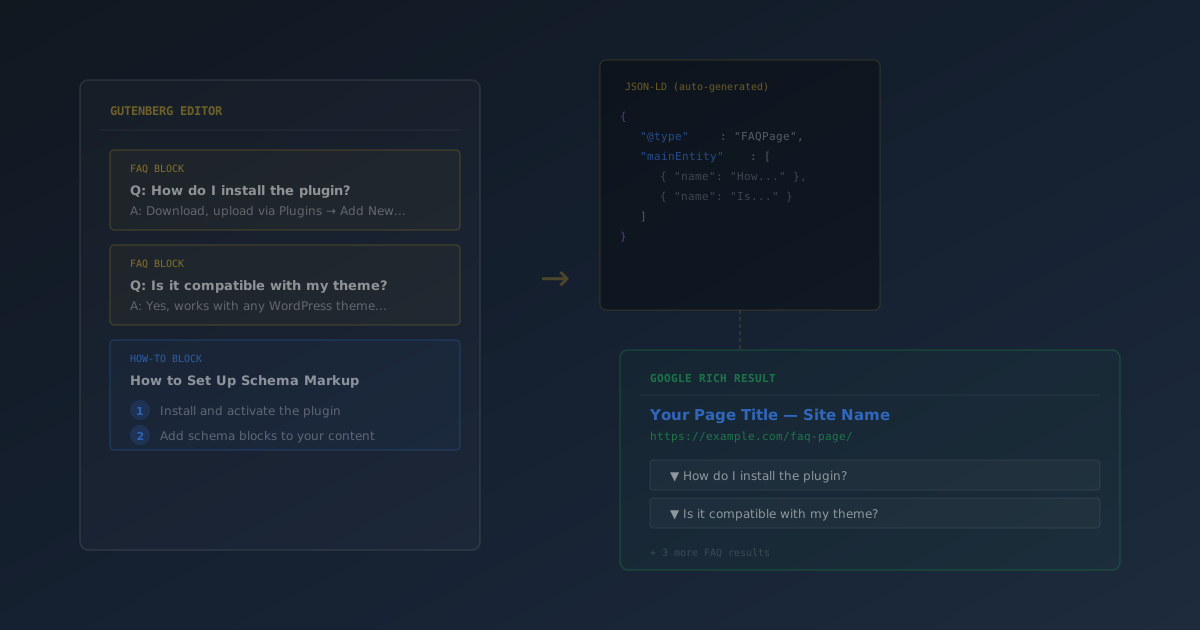
The difference? Structured data. Specifically, FAQPage and HowTo schema markup — a layer of JSON-LD code that tells Google exactly what your content contains, so it can display it as a rich result.
This guide covers what FAQ and How-To rich results are, how they work, and how to add them to any WordPress page in minutes using SEObolt's Gutenberg blocks — no coding required.
What Are FAQ and How-To Rich Results?
Rich results are enhanced search listings that go beyond the standard title-and-description format. Google generates them from structured data (schema markup) embedded in your page's HTML.
Two of the most impactful rich result types for content sites are:
| Schema Type | Rich Result | What Google Displays |
|---|---|---|
| FAQPage | FAQ Rich Result | Expandable question/answer dropdowns directly in search results |
| HowTo | How-To Rich Result | Numbered step-by-step instructions with optional images and time estimates |
Both types increase your listing's visual footprint in the SERP, which drives higher click-through rates even without ranking higher. A FAQ rich result with 3 questions can push competing results below the fold. A How-To rich result with step images catches the eye in a wall of plain text links.
Writing FAQs with regular heading and paragraph blocks does not generate schema markup. Google needs the structured data (JSON-LD) behind the scenes to identify your content as FAQ or How-To eligible. Schema blocks create both the visible content and the structured data simultaneously.
How Schema Markup Works (The Short Version)
Schema markup is a standardized vocabulary (defined at Schema.org) that helps search engines understand page content. For FAQ and How-To content, you embed a JSON-LD script in your page that describes your questions, answers, and steps in a format Google can parse.
Here is what a minimal FAQPage schema looks like:
{

  "@context": "https://schema.org",

  "@type": "FAQPage",

  "mainEntity": [

    {

      "@type": "Question",

      "name": "What is structured data?",

      "acceptedAnswer": {

        "@type": "Answer",

        "text": "Structured data is code in a specific format that

                helps search engines understand your content."

      }

    }

  ]

}
And a minimal HowTo schema:
{

  "@context": "https://schema.org",

  "@type": "HowTo",

  "name": "How to Add Schema to WordPress",

  "totalTime": "PT5M",

  "step": [

    {

      "@type": "HowToStep",

      "name": "Install a schema plugin",

      "text": "Install SEObolt from the WordPress plugin directory."

    }

  ]

}
Writing this by hand for every page is tedious and error-prone. That's where Gutenberg schema blocks come in — you fill in questions and steps visually, and the JSON-LD is generated automatically on page render.
Adding FAQ Schema to WordPress
SEObolt registers two custom Gutenberg blocks: SEObolt FAQ and SEObolt How-To. Here's how to use the FAQ block.
Step 1: Insert the Block
Open any post or page in the WordPress block editor. Click the + inserter, search for "FAQ" or "SEObolt FAQ", and add the block.
Step 2: Add Questions and Answers
Type your question in the question field and your answer in the answer field. Click "Add Question" to add more Q&A pairs. Aim for 3 to 10 questions per page.
Step 3: Publish
Save or publish the page. SEObolt automatically generates the FAQPage JSON-LD schema on page render — no additional configuration needed.
Write genuine questions your visitors actually ask. Keep answers concise (2-3 sentences). Include keywords naturally but don't stuff them. Use one FAQ block per page — multiple FAQ blocks on the same page can confuse schema validators.
Adding How-To Schema to WordPress
The How-To block works similarly but is designed for step-by-step instructional content like tutorials, recipes, and guides.
Step 1: Insert the Block
In the block editor, click + and search for "How-To" or "SEObolt How-To".
Step 2: Fill In the Overview
Enter a title (what the guide teaches), a description (brief overview), and optionally an estimated time (e.g., "5 minutes"). Google displays the time estimate in the rich result.
Step 3: Add Steps
For each step, provide a step title, detailed instructions, and optionally a step image. Images significantly improve How-To rich result visibility.
Step 4: Publish
Save the page. The HowTo JSON-LD schema is generated automatically.
Keep steps between 3 and 10. Be specific with step titles — "Click the Install Button" is better than "Step 3." Always include the estimated time. Add images to steps whenever possible — How-To rich results with images perform significantly better.
Testing and Validating Your Schema
After publishing, you need to verify that the schema is valid and eligible for rich results. Google provides two free tools for this.
Google Schema Validator or Google's Rich Results Test
Go to search.google.com/test/rich-results, paste your page URL, and click "Test URL." Look for "FAQ" or "How-to" under detected items. Fix any errors or warnings before expecting results.
View Page Source
Right-click your published page, select "View Page Source," and search for application/ld+json. You should see the FAQPage or HowTo schema that SEObolt generated.
You can also use our free Schema Validator tool to check for issues without leaving the Royal Plugins site.
Valid schema is necessary but not sufficient. Google decides whether to show rich results based on content quality, site authority, competition, and query relevance. New sites may not see rich results initially. After passing the Rich Results Test, focus on content quality and be patient — it can take days to weeks.
Common Mistakes That Block Rich Results
Even with valid schema, these mistakes can prevent Google from showing your rich results:
- Fake questions: FAQ blocks with invented questions that nobody actually asks. Google's quality reviewers flag this.
- Keyword stuffing: Cramming keywords into questions and answers instead of writing naturally.
- Multiple schema blocks per page: Two FAQ blocks on the same page can produce conflicting schema that confuses validators.
- Using FAQ blocks on every page: Only use them where FAQs genuinely make sense — product pages, service pages, and help articles.
- Long answers: Google truncates long answers in the rich result dropdown. Keep to 2-3 sentences for optimal display.
- Missing images on How-To steps: While optional in the schema, steps with images consistently outperform text-only steps in rich results.
FAQ vs. How-To: When to Use Each
Choosing the right schema type matters. Using the wrong one won't generate the rich result you want.
- FAQ schema is for pages with genuine question-and-answer content: product pages, service pages, landing pages, and support articles where visitors come with specific questions.
- How-To schema is for step-by-step instructional content: tutorials, guides, recipes, setup walkthroughs, and any content that teaches a sequential process.
Don't force FAQ markup onto tutorial content, and don't use How-To markup for a page that is clearly a Q&A section. Google's algorithms can detect the mismatch.
Troubleshooting
Blocks Not Appearing in the Editor
FAQ and How-To blocks require SEObolt Starter tier or above. Verify your license is active under SEObolt → License. The blocks only work in the Gutenberg block editor — they are not available in Classic Editor. If you use Classic Editor, add FAQ or HowTo schema manually through the Schema tab in the SEObolt meta box.
Schema Not Generating
Empty questions or steps won't produce schema. Ensure all fields are filled in. Check for plugin conflicts — another SEO plugin may be outputting competing FAQ or HowTo schema. Schema generates on page render, not in the editor, so save and view the published page source to verify.
Rich Results Disappeared
Google can remove rich results at any time. Common reasons: a Google algorithm update changed eligibility criteria, your content quality dropped, or a competing site's schema was preferred. Re-test with the Rich Results Test to confirm your schema is still valid.