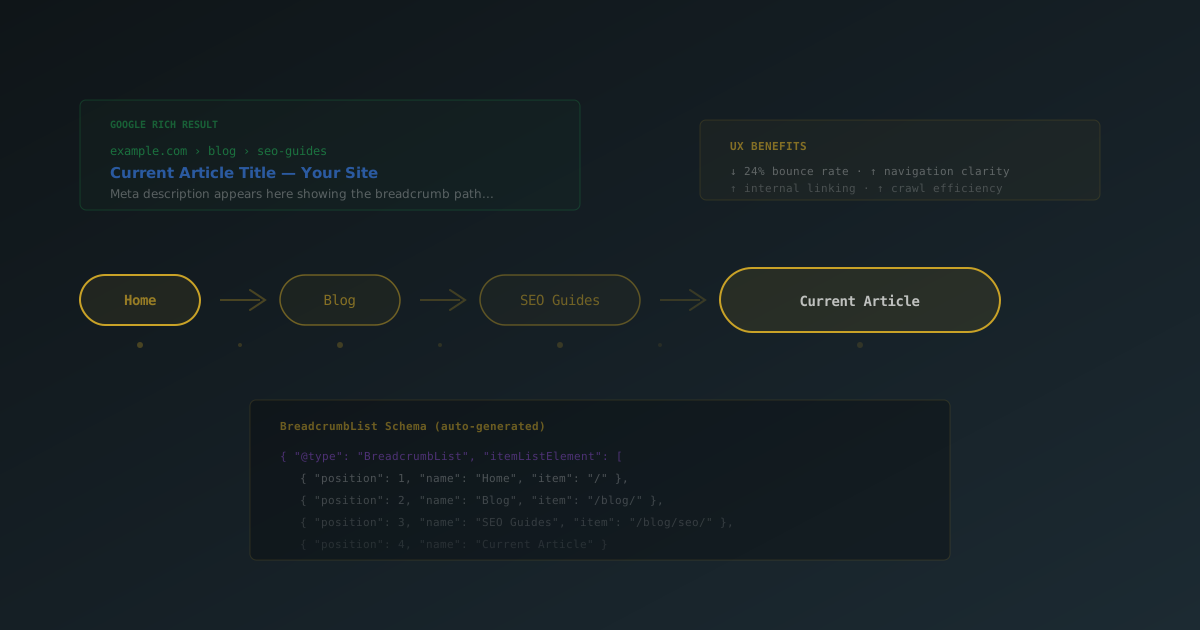
You have probably seen breadcrumbs on nearly every website you visit — that small navigation trail at the top of a page showing something like Home > Blog > SEO Tips > Post Title. They look simple. But behind that simplicity is a meaningful SEO and UX pattern that too many WordPress sites still ignore.
Breadcrumbs help your visitors understand where they are within your site. They help Google understand your site structure. And when implemented correctly with structured data, they replace ugly raw URLs in search results with a clean, readable hierarchy. That alone can improve click-through rates.
This guide covers why breadcrumbs matter, what they do for SEO and user experience, and how to add them to any WordPress site using SEObolt.
What Are Breadcrumbs (and Why Should You Care)?
Breadcrumbs are a secondary navigation element that displays the path from your homepage to the current page. Named after the Hansel and Gretel fairy tale, they leave a trail that users can follow back.
A typical breadcrumb trail looks like this:
Home > Blog > SEO Tips > How to Optimize ImagesEach item in the trail is a clickable link (except the current page), giving visitors a one-click way to jump back to any parent section. On a site with deep content hierarchies — think WooCommerce stores with nested product categories, or blogs with dozens of topics — breadcrumbs turn a confusing navigation experience into a clear one.
How Breadcrumbs Improve Your SEO
Breadcrumbs are not a direct Google ranking factor. But they influence several things that are.
1. Rich Results in Google Search
When you add BreadcrumbList structured data (JSON-LD schema), Google replaces the raw URL in search results with your breadcrumb trail. Instead of seeing:
https://yoursite.com/blog/seo-tips/optimize-images/Searchers see:
yoursite.com > Blog > SEO TipsThis is cleaner, more informative, and gives searchers confidence about what they will find. The result? Higher click-through rates from search results pages.
2. Stronger Internal Linking
Every breadcrumb item is an internal link. On a site with 500 blog posts, each post's breadcrumbs create additional links back to category pages and your homepage. This distributes link equity (PageRank) more evenly across your site and helps Google discover and crawl your content more efficiently.
3. Better Site Structure Signals
Google's crawlers use breadcrumbs to understand your content hierarchy. A blog post with the trail Home > Marketing > SEO > Keyword Research Tips tells Google exactly how that content fits into your site's taxonomy. This is especially valuable for large sites where crawl budget matters.
4. Lower Bounce Rates
When a visitor lands on a deep page from search and doesn't find exactly what they need, breadcrumbs give them a natural next step. Instead of hitting the back button and returning to Google (a bounce), they click up to a parent category and keep browsing your site. Lower bounce rates and longer sessions send positive engagement signals.
Even if you choose not to display visible breadcrumbs, you can still output BreadcrumbList schema in your page's <head> for the search result benefit. SEObolt does this automatically when breadcrumbs are enabled.
The User Experience Case for Breadcrumbs
SEO aside, breadcrumbs solve real navigation problems for your visitors.
- Orientation: Visitors instantly know where they are on your site, even if they arrived from a search engine or shared link
- Efficient navigation: One click to jump to any parent page, instead of hunting through menus or using the back button
- Reduced cognitive load: The visual trail provides context without requiring the user to remember how they got to the current page
- Mobile-friendly wayfinding: On small screens where full navigation menus are hidden behind hamburger icons, breadcrumbs provide always-visible navigation context
Breadcrumbs are particularly valuable for content-heavy sites: blogs, documentation portals, e-commerce stores, and membership sites. Any site where users might land on a deep page and need to understand the surrounding context.
How WordPress Breadcrumb Hierarchy Works
A good breadcrumb implementation builds trails based on your content structure. Here is how SEObolt maps different content types to breadcrumb paths:
| Page Type | Breadcrumb Format |
|---|---|
| Blog Post | Home > Category > Post Title |
| Static Page | Home > Parent Page > Child Page |
| Category Archive | Home > Category Name |
| Tag Archive | Home > Tag: Tag Name |
| Author Archive | Home > Author: Display Name |
| Search Results | Home > Search: "query" |
| WooCommerce Product | Home > Shop > Category > Product |
| 404 Page | Home > Page Not Found |
For blog posts with multiple categories, the breadcrumb uses the primary category you set in the SEObolt meta box on each post. This prevents confusing trails where a post might appear under an unexpected category.
Adding Breadcrumbs to WordPress with SEObolt
SEObolt handles both the visible breadcrumb output and the BreadcrumbList JSON-LD schema automatically. Here is the quick overview of getting set up.
Enable Breadcrumbs
Navigate to SEObolt > Settings > Breadcrumbs in your WordPress dashboard and toggle the feature on. From there you can configure:
- Separator style: Choose from
>,/,», arrows, or custom text - Home label: Set what the first breadcrumb item says (defaults to "Home")
- Show current page: Whether to display the current page title as the last (non-linked) item
- Prefix text: Optional text before the trail, like "You are here:"
Place Breadcrumbs in Your Theme
SEObolt gives you three ways to add visible breadcrumbs to your pages:
- Shortcode: Drop
[seobolt_breadcrumbs]into any post, page, or widget area - PHP function: Add
<?php if ( function_exists( 'seobolt_breadcrumbs' ) ) seobolt_breadcrumbs(); ?>to your theme template files - Page builder widget: Use the shortcode inside Elementor, Divi, or Beaver Builder modules
The PHP function approach is recommended for theme-level integration because it ensures breadcrumbs appear consistently across all pages of that template type. Add it to header.php for site-wide breadcrumbs, or to specific templates like single.php and page.php for selective placement.
The BreadcrumbList JSON-LD schema is injected into your page's <head> automatically once breadcrumbs are enabled. You do not need to add any extra code for the structured data — it works independently of whether you display visible breadcrumbs.
Styling Your Breadcrumbs
SEObolt outputs breadcrumbs with CSS classes you can target for custom styling:
/* Container */

.seobolt-breadcrumbs { font-size: 13px; color: #666; padding: 8px 0; }


/* Links */

.seobolt-breadcrumbs a { color: #0073aa; text-decoration: none; }

.seobolt-breadcrumbs a:hover { text-decoration: underline; }


/* Current page (last item) */

.seobolt-breadcrumb-current { color: #333; font-weight: 500; }


/* Separator between items */

.seobolt-breadcrumb-separator { margin: 0 0.5em; }
This gives you full control over the visual presentation without touching any plugin settings. Match your theme's typography, colors, and spacing to make breadcrumbs feel native to your design.
Common Breadcrumb Mistakes to Avoid
- Duplicate breadcrumbs: If your theme has built-in breadcrumbs (many do), disable the theme's version before enabling SEObolt's. Two breadcrumb trails confuse users and can produce duplicate schema.
- Breadcrumbs on the homepage: A breadcrumb trail that just says "Home" adds no value. SEObolt skips breadcrumbs on the homepage by default.
- Hiding breadcrumbs on mobile: Breadcrumbs are arguably more useful on mobile, where navigation menus are collapsed. If space is tight, reduce the font size instead of hiding them entirely.
- Conflicting SEO plugins: If you are migrating from Yoast or Rank Math, disable their breadcrumb features to avoid outputting two sets of BreadcrumbList schema.
- Ignoring primary categories: If a post belongs to multiple categories, set a primary category in the SEObolt meta box. Otherwise the breadcrumb might show an unexpected category path.
After setting up breadcrumbs, verify your BreadcrumbList schema is valid with our Schema Validator — invalid schema won't produce rich results in Google.