# Conversions: leads and sales from search, by page
> The SEObolt Conversions tab joins Search Console, Google Analytics and WooCommerce by page, so you see which pages turn Google clicks into leads and sales.
- Canonical:
- Last updated: 2026-11-21
- HTML version:
---
The **Conversions** tab follows every page from Google search to outcome in one row: impressions, clicks and position from Search Console, visits and key events from Google Analytics, and revenue from Google Analytics and WooCommerce. Open it at **SEObolt → Analytics → Conversions**. It is included from the Pro plan.
By Jameson · Updated November 2026 for SEObolt Pro 2.4.182
## What you need
Connect both **Google Search Console** and **Google Analytics 4** in **SEObolt → Settings → Connections**. The tab still works with one of them: with only Search Console you see impressions, clicks and position per page, and with only Google Analytics you see visits, key events and revenue. A message at the top says which side is missing.
On a WooCommerce store, the store figures come from WooCommerce’s own order attribution, so they work without Google Analytics ecommerce tracking.
## The figures at the top
[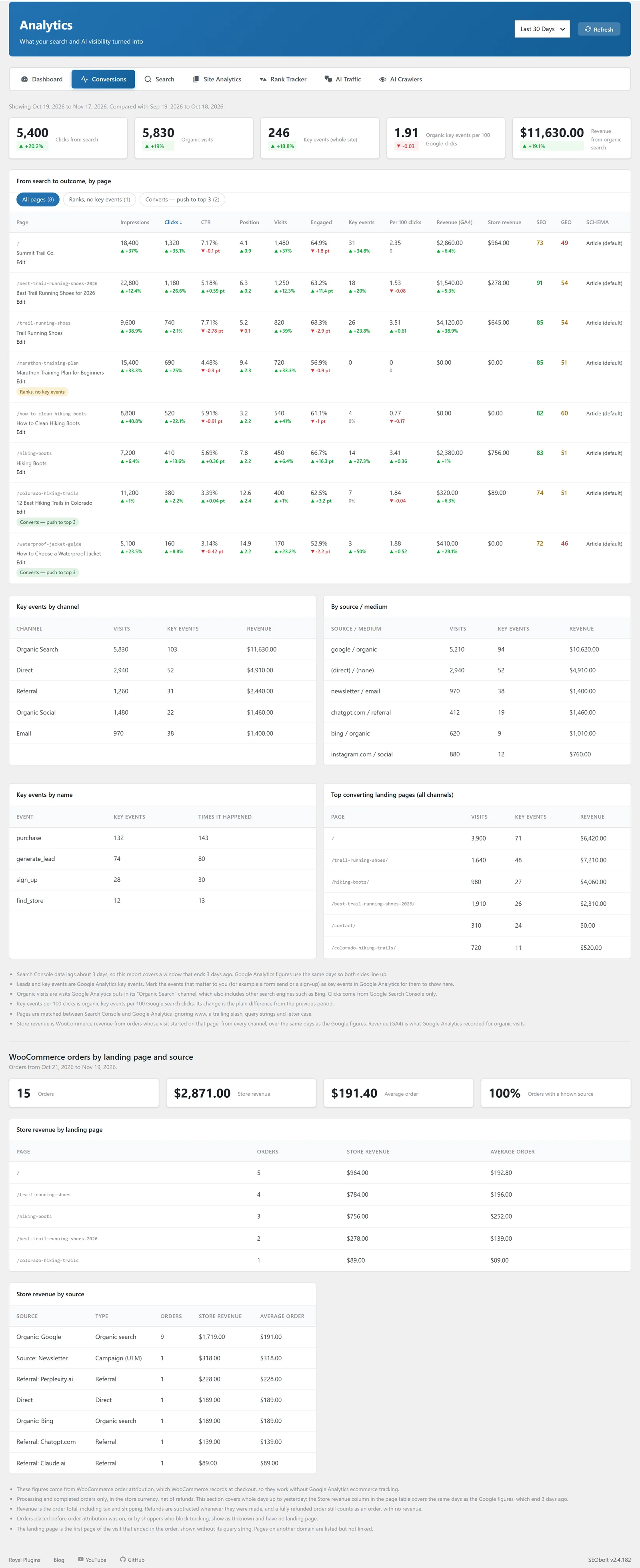](https://royalplugins.com/seobolt/images/seobolt-seo-conversions-leads-revenue-by-page.webp)
Conversions tab with sample store data. Open the image to see the whole tab.
| Figure | Meaning |
| --- | --- |
| Clicks from search | Clicks from Google search to your pages, compared with the previous period of the same length. |
| Organic visits | Visits Google Analytics puts in its Organic Search channel. |
| Key events (whole site) | Key events from every channel, for context. |
| Organic key events per 100 Google clicks | How well search traffic converts. Organic visits also include other search engines such as Bing, so this can read a little high. |
| Revenue from organic search | Revenue Google Analytics recorded from organic visits. |
## From search to outcome, by page
The page table lines up each page’s Search Console and Google Analytics figures, with WooCommerce store revenue next to them and the page’s SEO and GEO scores. Two filters find work for you:
| Filter | Shows pages that | What to do |
| --- | --- | --- |
| Ranks, no key events | rank at position 10 or better, get at least 50 clicks, and bring no key events | Fix the offer: a clearer call to action, a form higher up, a better match between the search and the page. |
| Converts — push to top 3 | rank at position 8 to 20 and already bring at least one key event | Improve the content and internal links. These pages already sell, so moving up pays. |
Pages are matched between Search Console and Google Analytics ignoring www, a trailing slash, query strings and letter case.
## Channel, source and event breakdowns
- **Key events by channel**: organic search next to direct, referral, email and social, so you can see what search is worth against the rest.
- **By source / medium**: the same split by source, such as google / organic or newsletter / email.
- **Key events by name**: which events happen, for example `generate_lead` or `purchase`.
- **Top converting landing pages (all channels)**: landing pages sorted by key events from every channel.
## WooCommerce orders by landing page and source
On a WooCommerce store this section shows **Orders**, **Store revenue**, **Average order** and **Orders with a known source**, then store revenue by landing page, by source and by campaign.
- Only processing and completed orders count, in the store currency. Revenue is the order total including tax and shipping, less refunds.
- The landing page is the first page of the visit that ended in the order, shown without its query string.
- Orders placed before WooCommerce order attribution was on, or by shoppers who block tracking, show as **Unknown** with no landing page.
## Why the dates and totals differ
Search Console data lags about 3 days, so the report covers a window that ends 3 days ago, and the Google Analytics figures use the same days so both sides line up. The WooCommerce summary covers whole days up to yesterday, while the **Store revenue** column in the page table uses the same days as the Google figures.
Leads are key events
Leads are Google Analytics key events. Mark the events that matter to you, such as a form send or a sign-up, as key events in Google Analytics for them to show here.
If a message says the report needs a newer version of the SEObolt Google connection server, nothing needs to change on your site; the missing figures appear once the server is updated. If parts of the report fail to load, click **Refresh** after a minute. Still empty? Work through [Analytics not populating](https://royalplugins.com/support/seobolt/analytics-not-populating/).
[Back to SEObolt Support](https://royalplugins.com/support/seobolt/)
[Analytics Dashboard](https://royalplugins.com/support/seobolt/analytics-dashboard/)