# AI Traffic: visits, leads and sales from AI assistants
> See how many visits ChatGPT, Perplexity, Gemini, Claude and Copilot send your WordPress site, which pages they land on and how many become leads and sales.
- Canonical:
- Last updated: 2026-11-21
- HTML version:
---
The **AI Traffic** tab shows how many visits AI assistants (ChatGPT, Perplexity, Gemini, Claude, Copilot and others) sent your site, what share of all visits that is, and how many of those visits became leads and revenue. Open it at **SEObolt → Analytics → AI Traffic**. It reads your Google Analytics 4 data, so connect GA4 first.
By Jameson · Updated November 2026 for SEObolt Pro 2.4.182
## What you need
| Plan | What AI Traffic shows |
| --- | --- |
| Starter | The basic report: visits from AI, the daily chart, visits per assistant and, on a store, WooCommerce orders from AI assistants. |
| Pro, Business, Agency | The full report, which adds leads and revenue from AI and the pages AI sends people to. |
Connect Google Analytics 4 in **SEObolt → Settings → Connections** (see the [GA4 setup guide](https://royalplugins.com/support/seobolt/connect-google-analytics-4/)). If it isn’t connected, the tab shows a link to that page instead of figures.
## What each figure means
[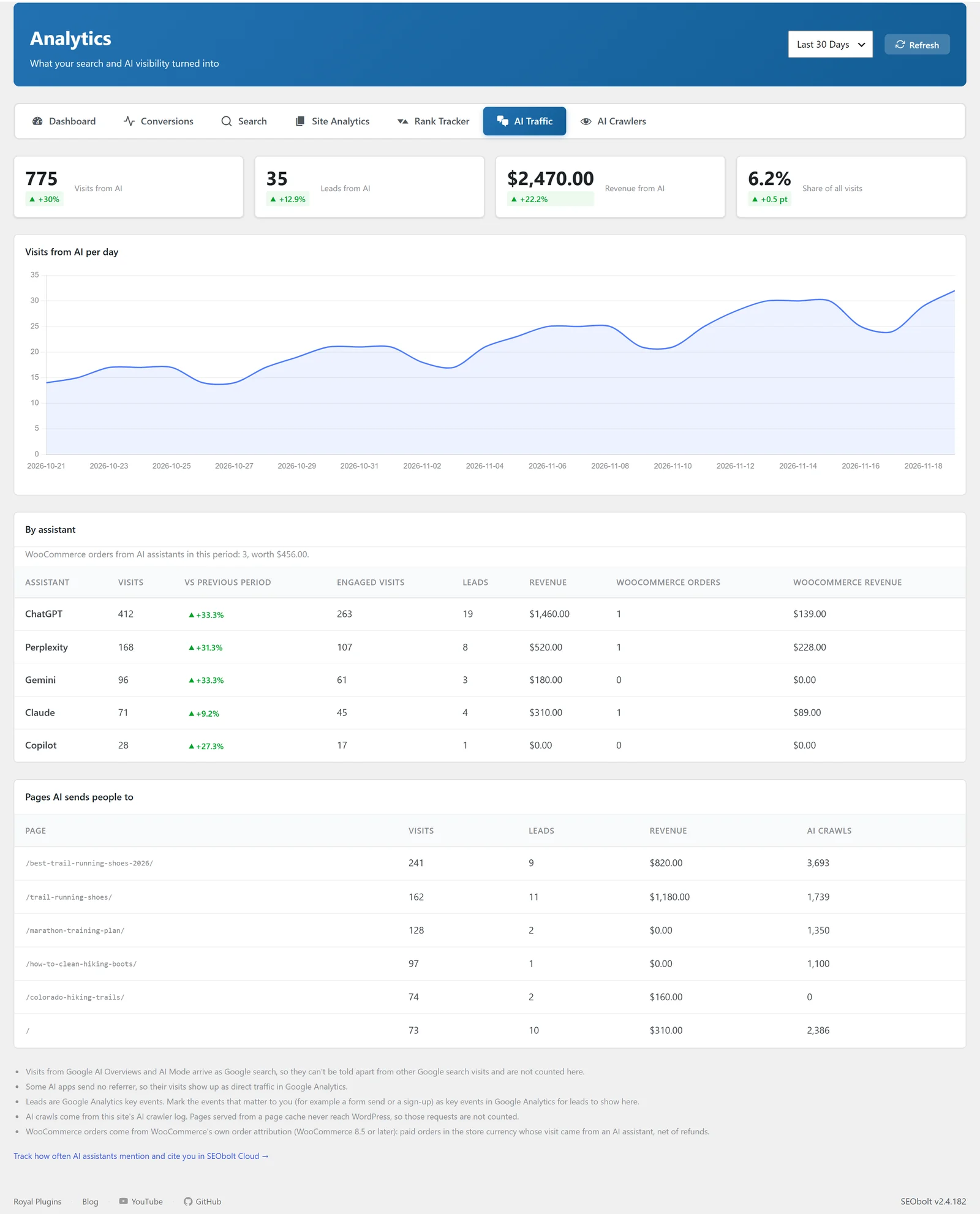](https://royalplugins.com/seobolt/images/seobolt-ai-traffic-chatgpt-perplexity-referrals.webp)
AI Traffic tab with sample store data.
| Figure | Meaning |
| --- | --- |
| Visits from AI | Visits whose source is an AI assistant, compared with the previous period of the same length. |
| Leads from AI | Google Analytics key events from those visits, such as form sends or sign-ups. |
| Revenue from AI | Revenue Google Analytics recorded from those visits. |
| Share of all visits | Visits from AI as a share of every visit to the site. |
Below the figures, **Visits from AI per day** charts the trend, **By assistant** breaks visits, leads and revenue down per assistant, and **Pages AI sends people to** lists the landing pages. On a WooCommerce store, **WooCommerce orders from AI assistants** adds the orders WooCommerce attributed to each assistant at checkout.
## Make leads show up
Leads are Google Analytics **key events**. If **Leads from AI** stays at zero while visits come in, mark the events that matter to your business (a form send, a sign-up, a booking) as key events in Google Analytics. New key events count from the day you mark them; Google Analytics doesn’t apply them to past visits.
## Why some AI visits don’t appear here
### Google AI Overviews and AI Mode
Visits from Google AI Overviews and AI Mode arrive as ordinary Google search, so Google Analytics can’t separate them. They count in the **Search** and **Conversions** tabs instead.
### AI apps that send no referrer
Some AI apps open links without telling your site where the visitor came from. Google Analytics files those visits as direct traffic, so the real AI share is usually a little higher than this tab shows.
Estimates on busy sites
When the tab says Google Analytics sampled the data, the numbers are estimates. This happens on high-traffic properties and long date ranges; a shorter range usually removes it.
## What to do with it
- Open the pages in **Pages AI sends people to** and check that each one answers the question in its first paragraph and leads to a clear next step.
- Compare with the [AI Crawlers](https://royalplugins.com/support/seobolt/ai-crawlers/) tab: pages AI bots read often but that get no AI visits are good candidates for clearer, quotable answers.
- To see how often assistants mention and cite your brand, not just the clicks they send, use LLM Rankings in SEObolt Cloud, included from the Pro plan.
[Back to SEObolt Support](https://royalplugins.com/support/seobolt/)
[Conversions](https://royalplugins.com/support/seobolt/conversions/)