# Royal MCP Reference
> The Royal MCP reference: installation, supported AI platforms, seven plugin integrations, the composer pattern, undo tokens, Activity Log, and REST API.
- Canonical:
- Last updated: 2026-09-22
- HTML version:
---
The full Royal MCP reference in one place. Installation and configuration walkthroughs. Supported AI platforms. Seven plugin integrations that auto-register when the sibling plugin is active. The composer pattern for one-call publish flows. The free undo-token system. The Activity Log. And the REST API endpoints. Anchor links from the old hub URL still resolve here.
## Installation
### From WordPress.org (recommended)
#### Search for the plugin
In your WordPress admin, go to **Plugins → Add New** and search for “Royal MCP”.
#### Install and activate
Click **Install Now**, then **Activate** once installation completes.
#### Configure settings
Navigate to **Royal MCP → Settings** in your admin menu to begin setup.
### Manual installation
#### Download the plugin
Download the ZIP file from WordPress.org or your purchase receipt.
#### Upload via WordPress
Go to **Plugins → Add New → Upload Plugin**, choose the ZIP file, and click **Install Now**.
#### Activate the plugin
Click **Activate Plugin** after installation completes.
## Configuration
#### Enable Royal MCP integration
Toggle the main switch to ON to activate the MCP endpoints.
#### Copy your API key
An API key is auto-generated on activation. Copy this for use with AI platforms.
#### Add AI platforms
Use the dropdown to add platforms such as Claude, ChatGPT, and Perplexity. Enter their API keys.
#### Test connection
Click **Test Connection** on each platform card to verify setup.
WordPress API key vs. platform API key
Your WordPress API key is different from platform API keys. The WordPress key authenticates requests *to* your site; platform keys authenticate requests *from* your site to AI services. See [API Keys →](https://royalplugins.com/support/royal-mcp/api-keys/) for the full reference.
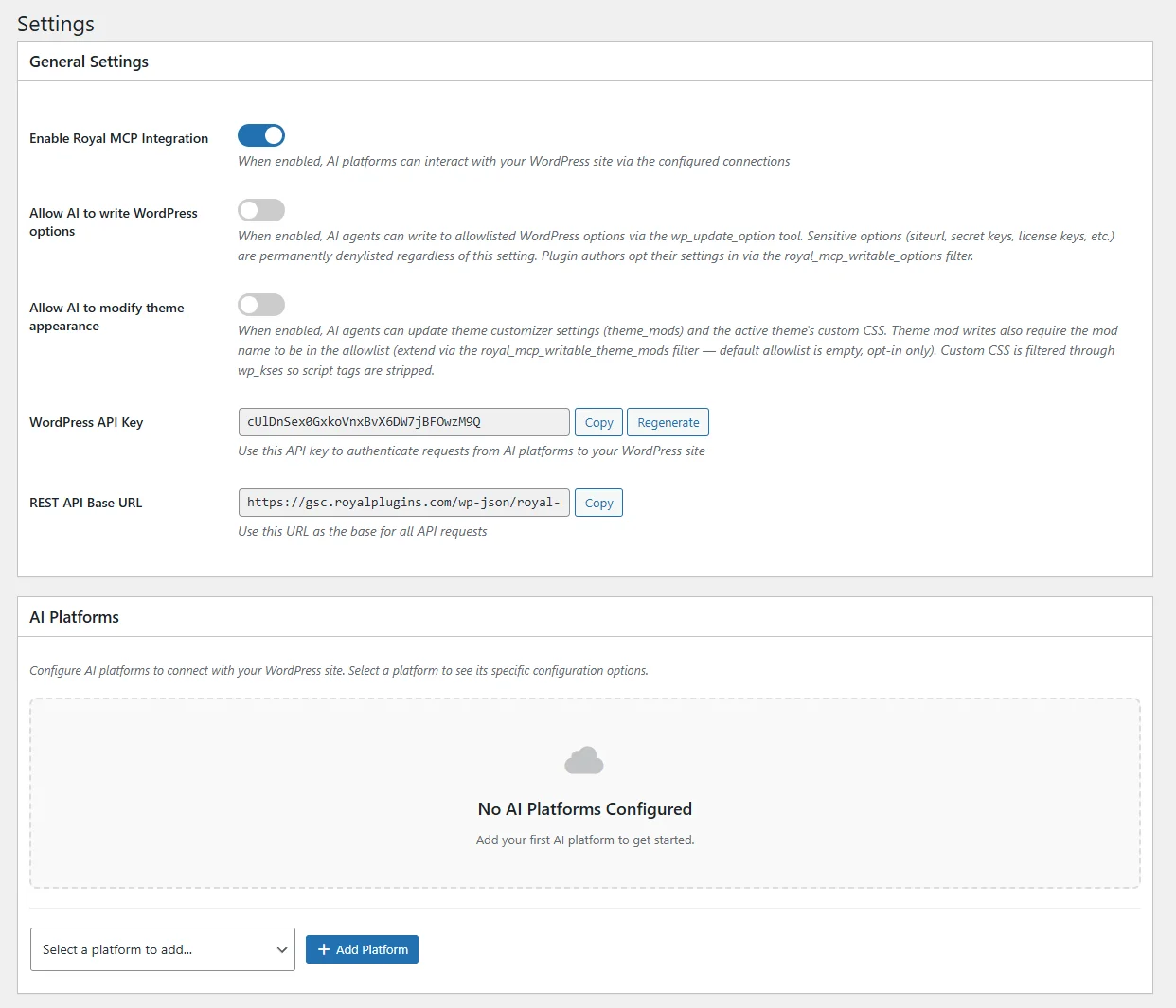
The main Royal MCP settings page showing API key and endpoint configuration.
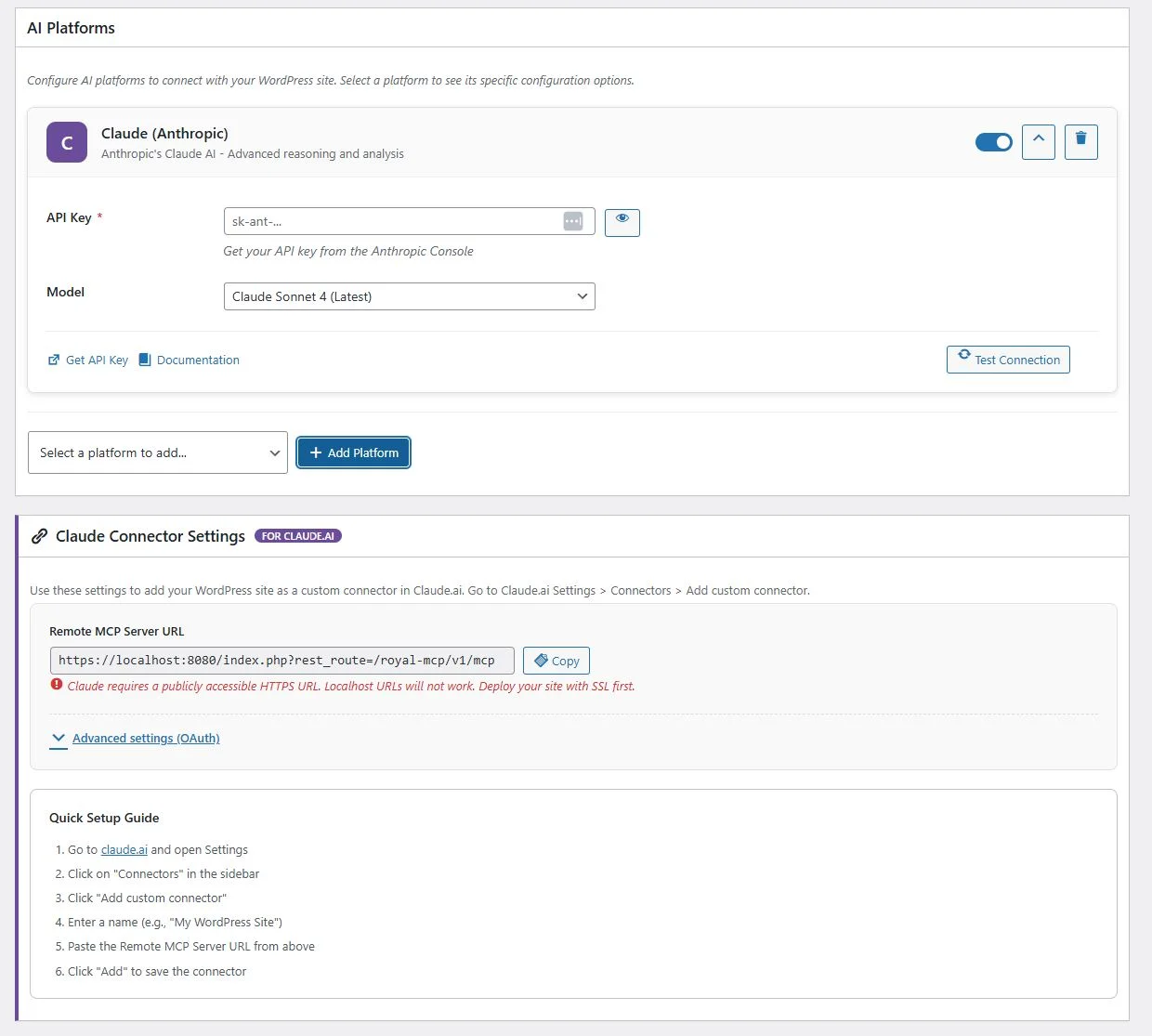
Adding and configuring AI platforms with API keys and model selection.
## Supported AI platforms
Royal MCP supports multiple AI platforms, configured independently. See [AI IDE Compatibility →](https://royalplugins.com/support/royal-mcp/ai-ide-compatibility/) for the full IDE and CLI list.
| Platform | Connection Type | Notes |
| --- | --- | --- |
| Claude (Anthropic) | Native MCP | Full MCP support with Claude Desktop, Web, and Code CLI |
| ChatGPT (OpenAI) | Native MCP + REST API | Via Custom GPT MCP connector or platform API |
| Perplexity | Native MCP + REST API | Any MCP-compliant client connection |
| Google Gemini | REST API | Via API integration |
| Mistral AI | REST API | Via API integration |
| Groq | REST API | High-speed inference |
## Cross-plugin composers
The composer pattern stitches multiple write operations into a single atomic MCP call. Instead of asking the AI to make five separate calls (upload image, create post, set featured image, assign categories, write SEO meta), the composer does it in one, with each step logged and any failure surfaced as a warning rather than a hard error.
### Available composers
wp\_publish\_and\_promote
Publish a WordPress post in one call: optional featured image sideload, post creation, optional category (created if missing), optional tags (created if missing), optional SEO meta write (Yoast, Rank Math, AIOSEO, and SEObolt auto-detected). Best-effort composition. Added in v1.4.41.
### Composition pattern
Composers follow a best-effort shape:
1. One step is the *anchor*. If it fails, the whole call fails. In `wp_publish_and_promote` the anchor is post creation.
2. Every other step is best-effort. Failures surface as warnings in the response but don’t block the anchor step.
3. Every step’s status is logged in the `steps` array of the response, so an AI agent can inspect exactly what worked and what didn’t.
### Example queries
- “Draft a blog post titled ‘Winter Sale is Live’ from the outline in my notes, sideload the hero image from this URL, categorize under ‘Announcements’, tag ‘sale’ and ‘winter’, write SEO meta, and publish immediately.”
- “Schedule this launch post to publish next Tuesday at 9am with a featured image from the /media/hero.jpg URL and set the meta description to ‘...’.”
- “Save the following as a draft, categorize under ‘Case Studies’, tag with ‘retail’, and write SEO title and description. I’ll review and publish manually.”
Scheduling and status
Status defaults to `publish`, so the composer writes a LIVE post unless you pass `status="draft"`. Supply `publish_date` in the future and the composer auto-flips status to `future` for WordPress’s scheduling. Ask Claude to draft first if you want to review before it goes live.
Backslash escape sequences in payloads
Payloads with backslash escape sequences (JSON unicode escapes, embedded JSON-LD, Divi loop field bindings) may not survive the MCP-to-REST-to-write pipeline as literal backslashes. Decode client-side before sending, or verify rendered output after the call.
## Undo tokens
Royal MCP ships an undo-token system for reversible operations. Every destructive tool call that supports it returns a short opaque `undo_token` in its response. Passing that token to the `mcp_undo_last_operation` tool reverses the operation. Tokens live for 72 hours by default. Shipped across the Free plugin starting in v1.4.39 and expanded in v1.4.40.
### Tools that issue undo tokens (Free)
- `wp_delete_post` restores the deleted post (or page, product, or custom post type) including all meta, terms, and revisions.
- `wp_delete_term` restores the deleted taxonomy term and re-attaches it to every post that had it before deletion.
- `wp_delete_menu_item` restores the deleted menu item at its original position.
- `wp_reorder_menu_items` reverts a menu reorder to its prior order.
### How to use it
The flow is one extra call. When the AI agent runs a destructive tool, the response includes an `undo` block:
```
{
"ok": true,
"deleted_post_id": 142,
"undo": {
"token": "opaque-string-here",
"expires_at": "2026-08-24T14:30:00Z"
}
}
```
To reverse it, call `mcp_undo_last_operation` with that token:
```
mcp_undo_last_operation({ token: "opaque-string-here" })
```
Or just tell your AI in natural language: *“Undo that,”* *“wait, restore that post,”* *“revert the last menu reorder.”* Claude and other MCP-capable clients handle the token roundtrip internally when they see an `undo` block in a prior response.
### Token lifetime
Undo tokens live for **72 hours** after issuance. After that, the reverse-state is garbage-collected on the daily `royal_mcp_token_cleanup` cron. If the token is used before expiry, the reverse-state is consumed and removed. Each token is single-use.
Pro version
Royal MCP Pro extends undo coverage across every destructive integration tool (WooCommerce bulk updates, Divi page clones, Elementor edits, SEO meta writes, redirect changes, form entry restores, and more) with token lifetimes of 72 to 168 hours depending on the operation. Pro also ships a **Recent Operations dashboard widget** that surfaces every pending undo in one place with batch rollback and per-row undo buttons. See [Undo Tokens & Reversibility →](https://royalplugins.com/support/royal-mcp-pro/undo-tokens-and-reversibility/).
## Activity Log
Royal MCP logs all API interactions for security and debugging.
### Accessing the log
Navigate to **Royal MCP → Activity Log** in your WordPress admin.
### What each entry contains
- **Timestamp** when the request occurred
- **MCP server** which AI platform made the request
- **Action** the MCP tool that was called
- **Status** success or error
- **Request and response** detailed data (expandable)
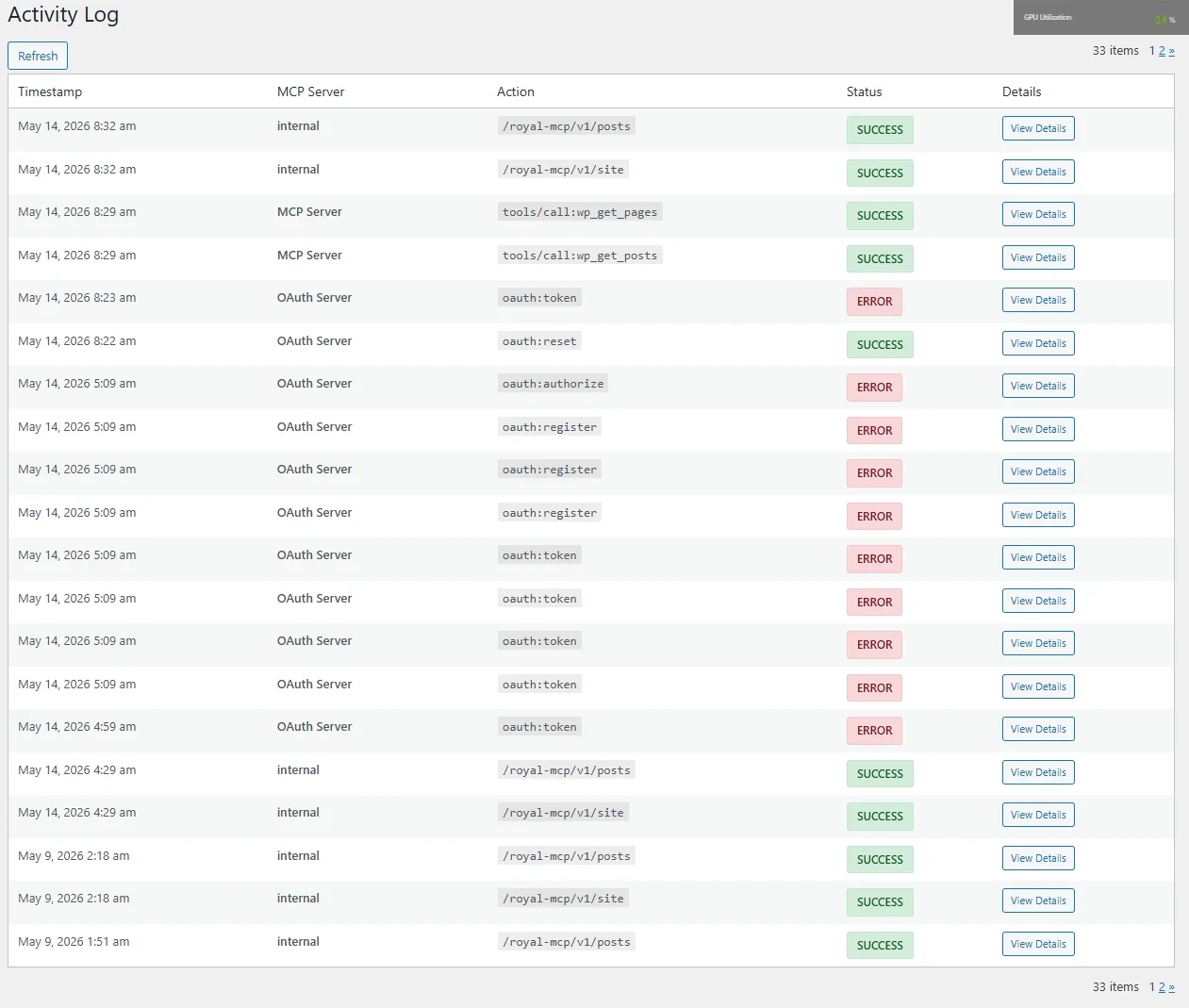
Activity log showing all AI interactions with timestamps, actions, and status.
Pro version
Need to review, audit, or reverse AI-driven changes across a portfolio? Royal MCP Pro ships the **Universal Audit Log**: a full filter UI (tool, user, status, undo state, date range, free-text search), CSV export with formula-injection defense, per-row undo action for reversible Pro tool calls, configurable retention window, and value-scrubbing of sensitive fields in stored arguments and response summaries. See [Understanding the Universal Audit Log →](https://royalplugins.com/support/royal-mcp-pro/understanding-the-audit-log/).
## REST API reference
### Endpoints
| Endpoint | Method | Description |
| --- | --- | --- |
| `/wp-json/royal-mcp/v1/mcp` | POST | Main MCP endpoint for JSON-RPC messages |
| `/wp-json/royal-mcp/v1/mcp` | GET | MCP stream endpoint |
| `/wp-json/royal-mcp/v1/posts` | GET | REST endpoint for posts |
| `/wp-json/royal-mcp/v1/pages` | GET | REST endpoint for pages |
| `/wp-json/royal-mcp/v1/media` | GET | REST endpoint for media |
### Authentication
All API requests require authentication via the WordPress API key:
```
Authorization: Bearer your-api-key
```
See [API Keys →](https://royalplugins.com/support/royal-mcp/api-keys/) for the full authentication reference, or [OAuth Connector Deep Dive →](https://royalplugins.com/support/royal-mcp/oauth-connector-deep-dive/) for the primary token-negotiated path.
## GuardPress integration
When [GuardPress](https://royalplugins.com/guardpress/) is active, Royal MCP registers **7 additional tools** for monitoring site security, viewing scan results, and reviewing the audit log from any AI client. Use it for daily security check-ins, on-demand vulnerability scans, blocked-IP review, failed-login analysis, and audit-log queries.
gp\_get\_security\_status
Current security score and grade with factor breakdown.
gp\_get\_security\_stats
Failed logins, blocked IPs, alert counts, blocked countries.
gp\_run\_vulnerability\_scan
Trigger a fresh vulnerability scan against installed plugins and themes.
gp\_get\_vulnerability\_results
Read the latest scan results with CVE details and severity.
gp\_get\_blocked\_ips
List currently blocked IP addresses with block reason and timestamp.
gp\_get\_failed\_logins
Recent failed login attempts with username, IP, country, and timestamp.
gp\_get\_audit\_log
Browse the security audit log filtered by severity, action, or time range.
### Example queries
- “What’s my current security score?”
- “Run a vulnerability scan and tell me what it finds.”
- “Show me all failed login attempts from the last 24 hours.”
- “List the IPs blocked in the past week and the reason for each block.”
- “Are there any plugins on this site with known CVEs?”
- “Summarize the security audit log for high-severity events this month.”
## SiteVault integration
When [SiteVault](https://royalplugins.com/sitevault/) is active, Royal MCP registers **6 additional tools** for triggering backups, listing backup history, and reviewing schedules. Use it for pre-update backup automation, backup health checks, “is the latest backup complete yet?” status polling, and schedule audits.
sv\_get\_backups
List available backups filtered by status, type, or date.
sv\_get\_backup
Fetch full details on a single backup (size, files, manifest).
sv\_create\_backup
Trigger a new backup (full, database-only, files, plugins, or themes).
sv\_get\_backup\_status
Check progress on an in-flight backup in real time.
sv\_get\_backup\_stats
Total size, last backup time, success and failure counts.
sv\_get\_schedules
Review configured backup schedules and their next-run times.
### Example queries
- “Trigger a full backup before I install this plugin update.”
- “When was the last successful backup, and how big was it?”
- “Is the backup that’s currently running complete yet?”
- “Run a database-only backup right now.”
- “Show me my backup schedules and when each one runs next.”
- “What’s the total size of all my backups on disk?”
Lite vs Pro
Both [SiteVault Lite](https://wordpress.org/plugins/sitevault-backup-restore-migration/) (free, on WordPress.org) and SiteVault Pro expose these tools. Pro adds cloud destinations, AES-256 encryption, and staging environments. The MCP tools are the same across both.
## Redirection integration
When [Redirection](https://wordpress.org/plugins/redirection/) (John Godley’s plugin, 2M+ active installs) is active, Royal MCP registers **4 additional tools** for listing, creating, and updating redirects, plus listing redirect groups. Added in v1.4.38.
Use it for bulk 301 setup during a site migration, cleaning up 404s an AI agent found in your Activity Log, staging redirect changes during a URL structure refactor, or asking Claude to audit redirect groups before an SEO audit.
redirection\_list\_redirects
List redirects with source URL, target URL, HTTP status code, group, and hit count. Filter by group ID or URL substring. Default limit 50, max 200.
redirection\_create\_redirect
Create a redirect. Supports 301 (permanent, default), 302 (temporary), and 307 (preserved-method). Group assignment and regex-pattern support included.
redirection\_update\_redirect
Edit an existing redirect: target URL, status code, group, or enable/disable.
redirection\_list\_groups
Enumerate redirect groups so an AI agent can file new redirects under the right group without guessing IDs.
### Example queries
- “Set up 301 redirects for every old `/blog/YYYY/MM/` URL to the new `/articles/` structure.”
- “List every redirect in the ‘Modified Posts’ group with a hit count above 100.”
- “The old /pricing-2024/ URL is still getting hits. Redirect it to /pricing/ permanently.”
- “Show me all redirects pointing at pages that don’t exist anymore.”
- “Change the target of the /old-about redirect from /company to /about.”
## Royal AI Firewall integration
When [Royal AI Firewall](https://royalplugins.com/royal-ai-firewall/) is active, Royal MCP registers **6 additional tools** for reading firewall stats, inspecting recent bot activity, and adjusting per-bot policies through natural language. Added in v1.4.37.
Royal MCP and Royal AI Firewall work as a companion pair. Royal AI Firewall sees HTTP-layer AI bot traffic hitting your site; Royal MCP lets your own AI clients act on your site. Together they give complete visibility over both sides of AI traffic on your WordPress install.
raif\_get\_dashboard\_stats
Return current dashboard metrics: total bot hits, unique bots seen, top blocked and allowed bots, and time-window aggregates.
raif\_get\_recent\_hits
List the most recent bot requests with user-agent, IP, path, timestamp, and policy decision. Useful for spotting unusual crawler behavior.
raif\_get\_bot\_policies
Enumerate every configured bot policy with the current action (allow, block, throttle) and rule scope.
raif\_set\_bot\_policy
Change the policy on a specific bot. Block GPTBot, allow ClaudeBot, throttle a scraping tool, and so on.
raif\_get\_daily\_rollup
Return a summarized rollup for a given day: total hits, blocked, allowed, throttled, and per-bot subtotals.
raif\_block\_all\_ai\_bots
Toggle the master switch that blocks every known AI training crawler in one action. Useful for a fast lockdown.
### Example queries
- “How many bot hits did we get in the last 7 days, and which bots were the top 5?”
- “Show me the last 20 bot requests to /wp-json paths.”
- “Block GPTBot and CCBot but allow ClaudeBot through.”
- “Give me yesterday’s bot-hit rollup with per-bot subtotals.”
- “Turn on the master AI-bot block for the next hour while we test the site.”
Companion positioning
Royal MCP handles AI agents that *you* connect to your site: Claude, ChatGPT, Perplexity, and so on. Royal AI Firewall handles AI bots that show up *uninvited*: training crawlers, scrapers, and unauthorized indexers. Running both is the complete AI-traffic story for WordPress: outbound control via MCP, inbound control via the firewall.
## ForgeCache integration
When [ForgeCache](https://royalplugins.com/forgecache/) is active, Royal MCP registers **3 additional tools** for page cache management. Useful when an AI agent just published or updated content and needs the cache to reflect it, or when troubleshooting stale-content reports.
fc\_purge\_url
Purge the ForgeCache entry for a single URL. Resolves the URL to a WordPress post or page and clears its cached HTML.
fc\_clear\_cache
Clear the entire ForgeCache page cache. Use after a major site update, content migration, or when troubleshooting stale content.
fc\_get\_cache\_stats
Return cache statistics: total cached files, total size on disk, oldest and newest cached entries.
### Example queries
- “I just updated the /pricing page. Purge its cache so visitors see the new copy.”
- “How much disk is ForgeCache using and how old is the oldest entry?”
- “Clear the entire cache. I just imported 200 posts and want everything fresh.”
Auto-purge on Royal MCP writes
Royal MCP’s standard post and page write tools (`wp_update_post`, `wp_update_page`, `elementor_replace_text`, etc.) don’t auto-invalidate ForgeCache today. Explicit `fc_purge_url` or `fc_clear_cache` calls are required after a write for the change to appear immediately to cached visitors. Auto-invalidate composition is on the Royal MCP Pro roadmap.
## Royal Links integration
When [Royal Links](https://royalplugins.com/royal-links/) (affiliate-link, URL-shortener, and cloaker plugin) is active, Royal MCP registers **3 additional tools** for creating short URLs, listing existing links, and pulling click stats.
Use it for spinning up a branded short URL on the fly (`yoursite.com/deal` instead of a long UTM-tagged affiliate URL), asking Claude to pull click stats before a campaign wrap-up, or bulk-creating short URLs from a campaign spreadsheet.
rlinks\_get\_links
List short URLs with destination, slug, click count, and category. Default limit 25, max 100. Filterable by category slug or title/destination search term.
rlinks\_create\_link
Create a new short URL. Custom slug (auto-generated if omitted), redirect type (301 default, 302, 307), and nofollow toggle (default true).
rlinks\_get\_link\_stats
Return click statistics for a specific short URL: total clicks, recent click activity, top referrers.
### Example queries
- “Create a short URL `/deal` that redirects to my affiliate URL for WPForms Pro.”
- “Show me my top 10 short URLs by click count this month.”
- “How many clicks did the `/summer-sale` link get in the last 30 days?”
- “List every short URL in the ‘affiliate’ category.”
## Royal Ledger integration
When [Royal Ledger](https://royalplugins.com/royal-ledger/) (cost-tracker and license-vault plugin) is active, Royal MCP registers **4 additional tools** for adding tracked costs, listing them, checking upcoming renewals, and listing stored license keys.
Use it for asking Claude to log a new subscription you just bought, getting a rundown of renewals in the next 30 days, categorizing costs (plugins, themes, hosting, domains, SaaS), or discovering which license keys are stored for a specific product.
rl\_get\_costs
List tracked cost items (premium plugins, hosting, domains, CDN, SaaS subscriptions). Filter by category and status (active, paused, expired).
rl\_create\_cost
Add a new cost item: name, amount, currency, billing cycle (monthly, quarterly, annual, biennial, one-time, custom), next renewal date, and category.
rl\_get\_renewals
Return upcoming renewals in a given date window, sorted by next-renewal date. Ideal for “what’s due this month?” queries.
rl\_get\_keys
List stored license keys (product name, partial key, associated cost item). Full key decryption requires a manual visit to the Royal Ledger admin. MCP surface is metadata-only for safety.
### Example queries
- “What subscriptions renew in the next 30 days?”
- “Add WPForms Pro at $199/year renewing on 2026-11-15 to my plugin costs.”
- “How much am I spending per year on hosting across all my tracked items?”
- “List every license key I have stored for ‘Elementor Pro’.”
- “Show me all expired SaaS subscriptions I’m still tracking.”
Metadata only for license keys
The `rl_get_keys` tool returns license metadata (product name, partial key, associated cost item). Full key decryption requires a manual visit to the Royal Ledger admin. AI agents can help you find and organize keys but cannot decrypt them, so a compromised MCP session cannot exfiltrate your license library.
## Related deep dives
Extracted references for the plugin integrations and protocol topics that have their own pages:
[Integration
Elementor Tools
11 tools for page cloning, widget management, template library, and bulk replacements.](https://royalplugins.com/support/royal-mcp/elementor-tools/)
[Integration
Divi Tools
9 tools for Divi 4 shortcode and Divi 5 block editing with layout validation.](https://royalplugins.com/support/royal-mcp/divi-tools/)
[Integration
WooCommerce Tools
29 tools for products, variations, attributes, orders, coupons, customers, and store stats.](https://royalplugins.com/support/royal-mcp/woocommerce-tools/)
[Integration
ACF Tools
4 tools with type-aware writes and Return-Format-respecting reads.](https://royalplugins.com/support/royal-mcp/acf-tools/)
[Protocol
Protocol Insights
Supported MCP spec revisions, per-client compatibility matrix, WP Abilities API integration.](https://royalplugins.com/support/royal-mcp/protocol-insights/)
[Auth
OAuth Connector Deep Dive
How Royal MCP’s OAuth 2.0 server works. Setup, security, every known failure mode.](https://royalplugins.com/support/royal-mcp/oauth-connector-deep-dive/)
[Auth
API Keys
Universal API-key reference. When to use it, how to send it, rotation.](https://royalplugins.com/support/royal-mcp/api-keys/)
[Setup
AI IDE Compatibility
Config patterns for Cursor, VS Code, Windsurf, Zed, JetBrains, LM Studio, Ollama, and more.](https://royalplugins.com/support/royal-mcp/ai-ide-compatibility/)
[Back to Royal MCP Support](https://royalplugins.com/support/royal-mcp/)
[Protocol Insights](https://royalplugins.com/support/royal-mcp/protocol-insights/)