# Getting Started
> Install Royal Affiliate Pro, activate your license, and set up your affiliate program in minutes. Complete step-by-step walkthrough.
- Canonical:
- Last updated: 2026-09-04
- HTML version:
---
Install Royal Affiliate Pro, activate your license, and set up your affiliate program in minutes. Complete step-by-step walkthrough.
## Getting Started
Royal Affiliate Pro is a complete affiliate management solution for WordPress, built for store owners and marketers who need powerful commission tracking, automated payouts, and robust fraud protection without relying on external SaaS platforms.
### Pro Features
#### Automated PayoutsBUSINESS
Stripe Connect and auto payouts (Business+), PayPal and manual (all plans). Zero additional platform fees.
#### Multi-Tier MLMBUSINESS
UniLevel commission system with configurable 2-5 level depth for recruitment rewards.
#### Tiered CommissionsBUSINESS
Automatic tier progression based on referral count and earnings performance.
#### Campaign ManagementBUSINESS
Time-bound campaigns with custom commission rates and URL-based tracking.
#### Fraud DetectionBUSINESS
VPN/proxy blocking, IP rate limiting, bot detection (Business+). Self-referral and duplicate blocking included in all plans.
#### Standalone ConversionsAGENCY
Track affiliate referrals without WooCommerce using shortcode-based conversion pages.
#### Affiliate DashboardPRO
7-tab dashboard (Pro). Business adds Challenges and Team tabs for 9 total.
#### Lifetime CommissionsBUSINESS
Recurring commissions from first-referred customers on all future purchases.
#### Affiliate TagsPRO
Color-coded tags for grouping affiliates. Filter, bulk-assign, and target campaigns by tag.
#### Coupon TrackingPRO
Assign WooCommerce coupons to affiliates with usage analytics and tag-based bulk generation.
#### Challenges & GamificationBUSINESS
Goal-based challenges with 5 reward types: commission overrides, bonuses, payouts, tier upgrades, and custom prizes.
#### Email MarketingBUSINESS
Mailchimp, Kit (ConvertKit), and ActiveCampaign integrations with tag mapping and bulk sync.
### Core Features
- Real-time cookie-based referral tracking
- Percentage or fixed-rate commission structures
- WooCommerce integration with automatic referral tracking
- Affiliate tags with color-coded management (Pro)
- Coupon tracking with usage analytics (Pro)
- Form lead tracking — Gravity Forms, WPForms, FormForge (Pro)
- Challenges & gamification with 5 reward types (Business)
- Email marketing — Mailchimp, Kit, ActiveCampaign (Business)
- Affiliate landing pages (Business)
- Email notifications for registration, approval, referrals, and payouts
- REST API for custom integrations (Agency)
- Link cloaking with branded redirect URLs (Pro)
- QR code generation and download (Pro)
- Vanity coupon codes — affiliates choose their own codes (Pro)
- Webhooks — 13 events with HMAC-SHA256 signing (Pro)
- Custom registration fields (Pro)
- Direct link tracking via referer domain matching (Pro)
- CSV export with contact fields for all data
- Monthly performance report emails (Business)
- Bulk email communications (Agency)
- Activity log for admin actions (Agency)
- White-label branding (Agency)
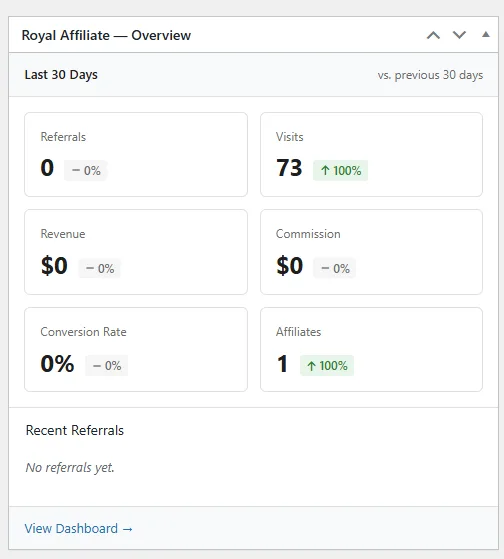
- WordPress dashboard widget for quick stats overview
### WordPress Dashboard Widget
A quick stats widget appears on your WordPress admin dashboard showing total affiliates, pending approvals, recent referrals, and earnings at a glance.
## Installation
#### Download from your account
Log in to [my.royalplugins.com](https://my.royalplugins.com/my-account/downloads/) and download the Royal Affiliate Pro zip file.
#### Upload to WordPress
Go to Plugins > Add New > Upload Plugin, select the zip file, and click "Install Now".
#### Activate the plugin
Click "Activate" after installation completes.
#### Enter your license key
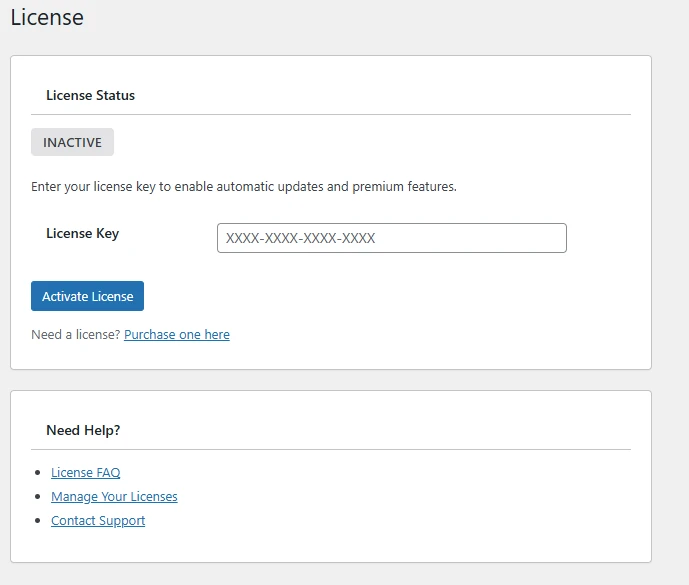
Go to Royal Affiliate Pro > License and enter your license key to enable updates and Pro features.
Quick Start
After activation, use the built-in Setup Wizard to configure your affiliate program in minutes. It walks you through page creation, commission rates, and payment gateway setup.
## License Activation
A valid license is required to receive updates and access Pro features.
#### Find your license key
Your license key is in your purchase confirmation email or at [my.royalplugins.com/my-account/licenses/](https://my.royalplugins.com/my-account/licenses/)
#### Enter the key
Go to Royal Affiliate Pro > License and paste your license key.
#### Activate
Click "Activate License". You should see a success message and green "Active" status.
Activation Limits
Each license has an activation limit based on your plan. Deactivate unused sites from your account to free up activations.
[← Documentation home](https://royalplugins.com/support/royal-affiliate/)
[Next: Commission System →](https://royalplugins.com/support/royal-affiliate/commission-system/)