# Developer & API
> REST API for custom integrations, 13-event webhooks with HMAC-SHA256 signing, admin activity log, and white-label branding options.
- Canonical:
- Last updated: 2026-09-04
- HTML version:
---
REST API for custom integrations, 13-event webhooks with HMAC-SHA256 signing, admin activity log, and white-label branding options.
## Webhooks
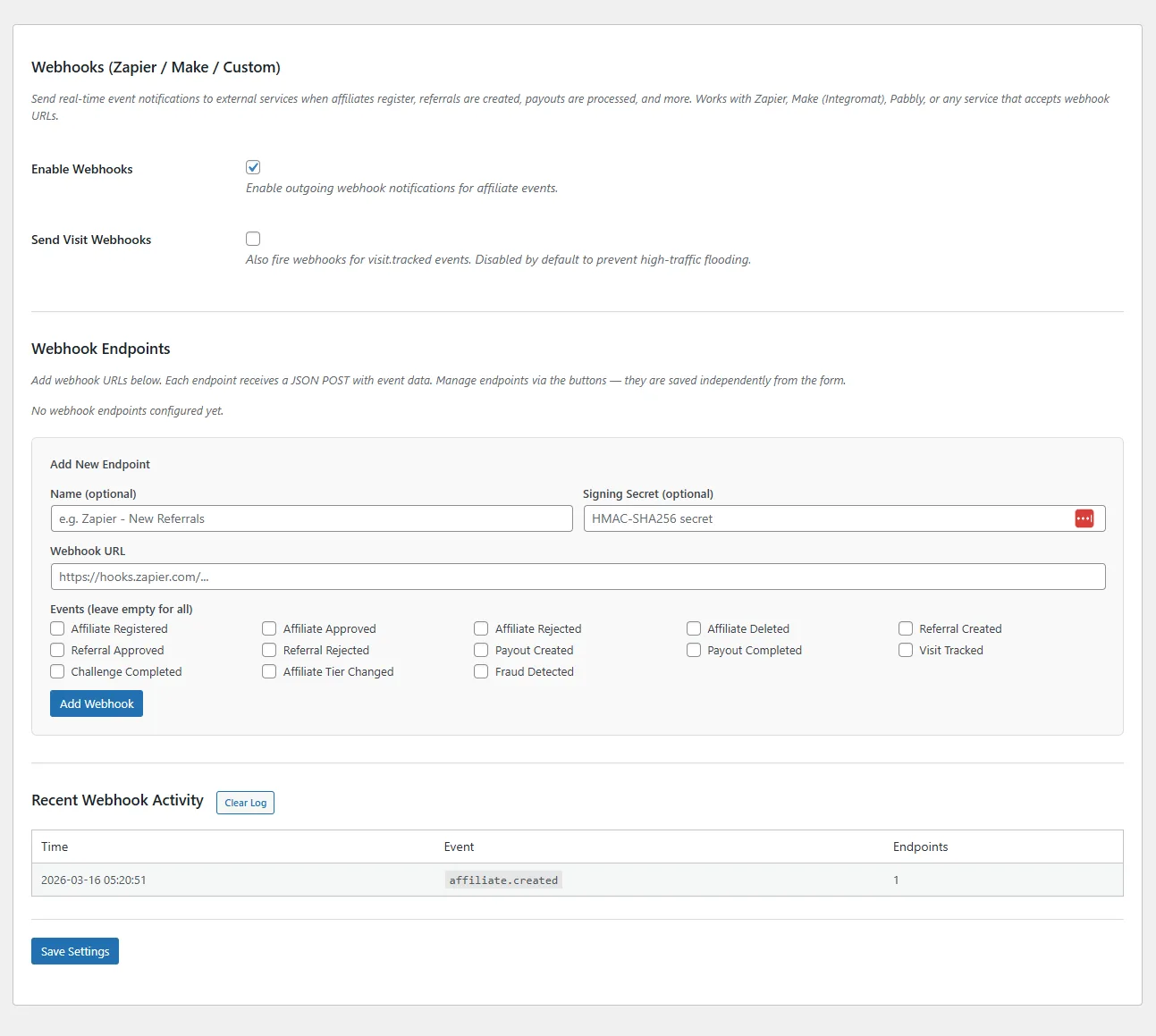
Fire real-time HTTP POST notifications to any URL when key events occur. Connect to Zapier, Make (Integromat), or any custom endpoint.
### Supported Events (13)
- **affiliate.created** — New affiliate registered
- **affiliate.approved** — Affiliate approved by admin
- **affiliate.rejected** — Affiliate rejected
- **affiliate.deleted** — Affiliate removed
- **referral.created** — Referral recorded (sale or lead)
- **referral.approved** — Referral approved
- **referral.rejected** — Referral rejected
- **payout.created** — Payout initiated
- **payout.completed** — Payout marked as paid
- **visit.tracked** — Affiliate link click recorded
- **challenge.completed** — Affiliate completed a challenge
- **tier.changed** — Affiliate moved to a new tier
- **fraud.detected** — Suspicious activity flagged (medium+ severity)
### Setup
1. Go to **Tools → Webhooks**
2. Click **Add Endpoint** and enter the URL
3. Optionally add a **Secret** for HMAC-SHA256 payload signing
4. Select which events to subscribe to (or leave blank for all events)
5. Use the **Test** button to verify connectivity
### Payload Format
Each webhook sends a JSON payload with these fields:
```
{
"event": "referral.created",
"timestamp": "2026-03-16T12:00:00+00:00",
"site_url": "https://yoursite.com",
"data": {
"referral_id": 42,
"affiliate_id": 7,
"amount": 99.00,
"commission_amount": 9.90,
"reference": "order_1234",
"reference_type": "sale",
"status": "pending"
}
}
```
### Security
If you provide a secret, every payload is signed with **HMAC-SHA256**. The signature is sent in the `X-RAFP-Signature` header. Verify it on your server by computing `hash_hmac('sha256', $raw_body, $secret)` and comparing.
**Tip:** Webhooks are non-blocking (fire and forget) so they won't slow down your WordPress site. The last 100 dispatches are logged in the webhook activity log.
## REST API
Full CRUD access to affiliates, referrals, payouts, and visits via the WordPress REST API. Build custom dashboards, integrate with external tools, or automate workflows.
### Namespace
`royal-affiliate/v1`
### Endpoints
| Method | Endpoint | Description |
| --- | --- | --- |
| `GET` | `/affiliates` | List all affiliates (paginated) |
| `GET` | `/affiliates/{id}` | Get single affiliate |
| `PUT` | `/affiliates/{id}` | Update affiliate |
| `DELETE` | `/affiliates/{id}` | Delete affiliate |
| `GET` | `/affiliates/{id}/stats` | Affiliate statistics |
| `GET` | `/referrals` | List referrals (date filtering) |
| `POST` | `/referrals` | Create manual referral |
| `PUT` | `/referrals/{id}` | Update referral status |
| `GET` | `/payouts` | List payouts |
| `GET` | `/visits` | List visits (with filtering) |
### Authentication
The REST API uses WordPress authentication. API requests must be made by an authenticated admin user with `manage_options` capability, or via application passwords.
**Tier:** REST API access requires **Agency**.
## Activity Log
Every admin action in Royal Affiliate Pro is logged with timestamps and user attribution. Useful for auditing changes, resolving disputes, and tracking who did what.
### Logged Events
- Affiliate approved, rejected, deleted, or edited
- Referral status changes (approved, rejected)
- Payout processing and completion
- Setting changes
- Campaign and tier modifications
- Coupon generation
- Tag assignments
### Viewing the Log
The activity log is visible on the **Dashboard** page. Each entry shows the action type, affected entity, admin user, and timestamp. Searchable and filterable.
**Tier:** Full activity logging requires **Agency**.
## White Label
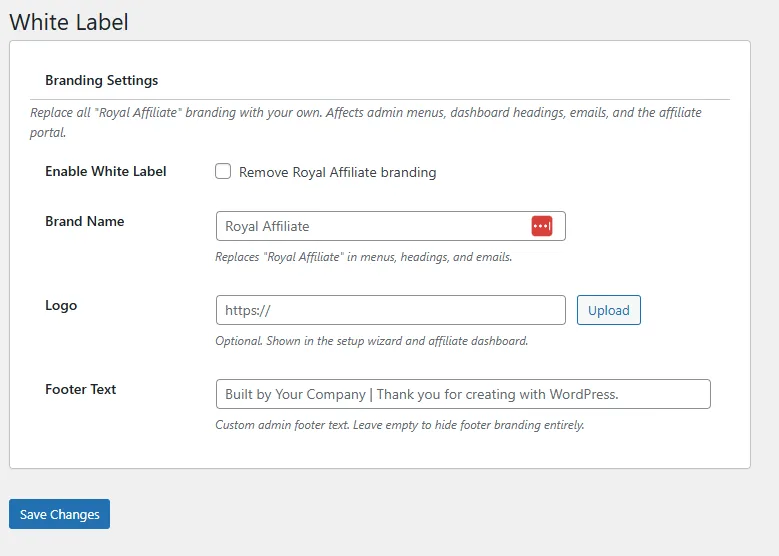
Remove Royal Affiliate Pro branding from the admin interface and replace it with your own brand.
### Customizable Elements
- **Brand Name** — Replace "Royal Affiliate Pro" with your agency or company name throughout the admin
- **Logo** — Upload a custom logo to replace the Royal Affiliate Pro logo on admin pages
- **Footer Text** — Customize the admin footer credit text
### Setup
Go to **Royal Affiliate Pro → White Label**, enter your brand name, upload your logo, and save. Changes take effect immediately across all admin pages.
**Tier:** White-label branding requires **Agency**.
[← Previous: Affiliate Portal](https://royalplugins.com/support/royal-affiliate/affiliate-portal/)
[Next: Fraud Detection →](https://royalplugins.com/support/royal-affiliate/fraud-detection/)