# 57-Point SEO Analysis
> SEObolt's 57-point SEO analysis scores every page across 7 categories with real-time scoring, unlimited focus keywords, readability and actionable fixes.
- Canonical:
- HTML version:
---
- [Overview](https://royalplugins.com/seobolt/)
- [Features](https://royalplugins.com/seobolt/features/)
[All Features](https://royalplugins.com/seobolt/features/)
[Content Analysis](https://royalplugins.com/seobolt/features/content-analysis/)
[Schema Markup](https://royalplugins.com/seobolt/features/schema-markup/)
[GEO Score](https://royalplugins.com/seobolt/features/geo-score/)
[AI Integration](https://royalplugins.com/seobolt/features/ai-integration/)
[Content AI](https://royalplugins.com/seobolt/features/content-ai/)
[Analytics](https://royalplugins.com/seobolt/features/analytics/)
[Page Builders](https://royalplugins.com/seobolt/features/page-builders/)
[Preferred Sources](https://royalplugins.com/seobolt/features/preferred-sources/)
- [Compare](https://royalplugins.com/seobolt/compare/)
[All Comparisons](https://royalplugins.com/seobolt/compare/)
[vs Rank Math](https://royalplugins.com/seobolt/vs-rank-math/)
[vs Yoast](https://royalplugins.com/seobolt/vs-yoast/)
[vs AIOSEO](https://royalplugins.com/seobolt/vs-aioseo/)
[vs SEOPress](https://royalplugins.com/seobolt/vs-seopress/)
- [Pricing](https://royalplugins.com/seobolt/pricing/)
- [Extras](https://royalplugins.com/seobolt/pricing/)
[AI Credits](https://royalplugins.com/seobolt/pricing/#ai-credits)
[Add-Ons](https://royalplugins.com/seobolt/pricing/#add-ons)
- [Guides](https://royalplugins.com/blog/)
[Perfect SEO Score](https://royalplugins.com/blog/wordpress-perfect-seo-score/)
[WooCommerce SEO](https://royalplugins.com/blog/woocommerce-seo-complete-guide/)
[Agent Readiness](https://royalplugins.com/blog/agent-readiness-guide/)
- [Docs](https://royalplugins.com/support/seobolt/)
Overview
All Features
-- Content Analysis
-- Schema Markup
-- GEO Score
-- AI Integration
-- Content AI
-- Analytics
-- Page Builders
-- Preferred Sources
Compare
vs Rank Math
vs Yoast
vs AIOSEO
vs SEOPress
Pricing
Extras
— AI Credits
— Add-Ons
Guides
— Perfect SEO Score
— WooCommerce SEO
— Agent Readiness
Documentation
Core Feature
Every page scored across 7 categories with actionable suggestions. Real-time analysis as you type, unlimited focus keywords, and a color-coded score that tells you exactly where to improve.
By Jameson · Founder & Lead Developer
[Get SEObolt Pro](https://royalplugins.com/seobolt/pricing/)
How It Works
## SEO Scoring That Actually Helps You Rank
Most SEO plugins give you a checklist. SEObolt gives you a **complete diagnostic**. Our 57-point analysis engine evaluates every page and post across 7 distinct categories, producing a weighted score that directly correlates with search ranking factors.
The analysis runs in real-time as you write. No saving drafts, no waiting for a re-scan. Every keystroke updates your score and suggestions instantly, so you can optimize content before it ever goes live.
92
Excellent
64
Needs Work
31
Poor
Color-coded scoring makes it instantly clear how optimized your content is. Green means you are on track. Yellow means there are improvements to make. Red means critical issues need attention before publishing.
[Learn how to achieve 100/100](https://royalplugins.com/blog/wordpress-perfect-seo-score/)
57
SEO Tests
7
Categories
Real-time
As You Type
∞
Focus Keywords
7 Categories
## Every Angle of SEO, Covered
Each of the 57 tests is grouped into one of 7 categories. Every category produces its own sub-score, so you can see exactly which area of your page needs attention.
### Content Quality
Category 1 of 7
Ensures your content is substantial, well-structured, and optimized for your focus keyword.
- Word count threshold
- Keyword density analysis
- Heading structure (H1-H6)
- Paragraph length optimization
### Title & Meta
Category 2 of 7
Validates the elements that appear directly in search results and influence click-through rates.
- Title tag length (50-60 chars)
- Keyword in title position
- Meta description length
- Keyword in meta description
### URL & Links
Category 3 of 7
Analyzes your permalink structure and internal/external linking patterns for SEO best practices.
- URL length and structure
- Keyword in URL slug
- Internal link count
- External link presence
- Broken link detection
### Images
Category 4 of 7
Checks that every image contributes to your SEO rather than dragging it down.
- Alt text presence
- Keyword in alt attributes
- Descriptive file names
- Image compression check
### Readability
Category 5 of 7
Google rewards content that is easy to read. These tests ensure your writing is accessible to your audience.
- Flesch reading ease score
- Average sentence length
- Paragraph length check
- Transition word usage
### Technical
Category 6 of 7
Verifies the behind-the-scenes signals that search engines rely on to properly index and rank your page.
- Canonical URL presence
- Robots meta directives
- Schema markup presence
- Page speed indicators
### Social
Category 7 of 7
Ensures your content looks great when shared on social platforms, driving more clicks back to your site.
- Open Graph tags (og:title, og:description, og:image)
- Twitter Card meta tags
- Social share image presence and dimensions
Workflow
## From Writing to Ranking
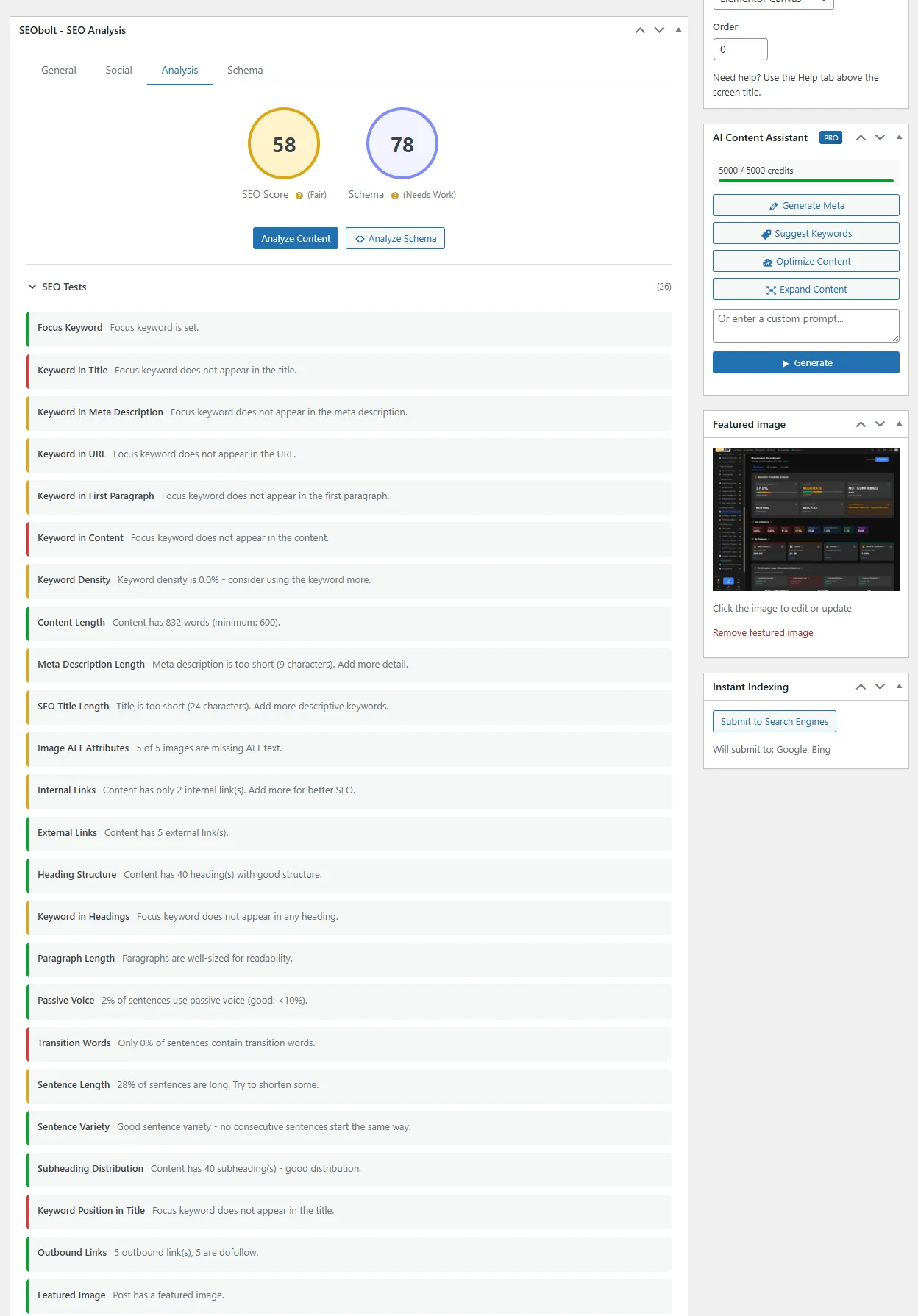
The analysis engine integrates directly into the WordPress editor. Here is how the scoring workflow operates from the moment you start writing.
1
### Set Your Focus Keywords
Enter your focus keyword in the SEObolt meta box, plus a comma-separated list of secondary keywords. The engine analyzes your content against each keyword.
2
### Write Your Content
As you type in any supported editor (Gutenberg, Classic, Elementor, Divi, and more), the analysis panel updates in real-time. No need to save or refresh. Scores recalculate with every change.
3
### Review Your Score
The color-coded score circle shows your overall SEO health at a glance. Click into the score breakdown to see per-category results and identify exactly which tests are passing, which need improvement, and which are failing.
4
### Follow Actionable Suggestions
Each failed test includes a plain-language explanation of what is wrong and how to fix it. No SEO expertise required. Follow the suggestions, watch your score climb, and publish with confidence.
NEW
## Standalone SEO Analysis Page
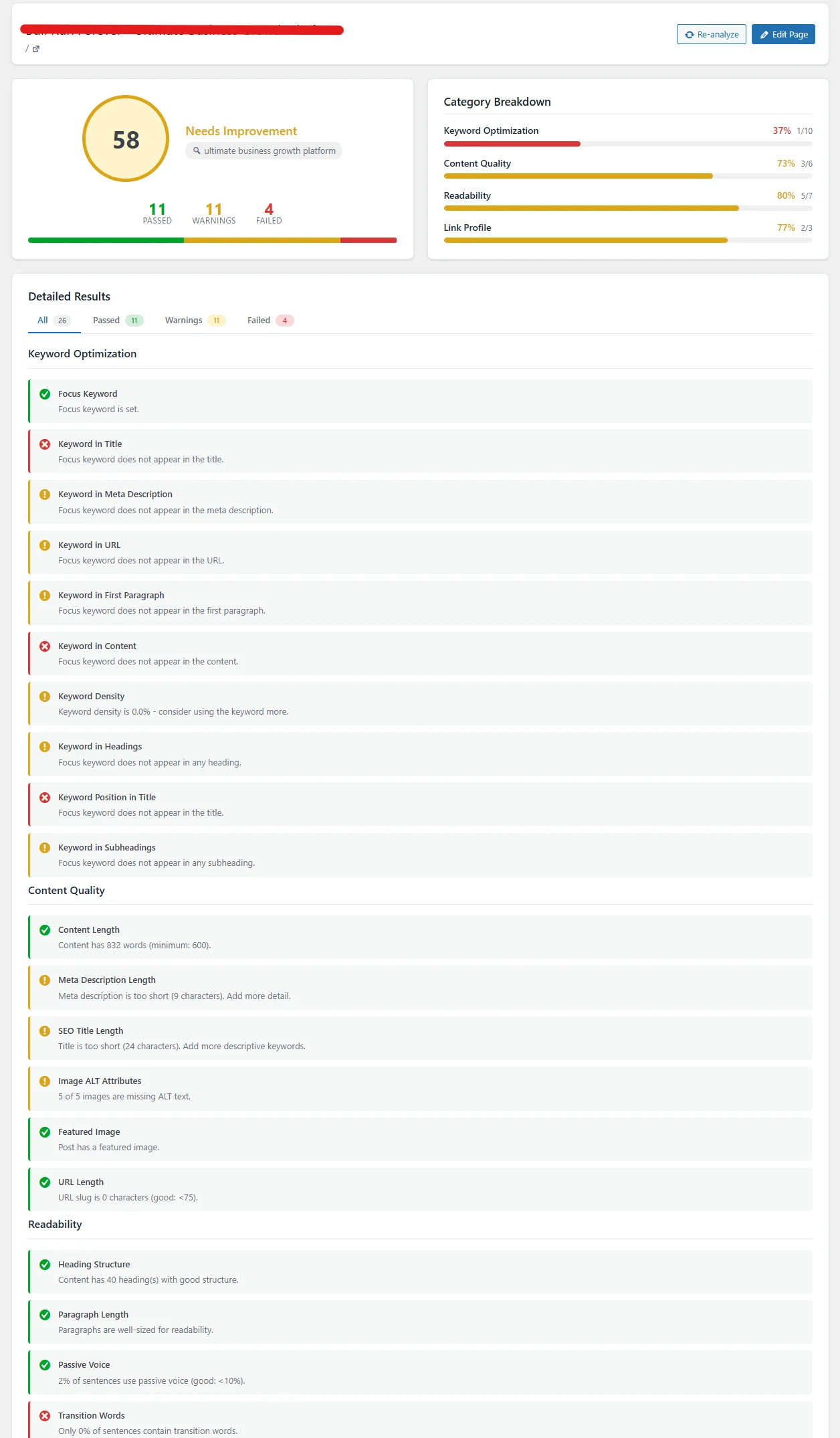
Click any page in your Site Analytics or SEO Performance dashboard and land on a dedicated, full-page analysis breakdown. No more scrolling through the post editor to find the meta box—everything is right there.
### One-Click Access
Title links in the analytics table go directly to the analysis page. See your full SEO report instantly without opening the editor.
### Category Progress Bars
See scores for Keyword Optimization, Content Quality, Readability, and Link Profile at a glance with color-coded progress bars.
### Filter Tabs
Quickly filter to see all tests, only passed, only warnings, or only failed. Focus on what needs fixing without the noise.
### Re-analyze & Edit
Hit re-analyze to refresh your score after changes, or jump straight to the post editor with the Edit Page button when you are ready to fix issues.
## What Sets SEObolt Apart
- **Real-Time Analysis:** Scores update as you type in the editor, with no delay and no need to save drafts first.
- **Focus Keyword + Secondary Keywords:** Set a primary focus keyword plus a comma-separated secondary keywords field. The engine analyzes your content against each.
- **SEO Score Column:** A color-coded score appears in the WordPress post and page lists, so you can audit content health at a glance without opening each post.
- **Per-Category Breakdown:** See individual scores for each of the 7 categories, pinpointing the exact area that needs attention.
- **Page Builder Support:** Works with Gutenberg, Elementor, Divi, Beaver Builder, WPBakery, Bricks, Oxygen, Thrive Architect, and Avada (Fusion Builder).
- **Actionable Suggestions:** Every failing test includes a specific, plain-language recommendation on how to fix the issue.
- **Weighted Scoring:** Tests are weighted by their actual impact on search rankings, so a missing title tag counts more than a missing transition word.
- **Multi-Language Ready:** The analysis engine is fully translatable and works with content in any language.
BEYOND THE 57 TESTS
## Two More Exclusive Scores
The 57-point SEO Score is just the beginning. SEObolt Pro also includes two proprietary scoring systems that no other WordPress SEO plugin offers.
[### Schema Score (0-100)
11-factor algorithm that grades your structured data quality. Tells you exactly which properties to add for richer search results.](https://royalplugins.com/seobolt/features/schema-markup/)
### Local SEO Score (0-100)
10 weighted tests validate your local business configuration: business hours, KML sitemap, service areas, and social profiles.
[Complete Scoring Guide: How to Get 100/100](https://royalplugins.com/blog/wordpress-perfect-seo-score/)
## Related SEO Features
[### Schema Markup & Schema Score
67 schema templates with an exclusive 0-100 Schema Score that grades your structured data quality per post.](https://royalplugins.com/seobolt/features/schema-markup/)
[### Content AI
Four-engine AI (OpenAI, Claude, DeepSeek, Gemini) generates meta descriptions, titles, and content suggestions in seconds.](https://royalplugins.com/seobolt/features/content-ai/)
[### Analytics Dashboard
Cloud-based SaaS dashboard with Google Search Console integration, keyword tracking, and automated reports.](https://royalplugins.com/seobolt/features/analytics/)
[### Page Builder Support
SEO controls appear directly inside Elementor, Divi, Beaver Builder, and 6 more page builders.](https://royalplugins.com/seobolt/features/page-builders/)
## Start Optimizing Every Page
Get the 57-point analysis engine, unlimited focus keywords, and all other SEObolt Pro features with a single license.
[View Pricing](https://royalplugins.com/seobolt/pricing/)