# Run every client site through your AI agent . Approve every change.
> Royal MCP Pro on every site, Royally across all of them: 400+ AI tools, approvals, backups first, undo, monitoring and client reports. From $9 a month.
- Canonical:
- HTML version:
---
Royally + Royal MCP Pro
Royal MCP Pro goes on each WordPress site. Royally works across all of them. Your AI agent handles **updates, bulk edits, backups, security, SEO and client reports**, and nothing changes until someone on your team approves it. Every change gets a receipt, risky ones start with a backup, and changes made through Royal MCP Pro can be undone.
One plan covers both: the plugin on every site and Royally in the cloud. Works with **Claude** and **ChatGPT**, on your own AI subscription.
Updates, backup first
Bulk changes, one undo
Approvals and receipts
Uptime and alerts
Client reports and portal
SEO across sites
[See everything it does](#workflows)
[Compare plans](#pricing)
Royally + Royal MCP Pro
$9
/ month
or $89 a year, billed yearly
3 sites · 2 members
On every site
- Royal MCP Pro: 400+ AI tools
- Every change logged, with undo
In Royally
- Approvals and receipts across sites
- Updates, backups, monitoring, reports
[Buy Solo monthly →](https://my.royalplugins.com/cart/?add-to-cart=551)
30-day money-back guarantee on your first purchase.
Have a Royal MCP Pro licence? [Royally is included](https://royalplugins.com/royal-mcp-pro/pricing/#existing-licence).
437MCP tools on every site
61Royally fleet tools
28Third-party plugins
9Services connected
9Other MCP servers
HOW IT WORKS
## The plugin on each site. Royally across all of them.
Your AI agent never touches a client site on its own. It asks Royally, a person approves, and Royal MCP Pro makes the change on the site and keeps the undo.
Your AI agent
Claude or ChatGPT asks for a change on one site or fifty: update these plugins, fix these titles, block this IP.
In the cloud: Royally
Royally shows exactly what will change and waits for approval. Approve once for the whole run. Royally keeps the receipt.
On each site: Royal MCP Pro
The plugin applies the change, reads it back to confirm it, logs it and holds the undo.
- Your team works in Royally; your agent connects to Royally once and reaches every site you allow
- Members only see the clients you give them
- Clients get a read-only portal and never take a seat
- Royally is optional: connect your agent straight to a site any time
WHAT IT DOES
## The jobs that eat your week, handled across every site.
Each one runs the same way: your agent prepares it, Royally shows you what will happen, a person approves, and you get a receipt per site.
### Plugin, theme and core updates
Updates that check the site and roll themselves back if it breaks.
1. Preview
2. Approve
3. Backup
4. Update
5. Check
- Backup first by default, always for WordPress core
- One item at a time, then the cache is cleared and the home page loaded
- A breaking update is rolled back and that site stops
- Per-site policy: never, with approval, or minor updates automatically
- Ignore an update on one site or the whole fleet
### Bulk changes across sites
Change up to 50 sites from one request, with a preview first and one undo for the whole run.
- Find and replace, Elementor widget settings, global colours and fonts, widget text, menus, custom CSS
- Copy Elementor templates and Divi Library items between sites
- Plugins and themes: install, activate, switch, remove
- Users, maintenance mode, database clean-up, AI bot policies, GuardPress hardening
- Applied only to sites that haven't changed since the preview
### WooCommerce store updates
Tell your agent “raise every winter product 10% and end the sale on Sunday.” You see the change first, approve it, and can undo it.
- Bulk price updates, product edits, stock levels and categories
- Coupons: create, update and expire in bulk
- Bulk order status updates
- WooCommerce Subscriptions: pause, resume, cancel, move the next payment date, change subscription prices
- Every change logged on the store, with undo
### Elementor page building
Build and update Elementor pages by asking: new sections, widget changes, templates and site-wide text, on one site or many.
- Build compositions, add, update and remove widgets, manage elements
- Elementor 4 global classes and variables, kit colours and fonts
- Clone and apply templates, Theme Builder conditions, replace text across the site
- Across sites from Royally: widget settings, global colours and fonts, template copies, in one approval with one undo
- Connect Elementor’s own MCP server next to Royal MCP Pro and your agent builds with Elementor 4 atomic widgets too. Changes through Elementor’s server are approved and recorded; undo comes from Royal MCP Pro’s own changes
### Staging first
Link a live site to its staging copy, and bulk changes and updates can run on the copy first.
- Each copy is checked: the change landed, the home page loads, no new PHP fatal errors
- Live sites are only touched if every copy passes
- One approval covers staging and live
- Make it the default for your agency
Royally uses staging copies you already have; it doesn't create them.
### Backups and restore
Know every client site has a working backup, and take one before anything risky.
- Backup checks across sites with SiteVault, UpdraftPlus or Duplicator
- Backup before risky changes with SiteVault, or UpdraftPlus if that's what the site runs
- Backup health checks
- Restore from a Royally backup: your agent prepares it, a person starts it
Restore needs SiteVault Pro on the site.
### Monitoring and alerts
Hear about problems before your client does.
- Uptime every 5 minutes
- SSL and domain expiry, checked daily
- Page speed and Core Web Vitals weekly, phone and desktop
- PHP fatal errors, naming the plugin
- New admin users, and changes made outside Royally
- Alerts by email, Slack or Discord; signed webhooks on Agency
### Security across sites
One sweep across the fleet, with the findings sorted for you.
- Security scans and triage across sites
- Vulnerability alerts from the Wordfence Intelligence feed, even on sites with no security plugin
- Block an IP on every site at once through Wordfence, Solid Security or GuardPress
- Admin-user audits and GuardPress hardening in bulk
### SEO audits and data
Audit every site's SEO and fix it through whichever SEO plugin the site runs.
- SEO audits and findings across the fleet
- Meta written through Yoast, Rank Math, SEOPress, AIOSEO or SEObolt
- Search Console and Analytics data for each site, with your Google service account or SEObolt key
- Keyword, SERP and backlink data from your own DataForSEO or Ahrefs account
### Clients, reports and portal
Show clients the work without sending another spreadsheet.
- Client records, with members limited to the clients you choose
- Weekly and monthly reports with your logo and colours, as a PDF
- Scheduled report emails, with unsubscribe
- A read-only client portal by email link: uptime and reports
- White-label and your own email provider on Agency
### Approvals and the record
The controls you need before letting AI near client sites.
- An approvals inbox, with a window of 15 minutes, 1, 4 or 24 hours
- Two-person approval per site or agency-wide; the requester can't approve
- One switch that stops every agent in the agency
- Append-only log with a signed daily checkpoint, and signed exports
- Two-step sign-in required for owners; one-click wp-admin login for owners and admins
INSIDE ROYAL MCP PRO
## The Pro admin surface, at a glance.
Every Pro tool call is logged, undoable, and scoped by role. Here's what that looks like in your WordPress admin.
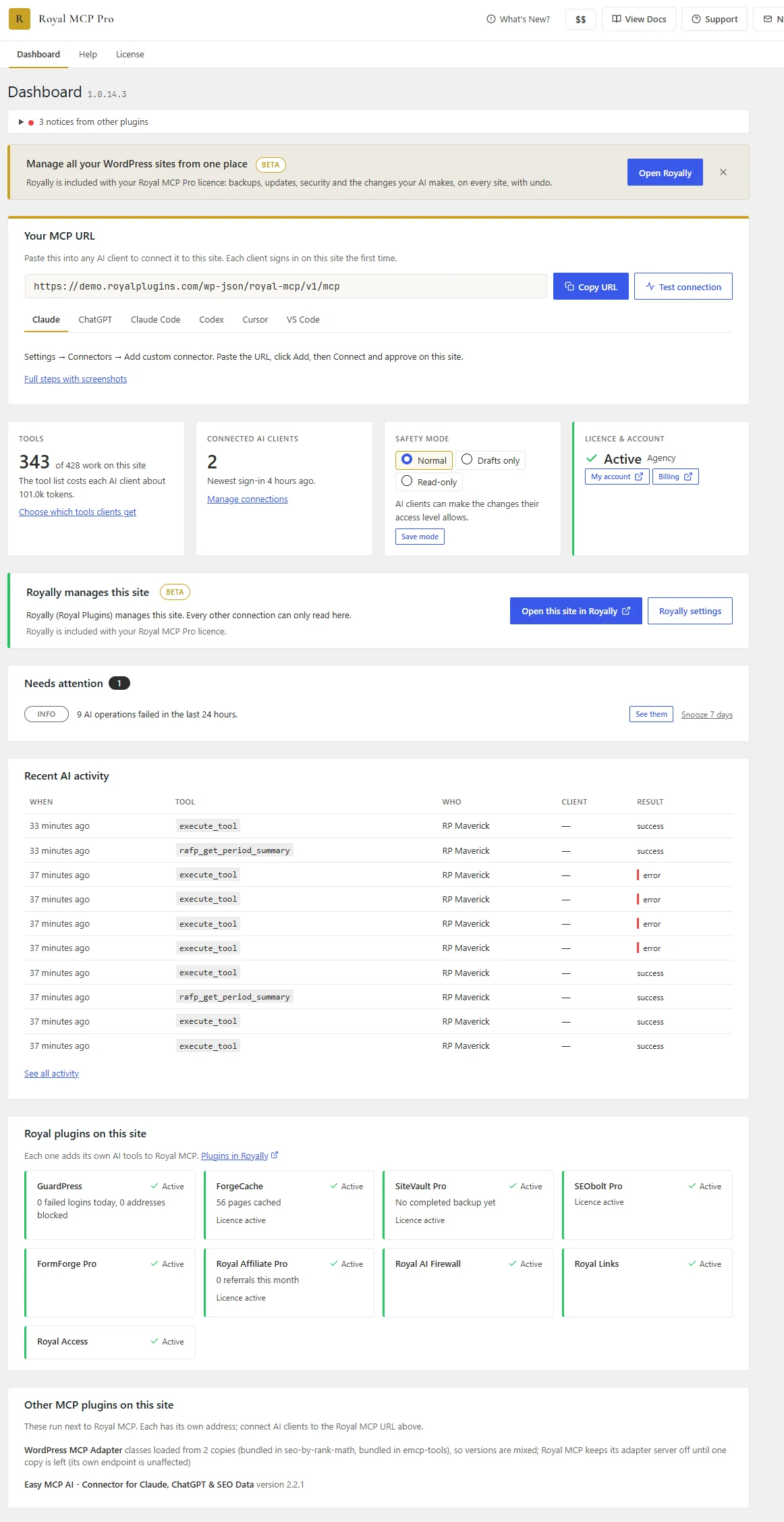
### Dashboard
Everything about the site on one screen: your MCP URL with setup steps for Claude, ChatGPT and other AI apps, the tools each AI client gets, connected clients, safety mode and your license. Below that sit what needs attention, recent AI activity and the Royal plugins on the site.
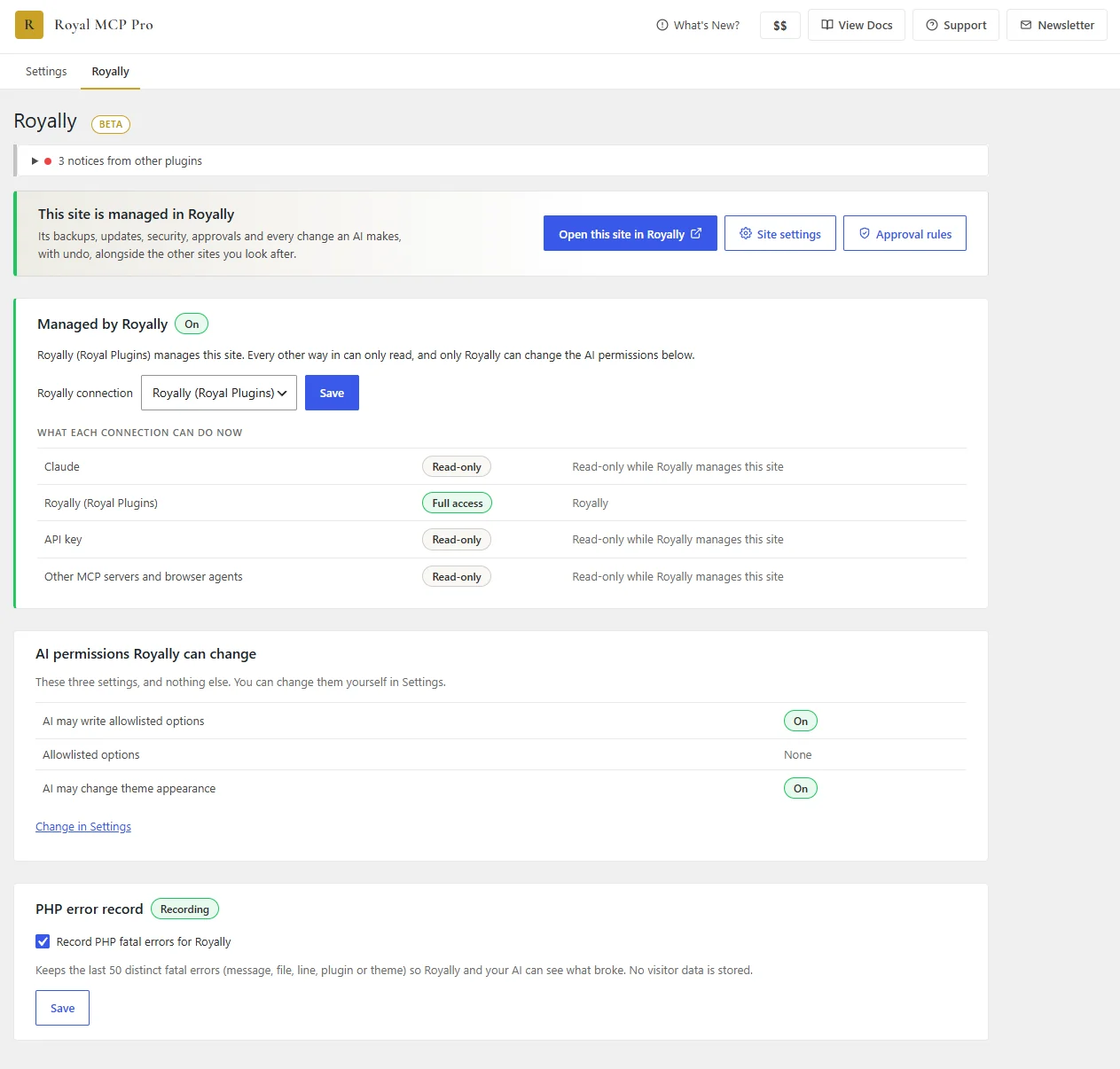
### Managed by Royally
When Royally manages a site, every other connection can only read, and only Royally can change the AI permissions. This page shows what each connection can do right now, the few settings Royally may change, and a PHP error record so you and your AI can see what broke.
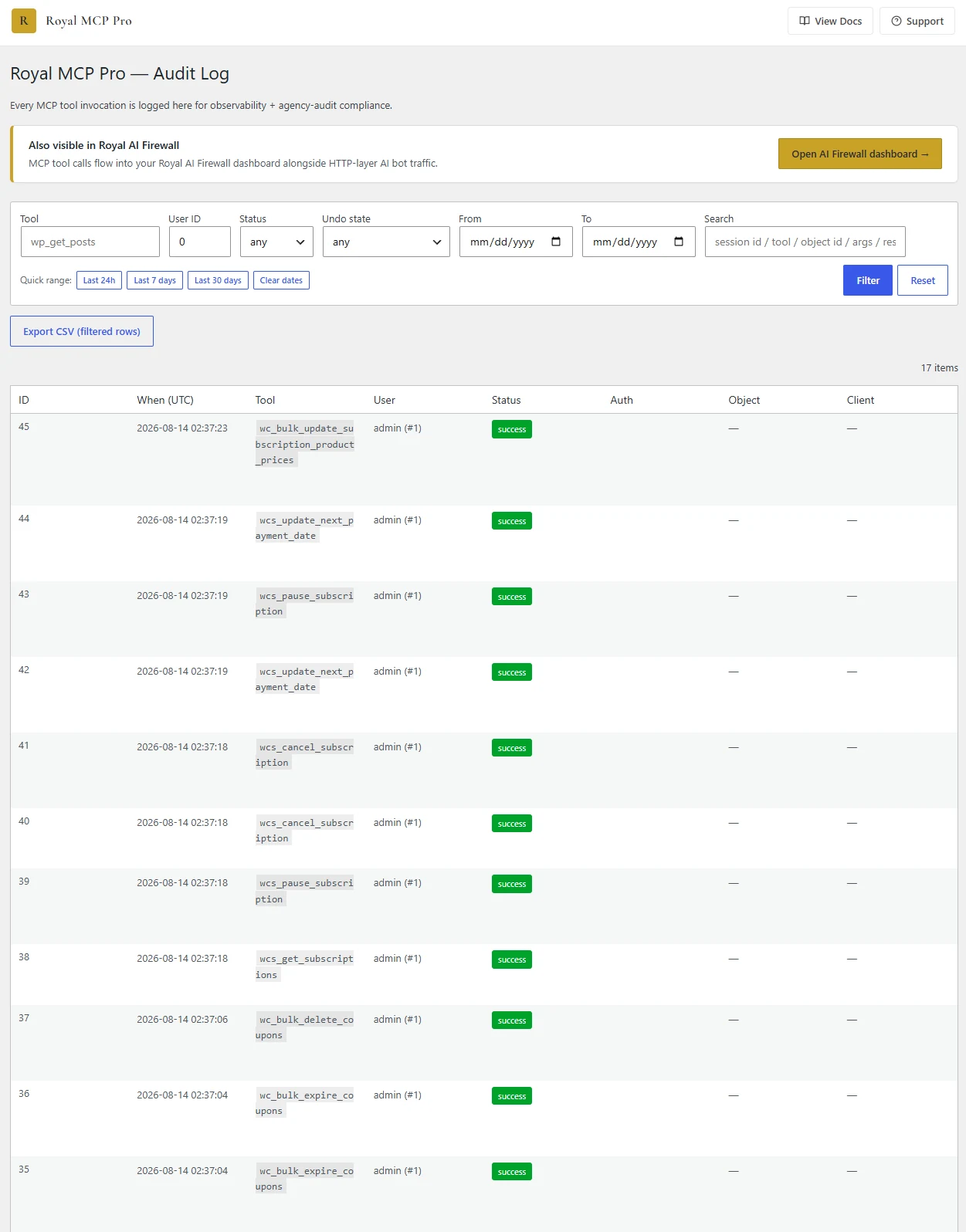
### Audit Log
Every MCP tool invocation logged with tool name, user, status, and undo state. Filter by tool, user, date range, or search. Export as CSV. Cross-linked into Royal AI Firewall for at-a-glance AI activity.
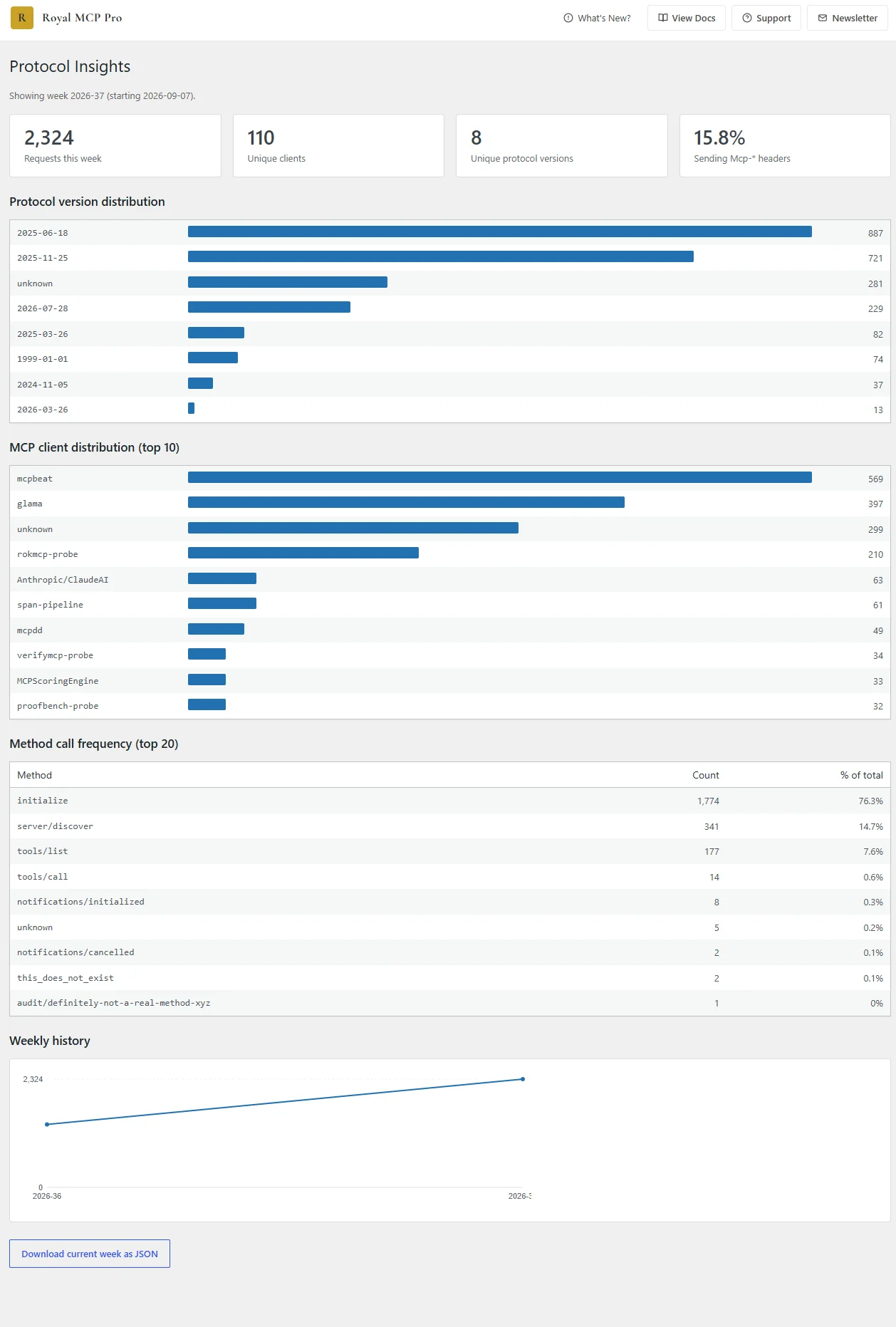
### Protocol Insights
Weekly telemetry on every MCP request, including total volume, unique clients, protocol version split, top clients by name, and method-call frequency. Spot version drift, identify which agents hit hardest, and export the raw week as JSON.
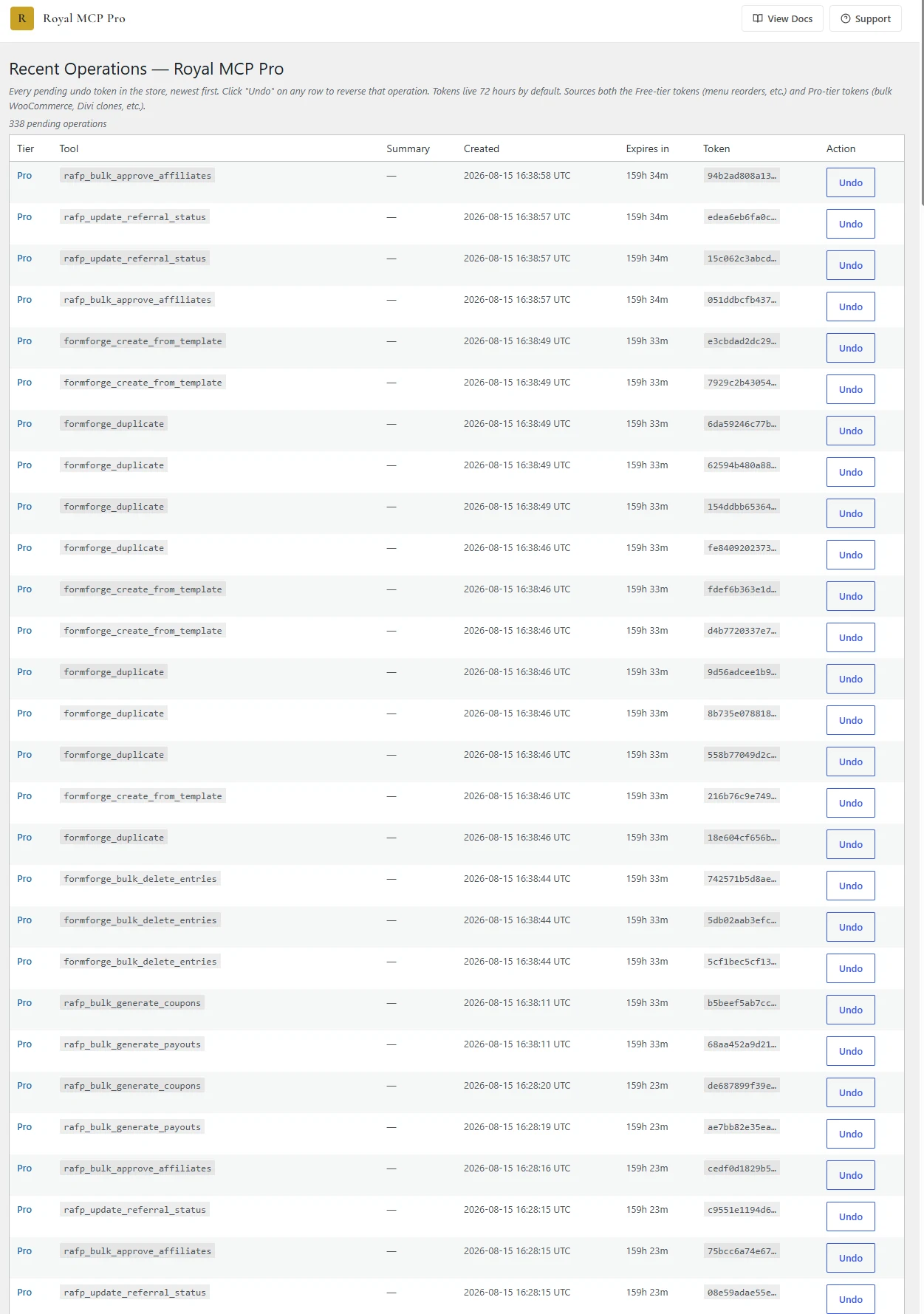
### Recent Operations
Every destructive Pro tool call within the 72-168 hour undo window is listed here with an active Undo button. One click reverses the operation — no CLI, no rollback SQL.
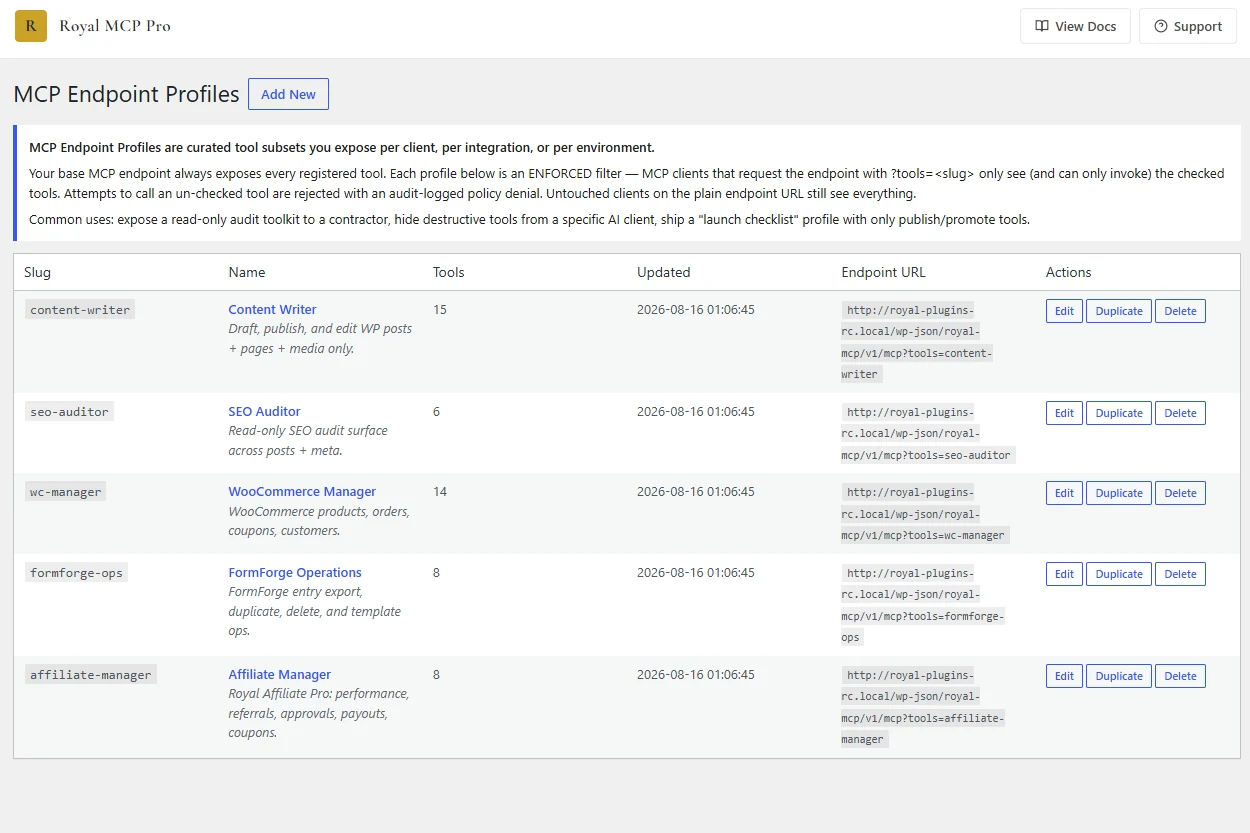
### Custom Endpoint Profiles
Ship a locked-down Content Writer profile for a contractor, a read-only SEO Auditor for a client, or a full WooCommerce Manager for your team — each with its own scoped endpoint URL, all from the same install.
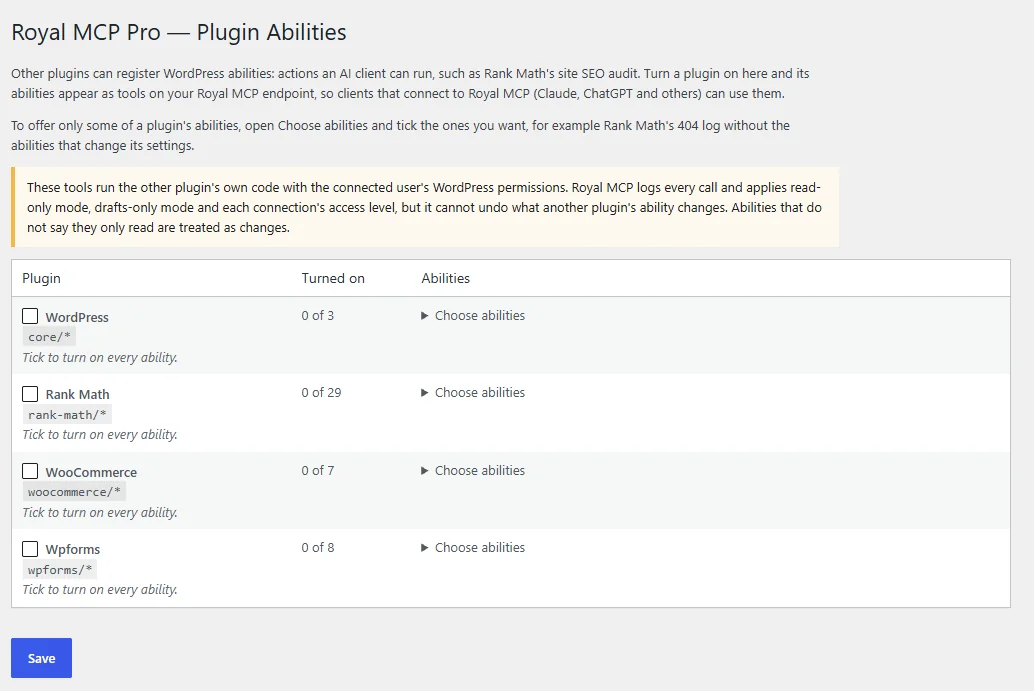
### Plugin Abilities
Other plugins' WordPress abilities become tools on your Royal MCP connection, a whole plugin or one ability at a time. Offer Rank Math's 404 log without the abilities that change its settings. Every ability is marked as reading or changing the site, and every call is logged.
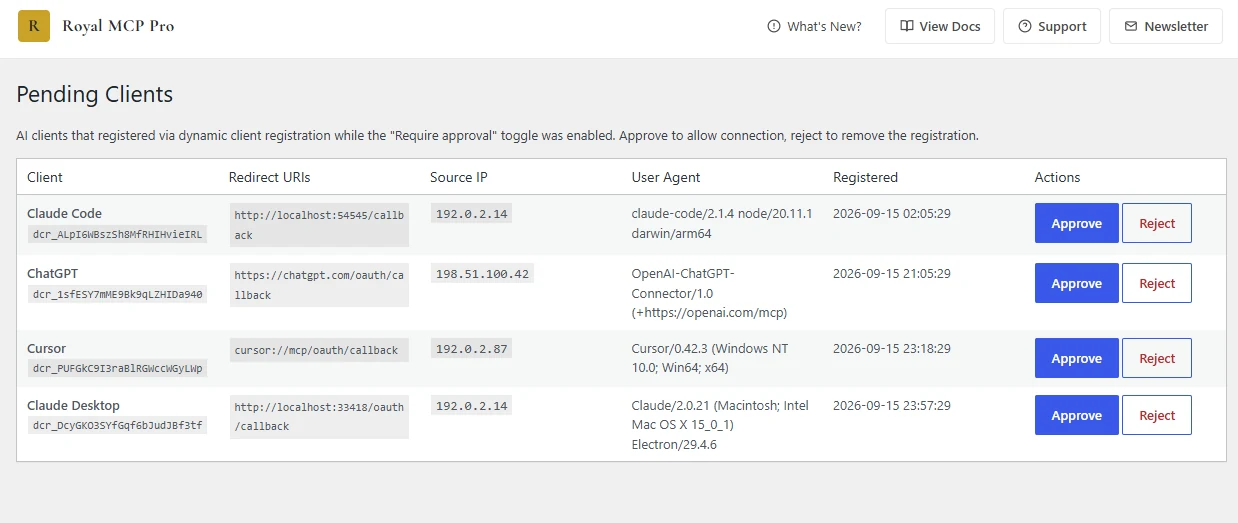
### Pending Client Approval
Flip on **Require approval before new AI clients can connect** and every dynamically-registered client queues here before it can touch the site. Inspect the redirect URI, source IP, and user agent per row, then Approve or Reject. The admin bar carries a live count badge so requests never sit unnoticed.
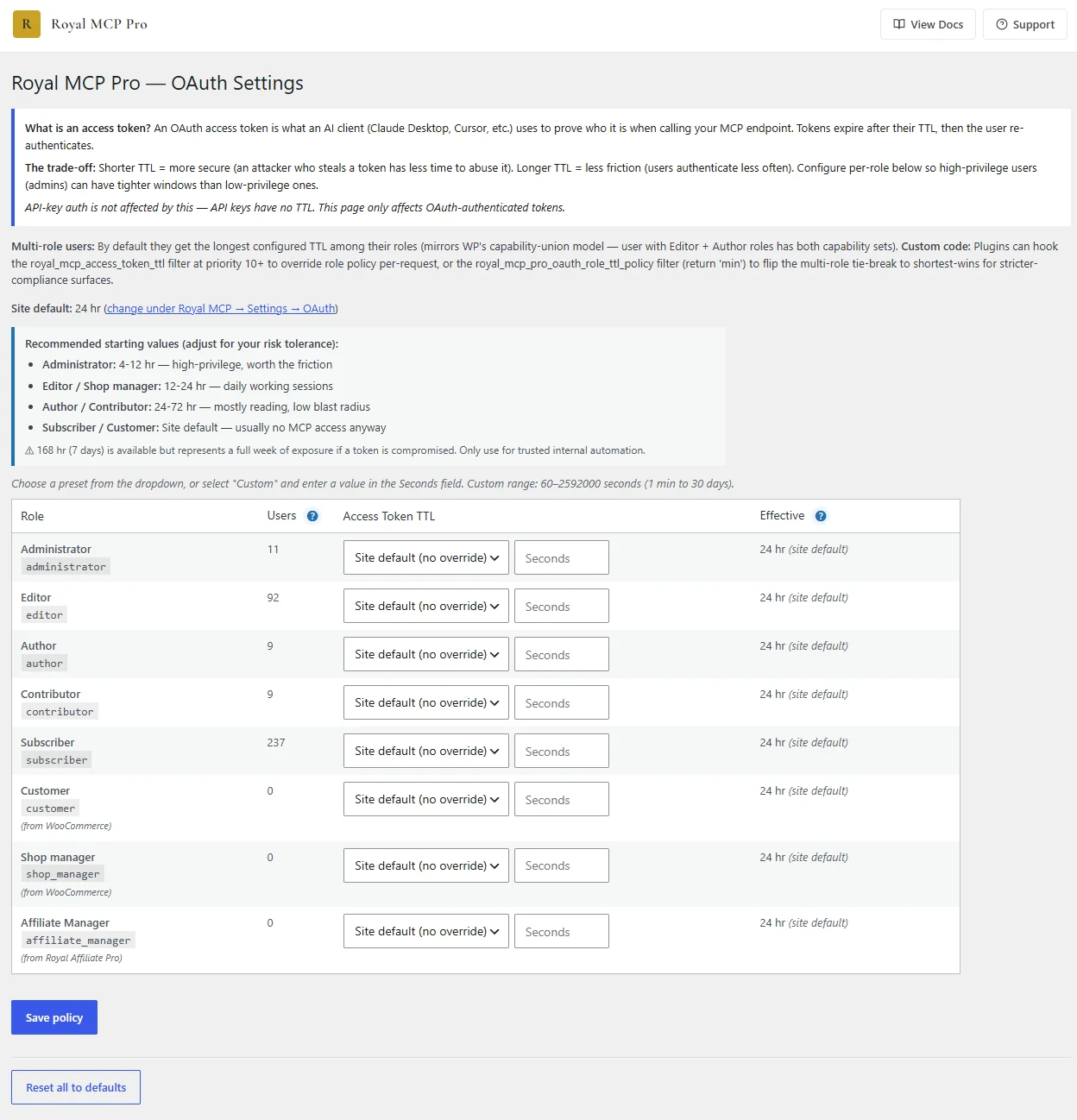
### Per-Role OAuth TTL
Configure access-token time-to-live per WordPress role. Tighter windows for administrators, looser for contributors. Multi-role users default to the longest applicable TTL, filterable via `royal_mcp_pro_oauth_role_ttl_policy`.
WHO IT WORKS WITH
## Your AI agent, your plugins, your hosts and services.
Royally connects what a WordPress agency already runs, and puts all of it behind the same approvals and the same record.
**2**AI agents tested end to end: Claude and ChatGPT
**28**third-party plugins with their own tools, plus the Royal plugins
**9**services: hosts, DNS, email and code
**9**other WordPress MCP servers, on the same site
### AI agents
Connect your agent to Royally once. It signs in through Royally's own approval screen, so no keys are copied around.
Claude web, Desktop, Claude Code
ChatGPT developer mode, paid plan
### Services
Sign in to the services around your sites and your agent can use them through Royally.
Cloudflare
WordPress.com and Jetpack sites
Hostinger
Cloudways
Pressable
InstaWP
Kit per client
Substack per client, read only
GitHub
### WordPress plugins with their own tools
Royal MCP Pro turns on a plugin's tools when that plugin is active, so each site gets the tools that fit it.
### Builders and blocks
ElementorDivi 4 and 5GenerateBlocksStackableSpectraGreenShift
### Store
WooCommerceWooCommerce Subscriptions
### SEO
YoastRank MathAIOSEOSEOPressRedirection
### Backups
UpdraftPlusDuplicatorAll-in-One WP MigrationBackWPupJetpack BackupWPvivid
### Security and speed
WordfenceSolid SecurityLiteSpeed CacheW3 Total Cache
### Fields, forms and more
ACFWPFormsContact Form 7Code SnippetsWPCodeTablePressBuddyPressComplianzMonsterInsights
### Royal plugins
GuardPressSiteVaultForgeCacheSEOboltFormForgeRoyal Affiliate ProRoyal LinksRoyal AI FirewallRoyal Ledger
### The other MCP plugins you already run
Royally connects other WordPress MCP servers on the same site as Royal MCP Pro, over OAuth, an API key or a WordPress application password. Their read tools are on; their change tools stay off until an owner or admin turns them on.
Elementor MCPEasy MCP AI 240+ toolsAI EngineWordPress MCP AdapterEMCP ToolsRank Math, WP Rocket, Imagify and BackWPup serverminiOrange MCPWSP MCPCowboy MCP
| What Royally gives each action | Other MCP servers | Royal MCP Pro |
| --- | --- | --- |
| Who asked, who approved, when, on which site | Yes | Yes |
| Exact arguments, checked from approval to send | Yes | Yes |
| Two-person approval rules | Yes | Yes |
| The site's reply kept on the receipt | Yes | Yes |
| Tamper-evident log, reads included | Yes | Yes |
| Preview of exactly what will change | No | Yes |
| Change confirmed by reading it back | No | Yes |
| Undo | No | Yes |
| Changes made outside Royally caught | No | Yes |
EVERY TOOL
## 434 tools on a Royal MCP Pro site. Here's every one.
113 WordPress core tools, 158 tools that turn on with their plugin, and 163 Pro tools. Open any group to see the exact tool names your agent sees.
### Royal MCP Pro tools (163)
The depth: builders, stores, SEO plugins, site admin, backups and security, in bulk where it counts.
elementor\_clone\_template
elementor\_apply\_template\_advanced
elementor\_save\_template\_with\_conditions
elementor\_create\_widget
elementor\_update\_widget
elementor\_delete\_widget
elementor\_update\_widget\_setting
elementor\_bulk\_replace\_widget\_setting
elementor\_replace\_text\_sitewide
elementor\_apply\_theme\_builder\_conditions
elementor\_export\_theme\_builder\_template
elementor\_get\_kit\_globals
elementor\_update\_kit\_global
elementor\_manage\_global\_variable
elementor\_manage\_global\_classes
elementor\_manage\_elements
elementor\_build\_composition
divi\_library\_create
divi\_library\_update
divi\_library\_delete
divi\_apply\_global\_preset
divi\_convert\_shortcodes\_to\_blocks
divi\_prepare\_shortcode\_migration
divi5\_scaffold\_block
wc\_bulk\_price\_update
wc\_bulk\_update\_stock
wc\_bulk\_update\_products
wc\_bulk\_delete\_products
wc\_bulk\_assign\_categories
wc\_bulk\_update\_orders
wc\_bulk\_create\_coupons
wc\_bulk\_update\_coupons
wc\_bulk\_expire\_coupons
wc\_bulk\_delete\_coupons
wc\_bulk\_update\_subscription\_product\_prices
wc\_manage\_grouped\_children
wcs\_get\_subscriptions
wcs\_pause\_subscription
wcs\_resume\_subscription
wcs\_cancel\_subscription
wcs\_update\_next\_payment\_date
wp\_audit\_seo\_bulk
yoast\_bulk\_update\_meta
rankmath\_bulk\_update\_meta
seopress\_bulk\_update\_meta
aioseo\_bulk\_update\_meta
seobolt\_bulk\_update\_meta
seobolt\_get\_search\_performance
wp\_validate\_schema
rankmath\_get\_post\_score
redirection\_bulk\_import
redirection\_bulk\_export
redirection\_apply\_rule\_set
wp\_bulk\_find\_and\_replace
wp\_bulk\_update\_widgets
wp\_bulk\_replace\_widget\_content
wp\_bulk\_update\_menu\_items
wp\_prepare\_for\_launch
wp\_monthly\_maintenance\_report
wp\_migrate\_theme\_assets
wp\_publish\_and\_promote\_pro
seo\_optimize\_for\_launch
wp\_update\_plugin
wp\_update\_theme
wp\_update\_core
wp\_install\_plugin
wp\_activate\_plugin
wp\_deactivate\_plugin
wp\_delete\_plugin
wp\_set\_plugin\_auto\_update
wp\_install\_theme
wp\_switch\_theme
wp\_delete\_theme
wp\_set\_theme\_auto\_update
wp\_run\_cli\_command
wp\_create\_login\_link
wp\_create\_user
wp\_set\_user\_role
wp\_demote\_user
wp\_delete\_user
wp\_audit\_application\_passwords
wp\_bulk\_moderate\_comments
wp\_optimize\_database
wp\_set\_maintenance\_mode
wp\_get\_php\_errors
wp\_purge\_and\_verify\_url
sv\_get\_dashboard\_summary
sv\_verify\_backup
sv\_verify\_backup\_health
sv\_restore\_backup
sv\_get\_restore\_status
ai1wm\_get\_backup\_status
wpvivid\_get\_backup\_status
jetpack\_get\_backup\_status
backwpup\_get\_backup\_status
gp\_get\_dashboard\_summary
gp\_block\_ip
gp\_unblock\_ip
gp\_get\_hardening
gp\_set\_hardening
gp\_get\_malware\_results
gp\_get\_file\_integrity
snippets\_create
snippets\_update\_code
snippets\_activate
wpcode\_create\_snippet
wpcode\_update\_snippet
wpcode\_activate\_snippet
wpcode\_deactivate\_snippet
acf\_create\_field\_group
acf\_clone\_field\_group
acf\_update\_field\_group
acf\_delete\_field\_group
acf\_import\_field\_group\_json
acf\_export\_field\_group\_json
acf\_add\_field
acf\_update\_field\_definition
acf\_delete\_field
acf\_reorder\_fields
acf\_get\_field\_group\_config
acf\_list\_supported\_field\_types
acf\_create\_options\_page
acf\_register\_post\_type
acf\_register\_block
formforge\_list\_forms
formforge\_get\_entry
formforge\_get\_entry\_counts
formforge\_get\_analytics
formforge\_bulk\_export\_entries
formforge\_bulk\_delete\_entries
formforge\_bulk\_resend\_notifications
formforge\_duplicate
formforge\_create\_from\_template
rafp\_list\_affiliates
rafp\_get\_affiliate\_performance
rafp\_get\_period\_summary
rafp\_get\_referral\_records
rafp\_get\_fraud\_incidents
rafp\_scan\_fraud
rafp\_bulk\_approve\_affiliates
rafp\_update\_referral\_status
rafp\_bulk\_generate\_payouts
rafp\_list\_payouts
rafp\_bulk\_generate\_coupons
rafp\_list\_campaigns
rafp\_get\_campaign
rafp\_get\_campaign\_performance
rafp\_create\_campaign
rafp\_create\_challenge
rafp\_list\_creatives
rafp\_bulk\_upload\_creatives
rafp\_list\_landing\_pages
rafp\_assign\_landing\_page
rafp\_bulk\_tag\_affiliates
rafp\_bulk\_update\_category\_rates
rafp\_bulk\_update\_product\_rates
rafp\_grant\_store\_credit
rafp\_broadcast\_to\_affiliates
rafp\_send\_monthly\_report
rafp\_get\_activity\_log
royal\_mcp\_get\_ai\_permissions
royal\_mcp\_update\_ai\_permissions
royal\_mcp\_undo\_last\_operation
### WordPress core (113)
Plus 158 plugin tools that turn on when WooCommerce, Elementor, Divi, Yoast, Wordfence, UpdraftPlus and the other supported plugins are active.
discover\_tools
execute\_tool
get\_tool\_info
mcp\_get\_change
mcp\_list\_recent\_changes
mcp\_undo\_last\_operation
royal\_mcp\_connection\_health
seo\_audit\_meta\_tags
wp\_add\_post\_meta
wp\_add\_post\_terms
wp\_approve\_comment
wp\_clone\_post\_as\_draft
wp\_count\_media
wp\_count\_posts
wp\_count\_terms
wp\_create\_comment
wp\_create\_menu
wp\_create\_menu\_item
wp\_create\_page
wp\_create\_post
wp\_create\_preview\_link
wp\_create\_synced\_pattern
wp\_create\_term
wp\_delete\_block
wp\_delete\_comment
wp\_delete\_media
wp\_delete\_menu\_item
wp\_delete\_page
wp\_delete\_post
wp\_delete\_post\_meta
wp\_delete\_term
wp\_delete\_term\_meta
wp\_diff\_revisions
wp\_find\_media
wp\_get\_active\_theme
wp\_get\_block\_outline
wp\_get\_block\_template
wp\_get\_categories
wp\_get\_comments
wp\_get\_cron\_schedule
wp\_get\_custom\_css
wp\_get\_error\_log\_tail
wp\_get\_global\_styles
wp\_get\_mcp\_coexistence
wp\_get\_media
wp\_get\_media\_item
wp\_get\_menu\_items
wp\_get\_menus
wp\_get\_option
wp\_get\_page
wp\_get\_pages
wp\_get\_pending\_comments
wp\_get\_permalink\_structure
wp\_get\_plugin\_settings
wp\_get\_plugins
wp\_get\_post
wp\_get\_post\_meta
wp\_get\_post\_revisions
wp\_get\_post\_terms
wp\_get\_post\_types
wp\_get\_posts
wp\_get\_revision\_content
wp\_get\_seo\_meta
wp\_get\_sidebars
wp\_get\_site\_info
wp\_get\_site\_status
wp\_get\_synced\_pattern
wp\_get\_tags
wp\_get\_taxonomies
wp\_get\_term\_meta
wp\_get\_terms
wp\_get\_theme\_mods
wp\_get\_themes
wp\_get\_user
wp\_get\_users
wp\_get\_widgets
wp\_insert\_blocks
wp\_list\_block\_templates
wp\_list\_block\_types
wp\_list\_synced\_patterns
wp\_move\_block
wp\_publish\_and\_promote
wp\_reorder\_menu\_items
wp\_replace\_block
wp\_replace\_in\_page
wp\_replace\_in\_post
wp\_replace\_text\_in\_blocks
wp\_restore\_revision
wp\_revoke\_preview\_links
wp\_search
wp\_security\_triage
wp\_set\_featured\_image
wp\_spam\_comment
wp\_trash\_comment
wp\_update\_block\_attributes
wp\_update\_custom\_css
wp\_update\_media
wp\_update\_menu\_item
wp\_update\_option
wp\_update\_page
wp\_update\_permalink\_structure
wp\_update\_post
wp\_update\_post\_meta
wp\_update\_seo\_meta
wp\_update\_synced\_pattern
wp\_update\_term
wp\_update\_term\_meta
wp\_update\_theme\_mod
wp\_update\_widget
wp\_upload\_media
wp\_upload\_media\_from\_url
wp\_validate\_blocks
wp\_verify\_rendered\_page
### Royally tools (61)
Royally's own tools work across all your sites at once. Each connected site's tools come through on top of these.
fleet/list\_sites
fleet/list\_site\_groups
fleet/list\_plugins
fleet/health\_summary
fleet/check\_updates\_pending
fleet/list\_recent\_changes
fleet/get\_site\_notes
fleet/get\_brand\_kit
fleet/bulk\_edit
fleet/run\_across\_sites
fleet/update\_seo\_meta
fleet/purge\_caches
fleet/trigger\_backups
fleet/block\_ip\_across\_fleet
fleet/continue\_call
fleet/scan\_security
fleet/security\_triage
fleet/check\_vulnerabilities
fleet/audit\_admin\_users
fleet/check\_broken\_links
fleet/verify\_backup\_health
fleet/restore\_from\_snapshot
fleet/restore\_status
fleet/get\_receipt
fleet/list\_recent\_receipts
fleet/get\_execution
fleet/undo
fleet/undo\_status
fleet/deny
fleet/list\_advisories
fleet/get\_advisory
fleet/acknowledge\_advisory
fleet/dismiss\_advisory
fleet/resolve\_advisory
fleet/kill\_manifest
fleet/kill\_manifests\_by\_plugin
fleet/get\_kill\_switch\_status
fleet/get\_rate\_limit\_status
recipe/backup\_status
recipe/run\_backup\_monitor
recipe/security\_status
recipe/run\_security\_sweep
recipe/seo\_audit
recipe/run\_seo\_audit
recipe/seo\_findings
recipe/fleet\_inventory
recipe/run\_site\_health
recipe/site\_report
recipe/uptime\_status
recipe/speed\_status
seo/search\_performance
seo/analytics
seo/rankings
seo/keyword\_metrics
seo/related\_keywords
seo/keyword\_questions
seo/ranked\_keywords
seo/domain\_overview
seo/backlinks\_summary
seo/serp
seo/data\_balance
BEFORE YOU BUY
## Every question, answered before you buy
Is it safe to let an AI agent change client sites?
Changes wait for a person on your team to approve them in Royally, unless you put a site in a group that skips approval (permanent changes still ask). Royally checks the site hasn't changed since the preview before it applies anything. You can require two people to approve changes on a site or across the agency, and the person who asked can't approve their own change. One switch stops every agent across the agency. Every action, reads included, goes into an append-only log with a signed daily checkpoint. And changes made through Royal MCP Pro keep an undo.
What happens if an update breaks a site?
Royally takes a backup first (always for WordPress core), updates one item at a time, clears the cache and loads the home page. If an update breaks the site, it rolls that update back and stops working on that site. If you've linked a staging copy, the update can run there first: live sites are only touched when every copy passes.
Will it work with my page builder, store and SEO plugin?
Royal MCP Pro has tools for Elementor, Divi, WooCommerce, WooCommerce Subscriptions, ACF, Yoast, Rank Math, SEOPress, AIOSEO, SEObolt, UpdraftPlus, Wordfence, WPForms, Code Snippets, WPCode and more, 29 third-party plugins in all plus the Royal plugins. A plugin's tools turn on when the plugin is active, so each site shows the tools that fit it. You don't need Elementor Pro or a paid WooCommerce tier.
Which AI agents does it work with?
Claude (on the web, Claude Desktop and Claude Code) and ChatGPT (developer mode, on a paid ChatGPT plan). You use your own AI subscription. Your agent signs in to Royally once and sees every site you've allowed.
Do I have to use Royally, or can I use Royal MCP Pro on its own?
Royally is optional. You can connect your AI agent straight to any site running Royal MCP Pro and keep the plugin's own log and undo. Royally adds the work across sites: approvals, receipts, bulk changes, update runs, monitoring, reports and the client portal.
Where does my data go?
Your sites connect to Royally through Royal MCP Pro with an OAuth sign-in you approve on the site, and you can disconnect a site at any time. Credentials for other MCP servers are stored sealed for your agency only. Owners must use two-step sign-in, and new-device sign-ins send an email.
What do my clients see?
Clients get a read-only portal by email link with their sites' uptime and reports, in your branding, and they never take a member seat. Reports run weekly or monthly with a PDF. On Agency, reports and the portal can be fully white-label.
Can it connect the other MCP plugins I already use?
Yes. Royally connects Elementor's own MCP, Easy MCP AI, AI Engine, the WordPress MCP Adapter and other WordPress MCP servers, on the same site as Royal MCP Pro. They're governed: read tools are on, change tools stay off until an owner or admin turns them on, and every change needs approval and lands on the record. Undo only exists for changes made through Royal MCP Pro.
I already have a Royal MCP Pro licence. Do I pay again?
No. An existing Royal MCP Pro licence includes a Royally plan sized to your licence.
What if I outgrow my plan?
Move up a plan when you need more sites or members. Plans differ in sites and members; Agency adds white-label, signed webhooks, the audit log API and your own email provider. More than 250 sites? [Talk to us](https://royalplugins.com/contact/).
Monthly or yearly?
Either. Yearly costs less: Solo $89 a year against $108 paid monthly, Studio $390 against $468. Switch the toggle above the plans to see both.
Can I cancel, and is there a refund?
Cancel any time from My Account and your plan stays active until the end of the period you've paid for. First purchases have a 30-day money-back guarantee: email support within 30 days for a full refund. Renewal payments aren't refundable. [Full refund policy](https://royalplugins.com/refund/).
PRICING
## One plan covers the plugin and the cloud.
Every plan includes Royal MCP Pro on every site and every Royally workflow. Plans differ in sites and members, and Agency adds white-label and developer access.
### Solo
3 sites · 2 members
$89/ year
or $9 a month
[Buy Solo →](https://my.royalplugins.com/cart/?add-to-cart=552)
- Royal MCP Pro on all 3 sites
- Every Royally workflow
- Unlimited client portal access
### Freelancer
10 sites · 3 members
$249/ year
or $24 a month
[Buy Freelancer →](https://my.royalplugins.com/cart/?add-to-cart=541)
- Royal MCP Pro on all 10 sites
- Every Royally workflow
- Unlimited client portal access
Most popular
### Studio
50 sites · 5 members
$390/ year
or $39 a month
[Buy Studio →](https://my.royalplugins.com/cart/?add-to-cart=543)
- Royal MCP Pro on all 50 sites
- Every Royally workflow
- Unlimited client portal access
### Agency
250 sites · Unlimited members
$790/ year
or $79 a month
[Buy Agency →](https://my.royalplugins.com/cart/?add-to-cart=545)
- Royal MCP Pro on all 250 sites
- Every Royally workflow
- Unlimited client portal access
- White-label reports and portal
- Signed webhooks and the audit log API
- Send from your own email provider
Prices in USD. VAT invoices on every purchase. More than 250 sites? [Talk to us](https://royalplugins.com/contact/). Already have a Royal MCP Pro licence? [Royally is included](https://royalplugins.com/royal-mcp-pro/pricing/#existing-licence).
**30-day money-back guarantee.** If it doesn't fit how your agency works, email support within 30 days of your first purchase for a full refund. Cancel any time and your plan runs to the end of the period you've paid for. [Refund policy](https://royalplugins.com/refund/).
## Royal MCP Pro on your sites. Royally across all of them.
From $89 a year or $9 a month. Your AI agent does the work, your team approves it, and every change has a receipt.
[Choose your plan →](#pricing)
[See what it does](#workflows)
30-day money-back guarantee · Cancel any time · VAT invoices