# Activity Logging
> Complete audit trail of all WordPress user actions, login attempts, plugin changes, and security events. Know exactly what's happening on your site.
- Canonical:
- HTML version:
---
- [Overview](https://royalplugins.com/guardpress/)
- [Features](https://royalplugins.com/guardpress/features/)
[All Features](https://royalplugins.com/guardpress/features/)
[Firewall](https://royalplugins.com/guardpress/features/firewall/)
[Malware Scanner](https://royalplugins.com/guardpress/features/malware-scanner/)
[Vulnerability Scanner](https://royalplugins.com/guardpress/features/vulnerability-scanner/)
[Two-Factor Auth](https://royalplugins.com/guardpress/features/two-factor-auth/)
[Activity Logs](https://royalplugins.com/guardpress/features/activity-logs/)
- [Compare](https://royalplugins.com/guardpress/free-vs-pro/)
[Free vs Pro](https://royalplugins.com/guardpress/free-vs-pro/)
[vs Wordfence](https://royalplugins.com/guardpress/vs-wordfence/)
[vs Sucuri](https://royalplugins.com/guardpress/vs-sucuri/)
[vs Kadence Security](https://royalplugins.com/guardpress/vs-kadence-security/)
- [Pricing](https://royalplugins.com/guardpress/pricing/)
- [Docs](https://royalplugins.com/support/guardpress/)
Overview
All Features
— Firewall
— Malware Scanner
— Vulnerability Scanner
— Two-Factor Auth
— Activity Logs
Compare
— Free vs Pro
— vs Wordfence
— vs Sucuri
— vs Kadence Security
Pricing
Documentation
Pro Feature
Complete audit trail of all user actions, login attempts, plugin changes, and security events. Know exactly what's happening on your WordPress site.
By Jameson · Founder & Lead Developer
[Get GuardPress Pro](https://royalplugins.com/guardpress/pricing/)
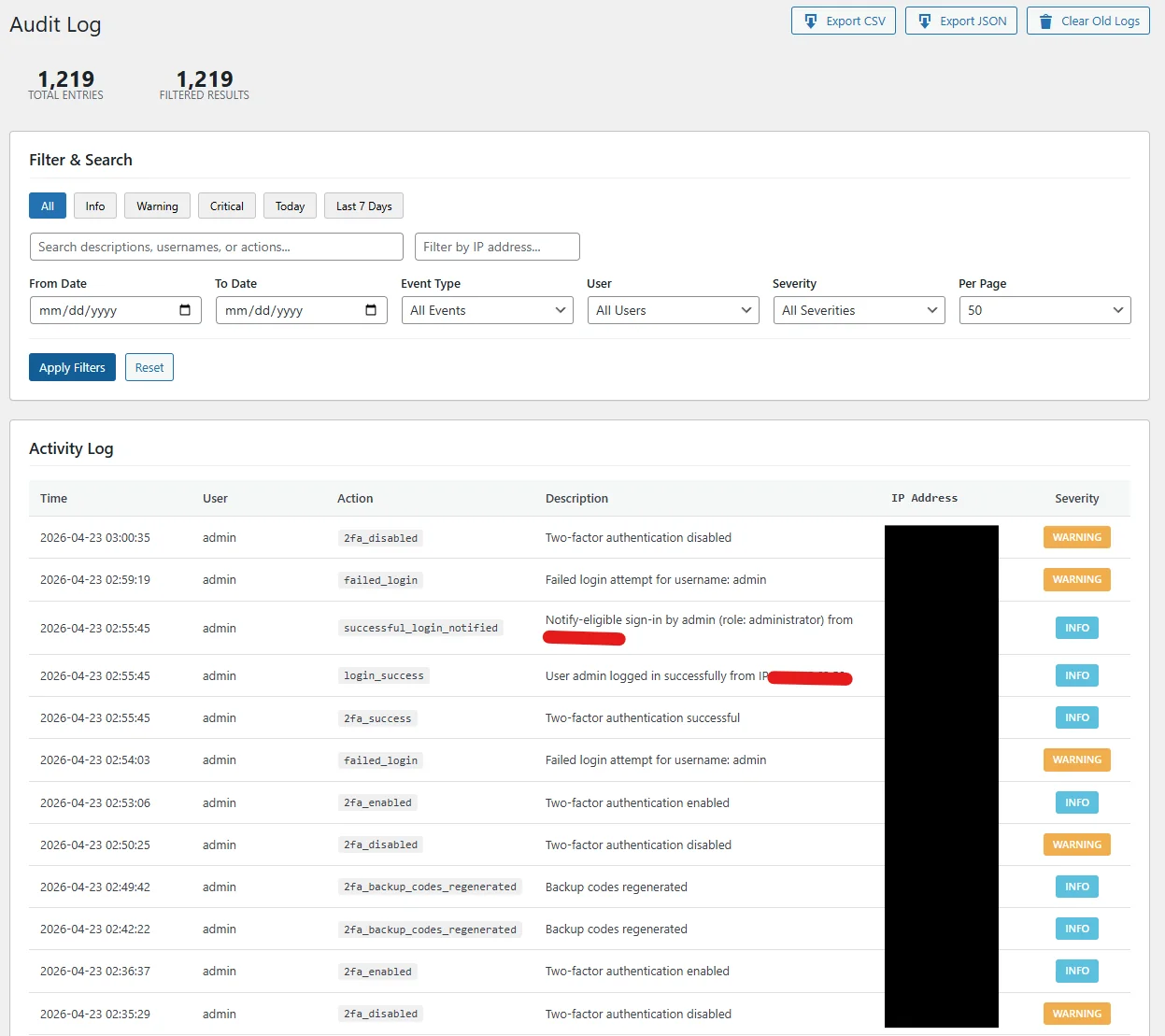
## Everything Gets Logged
Activity logging captures every significant action on your WordPress site. Whether it's a user login, content change, or security event, you'll have a complete record.
### User Logins
Successful logins, failed attempts, logouts, and session starts with IP and device info.
### Content Changes
Posts, pages, and media created, edited, published, trashed, or deleted.
### Plugin & Theme Changes
Installations, updates, activations, deactivations, and deletions.
### Settings Changes
WordPress options, permalinks, reading/writing settings modifications.
### Security Events
Blocked attacks, firewall triggers, malware detections, and vulnerability alerts.
### User Management
User creation, role changes, profile updates, and deletions.
## Real-Time Log View
Watch activity as it happens or search through historical logs. Every entry includes the user, action, timestamp, IP address, and additional context.
2024-01-23 14:32:18
LOGIN
admin
Successful login from 192.168.1.105 (Chrome/Windows)
2024-01-23 14:28:45
POST\_EDIT
editor
Updated "Getting Started Guide" (ID: 142)
2024-01-23 14:15:22
PLUGIN\_UPDATE
admin
Updated "WooCommerce" from 8.4.0 to 8.5.0
2024-01-23 14:02:11
BLOCKED
—
SQL injection attempt blocked from 45.227.xx.xx
2024-01-23 13:58:03
LOGIN\_FAIL
admin
Failed login attempt from 103.45.xx.xx (3rd attempt)
## Why Activity Logs Matter
Activity logging isn't just about security—it's essential for understanding your site's operations and maintaining accountability.
### Security Forensics
When a breach occurs, logs help you understand what happened, when it started, and what was affected. Trace the attack path and identify compromised accounts.
### Compliance Requirements
Many regulations (GDPR, HIPAA, PCI-DSS) require audit trails. Activity logs provide the documentation you need for compliance audits.
### Team Accountability
Know who changed what and when. Useful for multi-author sites, agencies, or any situation where multiple people have admin access.
### Troubleshooting
When something breaks, logs show recent changes. Quickly identify if a plugin update, settings change, or user action caused the problem.
## Logging Features
- **Searchable Logs:** Filter by user, action type, date range, IP address, or keyword to find specific events.
- **Log Retention:** Configure how long to keep logs. Set 30 days, 90 days, 1 year, or custom periods.
- **Email Alerts:** Get notified when specific events occur—failed logins, user creation, plugin installations, etc.
- **Export Options:** Download logs as CSV for external analysis, reporting, or long-term archival.
- **Geolocation:** See where login attempts and actions originate on a map view.
- **User Sessions:** View all active sessions and remotely terminate suspicious ones.
- **Database Optimization:** Automatic log cleanup and database optimization to prevent bloat.
- **Privacy Controls:** Anonymize IP addresses after a set period to comply with privacy regulations.
## Related Security Features
[### Web Application Firewall
Block attacks before they happen with intelligent request filtering.](https://royalplugins.com/guardpress/features/firewall/)
[### Malware Scanner
Deep scanning finds malware, backdoors, and suspicious code.](https://royalplugins.com/guardpress/features/malware-scanner/)
[### Vulnerability Scanner
Check plugins, themes, and core for known security vulnerabilities.](https://royalplugins.com/guardpress/features/vulnerability-scanner/)
[### Two-Factor Authentication
Add an extra layer of login security with TOTP-based 2FA.](https://royalplugins.com/guardpress/features/two-factor-auth/)
## Know What's Happening on Your Site
Get Activity Logging and all other GuardPress Pro features with a single license.
[View Pricing](https://royalplugins.com/guardpress/pricing/)
[Compare Free vs Pro](https://royalplugins.com/guardpress/free-vs-pro/)